Freedom251 › Cloud Storage Gateway Software

CloudMounter
What CloudMounter is
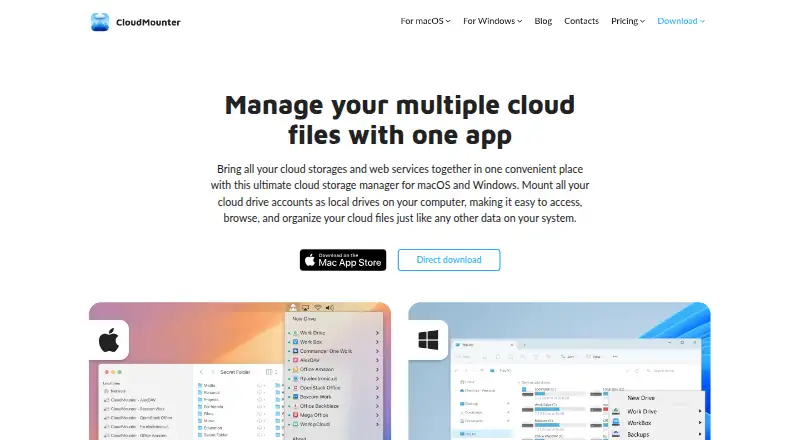
CloudMounter connects cloud storage accounts and web services to a computer as local drives. It lets users browse and manage remote files through Finder on macOS or Explorer on Windows, and move files between supported services by dragging and dropping without downloading them to the computer first. Files can remain in remote storage, which lets users work with them without using local disk space. Listed connections include Dropbox, OneDrive, Google Drive, Amazon S3, WebDAV, SFTP, FTP, Box, Backblaze, MEGA, OpenStack Swift, and pCloud. Supported protocols also include FTPS and FTPES. The maker describes client-side AES-256 encryption before files are sent to cloud storage. On macOS, login details are stored in Keychain and are not stored on CloudMounter’s servers. Offline work is supported on macOS and is listed as coming soon for Windows. CloudMounter has a free plan and paid plans from $29/yr. It runs on macOS and Windows and is made by Electronic Team, Inc., whose listed address is in Reston, Virginia.
Who it suits
CloudMounter suits people who want to manage files across supported cloud services from Finder or Explorer, or transfer files between services without first storing them locally. It can also suit users who need FTP, SFTP, WebDAV, or other listed protocol connections and remote file editing.
What it does well
- Browse cloud files in Finder or Explorer.
- Move files between cloud services by drag and drop.
- Work with remote files without saving them locally.
- Client-side AES-256 encryption before cloud upload.
- SSH key authentication and remote file editing are supported.
What to know first
- Folder synchronization is not included.
- Automation support is not included.
- Windows Free limits additional accounts and services to read-only access.
Limits
On Windows, after the 14-day PRO trial, the Free version allows full access to one Google Drive, Dropbox, and OneDrive account; additional accounts and services are read-only. The Mac yearly subscription trial lasts 7 days and can be canceled during the trial without charge.
Plans
| Plan | Billed and limits | Price |
|---|---|---|
| Mac Team Lifetime | Pay once, use forever; shown alongside $299 · Business and personal use · 5 Macs | $249, paid once |
| Lifetime Purchase Team License | flat rate, one time · Team lifetime license | $249.99, paid once |
| Mac Personal 1-year subscription | $29 per year · Personal use only · 1 Mac · 7-day trial | $29 a year |
| One-Year Personal Subscription | per user, per year · 1 Mac · Amazon S3, FTP/WebDAV, Dropbox, Google Drive encryption, OneDrive | $29.99 a year |
| Windows Personal | One-time purchase · 1 PC | $29.99, paid once |
| Mac Personal Lifetime | Pay once, use forever; shown alongside $99 · Personal use only · 1 Mac | $74, paid once |
| Lifetime Purchase Personal License | flat rate, one time · Personal lifetime license | $74.99, paid once |
| Mac Team 1-year subscription | $99 per year · Business and personal use · 5 Macs · 7-day trial | $99 a year |
The first 8 of 11 plans, as cloudmounter.net lists them, read 8 Oct 2026. The maker's own page has the final word. Every plan
Getting started
- Visit https://cloudmounter.net/.
- Choose macOS or Windows.
- Install CloudMounter and connect a supported cloud service or remote protocol.
- Use the free plan, or select a listed paid plan.
CloudMounter turns cloud storage and remote services into drives you can browse through Finder or Windows Explorer. It suits people who want to manage files across several services without filling local disks; its main trade-off is that it does not synchronize folders or support automation.
Overview
Instead of switching between separate cloud interfaces, CloudMounter connects accounts as local drives. You can browse and manage remote files from your computer, and move files between services by dragging and dropping without first downloading them locally. That makes it useful for handling transfers when computer storage is limited. The app supports services including Dropbox, OneDrive, Google Drive, Amazon S3, Box, MEGA and pCloud, as well as FTP, SFTP and WebDAV connections.
The maker describes client-side AES-256 encryption, which encrypts files before they are sent to cloud storage. On macOS, login details are stored in Keychain and are not kept on CloudMounter’s servers. Offline work is supported on macOS; for Windows it is described as coming soon.
Key features
- Finder and Explorer access: Browse and manage cloud files in the file manager you already use, rather than moving them through a separate interface.
- Cross-cloud transfers: Drag files between connected services without first saving them to your computer. This helps conserve local storage, though the product does not provide folder synchronization.
- Remote connections: Supported protocols include FTP, FTPS, FTPES, SFTP and WebDAV. SSH key authentication and remote file editing are supported, making the app relevant to users who also work with server files.
- Encryption and credentials: Client-side AES-256 encryption is described for files sent to cloud storage. The Keychain credential detail applies to macOS.
- Offline work: macOS supports offline work. Windows users should not count on it yet.
Pricing
CloudMounter has a free plan and paid options. The Mac Personal 1-year subscription costs $29 a year, billed $29 per year, for personal use on one Mac; it includes a 7-day trial. The trial is for yearly subscriptions and can be canceled during the trial without charge. This is the lower-commitment Mac option, but it renews yearly.
Mac Personal Lifetime costs $74, paid once, shown alongside $99, for personal use on one Mac. It avoids annual billing, though the upfront payment is higher than one year of the subscription. Windows Personal costs $29.99, paid once for one PC.
For teams, Mac Team 1-year subscription costs $99 a year, billed $99 per year, and covers business or personal use on five Macs, with a 7-day trial. Mac Team Lifetime costs $249, paid once, shown alongside $299, for business or personal use on five Macs. Windows Team costs $99.99, paid once for five PCs. Mac and Windows Team licenses are separate; each covers five devices on its own platform and cannot be shared across platforms.
The Company license has custom pricing, for more than five Macs or up to 50 PCs or more. On Windows, the free version becomes available after the 14-day PRO trial: it gives full access to one Google Drive, Dropbox and OneDrive account, while additional accounts and services are read-only. That cap makes it a practical way to try a narrow set of connections, but not a full replacement for a paid license if you need broader access.
Platforms
CloudMounter supports macOS and Windows. Its macOS feature set includes offline work and Keychain credential storage; Windows offline support is coming soon. Team licenses are platform-specific.
Who it's for
CloudMounter is a good fit for people who work across cloud accounts and remote servers and want to handle files from Finder or Explorer while preserving local disk space. Its broad mix of storage services and transfer protocols also suits users who need both cloud drives and FTP, SFTP or WebDAV connections in one app.
It is a weaker fit when folder synchronization or automation is central to the workflow. Windows users who need offline access should also look elsewhere for now.
Pros and cons
- Pro: Transfers between cloud services do not require a local download, which can save disk space.
- Pro: Cloud drives and several remote protocols are accessible through Finder or Explorer, with remote editing and SSH key authentication supported.
- Pro: Mac buyers can choose annual or lifetime licenses, while Windows buyers have one-time personal and team options.
- Con: There is no folder synchronization or automation support, so CloudMounter cannot cover workflows that depend on either.
- Con: Windows Free limits full access to one account each for Google Drive, Dropbox and OneDrive; other accounts and services are read-only.
- Con: Offline work is supported on macOS but not yet on Windows.
Alternatives
For a self-hosted gateway or infrastructure-focused setup, compare Infortrend EonCloud Gateway, which offers cache and sync modes with limits on connected folders, volumes and capacity during its 90-day trial. Synology Active Backup for SaaS is a free add-on for Synology NAS aimed at Microsoft 365 and Google Workspace backup; choose it when that self-hosted backup role is the priority.
NetApp Global File Cache is a paid option for Linux, Windows and self-hosted environments, with a listed one-year subscription. Hitachi Universal Volume Manager requires a license on the local storage system and supports API, Linux, self-hosted and web environments.
LucidLink suits readers looking for a paid filespace with broad platform coverage; its Starter plan is $7 a month per member, with 10 members and 100 GB per member shared. Oracle Cloud Infrastructure Object Storage is a freemium cloud storage service with API, Linux and web support, and may suit users seeking object storage rather than a desktop drive-mounting app.
QNAP HybridMount is a free, self-hosted option for NAS users; its paid Small plan adds one file share, NAS local cache and connections to more than 20 cloud services. Panzura CloudFS is a paid, capacity-licensed option for API and self-hosted environments, with custom pricing.
For category comparisons, see Cloud Storage Gateway Software, SFTP Client Software and WebDAV Client Software.
Verdict
Choose CloudMounter if you want cloud services and remote connections available as local drives, with file transfers that do not require downloading to your computer first. Look elsewhere if folder synchronization or automation is central to your workflow, or if you need Windows offline access now.
Verdict
Choose CloudMounter if you want cloud services and remote connections available as local drives, with file transfers that do not require downloading to your computer first. Look elsewhere if folder synchronization or automation is central to your workflow.
Questions
Is CloudMounter free?
Yes. It has a free plan, and paid plans start at $29/yr.
Which platforms does it support?
CloudMounter supports macOS and Windows.
Which services and protocols can I connect?
Listed services include Dropbox, OneDrive, Google Drive, Amazon S3, Box, Backblaze, MEGA, OpenStack Swift, and pCloud. Supported protocols include FTP, FTPS, FTPES, SFTP, and WebDAV.
Does CloudMounter offer a free trial?
Yes. The Mac yearly subscription includes a 7-day trial that can be canceled during the trial without charge. The Windows PRO trial lasts 14 days.
Who makes CloudMounter?
CloudMounter is made by Electronic Team, Inc., with a listed address in Reston, Virginia, USA.
Can team licenses be shared between Mac and Windows?
No. Mac and Windows Team licenses are separate. Each covers five devices on its own platform and cannot be shared across platforms.
Facts from CloudMounter's own pages
- Account count
- The maker says there is no CloudMounter limit on the number of accounts for one cloud service. · cloudmounter.net, 15 Oct 2026
- API usage
- The maker describes CloudMounter as accessing cloud services through the services’ developer APIs. · cloudmounter.net, 15 Oct 2026
- Client-side encryption
- CloudMounter offers AES-256 client-side encryption before files are sent to supported storage. · cloudmounter.net, 15 Oct 2026
- Cloud integrations
- Supported services include Dropbox, Google Drive, OneDrive, Amazon S3, Box, Backblaze B2, MEGA, pCloud and OpenStack Swift. · cloudmounter.net, 15 Oct 2026
- Commercial licensing
- CloudMounter is distributed under paid annual and lifetime licenses with a continuing free tier, rather than as an open-source project. · cloudmounter.net, 15 Oct 2026
- Company
- CloudMounter is made by Electronic Team, Inc., whose listed address is in Reston, Virginia, USA. · cloudmounter.net, 8 Oct 2026
- Company headquarters
- Electronic Team lists its mailing address at 11890 Sunrise Valley Drive, Reston, Virginia 20191, USA. · cloudmounter.net, 15 Oct 2026
- Company name
- The product is published by Electronic Team, Inc.; Apple identifies Eltima LLC as the provider for the Mac listing. · cloudmounter.net, 15 Oct 2026
- Company size and founding
- LinkedIn lists Electronic Team as privately held, headquartered in Reston, with 51–200 employees and a 2018 founding year. · linkedin.com, 15 Oct 2026
- Credential storage
- The macOS edition stores login credentials in macOS Keychain rather than retaining them in the app. · cloudmounter.net, 15 Oct 2026
- Cross-cloud transfer
- The product says files can be dragged between mounted cloud drives without first downloading them to the computer. · cloudmounter.net, 15 Oct 2026
- Cross-cloud transfers
- Users can transfer files between cloud services by dragging and dropping without first downloading them to their computer. · cloudmounter.net, 8 Oct 2026
- Documentation
- The support center lists 11 Windows user-guide articles covering connections, licensing, FAQs and version history. · help.electronic.us, 15 Oct 2026
- Encryption
- The maker describes client-side AES-256 encryption that encrypts files before they are sent to cloud storage. · cloudmounter.net, 8 Oct 2026
- File Explorer integration
- On Windows, CloudMounter maps remote services into File Explorer. · cloudmounter.net, 15 Oct 2026
- File management
- The app supports browsing and managing cloud files through Finder on macOS and Explorer on Windows. · cloudmounter.net, 8 Oct 2026
- File-size limits
- The FAQ lists provider limits including Dropbox 350 GB, Google Drive 5 TB, Amazon S3 5 TB and OneDrive 10 GB. · cloudmounter.net, 15 Oct 2026
- Finder integration
- On macOS, mounted services appear in Finder and can be handled like local drives. · cloudmounter.net, 15 Oct 2026
- Headquarters
- Reston, Virginia, USA · cloudmounter.net, 28 Sept 2026
- Integrations
- The listed services include Dropbox, OneDrive, Google Drive, Amazon S3, WebDAV, SFTP, FTP, Box, Backblaze, MEGA, OpenStack Swift, and pCloud. · cloudmounter.net, 8 Oct 2026
- License limits
- Mac and Windows Team licenses are separate; each covers five devices on its own platform and cannot be shared across platforms. · cloudmounter.net, 8 Oct 2026
- Limit: cache usage
- App Store reviewers report that cached files can consume substantial local disk space and that cache avoidance is unavailable. · apps.apple.com, 15 Oct 2026
- Limit: platform coverage
- A G2 reviewer noted there is no Linux version and described Windows as less stable than Mac in their experience. · g2.com, 15 Oct 2026
- Limit: service support
- The FAQ states that iCloud is not supported. · cloudmounter.net, 15 Oct 2026
Where CloudMounter stands on Freedom251
- Cloud Storage Gateway Software#1 of 26
- SFTP Client Software#4 of 31
- WebDAV Client Software#8 of 26