Freedom251 › Clipboard Manager Software
ClipMenu
What ClipMenu is
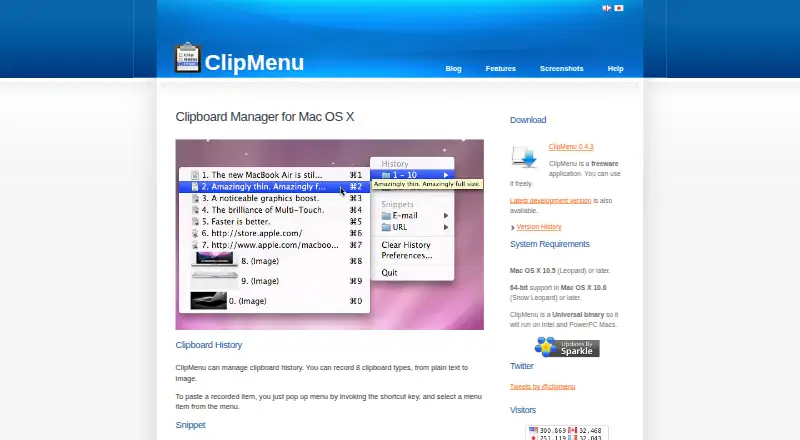
ClipMenu is a clipboard manager for Mac OS X that keeps a history of copied items and provides reusable text snippets. It records plain text, RTF, RTFD, PDF, filenames, URLs, TIFF images, and PICT images. Users can adjust the number of stored history items if the Mac has sufficient memory; the default is 20. History and snippets are available through the status bar icon or keyboard shortcuts. The menu can show image previews with adjustable dimensions, and hovering over an item for a second displays its full text before pasting. Right-clicking a history or snippet item opens an Action Menu, where users can select built-in actions or register JavaScript actions in preferences. Version 0.4.2 added text-file export for clipboard history and the option to exclude applications from clipboard checking. The listed download is version 0.4.3, dated November 9, 2009. The site lists Mac OS X 10.5 or later, with 64-bit support on Mac OS X 10.6 or later, and a Universal binary for Intel and PowerPC Macs. ClipMenu is freeware; its Help page says the history and snippet sections are under construction.
Who it suits
ClipMenu suits Mac users who want to revisit copied text, images, files, or URLs and paste saved snippets. Its listed system requirements and older release date are worth checking against the intended Mac.
What it does well
- Records eight clipboard content types.
- History size can be adjusted when memory allows.
- History and snippets are accessible by keyboard shortcuts.
- Offers image previews and configurable actions.
What to know first
- Listed release version 0.4.3 dates to November 9, 2009.
- Requires Mac OS X 10.5 or later.
- Help sections for history and snippets are under construction.
Limits
The listed system requirement is Mac OS X 10.5 or later; 64-bit support is listed for Mac OS X 10.6 or later. The history defaults to 20 items, and increasing its capacity depends on available Mac memory.
Plans
| Plan | Billed and limits | Price |
|---|---|---|
| ClipMenu | Freeware application · Mac OS X 10.5 or later | Free |
As clipmenu.com lists them, read 8 Oct 2026. The maker's own page has the final word.
Getting started
- Visit the ClipMenu website.
- Download the listed ClipMenu 0.4.3 version.
- Use a Mac running Mac OS X 10.5 or later.
- Open the status bar menu or use keyboard shortcuts to access clipboard history and snippets.
Verdict
ClipMenu offers a broad clipboard history, snippet storage, and menu-based actions as freeware. The listed release is dated 2009, and the Help page identifies unfinished sections.
Questions
How much does ClipMenu cost?
ClipMenu is freeware, listed as free.
Is there a free plan or trial?
It is free, and no free trial is listed.
Which systems does ClipMenu support?
The site lists Mac OS X 10.5 or later. It lists 64-bit support on Mac OS X 10.6 or later and a Universal binary for Intel and PowerPC Macs.
What kinds of clipboard items can it save?
It can record plain text, RTF, RTFD, PDF, filenames, URLs, TIFF images, and PICT images.
Can it save reusable snippets?
Yes. Users can save text snippets and select them from a menu to paste.
Does ClipMenu support clipboard search?
Yes. Clipboard history search is supported.
Facts from ClipMenu's own pages
- Actions
- Right-clicking a history or snippet item opens an Action Menu, and users can register built-in or JavaScript actions in preferences. · clipmenu.com, 8 Oct 2026
- Application exclusions
- Version 0.4.2 added a feature to exclude applications from clipboard checking. · clipmenu.com, 8 Oct 2026
- Clipboard history
- It records clipboard history in eight types, from plain text to images. · clipmenu.com, 8 Oct 2026
- Export
- Version 0.4.2 added an option to export clipboard history as text files. · clipmenu.com, 8 Oct 2026
- History capacity
- The number of clipboard history items can be adjusted freely if the Mac has sufficient memory; the default is 20. · clipmenu.com, 8 Oct 2026
- Image previews
- ClipMenu can show image previews in the menu, with adjustable image width and height. · clipmenu.com, 8 Oct 2026
- Menu access
- Users can access clipboard history and snippets through the status bar icon or keyboard shortcuts. · clipmenu.com, 8 Oct 2026
- Purpose
- ClipMenu is a clipboard manager for Mac OS X. · clipmenu.com, 8 Oct 2026
- Release status
- The site lists ClipMenu 0.4.3 as a download, with a release date of November 9, 2009. · clipmenu.com, 8 Oct 2026
- Snippets
- Users can save reusable text snippets and select them from a menu to paste. · clipmenu.com, 8 Oct 2026
- Supported clipboard types
- It can record plain text, RTF, RTFD, PDF, filenames, URLs, TIFF images, and PICT images. · clipmenu.com, 8 Oct 2026
- Supported systems
- The site lists Mac OS X 10.5 or later and says 64-bit support is available on Mac OS X 10.6 or later; the application is a Universal binary for Intel and PowerPC Macs. · clipmenu.com, 8 Oct 2026
- Support status
- The Help page says its clipboard history and snippet sections are under construction. · clipmenu.com, 8 Oct 2026
- Tooltips
- Hovering over a menu item for a second shows the full text of a clipboard history item before pasting. · clipmenu.com, 8 Oct 2026
Where ClipMenu stands on Freedom251
- Clipboard Manager Software#15 of 39
- Clipboard Managers#22 of 40