Freedom251 › Digital Brush Libraries

Clip Studio Assets
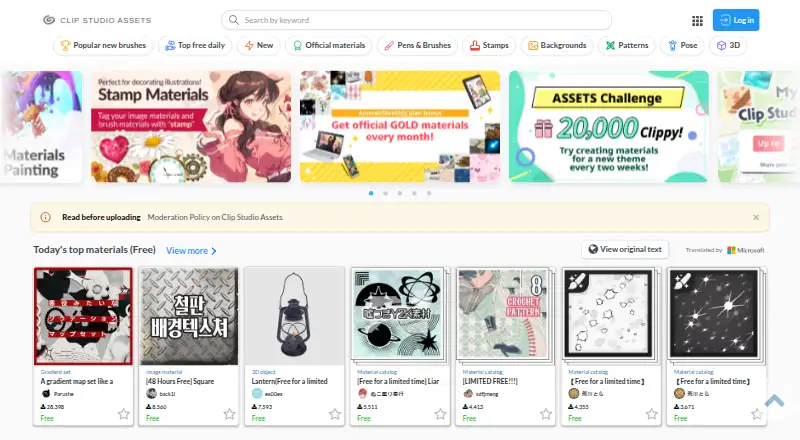
What Clip Studio Assets is
Clip Studio Assets is a catalog for finding, downloading, and publishing materials for Clip Studio Paint. Its categories include brushes, pens, patterns, image materials, poses, 3D objects, gradients, color sets, workspaces, and Auto Actions. Materials can be accessed through Clip Studio Start or a browser on a tablet, PC, or smartphone. A Clip Studio account is required to download materials or publish and edit them. Free materials are available; individual paid materials may be priced in Clippy or GOLD, which are needed to download them. Clip Studio Paint version 4.2 and later can automatically install downloaded tools, color sets, gradient sets, workspaces, and Auto Actions. With other software, users are instructed to extract downloaded ZIP files. Anyone may upload Clippy materials, while GOLD materials are limited to qualified creators, who earn royalties based on price and download count. Uploaders must hold the intellectual rights to submitted materials, and materials made using AI image-generation technology are prohibited. The service may remove materials or suspend accounts without prior warning. CELSYS, Inc., the maker, is headquartered in Shinjuku-ku, Tokyo, Japan.
Who it suits
Clip Studio Assets suits Clip Studio Paint users looking for materials and creators who want to publish their own. It is available through Clip Studio Start and web browsers across listed platforms.
What it does well
- Catalog covers brushes, 3D objects, and other materials.
- Free materials are available.
- Clip Studio Paint 4.2 and later can install some assets automatically.
- Creators can publish Clippy materials.
What to know first
- A Clip Studio account is required for downloads and publishing.
- Paid materials require Clippy or GOLD.
- AI image-generation materials are prohibited.
- Material catalogs cannot be published through a browser.
Limits
Free materials are available, but downloading requires a Clip Studio account and installed Clip Studio. Paid materials require Clippy or GOLD; no price for individual paid materials is listed.
Plans
| Plan | Billed and limits | Price |
|---|---|---|
| Free materials | free items available · Clip Studio account required for downloads | Free |
| Paid materials | Individual materials may be priced in Clippy or GOLD; Clippy or GOLD is required to download them. | On request |
| Clippy materials | priced in Clippy points · Clippy required for downloads | On request |
| GOLD materials | priced in GOLD points · qualified creators may sell · creator screening required | On request |
As assets.clip-studio.com lists them, read 15 Oct 2026. The maker's own page has the final word.
Getting started
- Open Clip Studio Assets through Clip Studio Start or visit the website in a browser.
- Create or use a Clip Studio account to download materials.
- Choose free materials or obtain Clippy or GOLD for paid materials.
- Download materials for Clip Studio Paint; version 4.2 and later can automatically install supported types.
- For other software, extract the downloaded ZIP files.
Clip Studio Assets is a materials catalog and publishing service for Clip Studio Paint users, especially artists seeking community-made brushes, 3D objects, and workflow tools. Its breadth and free downloads make it a useful place to start; the account requirement, paid materials, and creator restrictions are important trade-offs.
Overview
The catalog spans brushes, image materials, poses, 3D objects, gradients, color sets, workspaces, and Auto Actions. This range is more useful than a brush-only library for artists who want reusable visual elements as well as tools that support their workflow. The focus on Clip Studio Paint is also its main boundary: it is not a general-purpose materials catalog for other software.
Users can access Assets through Clip Studio Start or a browser on a tablet, PC, or smartphone. A Clip Studio account is required to download, publish, or edit materials. Downloading free materials also requires installed Clip Studio, and browser access does not let creators publish material catalogs.
Key features
Materials for drawing and workflow
Brushes and pens sit alongside image materials, poses, 3D objects, gradients, color sets, workspaces, and Auto Actions. That mix suits Clip Studio Paint users looking to extend several parts of their process in one place. Automatic installation is available in Clip Studio Paint version 4.2 and later for downloaded tools, color sets, gradient sets, workspaces, and Auto Actions. Users of other software are directed to extract downloaded ZIP files instead, so the newer installation convenience is not universal.
Publishing, points, and moderation
Anyone can upload Clippy materials, while GOLD materials are restricted to qualified material creators. Earnings on GOLD materials depend on their price and download count. Upload limits reach 20,000 Clippy for Clippy submissions and 20,000 GOLD for GOLD submissions, but creators must hold the intellectual rights to what they submit. AI image-generation materials are prohibited, some file types such as .pes and .exe cannot be uploaded, and material catalogs cannot be published through a browser. Celsys may remove materials or suspend accounts without prior warning; if a paid material is removed for breaching the terms, buyers receive their points back. These rules matter for creators who intend to sell or publish regularly.
Brush files use the .sut format, and delivery is both digital download and other delivery method. Users can consult materials FAQs, ask other users through Clip Studio Ask, or submit requests and bug reports through Clip Studio Support.
Pricing
The freemium model makes free materials a sensible starting point, but an account and installed Clip Studio are required to download them.
- Free materials: free. This suits users exploring the catalog without paying for individual materials, subject to the account and installation requirements.
- Paid materials: custom pricing. Individual materials may cost Clippy or GOLD, both of which are required to download them. This means cost depends on the material rather than a single catalog-wide price.
Platforms
Clip Studio Assets is available on Android, iOS, macOS, web, and Windows. The supported app is Clip Studio Paint; browser access broadens where users can reach the catalog, not which creative software its materials support.
Who it's for
Clip Studio Paint artists who want a broad selection of reusable materials, including workflow assets beyond brushes, are the clearest fit. It also serves creators who want to publish original materials, provided they meet the rights, file, and platform restrictions. Artists working primarily in other software should choose resources designed for those applications instead.
Pros and cons
- Pro: The catalog covers visual assets and workflow tools, giving Clip Studio Paint users more than brushes alone.
- Pro: Free materials cost nothing, offering a no-price option for users willing to create an account and install Clip Studio.
- Pro: Version 4.2 and later can automatically install several material types, reducing manual setup for supported downloads.
- Con: Materials are for Clip Studio Paint, limiting the catalog's value to artists using other applications.
- Con: Downloads require a Clip Studio account, and even free materials require installed Clip Studio.
- Con: Creator publishing is constrained by rights and file rules, browser limitations, and moderation that can remove materials or suspend accounts without warning.
Alternatives
For a wider comparison of brush-focused services, browse Digital Brush Libraries. These alternatives serve different workflows:
- Frankentoon Studio is a freemium option with a free Procreate Starter Pack and a 12.00 USD one-time Sketch Kit for Procreate; choose it if Procreate brushes are the priority.
- Krita is free and open source, with no subscriptions or trials, and supports Android, Linux, macOS, and Windows. Choose it if you want a free painting application rather than a materials catalog for Clip Studio Paint.
- LaneDraws offers a free high-resolution JPG anatomy chart and an 18.00 USD one-time pack of 120+ inking brushes for Photoshop CC. Choose it for those Photoshop-oriented resources.
- Brusher has free starter packs without an account and a 4.99 USD weekly subscription that unlocks premium collections. Choose it if account-free starter packs or a subscription to premium brush collections better fits your needs.
- DAUB Brushes offers free Clip Studio Paint pencils with 12 tools and markers for 3.99 EUR. Choose it for a focused Clip Studio Paint brush selection.
- Bardot Brush sells Procreate brush sets, including Basic Toolkit for 12.00 USD, Misshapen Shapes for 20.00 USD, and Ceramic Glaze for 22.00 USD. Choose it if those Procreate sets suit your work.
- RetroSupply Co. sells its current Procreate products as a 197.00 USD one-time Complete Collection; fonts and future products are excluded. Choose it for that bundled Procreate collection.
- Brusheezy offers a subscription with five downloads for $9 a month; unused subscription downloads do not roll over, and the license is for one user. Choose it if a monthly download allotment better matches your needs.
Verdict
Clip Studio Assets is a strong choice for Clip Studio Paint users who want varied community-made materials, with free downloads and paid options in one catalog. Its breadth is the main reason to choose it; look elsewhere if you need assets for other software, want to download without an account, or publish materials that fall outside its creator rules.
Verdict
Clip Studio Assets provides a broad catalog of materials for Clip Studio Paint, with both free and paid options. Check the account, upload, and licensing requirements before downloading or publishing.
Questions
Is Clip Studio Assets free?
Free materials are available free of charge. Individual paid materials may be priced in Clippy or GOLD.
What do I need to download materials?
A Clip Studio account is required. The free-material plan also specifies that Clip Studio must be installed.
Which platforms are listed?
Android, iOS, macOS, web, and Windows are listed. Assets can be opened through Clip Studio Start or a browser on a tablet, PC, or smartphone.
Can creators publish materials?
Yes. Anyone can upload Clippy materials; GOLD materials are limited to qualified creators and earn royalties based on price and download count.
Can I upload AI-generated materials?
No. The moderation policy prohibits materials created using AI image-generation technology.
Who makes Clip Studio Assets?
CELSYS, Inc. lists its headquarters in Shinjuku-ku, Tokyo, Japan, and says it was established in May 1991.
Facts from Clip Studio Assets's own pages
- Access
- The service can be opened from Clip Studio Start or in a web browser on tablets, PCs and smartphones. · assets.clip-studio.com, 15 Oct 2026
- Account requirement
- A Clip Studio account is required to download, publish or edit materials, and Clip Studio must be installed for the Download, New Upload and Edit buttons to work. · assets.clip-studio.com, 15 Oct 2026
- AI content policy
- The moderation policy prohibits posting materials created using AI image-generation technology. · assets.clip-studio.com, 7 Oct 2026
- API and SDK documentation
- The reviewed official help and manual pages document browser and Clip Studio application workflows but list no public Assets API or SDK. · assets.clip-studio.com, 15 Oct 2026
- Automatic installation
- Clip Studio Paint 4.2 and later can automatically install downloaded tools, color sets, gradients, workspaces and auto actions into their corresponding palettes. · assets.clip-studio.com, 15 Oct 2026
- Clippy economy
- Creators can upload for Clippy rewards, and users spend Clippy to download designated materials; earned Clippy can be exchanged for codes subject to monthly limits. · assets.clip-studio.com, 15 Oct 2026
- Creator earnings
- Clippy materials can be uploaded by anyone, while GOLD materials are limited to qualified material creators and earn royalties based on price and download count. · assets.clip-studio.com, 7 Oct 2026
- Creator limits
- The help page lists a limit of up to 20,000 Clippy for Clippy uploads and up to 20,000 GOLD for GOLD uploads. · assets.clip-studio.com, 7 Oct 2026
- Creator publishing
- Creators can publish materials from Clip Studio on PC, tablet or smartphone, while browser uploads have file-name, archive and file-type restrictions. · assets.clip-studio.com, 15 Oct 2026
- GOLD creator payout
- GOLD materials are sold for GOLD points and approved sellers receive 70% of the sale amount. · assets.clip-studio.com, 15 Oct 2026
- Headquarters
- Tokyo, Japan · assets.clip-studio.com, 28 Sept 2026
- Installation and downloads
- Celsys supplies Windows and macOS downloads plus store links for Galaxy, iPad, iPhone, Android and Chromebook versions. · clipstudio.net, 15 Oct 2026
- Integration: Adobe workflows
- GetApp reviewer data identifies Adobe Photoshop and Adobe Premiere Pro as products mentioned in Clip Studio Paint workflows, with Photoshop receiving a 4.2 integration rating from five mentions. · getapp.com, 15 Oct 2026
- Intellectual property
- The moderation policy says uploaded materials must have intellectual rights belonging to the person who submits them. · assets.clip-studio.com, 7 Oct 2026
- Limit: interface and licensing
- G2 reviewers mention an initially overwhelming interface, expensive-tier feature gating, subscription changes and concerns about newer AI involvement. · g2.com, 15 Oct 2026
- Limit: mobile pricing
- A Google Play reviewer complains that the app lacks a buy-once option and that the trial and sign-in requirements are not obvious before installation. · play.google.com, 15 Oct 2026
- Limit: performance and browsing
- Capterra reviews report that some assets are CPU-heavy, older machines can lag and the asset store can be slow to browse. · capterra.com, 15 Oct 2026
- Limit: vector export
- An Apple App Store reviewer complains that color-filled vector artwork is excluded from vector export, leaving only vector line art. · apps.apple.com, 15 Oct 2026
- Maker
- CELSYS, Inc. lists its headquarters in Shinjuku-ku, Tokyo, Japan, and says it was established in May 1991. · celsys.com, 7 Oct 2026
- Maker headquarters and size
- CELSYS lists its headquarters in Shinjuku, Tokyo, Japan and 305 employees as of September 2026. · celsys.com, 15 Oct 2026
- Maker legal name
- The maker is CELSYS, Inc., established in May 1991. · celsys.com, 15 Oct 2026
- Material categories
- Supported marketplace categories include brushes, stamps, backgrounds, patterns, poses, 3D heads, 3D objects, gradients, color sets, workspaces, auto actions, comics templates and animation materials. · assets.clip-studio.com, 15 Oct 2026
- Moderation
- Celsys says it may remove materials or suspend accounts without prior warning to protect the community. · assets.clip-studio.com, 7 Oct 2026
- Notable news: Wacom bundle
- Celsys announced on October 1, 2025 that Clip Studio Paint would be pre-installed on the Wacom MovinkPad Pro 14. · celsys.com, 15 Oct 2026
Where Clip Studio Assets stands on Freedom251
- Digital Brush Libraries#1 of 23