Freedom251 › Digital Brush Libraries
Brusher
What Brusher is
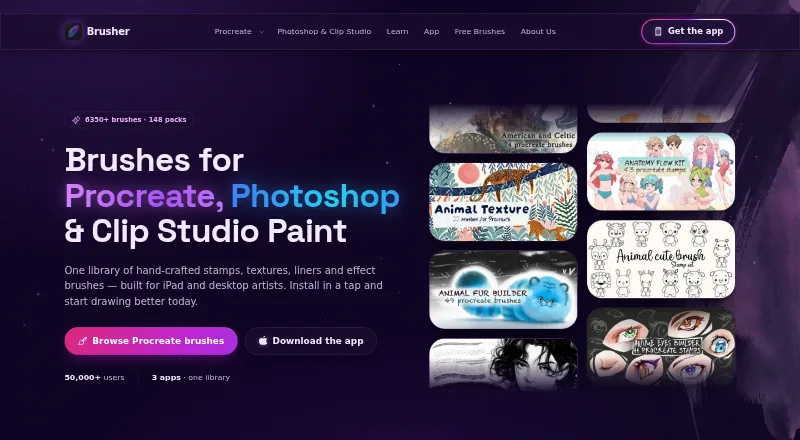
Brusher provides digital art brushes for Procreate on iPad and Photoshop and Clip Studio Paint on desktop. Its library is described as containing 3,000+ brushes in 200+ collections. Collections can be installed in Procreate with a tap; Procreate packs use .brushset files, while Photoshop and Clip Studio Paint use .abr packs on Mac and PC. The app also includes a Vectorizer for converting JPG or PNG images into SVG, and a Background Remover for making transparent PNG cut-outs. It is free to download with free brushes, and the website has free starter packs without an account. Brushes may be used to create personal or commercial artwork, but the brush files cannot be redistributed or resold. Brusher is available for iOS, macOS, and Windows. Website purchases are processed by LavaTop, while app purchases are through the Apple App Store. Listed options include a 5.00 USD one-time website brush pack and in-app subscriptions.
Who it suits
Brusher suits beginners and artists working in illustration, tattoo art, comics, or lettering. It fits users of Procreate, Photoshop, or Clip Studio Paint who want brushes in those formats.
What it does well
- 3,000+ brushes across 200+ collections
- One-tap installation into Procreate
- Includes image vectorizing and background removal
- Commercial artwork use is permitted
- Free starter packs require no account
What to know first
- Brush files cannot be redistributed or resold
- Some paid access is subscription-based
Limits
The free download includes free brushes, while premium collections are unlocked through paid subscriptions. The free website starter packs are available without an account; individual website brush packs cost $5 as a one-time purchase.
Plans
| Plan | Billed and limits | Price |
|---|---|---|
| Free brush packs | Starter packs · no account required | Free |
| Yearly Access | yearly · In-app subscription · unlocks premium collections | $24.99 a year |
| Weekly Plan | weekly · In-app subscription · unlocks premium collections | $4.99 a month |
| Website brush pack | one-time purchase per premium pack · One brush pack · free future updates | $5, paid once |
| Monthly Plan | monthly · In-app subscription · unlocks premium collections | $9.99 a month |
| Life-time Access | one-time in-app purchase · Lifetime access | $99.99, paid once |
As brusher.art lists them, read 28 Sept 2026. The maker's own page has the final word.
Getting started
- Download Brusher for iOS, macOS or Windows.
- For free website starter packs, visit the website; no account is required.
- Choose a free brush pack or a paid pack or in-app subscription.
- Install a Procreate collection with a tap, or use .abr packs with Photoshop or Clip Studio Paint.
Overview
Brusher is a brush library and image-tool app for artists using Procreate, Photoshop or Clip Studio Paint. It is a strong fit for people who want brushes across those apps, with free starter packs to try before paying. Its main trade-off is that premium collections are unlocked through several distinct purchase routes rather than one simple price.
The library is described as containing more than 3,000 brushes in more than 200 collections. It also includes tools to turn JPG or PNG images into SVGs and to make transparent PNG cut-outs.
For a wider comparison of brush collections, browse Digital Brush Libraries.
Key features
Brush collections and formats
Brusher supports Procreate on iPad and Photoshop and Clip Studio Paint on desktop. Procreate collections install with a single tap and use .brushset files; Photoshop and Clip Studio Paint use a single .abr pack on PC and Mac. That split makes the library relevant across all three supported art apps, though users should choose packs for the software they actually use.
The entry specifies 11 included brushes alongside the broader library of 3,000+ brushes across 200+ collections. Free brushes in the app and free website starter packs let newcomers begin without paying; the website packs require no account.
Image tools and license
The Vectorizer converts JPG or PNG images to SVG, while the Background Remover creates transparent PNG cut-outs. These are useful additions for artists who need those particular image transformations, but they do not change Brusher’s core focus on brushes.
Users may create and sell personal or commercial artwork with the brushes. They may not redistribute or resell the brush files, so the license supports finished work rather than passing the assets on as products.
Pricing
Free brush packs cost nothing and include starter packs without an account. The app is free to download and includes free brushes, making it a practical way to assess the collection before committing. The included set is much narrower in scope than the full library described for the app.
In-app subscriptions unlock premium collections: Weekly Plan is $4.99 a month, billed weekly; Monthly Plan is $9.99 a month, billed monthly; and Yearly Access is $24.99 a year, billed yearly. The weekly option has the shortest commitment but renews each week; the yearly option costs more upfront while extending access for a year. The plan descriptions do not state a collection quota or seat count.
Life-time Access is $99.99, paid once as a one-time in-app purchase and is described as lifetime access. For buyers who want a specific pack rather than premium-collection access, a Website brush pack costs $5, paid once and covers one premium pack with free future updates. Website purchases are processed by LavaTop; app purchases are sold through the Apple App Store.
Platforms
Brusher is listed for iOS, macOS and Windows. The supported art apps are Procreate, Adobe Photoshop and Clip Studio Paint; Procreate brush files are .brushset, while .abr packs serve Photoshop and Clip Studio Paint on PC and Mac. The supported-app choices make it more useful to artists moving between these named workflows than to users of other art software.
Who it's for
Brusher is aimed at beginners, illustrators, tattoo artists, comic artists and lettering artists. Beginners can start with free brushes and starter packs; working artists can use the commercial-artwork permission when creating work for sale. It is less suitable for anyone seeking permission to redistribute brush files or who needs brushes for an app outside Procreate, Photoshop and Clip Studio Paint.
Pros and cons
- Pros: A broad stated library of 3,000+ brushes across 200+ collections serves three supported art apps.
- Pros: Free in-app brushes and no-account website starter packs offer a no-cost starting point.
- Pros: Commercial artwork is allowed, including artwork users sell.
- Cons: Brush files cannot be redistributed or resold, limiting asset resale and sharing.
- Cons: Premium access is split among weekly, monthly, yearly and lifetime in-app options, plus one-pack website purchases.
Alternatives
Choose Frankentoon Studio if a free 10-brush Procreate starter pack or its 12.00 USD one-time Sketch Kit is a closer match than Brusher’s broader multi-app library.
Krita is a free, open-source option for readers who want art software without subscriptions or trials, including on Linux and Android.
Choose LaneDraws if its 120+ inking brushes for Photoshop CC, with pressure and tilt sensitivity, better suit the work than Brusher’s cross-app collection.
Bardot Brush offers a freemium option for readers focused on Procreate brush sets.
RetroSupply Co. offers a one-time 197.00 USD Complete Collection for Procreate; its stated scope excludes fonts and future products.
Brusheezy is a web-based freemium alternative with a monthly five-download subscription at 9.00 USD; unused downloads do not roll over and the single license is for one user.
TsaoShin Full Brush Set is a free alternative for Windows, macOS and iOS.
Brushapes Studio is another freemium alternative.
Verdict
Brusher is a good choice for illustrators and other artists who work in Procreate, Photoshop or Clip Studio Paint and want a substantial brush library, useful starter packs and permission to sell finished artwork. Its strongest reason to choose it is the combination of cross-app brush formats and free entry points; look elsewhere if you need a different art app or the right to redistribute brush files.
Verdict
Brusher combines brush collections for three supported art apps with two image tools. Free brushes and starter packs offer a way to begin, while commercial artwork is allowed under the stated restriction on sharing brush files.
Questions
Is Brusher free?
Yes. Brusher is free to download and includes free brushes. Its website also offers free starter packs without requiring an account.
How much do paid options cost?
A website brush pack costs $5 as a one-time purchase. In-app options include $4.99 a month billed weekly, $9.99 a month, $24.99 a year and $99.99, paid once lifetime access.
Which apps and platforms does it support?
The listed platforms are iOS, macOS and Windows. Brushes are for Procreate, Adobe Photoshop and Clip Studio Paint.
Can I use the brushes commercially?
Yes. The brushes may be used to create and sell personal or commercial artwork. The brush files themselves may not be redistributed or resold.
How are brush packs delivered?
Procreate packs use .brushset files, while a single .abr pack works in Photoshop and Clip Studio Paint on PC and Mac. Procreate collections can be installed with a single tap.
How are purchases processed?
Website purchases are processed by LavaTop. App purchases are sold through the Apple App Store.
Facts from Brusher's own pages
- Audience
- Brusher says it is for beginners, illustrators, tattoo artists, comic artists and lettering artists. · brusher.art, 28 Sept 2026
- Built-in tools
- The app includes a Vectorizer that converts JPG or PNG images into SVG and a Background Remover that produces transparent PNG cut-outs. · brusher.art, 28 Sept 2026
- Commercial use
- Users may use the brushes to create and sell personal or commercial artwork, but may not redistribute or resell the brush files. · brusher.art, 28 Sept 2026
- Data collection
- The privacy policy says website analytics are anonymous by default, and an analytics cookie is set only if the visitor accepts the cookie banner. · brusher.art, 28 Sept 2026
- Formats
- Procreate packs use .brushset files, while a single .abr pack works in Photoshop and Clip Studio Paint on PC and Mac. · brusher.art, 28 Sept 2026
- Free access
- The app is free to download with free brushes, and the website offers free starter packs with no account required. · brusher.art, 28 Sept 2026
- Installation
- The app installs brush collections into Procreate with a single tap. · brusher.art, 28 Sept 2026
- Library
- The app page describes a library of 3,000+ brushes across 200+ collections. · brusher.art, 28 Sept 2026
- Payments
- Website purchases are processed by LavaTop, while app purchases are sold through the Apple App Store. · brusher.art, 28 Sept 2026
- Payment security
- The policy says LavaTop processes card details and Brusher does not see or store full card details. · brusher.art, 28 Sept 2026
- Privacy rights
- The policy describes data access, correction, deletion, export, objection and restriction rights depending on the user's location, and says Brusher does not sell personal data. · brusher.art, 28 Sept 2026
- Product
- Brusher offers hand-crafted digital art brushes for Procreate on iPad and for Photoshop and Clip Studio Paint on desktop. · brusher.art, 28 Sept 2026
- Support
- The site directs users with questions, licensing or support requests to its contact page. · brusher.art, 28 Sept 2026
Where Brusher stands on Freedom251
- Digital Brush Libraries#2 of 23