Freedom251 › User Onboarding Software

Clew
What Clew is
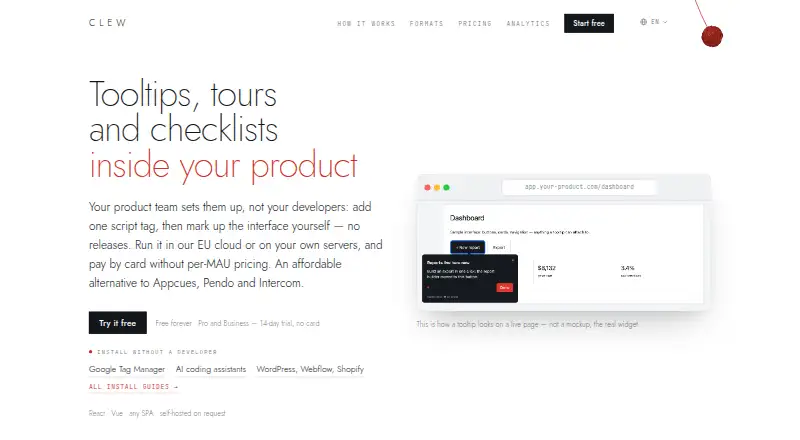
Clew adds product tours, tooltips, modals, and onboarding checklists within a product. A team can install it with a script tag, then build and publish overlays in a visual editor without another site release. Its widget supports React, Vue, plain HTML, and single-page apps, including client-side route changes. Setup guides cover Google Tag Manager, AI coding assistants, WordPress, Webflow, and Shopify. Clew tracks views, completions, and dismissals using an anonymous in-browser ID; it says those counts do not rely on IP addresses or personal data. If a tooltip loses its target element, Clew flags and skips that step so the tour can continue. Cloud hosting in the EU and a self-hosted option are available. The free plan allows one site, one team seat, and up to three published tours. Pro is $14.99 a month and includes A/B testing. Pro and Business have a 14-day free trial without a credit card.
Who it suits
Clew suits product teams that want to create in-product guidance without further site releases. Its self-hosted option is described for banks, the public sector, and regulated industries.
What it does well
- Visual editor publishes overlays without another site release.
- Works with React, Vue, plain HTML, and single-page apps.
- Tracks views, completions, and dismissals.
- Broken tooltip steps are flagged and skipped.
- Pro and Business offer a 14-day trial.
What to know first
- Free plan allows one site and one team seat.
- Free plan caps published tours at three.
- A/B testing starts on Pro.
- Cloud plans are subject to fair use.
Limits
The free plan allows one site, one team seat, up to three published tours and one month of analytics history. Pro costs $14.99/mo and allows three sites, three seats, up to 20 published tours, one A/B test at a time and three months of analytics history. Cloud plans are subject to fair use even though visitors and tooltip views are described as uncapped.
Plans
| Plan | Billed and limits | Price |
|---|---|---|
| Free | 1 site · 1 team seat · up to 3 published tours · tours and tooltips · 1 month analytics history · docs support | Free |
| Pro | $14.99/mo · 3 sites · 3 team seats · up to 20 published tours · 1 A/B test at a time · 3 months analytics history · email support | $14.99 a month |
| Self-hosted | $1,499 one-time · Unlimited sites, seats, tours and A/B tests · unlimited analytics history · one year of updates and support | $1,499, paid once |
| Business | $39.99/mo · 10 sites · 10 team seats · unlimited tours · 5 A/B tests at a time · 12 months analytics history · priority support | $39.99 a month |
| Lifetime | $499 one-time · Unlimited sites and tours · 10 team seats · 5 A/B tests at a time · 12 months analytics history · email support | $499, paid once |
As tryclew.io lists them, read 29 Sept 2026. The maker's own page has the final word.
Getting started
- Visit https://tryclew.io/.
- Choose the free plan or review paid plans; Pro and Business have a 14-day trial without a credit card.
- Add Clew’s script tag to your product, using a setup guide for Google Tag Manager, an AI coding assistant or a supported site builder if useful.
- Create and publish tours or other overlays in the visual editor.
Clew is a web onboarding tool for product teams that want to guide users inside their product. It suits teams that need to update guidance without another site release, particularly those with privacy or hosting requirements. Its visual editor and framework support are useful strengths, but the free tier is narrow and paid plans cap seats.
Overview
Once a team adds Clew’s script tag, it can build and publish tours, tooltips, modals and onboarding checklists in a visual editor. That lets product teams adjust guidance without waiting for another site release. The widget supports React, Vue, plain HTML and single-page apps, following client-side route changes; it is a web-focused option rather than a cross-platform mobile onboarding tool.
Setup guides cover Google Tag Manager, AI coding assistants, WordPress, Webflow and Shopify, giving teams several installation paths. Clew offers EU cloud hosting and a self-hosted option that it says keeps data within the customer’s perimeter.
Key features
Guidance, analytics and reliability
Clew’s analytics track views, completions and dismissals using an anonymous in-browser ID. The company says those counts do not use IP addresses or personal data. History ranges from one month on Free to unlimited on Self-hosted, so teams that need to compare onboarding performance over longer periods will need a higher tier.
When a tooltip can no longer find its target element, Clew flags and skips that step instead of crashing the tour. That is a practical safeguard for changing interfaces, though it does not remove the need to keep guidance aligned with product changes.
Experiments and AI workflow
Pro and higher plans include A/B testing, comparing a tour variant with a control group. Pro allows one active test; Business and Lifetime allow five, while Self-hosted has no stated cap. Pro also includes an MCP server for managing tours from Claude, Cursor and ChatGPT. Integrations and webhooks are marked as coming soon on Business, Lifetime and Self-hosted, so teams choosing those plans should not treat them as current capabilities.
Pricing
Clew’s cloud plans say visitor and tooltip-view counts are uncapped, subject to fair use. The meaningful limits are sites, seats, published tours, test concurrency and analytics history.
| Plan | Price | Limits and support |
|---|---|---|
| Free | free | 1 site, 1 team seat, up to 3 published tours, 1 month of analytics history and docs support. |
| Pro | $14.99 a month | 3 sites, 3 team seats, up to 20 published tours, 1 A/B test at a time, 3 months of analytics history and email support. |
| Business | $39.99 a month | 10 sites, 10 team seats, unlimited tours, 5 A/B tests at a time, 12 months of analytics history and priority support. |
| Lifetime | $499, paid once | Unlimited sites and tours, 10 team seats, 5 A/B tests at a time, 12 months of analytics history and email support. |
| Self-hosted | $1,499, paid once | Unlimited sites, seats, tours, A/B tests and analytics history; one year of updates and support. |
Free is a small evaluation tier: one seat and three published tours are restrictive for teams managing multiple products or collaborators. Pro is the entry paid option for a small team that needs more sites, a limited experiment and a 14-day analytics window beyond Free’s one month. Pro and Business offer a 14-day free trial without a credit card. Business suits larger teams needing unlimited tours and more concurrent tests; its higher price buys ten seats and longer history, not unlimited testing or analytics. Lifetime trades a larger one-time payment for unlimited sites and tours, but still caps seats at ten and analytics history at 12 months. Self-hosted is the fit for teams that need data kept within their perimeter and unlimited usage; its one-time price includes only one year of updates and support.
Platforms
Clew supports web products and offers self-hosted deployment. Its documented framework compatibility covers React, Vue, plain HTML and single-page apps; no mobile platform support is stated.
Who it's for
Clew is best for product teams that want to own onboarding content and publish changes independently of site releases. Its self-hosted plan is aimed at banks, the public sector and regulated industries. Small teams can start free, but organizations needing multiple seats or a meaningful tour library will quickly outgrow that tier.
Pros and cons
- Pro: A visual editor and script-tag setup let product teams publish guidance without another site release.
- Pro: React, Vue, plain HTML and route-change support cover several common web app structures.
- Pro: Self-hosting and EU cloud hosting give teams distinct deployment choices.
- Pro: A broken tooltip step is skipped rather than bringing down the tour.
- Con: Free allows only one team seat and three published tours, limiting its usefulness beyond evaluation.
- Con: Even Business caps seats at ten and concurrent A/B tests at five; only Self-hosted removes those stated caps.
- Con: Lifetime still limits analytics history to 12 months and includes one year of updates and support only on Self-hosted.
Alternatives
For a broader comparison, see User Onboarding Software. Consider Wakeline if Android, iOS or browser-extension coverage matters; its free tier allows three flows, 1,000 monthly active users and one teammate. Driver.js is a free option for teams seeking unlimited projects and personal or commercial use without attribution. Choose Candu if overlays are enough: its free plan permits three live experiences and unlimited user licenses. Guidez offers a free tier capped at 100 monthly active users, one team member and one environment.
Tour Kit may suit development, evaluation, testing, CI and preview deployments; production use requires a license key. Guida.js is a free open-source web option with an MIT license, roughly 4.8kB minified and gzipped, and no external dependencies. GuideMark is worth considering when monthly active-user volume is a central pricing choice; its Pro plan is €19 a month, billed annually, with selectable volume and a 14-day grace period after exceeding the limit. Intro.js offers lifetime-license plans, including a Starter option at $9.99, paid once for one project with no commercial support.
Verdict
Choose Clew if a web product team wants to publish in-app guidance independently, needs broad framework compatibility, or requires a self-hosted deployment. Its combination of a visual editor, route-aware widget and options for testing makes it a capable fit as needs grow. Look elsewhere if you need mobile coverage, many collaborators on a modest budget, or more than the free tier’s three published tours without moving to a paid plan.
Verdict
Clew provides product guidance tools with a visual editor and broad web-framework compatibility. The free plan is limited to one site, one seat, and three published tours; Pro starts at $14.99 a month.
Questions
Is there a free plan?
Yes. The Free plan costs nothing and includes one site, one team seat and up to three published tours.
What does Clew cost?
Pro is $14.99/mo and Business is $39.99/mo. Lifetime is $499.00 per once, and Self-hosted is $1499.00 per once.
Is there a free trial?
Pro and Business have a 14-day free trial that does not require a credit card.
Which platforms does Clew support?
Clew lists web and self-hosted platforms. Its widget works with React, Vue, plain HTML and single-page apps.
Can Clew be self-hosted?
Yes. Clew offers a self-hosted option that it says keeps data within the customer’s perimeter.
Does Clew offer A/B testing?
Yes. A/B testing is available on Pro and higher plans. Pro allows one test at a time; Business and Lifetime allow five.
Facts from Clew's own pages
- A/B testing
- A/B tests compare a tour variant with a control group and are available on Pro and higher plans. · tryclew.io, 29 Sept 2026
- AI integration
- The Pro plan includes an MCP server to manage tours from Claude, Cursor and ChatGPT. · tryclew.io, 29 Sept 2026
- Analytics
- Clew tracks views, completions and dismissals with an anonymous in-browser ID and says it does not use IP addresses or personal data for those counts. · tryclew.io, 29 Sept 2026
- Audience
- Clew describes its self-hosted plan as intended for banks, the public sector and regulated industries. · tryclew.io, 29 Sept 2026
- Broken steps
- When a tooltip can no longer find its target element, Clew flags and skips the broken step rather than crashing the tour. · tryclew.io, 29 Sept 2026
- Compatibility
- The widget works with React, Vue, plain HTML and single-page apps, following client-side route changes. · tryclew.io, 29 Sept 2026
- Headquarters
- Amsterdam, Netherlands · tryclew.io, 28 Sept 2026
- Hosting and privacy
- Clew offers EU cloud hosting and a self-hosted option that it says keeps data within the customer's perimeter. · tryclew.io, 29 Sept 2026
- Install options
- Clew provides setup guides for Google Tag Manager, AI coding assistants, and site builders including WordPress, Webflow and Shopify. · tryclew.io, 29 Sept 2026
- Other integrations
- The plan comparison lists integrations and webhooks as coming soon on Business, Lifetime and Self-hosted plans. · tryclew.io, 29 Sept 2026
- Product
- Clew provides product tours, tooltips, modals and onboarding checklists inside a product. · tryclew.io, 29 Sept 2026
- Setup
- The product team can add a script tag and create or publish overlays in a visual editor without further site releases. · tryclew.io, 29 Sept 2026
- Trial
- Pro and Business have a 14-day free trial that does not require a credit card. · tryclew.io, 29 Sept 2026
- Usage limits
- The pricing page says visitors and tooltip views are uncapped, while cloud plans are subject to fair use. · tryclew.io, 29 Sept 2026
Where Clew stands on Freedom251
- User Onboarding Software#3 of 30