Freedom251 › File Repair Software

Clever Online Video Repair
What Clever Online Video Repair is
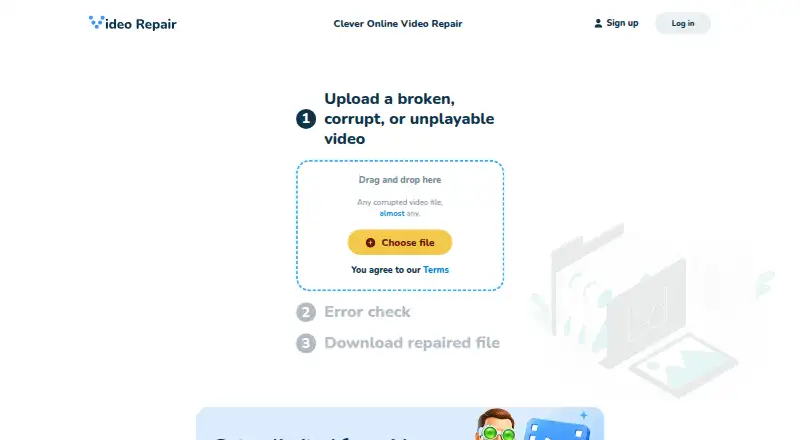
Clever Online Video Repair is a browser based service for repairing corrupted or unplayable video files. Uploading a file starts analysis and repair automatically. It handles videos damaged during recording, screen recordings, interrupted live streams, and some audio files contained in MP4 files. The service fully supports formats including MP4 and MOV, and describes repair for ISOBMFF or QTFF files with H.264 or H.265 video and AAC or PCM audio. Its experimental support extends to almost 400 other file formats and decoding errors for almost 500 codecs. The maker says repairs do not re-encode files and restore missing frames at their original quality. When the service cannot detect the video or audio parameters, it may require a working sample from the same device or software with identical settings. Files can be up to 20 GB. Without registration, up to three files can be repaired and are deleted after 24 hours; an account allows up to 10 repairs and storage for more than three days. The web service is optimized for modern smartphones, but videos stored in cloud services must first be downloaded to the user's device. Repair is not guaranteed for every video, and variable-frame-rate video cannot be repaired automatically.
Who it suits
It suits people who need to repair damaged recordings, screen recordings, interrupted streams, or certain MP4-contained audio files through a web browser, including on modern smartphones. Users who need account-based repair history, task controls, or access to repaired files on different devices can register for an account.
What it does well
- Analysis and repair start automatically after upload.
- Supports MP4, MOV, and specified H.264/H.265 media.
- Repairs are not re-encoded, according to the maker.
- Mobile browser use is supported.
- Registered users can access repair history and password-protect tasks.
What to know first
- Batch processing is unavailable.
- Variable-frame-rate video cannot be repaired automatically.
- Cloud videos must be downloaded before upload.
- The exact dynamic price appears only after upload, and refunds are not offered.
Limits
Without registration, up to three files can be repaired and files are deleted after 24 hours. Registered users can make up to 10 repairs, with files stored for more than three days. Each file can be up to 20 GB; repair is not guaranteed for every video, and variable-frame-rate video cannot be repaired automatically.
Plans
| Plan | Billed and limits | Price |
|---|---|---|
| Clever Online Video Repair | Dynamic pricing; exact cost is determined only after uploading the file. · Maximum 20 GB per file · up to 3 repairs without registration · up to 10 repairs with an account | On request |
As repair.cleverfiles.com lists them, read 9 Oct 2026. The maker's own page has the final word.
Getting started
- Open https://repair.cleverfiles.com/ in a web browser.
- Download any video stored in a cloud service to your device.
- Upload a video or audio file of up to 20 GB.
- Allow analysis and repair to start when the upload finishes.
- Provide a working sample with identical device or software settings if the service cannot detect the media parameters.
- Register for an account if you want up to 10 repairs and storage for more than three days.
Verdict
Choose Clever Online Video Repair for browser based repair of supported damaged video and audio, especially when automatic processing and mobile access are useful. Look elsewhere if you need batch repair, automatic handling of variable-frame-rate video, or a known price before uploading.
Questions
How much does Clever Online Video Repair cost?
Pricing is dynamic, and the exact cost is shown after you upload a file. The maker says it has a strict no-refund policy.
How many repairs can I make?
Without registration, you can repair up to three files. Registered users can make up to 10 repairs.
How long are repaired files stored?
Files are deleted after 24 hours without registration. Registered users can store files for more than three days.
What file types and codecs does it support?
It fully supports formats including MP4 and MOV, and says it can repair ISOBMFF or QTFF files using H.264 or H.265 video with AAC or PCM audio. Experimental support covers almost 400 additional file formats and decoding errors for almost 500 codecs.
Can I use it on a phone?
The web service says it is optimized for modern smartphones and can be used directly from a mobile device.
Does it repair every video?
Repair is not guaranteed for every video. The tool cannot automatically repair video recorded with variable frame rate.
Facts from Clever Online Video Repair's own pages
- Account features
- Registered users can view repair history, delete repair tasks, access repaired files from different devices, password-protect tasks, manage sessions, and delete their account. · repair.cleverfiles.com, 9 Oct 2026
- Automatic repair
- Analysis and repair start automatically after the upload finishes. · repair.cleverfiles.com, 9 Oct 2026
- Batch processing
- The page says batch processing is generally unavailable for online video repair services. · repair.cleverfiles.com, 9 Oct 2026
- Cloud-file limit
- Videos must be downloaded to the user's device before they can be uploaded for repair. · repair.cleverfiles.com, 9 Oct 2026
- Experimental formats
- The page says experimental support covers almost 400 additional file formats and decoding errors for almost 500 codecs. · repair.cleverfiles.com, 9 Oct 2026
- Formats and codecs
- It fully supports listed formats including MP4 and MOV, and says it can repair ISOBMFF or QTFF files using H.264 or H.265 video and AAC or PCM audio. · repair.cleverfiles.com, 9 Oct 2026
- Founded
- 2011 · repair.cleverfiles.com, 28 Sept 2026
- Headquarters
- New Castle, Delaware, USA · repair.cleverfiles.com, 28 Sept 2026
- Maker and address
- The product page footer identifies CleverFiles Inc. and lists an address in Claymont, Delaware, USA. · repair.cleverfiles.com, 9 Oct 2026
- Mobile use
- The service says it is optimized for modern smartphones and can be used directly from a mobile device. · repair.cleverfiles.com, 9 Oct 2026
- Payment and refunds
- The maker says pricing is dynamic, the exact cost is shown only after upload, and it has a strict no-refund policy. · repair.cleverfiles.com, 9 Oct 2026
- Purpose
- The service repairs corrupted or unplayable video files online. · repair.cleverfiles.com, 9 Oct 2026
- Quality
- The service says it does not re-encode repaired files and restores missing frames in their original quality. · repair.cleverfiles.com, 9 Oct 2026
- Registration limits
- Without registration, users can repair up to three files and files are deleted after 24 hours; registered users can perform up to 10 repairs and store files for more than three days. · repair.cleverfiles.com, 9 Oct 2026
- Repair limitations
- The maker says repair is not guaranteed for every video and that its tool cannot automatically repair video recorded with variable frame rate. · repair.cleverfiles.com, 9 Oct 2026
- Sample files
- A working sample recorded with the same device or software and identical settings may be needed if the service cannot detect video or audio parameters. · repair.cleverfiles.com, 9 Oct 2026
- Security controls
- The maker says its platform provides secure sessions where users can monitor which devices access their account. · repair.cleverfiles.com, 9 Oct 2026
- Supported media
- The service repairs video files damaged during recording, screen recordings, interrupted live streams, and some audio files stored in MP4 containers. · repair.cleverfiles.com, 9 Oct 2026
Where Clever Online Video Repair stands on Freedom251
- File Repair Software#26 of 34
- Video Repair Software#21 of 26
- File repair tools#31 of 33