Freedom251 › File Repair Software
Remo Video Repair
What Remo Video Repair is
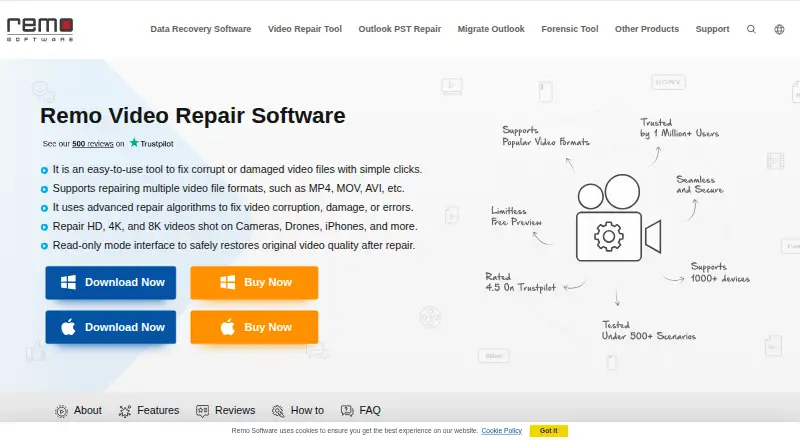
Remo Video Repair is desktop software for repairing damaged or corrupt video files. It supports MOV, MP4, AVI, DIVX and XVID, and the maker lists problems including videos that will not play, missing sound, stuttering, pixelation, audio-video sync issues and missing codecs. It can work with footage from cameras, camcorders, CCTV cameras, drones, iPhones and smartphones. The maker says it repairs HD, 4K and 8K video and lists AVC (H.264) and HEVC (H.265) codecs.
The software runs on Windows and macOS and performs repairs locally on a copy of the file, preserving the original. For severely damaged footage, it may ask for a healthy reference video recorded on the same device. A free demo lets users repair and preview a video, but saving the repaired file requires purchasing and activating a license. All listed licenses cover one PC: the 1 Month License is $69.97 per month, the 6 Months License is $79.97 per six months, and the Lifetime License is $199.97. Support differs by plan, with standard technical support on the one-month license and remote advanced file repair assistance on the other two.
Who it suits
Remo Video Repair suits people with damaged MOV, MP4, AVI, DIVX or XVID footage who want to repair files locally on Windows or macOS. Its listed device sources and resolution support also make it relevant to people working with video from phones, cameras, drones or CCTV systems.
What it does well
- Supports five listed video file categories.
- Addresses playback, sound, stuttering, pixelation and sync problems.
- Supports footage up to 8K, according to the maker.
- Repairs locally on a copy, leaving the original unchanged.
- Demo allows repair and preview before purchase.
What to know first
- Saving a repaired video requires a paid license.
- Each listed license covers one PC.
- Severely damaged videos may require a healthy reference clip.
Limits
The free demo allows repair and preview, but saving the repaired file requires purchasing and activating the full version. Each listed license is for one PC; its key can be used twice to activate the software, after which an activated device can be removed from the Remo ONE account or support can reset the limit.
Plans
| Plan | Billed and limits | Price |
|---|---|---|
| Lifetime License | $199.97 · 1 PC · MOV, MP4, AVI, DIVX & XVID repair · Remote advanced file repair assistance · Free standard tech support | $199.97, paid once |
| 1 Month License | $69.97 / month · 1 PC · MOV, MP4, AVI, DIVX & XVID repair · Standard Tech Support | $69.97 a month |
| 6 Months License | $79.97 / 6 months · 1 PC · MOV, MP4, AVI, DIVX & XVID repair · Remote advanced file repair assistance · Auto renews, cancel anytime | $79.97, paid once |
As remosoftware.com lists them, read 9 Oct 2026. The maker's own page has the final word.
Getting started
- Visit the Remo Video Repair website.
- Choose the Windows or macOS version.
- Use the free demo to repair and preview a video.
- If the video is severely damaged, provide a healthy reference video recorded on the same device if requested.
- Purchase and activate a license to save the repaired file.
Verdict
Choose Remo Video Repair if you need local repair for one of its supported video formats on Windows or macOS, and want to preview the result before buying. Look elsewhere if you need to save repaired files without purchasing a license or require a license for more than one PC.
Questions
Is Remo Video Repair free?
There is no free plan, but a free demo is available. Saving a repaired file requires purchasing and activating the full version.
Which file types does it repair?
The listed categories are MOV, MP4, AVI, DIVX and XVID.
Which platforms does it support?
Remo Video Repair is listed for Windows and macOS.
How much do the licenses cost?
The 1 Month License costs $69.97 per month, the 6 Months License costs $79.97 per six months, and the Lifetime License costs $199.97.
What support comes with each license?
The one-month license includes standard technical support. The six-month and lifetime licenses include remote advanced file repair assistance.
Does it alter the original video?
The maker says repairs are performed on a copy of the corrupted file, leaving the original unchanged.
Facts from Remo Video Repair's own pages
- Company history
- Remo Software says it was officially founded in 2011 after starting work in Bangalore in 2009. · remosoftware.com, 9 Oct 2026
- Device support
- The maker lists cameras, camcorders, CCTV cameras, drones, iPhones and smartphones as supported video sources. · remosoftware.com, 9 Oct 2026
- Founded
- 2011 · remosoftware.com, 28 Sept 2026
- Free demo
- The free demo allows users to repair and preview a video, while saving the repaired file requires purchasing and activating the full version. · remosoftware.com, 9 Oct 2026
- Headquarters
- Remo Software lists its India headquarters in Bengaluru, Karnataka. · remosoftware.com, 9 Oct 2026
- License limit
- The Windows purchase page says a license key can be used twice to activate the software, after which the user can remove an activated device from the Remo ONE account or contact support to reset the limit. · remosoftware.com, 9 Oct 2026
- Payment methods
- The purchase page says it supports credit card, PayPal and bank or wire transfer, with credit card and PayPal preferred. · remosoftware.com, 9 Oct 2026
- Platforms
- The product page says the software supports Windows and Mac; its product download links offer Windows and Mac downloads. · remosoftware.com, 9 Oct 2026
- Purpose
- Remo Video Repair repairs corrupt or damaged video files, including MOV, MP4, AVI, DIVX and XVID. · remosoftware.com, 9 Oct 2026
- Read-only handling
- Remo says the tool works on a copy of the corrupted file and does not alter the original. · remosoftware.com, 9 Oct 2026
- Reference video
- For severely damaged videos, the software may request a healthy reference video recorded on the same device to guide repair. · remosoftware.com, 9 Oct 2026
- Repair scenarios
- The product page lists unplayable video, missing sound, stuttering, pixelation, audio-video sync issues, and missing codecs among the problems it addresses. · remosoftware.com, 9 Oct 2026
- Resolution and codecs
- Remo says it repairs HD, 4K and 8K videos and lists AVC (H.264) and HEVC (H.265) video codecs. · remosoftware.com, 9 Oct 2026
- Security claim
- The maker says the software is digitally signed and verified and free from viruses and malware. · remosoftware.com, 9 Oct 2026
- Support
- The Windows purchase page lists standard technical support for the one-month license and remote advanced file repair assistance for the six-month and lifetime licenses. · remosoftware.com, 9 Oct 2026
Where Remo Video Repair stands on Freedom251
- File Repair Software#22 of 34
- File repair tools#22 of 33
- Video Repair Software#18 of 26