Freedom251 › Contract Analysis Software

ClearTerm
What ClearTerm is
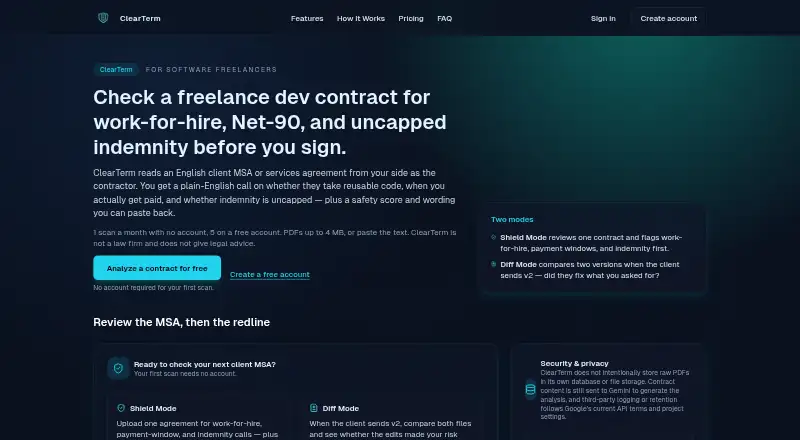
ClearTerm analyzes English-language client MSAs and services agreements from a software freelancer’s perspective, returning plain-English findings and wording for negotiations. It flags issues such as work-for-hire and broad IP assignment, long payment terms, and uncapped indemnity. Shield Mode reviews one contract with a 0–100 safety score, risk severity classifications and findings. Diff Mode compares two versions, assesses whether edits raise or lower risk, and counts as one scan. Each risk includes a ready-to-copy negotiation snippet; a scan pack also adds a composed email with tone choices. Users can paste text or upload selectable-text PDFs up to 4 MB and 40 pages, with about 100,000 characters of extracted text allowed. Scanned or photographed contracts will not work because there is no OCR. The first monthly scan requires no account; a free account includes five scans per month, and unused scans do not carry over. The free account costs nothing. A 20-scan pack costs $9, paid once. ClearTerm sends contract content to Google Gemini and says it is not a law firm or a substitute for a lawyer on high-stakes matters.
Who it suits
ClearTerm is intended for software freelancers reviewing English-language client agreements. It may help identify contract points to discuss, but is not a replacement for legal advice on high-stakes matters.
What it does well
- Free account includes five scans each month
- Compares contract versions in Diff Mode
- Provides negotiation snippets for identified risks
- Supports pasted text and selectable-text PDFs
- 20-scan pack credits last about a year
What to know first
- Scanned and photographed contracts are unsupported
- PDFs must be no larger than 4 MB and 40 pages
- Unused monthly free scans do not carry over
- Contract content is sent to Google Gemini
Limits
The free account includes five contract scans per month, and unused scans do not carry over. The 20-scan pack provides 20 scans, with credits used before the monthly free allowance; it is valid for about a year from purchase.
Plans
| Plan | Billed and limits | Price |
|---|---|---|
| Free account | 5 scans/month · Shield Mode · Diff Mode · safety score · plain-English explanations · negotiation snippets | Free |
| 20-scan pack | one-time via Stripe · 20 scans · archive · composed negotiation emails · credits valid about a year | $9, paid once |
| Pro | monthly · 50 scans/month · composed emails · searchable archive · priority support | $9 a month |
As clearterm.app lists them, read 15 Oct 2026. The maker's own page has the final word.
Getting started
- Open the ClearTerm website in a web browser.
- Paste contract text or upload a selectable-text PDF within the stated size and length limits.
- Use the first monthly scan without an account, or create a free account for five monthly scans.
- Choose Shield Mode to review one contract or Diff Mode to compare two versions.
- Review the findings and copy a negotiation snippet; a 20-scan pack adds composed emails with tone control.
ClearTerm is a web tool for reviewing English-language client agreements from a software freelancer’s perspective. It suits independent contractors who want to spot negotiation issues before signing. Its focused checks and two review modes are useful, but strict file requirements limit the contracts it can handle.
Overview
ClearTerm looks for contractor-facing terms including work-for-hire and broad IP assignment, long payment terms, and uncapped indemnity. It uses Google Gemini to analyze contract documents, so its findings should be treated as a starting point for review, not legal judgment. ClearTerm is not a law firm and is not a replacement for a lawyer on high-stakes matters.
Uploaded PDFs and extracted text are processed in memory and are not retained in ClearTerm’s own storage. Contract content is sent to Gemini, where handling follows Google’s current API terms and project settings. ClearTerm says connections to its service and Google’s API are encrypted in transit, and it does not reuse contracts to train its own models.
Key features
Review a contract or compare revisions
Shield Mode analyzes one contract and returns a 0–100 safety score, risk severity classifications, and plain-English findings. That combination offers a quick overall signal alongside explanations of flagged terms. Diff Mode compares two versions, assesses whether edits raise or lower risk, and counts as one scan. That makes it especially useful when a client sends a revised agreement.
Negotiation wording
Every identified risk includes a ready-to-copy negotiation snippet on every plan. The 20-scan pack adds a composed email with tone control, which can help turn individual comments into a fuller response. ClearTerm offers clause extraction, risk identification, and term comparison, but its stated focus is client MSAs and services agreements rather than general-purpose legal review.
File requirements
PDFs must be 4 MB or smaller, no longer than 40 pages, contain selectable text, and fit within about 100,000 characters of extracted text. Users can paste text instead. Scanned or photographed contracts will not work because ClearTerm has no OCR; that rules it out for agreements available only as image-based documents.
Pricing
The Free account costs nothing and includes five contract scans per month, Shield Mode and Diff Mode, a safety score with category breakdown, plain-English explanations, and negotiation snippets. The first scan each month does not require an account. Free scans do not roll over, so occasional users can try a review without signing up, while regular users face a firm monthly allowance.
The 20-scan pack costs $9, paid once, billed as a one-time payment via Stripe. It includes 20 scans, an archive, and composed negotiation emails with tone control. Credits are used before the monthly free allowance and remain valid for about a year from purchase. This is a modest commitment for someone who expects to review more than five contracts in a month, but it is not a recurring subscription and the credits have a validity window.
Platforms
ClearTerm runs on the web and is deployed in the cloud. Its supported file format is PDF, with text pasted directly as another input option; it does not support OCR.
Who it's for
ClearTerm is aimed at software freelancers reviewing English-language client agreements, particularly MSAs and services agreements where contractor-facing payment, IP, or indemnity terms matter. It is less suitable for people who need scanned documents processed, review agreements in other languages, or need legal advice for a high-stakes negotiation.
Pros and cons
- Pros: Shield and Diff modes cover both a single agreement and client revisions, with the comparison counting as one scan.
- Pros: Risk-specific negotiation snippets are included on every plan, while the scan pack adds composed emails with tone control.
- Pros: The free account provides five scans monthly, and the first monthly scan requires no account.
- Cons: PDFs must meet size, page, selectable-text, and extracted-text limits, excluding scanned or photographed contracts.
- Cons: The tool is focused on English-language software freelancer agreements, not broad legal review.
- Cons: Contract content goes to Google Gemini and is handled under Google’s current API terms and project settings.
Alternatives
For a broader set of contract-review choices, see Contract Analysis Software. PactSage may suit readers who want a broader workspace with daily analysis and questions alongside contract scans; its free plan includes two scans and two analyses per day, one space, and one seat. ClauseShield is worth considering for readers who want exports and redline suggestions: its free plan covers three contracts monthly and includes Word, PDF, and TXT export. ClauseShift is an option for readers who want Android or Windows access as well as web, with three reviews per month and three questions per day on its free plan.
Draft Ally may fit readers who want Word document uploads and a free monthly allowance of five contracts. Tiro is another paid option for readers considering a browser extension or web tool. DocJuris may suit teams seeking an annual platform fee sized to contract volume, unlimited users, and standard apps and integrations. eBrevia is an alternative for readers considering API or self-hosted deployment. LawGeex is another paid web option.
Verdict
Choose ClearTerm if you are a software freelancer who wants a focused first pass on an English-language client agreement, especially when comparing a revised version or preparing negotiation wording. Its useful contractor-specific checks and low one-time scan pack are balanced by narrow scope and demanding PDF requirements. Look elsewhere if you need OCR, broader contract coverage, or lawyer-led guidance for consequential terms.
Verdict
ClearTerm offers contract review and version comparison with specific limits on file size and format. Treat its findings as preparation for negotiation, not legal advice, especially for high-stakes agreements.
Questions
How much does ClearTerm cost?
There is a free account, and the listed 20-scan pack costs 9.00 USD as a one-time payment via Stripe.
Is there a free plan or trial?
Yes. The first scan each month requires no account, and a free account includes five scans per month. There is no free trial.
Which platforms does ClearTerm support?
ClearTerm is listed for web use.
What file types can I submit?
PDF files with selectable text are supported, and users can also paste text. Scanned or photographed PDFs do not work because OCR is unavailable.
What does the 20-scan pack add?
It includes 20 scans, an archive, and composed negotiation emails with tone control. Credits are used before the monthly free allowance and are valid for about a year.
Does ClearTerm provide legal advice?
No. ClearTerm says it is not a law firm, does not provide legal advice, and is not a replacement for a lawyer on high-stakes matters.
Facts from ClearTerm's own pages
- AI model
- The service states that each scan uses Google’s gemini-3.5-flash model in one model call. · clearterm.app, 15 Oct 2026
- AI provider
- ClearTerm uses Google Gemini to analyze contract documents from the contractor’s perspective. · clearterm.app, 2 Oct 2026
- API and SDKs
- The public materials describe Gemini use but publish no customer API, SDK or developer integration. · clearterm.app, 15 Oct 2026
- Archive
- The paid scan pack provides a searchable archive of saved analyses. · clearterm.app, 15 Oct 2026
- Availability limit
- The terms say uninterrupted availability is not guaranteed because maintenance or third-party outages can occur. · clearterm.app, 15 Oct 2026
- Company operator
- ClearTerm is built and operated by synexa labs, described as a one-person software studio. · clearterm.app, 15 Oct 2026
- Company size
- The studio describes itself as one person and lists four live products plus two in development. · synexalabs.org, 15 Oct 2026
- Composed emails
- The paid option can create a complete negotiation email with casual, professional or formal tone. · clearterm.app, 15 Oct 2026
- Data handling
- ClearTerm says uploaded PDFs and extracted text are processed in memory and not retained in its own storage; contract content is sent to Gemini, where handling follows Google’s current API terms and project settings. · clearterm.app, 2 Oct 2026
- Data retention
- Raw PDFs and extracted text are processed in memory and are not retained in ClearTerm storage. · clearterm.app, 15 Oct 2026
- Diff Mode
- Diff Mode compares two contract versions and assesses whether edits increase or reduce risk. · clearterm.app, 15 Oct 2026
- Documentation
- Public documentation consists of feature, workflow, FAQ, pricing, privacy and GDPR pages rather than API reference documentation. · clearterm.app, 15 Oct 2026
- File limits
- PDF uploads are limited to 4 MB and 40 pages, with about 100,000 extracted characters. · clearterm.app, 15 Oct 2026
- Free usage
- The first scan each month requires no account; a free account allows five scans per month, and unused free scans do not carry over. · clearterm.app, 2 Oct 2026
- Headquarters
- The maker identifies the studio as based in Bremen, Germany. · clearterm.app, 15 Oct 2026
- High-risk ceiling
- Any high-severity finding caps the overall score at 79. · clearterm.app, 15 Oct 2026
- Independent community signal
- KittyLaunch shows four community upvotes for the verified product. · kittylaunch.com, 15 Oct 2026
- Independent launch record
- ToolMage says the product was added to its directory on January 11, 2026. · toolmage.com, 15 Oct 2026
- Independent listing status
- KittyLaunch marks ClearTerms as a verified product launched on September 28, 2026. · kittylaunch.com, 15 Oct 2026
- Independent positioning
- ToolMage describes ClearTerm as a freemium AI contract-analysis product for freelancers and independent professionals. · toolmage.com, 15 Oct 2026
- Independent reviews
- KittyLaunch reports zero user reviews for ClearTerms at the time of its listing. · kittylaunch.com, 15 Oct 2026
- Independent traffic estimate
- ToolMage lists approximately 2.6K monthly visits for ClearTerm. · toolmage.com, 15 Oct 2026
- Input formats
- Users can paste clauses or upload selectable-text PDF files. · clearterm.app, 15 Oct 2026
- Input limits
- PDFs must be no larger than 4 MB and 40 pages, have selectable text, and fit within about 100,000 characters of extracted text; users can also paste text. · clearterm.app, 2 Oct 2026
Where ClearTerm stands on Freedom251
- Contract Analysis Software#4 of 23