Freedom251 › Behavior Management Software

Class Charts
What Class Charts is
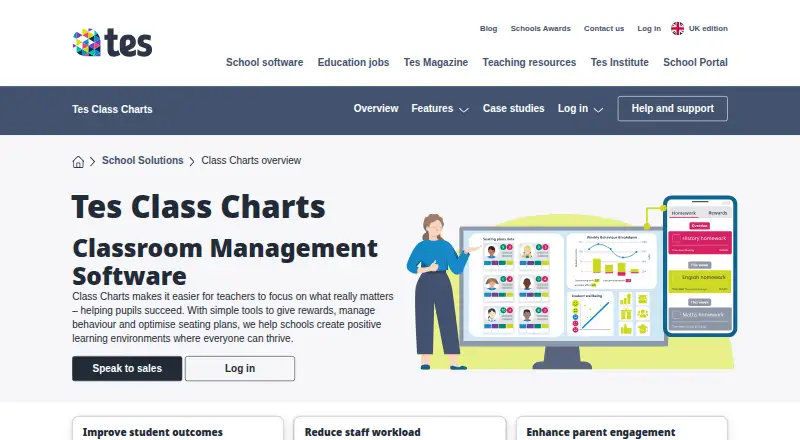
Class Charts is classroom management software for schools, with tools for student behaviour, teacher workflows, and school communication. Teachers can award performance points, tailor behaviours and achievements to school policy, and produce whole-school reports. Seating plans use recorded data and student interactions to help teachers create and adjust arrangements. The attendance module supports morning and afternoon registers, reporting, and identifying patterns. Teachers can set and track homework, with students and parents able to see requirements and deadlines. Other modules cover detentions, communications, and wellbeing; wellbeing tools highlight concerns and provide resources. Schools can share updates and student performance information with staff and families. Class Charts can connect with key MIS systems through writeback, or schools can ask about Wonde integration. Tes also describes links with MyConcern and Provision Map for safeguarding and learning-plan information. Parent and pupil apps are available for iOS and Android. Homework and reward store modules are described as free for schools. The product is paid, with pricing available on request; a free introductory demonstration is offered, but no price or trial period is stated.
Who it suits
It is presented for schools and teachers, with login options for teachers, parents, and students. Schools seeking behaviour, attendance, homework, and wellbeing tools in one product may find its modules relevant.
What it does well
- Teachers can tailor behaviours to school policy.
- Attendance tools support registers and pattern identification.
- Homework deadlines are visible to students and parents.
- Parent and pupil apps are available for iOS and Android.
What to know first
- Pricing is available on request.
- Only homework and reward store modules are identified as free.
Plans
| Plan | Billed and limits | Price |
|---|---|---|
| Class Charts | Pricing not stated; request a demo | On request |
As tes.com lists them, read 8 Oct 2026. The maker's own page has the final word.
Getting started
- Visit the Class Charts website.
- Request a demonstration from Tes.
- Contact sales to ask about subscription pricing.
- Choose web, Android or iOS access for the relevant users.
- Ask about MIS writeback or Wonde integration if needed.
Overview
Class Charts is classroom management software for schools, bringing behaviour tracking together with attendance, homework and student-support tools. It is best suited to schools that want teachers, pupils and parents working from a shared system; schools comparing budgets should first request custom pricing.
Key features
Teachers can award performance points, define behaviours and achievements around school policy, and generate whole-school reports. This gives schools a way to reinforce expectations consistently and review patterns across the school, although the approach depends on staff agreeing how to apply the school’s own categories.
Seating plans use recorded data and student interactions to help teachers create and adapt classroom arrangements. Attendance supports morning and afternoon registers, reporting and pattern identification, making it useful for schools that want to spot attendance patterns alongside routine register-taking.
Teachers can set and track homework, while pupils and parents can see requirements and deadlines. Tes describes the homework and reward store modules as free for schools, which may make those functions useful even when a school does not adopt the wider paid product. Other modules cover detentions, communications and wellbeing. Staff can share updates and student performance data with parents and colleagues; the wellbeing module highlights concerns and provides support resources.
Class Charts can interface with key MIS systems using writeback, or schools can ask about integration through Wonde. Tes also describes links with MyConcern and Provision Map that bring safeguarding, learning-plan and related student information into a single view. These connections matter for schools seeking to consolidate context, but buyers should confirm which integrations fit their systems and workflow.
The product includes incident tracking, positive reinforcement, family communication, IEP support, goal-progress monitoring, compliance reporting and data import and export. Tes states that its services are subject to data-protection laws including UK GDPR, EU GDPR, the Data Protection Act 2018 and the Australian Privacy Act 1988.
Pricing
Class Charts is a paid product with custom pricing; schools need to speak with sales for a quote. A free plan is available, and Tes describes the homework and reward store modules as free for schools, but the scope of the free plan is not detailed. The product page invites schools to request a demo, and the demo is a free introductory demonstration rather than a stated trial period. No subscription price or renewal term is published, so schools should ask for the quote and any applicable terms before budgeting.
The paid Class Charts plan is aimed at schools that want the broader classroom-management suite, rather than only free homework and reward-store functions. Since a subscription price is custom, schools should compare quotes against the modules and integrations they intend to use.
Platforms
Class Charts is deployed on the web, with parent and pupil apps for iOS and Android. That mix suits schools that want staff to use a web product while families access information on mobile devices.
Who it's for
Class Charts is designed for schools and teachers, with login options for teachers, parents and students. It is a stronger fit for schools looking to combine classroom behaviour, attendance, homework and family communication than for buyers seeking a narrowly focused special-education or IEP system. Schools should also verify MIS and Wonde integration needs before choosing it.
Pros and cons
- Pros: Behaviour points, custom school behaviours and whole-school reports support consistent reinforcement and oversight.
- Pros: Attendance, homework, communications and wellbeing sit alongside behaviour tools, giving schools a broader set of student-facing functions.
- Pros: Free homework and reward store modules offer a way to use those functions without committing to the full paid product.
- Pros: MIS writeback and potential links through Wonde, MyConcern and Provision Map can connect classroom records with wider school information.
- Cons: The broader subscription has custom pricing, so schools cannot assess its cost without requesting a quote.
- Cons: The free plan’s scope is unclear, and the free demonstration is not a stated trial period.
- Cons: Schools need to confirm the relevant integrations with sales rather than assume every system or workflow is covered.
Alternatives
For a wider range of specialist-education options, browse Special Education Software or Behavior Management Software.
- Osprey is worth considering for individuals who want a free plan with a live web demo and iOS, Android and Windows apps, or for schools and districts exploring IEP-team coordination.
- FrenalyticsEDU may suit a small team seeking a defined free allowance: 10 student profiles, one staff account and one daily Learning Session per student.
- PowerSchool Behavior Support is another paid behaviour-support option for schools considering Android, iOS and web platforms.
- EmbraceIEP may better suit districts looking for unlimited users and buildings with pricing based on student population and a district-specific proposal.
- Frontline Special Education Management is another web-based option for districts discussing their needs directly with the vendor.
- GoIDEA may suit districts seeking IEP management, progress monitoring and compliance documentation under a custom quote based on district needs and scale.
- IEP Evolve is another web-based, paid alternative for buyers seeking an IEP-focused product.
- IEP Online may suit school districts considering a web or self-hosted IEP product.
Verdict
Class Charts is a sensible choice for schools that want behaviour management at the centre of a broader set of attendance, homework, communication and wellbeing tools, with parent and pupil access and routes to connect other school systems. Its main drawback is that the core subscription requires a custom quote, and buyers should look elsewhere if they need a clearly priced plan or a specialist IEP product whose scope and terms are established before a sales conversation.
Verdict
Class Charts combines classroom behaviour tools with attendance, homework, communication, and wellbeing modules. Schools should request a demo and confirm pricing and integration requirements.
Questions
How much does Class Charts cost?
The subscription price is available on request. Tes invites schools to speak with sales.
Is any part of Class Charts free?
Tes describes the homework and reward store modules as free for schools.
Which platforms does Class Charts support?
Class Charts is available on web, Android and iOS. Parent and pupil apps are available for iOS and Android.
Can Class Charts connect to school systems?
It can interface with key MIS systems using writeback. Schools can also ask about integration via Wonde.
What other Tes products are linked with Class Charts?
Tes describes links with MyConcern and Provision Map for bringing behaviour, attendance, SEND and safeguarding information into a single view.
Who makes Class Charts?
Class Charts is a Tes product. Tes was founded in 2010 and is headquartered in Sheffield, United Kingdom.
Facts from Class Charts's own pages
- Attendance
- Attendance features include digital registers, real-time tracking, reports and automatic flags for missing or incomplete registers. · tes.com, 8 Oct 2026
- Audience
- Tes describes Class Charts as classroom management software designed for schools and teachers. · tes.com, 7 Oct 2026
- Behaviour
- Teachers can award performance points, customise behaviours to match school policy and generate whole-school reports. · tes.com, 7 Oct 2026
- Behaviour tools
- Teachers can award performance points, create school-specific behaviours and achievements, and generate whole-school reports. · tes.com, 8 Oct 2026
- Communications
- The communication module lets schools share updates and student performance data with staff and parents. · tes.com, 7 Oct 2026
- Connected products
- Tes describes integration with MyConcern and Provision Map as a way to bring behaviour, attendance, SEND and safeguarding information into a single view. · tes.com, 7 Oct 2026
- Founded
- 2010 · tes.com, 28 Sept 2026
- Free modules
- Tes describes the homework and reward store modules as free for schools. · tes.com, 7 Oct 2026
- Headquarters
- Sheffield, England, United Kingdom · tes.com, 28 Sept 2026
- Homework
- Teachers can assign homework with instructions, due dates and optional attachments, while students and parents can view tasks and deadlines in the apps. · tes.com, 8 Oct 2026
- Integrations
- Class Charts can connect with school MIS systems using writeback or through Wonde; the page displays SIMS, Bromcom, Arbor, iSAMS, Juniper, Engage and Integris logos. · tes.com, 8 Oct 2026
- Intended users
- The product is presented for schools, with teacher, parent and student login options. · tes.com, 8 Oct 2026
- Mobile apps
- Tes says the parent and pupil apps are available for iOS and Android. · tes.com, 8 Oct 2026
- Other modules
- The listed modules include homework, detentions, communications, attendance and wellbeing. · tes.com, 8 Oct 2026
- Pricing
- The product page invites schools to speak to sales and does not state a Class Charts subscription price. · tes.com, 7 Oct 2026
- Pricing and demo
- The demo page offers a free introductory demonstration; it does not state a product price or trial period. · tes.com, 8 Oct 2026
- Privacy and compliance
- Tes states that its services are subject to data protection laws including the UK GDPR, EU GDPR, Data Protection Act 2018 and Australian Privacy Act 1988. · tes.com, 8 Oct 2026
- Purpose
- Class Charts is classroom management software for managing behaviour, rewards and seating plans in schools. · tes.com, 8 Oct 2026
- Seating plans
- The software uses recorded data about pupil interactions to help create seating plans and can be used on whiteboards, laptops, iPads and phones. · tes.com, 8 Oct 2026
- Support
- Tes directs product support requests to the Class Charts help and support portal. · tes.com, 8 Oct 2026
- Tes product links
- Tes describes links with Provision Map for learning-plan information and MyConcern for safeguarding concerns. · tes.com, 8 Oct 2026
- Wellbeing
- The wellbeing module highlights concerns and provides resources to support students. · tes.com, 7 Oct 2026
Where Class Charts stands on Freedom251
- Behavior Management Software#1 of 22