Freedom251 › Chemistry Simulation Software

ChemViz3D
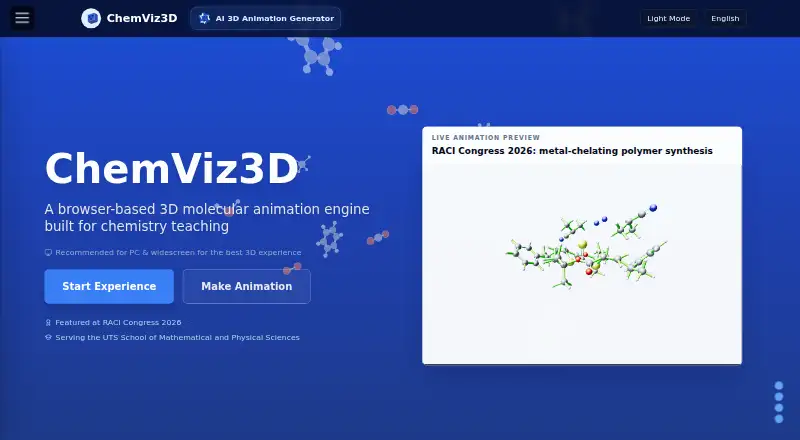
What ChemViz3D is
ChemViz3D is a free web tool for teaching chemistry with interactive 3D molecular scenes and reaction animations. Students can rotate, pause, and zoom in on atoms and bonds, while a keyframe editor lets learners and educators build custom reaction sequences. Animations can be shared by link and opened in a browser without installing software. Its molecule toolkit supports structure analysis and visualization, with SVG or MOL downloads. An image-to-SMILES workflow accepts uploaded files, pasted screenshots, or image URLs, and supports .smi and .mol exports. ChemViz3D can also turn .chemx or .json animation files into Python scripts for Blender. The product describes using PubChem PUG-REST and NCI/CADD services for molecular data and structure resolution. It says it is used in UTS chemistry courses and was developed with guidance from two UTS professors. The individual learning and teaching plan is free, with no sign-up required. The full interactive reaction player requires WebGL, and a modern desktop browser is recommended.
Who it suits
ChemViz3D suits chemistry learners and educators who want to explore molecular scenes or create and share reaction animations in a browser. Individual use is free, but institutional, LMS, enterprise, redistribution, and product integration use requires permission or a separate licence.
What it does well
- Free individual plan with no sign-up required
- Interactive 3D scenes with rotate, pause, and zoom
- Keyframe editor for custom reaction animations
- Exports animation files as Blender-ready Python scripts
- Image-to-SMILES workflow accepts files, screenshots, and URLs
What to know first
- Full reaction player requires WebGL
- Modern desktop browser recommended for full experience
- Institutional and product integration use requires permission or licence
Plans
| Plan | Billed and limits | Price |
|---|---|---|
| Individual learning and teaching | Free for individual students, learners, and educators; no sign-up required · institutional, LMS, enterprise, redistribution, and product integration require permission or a separate licence | Free |
As chemviz3d.com lists them, read 3 Oct 2026. The maker's own page has the final word.
Getting started
- Open https://www.chemviz3d.com/ in a web browser
- Start with the free Individual learning and teaching plan; no sign-up is required
- Use the molecule toolkit to analyze or visualize a structure, or open a reaction scene
- Use the keyframe editor to create a custom reaction animation
- Share an animation by link or export supported files
Verdict
ChemViz3D combines interactive molecular scenes with tools for making, sharing, and exporting reaction animations. Its full player depends on WebGL, and broader institutional use requires permission or a separate licence.
Questions
How much does ChemViz3D cost?
The Individual learning and teaching plan is free.
Do I need to sign up?
No sign-up is required for the free individual plan.
Which platforms does ChemViz3D support?
ChemViz3D is available on the web. The full interactive reaction player requires WebGL, and a modern desktop browser is recommended for the complete experience.
Can I share animations?
Yes. Animations can be shared by link and viewed in a browser without software installation.
Can an institution use ChemViz3D?
Institutional, LMS, enterprise, redistribution, and product integration use require prior permission or a separate licence.
Does ChemViz3D offer virtual labs?
No. Virtual labs are not among its listed tools.
Facts from ChemViz3D's own pages
- Animation editor
- The keyframe editor lets users create custom chemical reaction animations. · chemviz3d.com, 3 Oct 2026
- Availability limit
- The full interactive reaction player requires WebGL and the site recommends a modern desktop browser for the complete experience. · chemviz3d.com, 3 Oct 2026
- Company location
- The site acknowledges Traditional Custodians across Australia, but does not state a company headquarters. · chemviz3d.com, 3 Oct 2026
- Education audience
- ChemViz3D says it is used in UTS chemistry courses and developed under the guidance of two UTS professors. · chemviz3d.com, 3 Oct 2026
- Export
- ChemViz3D can convert .chemx or .json animation files into Blender-ready Python scripts. · chemviz3d.com, 3 Oct 2026
- External data services
- The product describes using PubChem PUG-REST and NCI/CADD services for molecular data and structure resolution. · chemviz3d.com, 3 Oct 2026
- Image recognition
- Its image-to-SMILES workflow accepts file uploads, pasted screenshots, and image URLs, and supports .smi and .mol export. · chemviz3d.com, 3 Oct 2026
- Institutional licensing
- Institutional, LMS, enterprise, redistribution, and product integration require prior permission or a separate licence. · chemviz3d.com, 3 Oct 2026
- Interactive playback
- Students can rotate, pause, and zoom in on atoms and chemical bonds in real-time 3D scenes. · chemviz3d.com, 3 Oct 2026
- Molecule tools
- The molecule toolkit uses RDKit.js and offers molecular structure analysis, visualization, and SVG or MOL downloads. · chemviz3d.com, 3 Oct 2026
- Purpose
- ChemViz3D is a browser-based 3D molecular animation tool built for chemistry teaching. · chemviz3d.com, 3 Oct 2026
- Sharing and installation
- Animations can be shared by link and viewed in a browser without software installation. · chemviz3d.com, 3 Oct 2026
- Support
- The site lists [email protected] for contact and licensing enquiries. · chemviz3d.com, 3 Oct 2026
Where ChemViz3D stands on Freedom251
- Chemistry Simulation Software#9 of 33