Freedom251 › Bill of Materials Software

Cascadia PLM
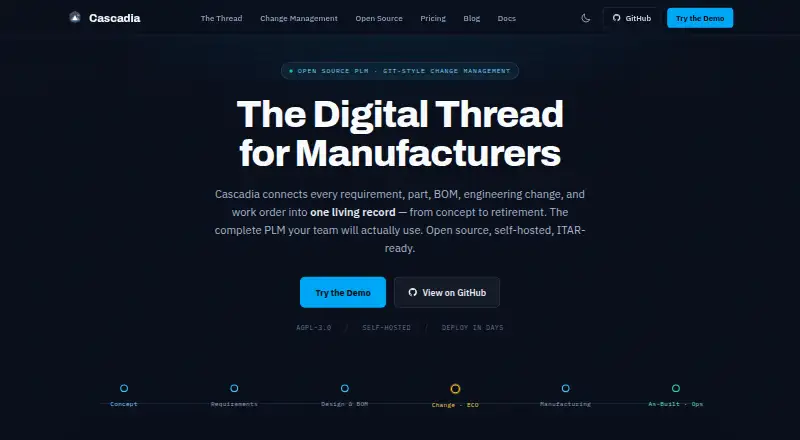
What Cascadia PLM is
Cascadia PLM links requirements, parts, bills of materials, engineering changes, and work orders in a product lifecycle record for manufacturers. Its core includes documents, multi-level BOMs, workflows, lifecycles, revision schemes, a file vault, search, import and export, APIs, and a 3D viewer. Engineering changes can be worked on in separate spaces for review before teams merge them. Teams can configure item types, workflows, lifecycles, and permissions in TypeScript files and review changes through pull requests. Documentation describes converting STEP and IGES files to STL and GLB for browser-based 3D viewing. Cascadia can be self-hosted or used as managed cloud software; documented deployments include Docker Compose, single-server, distributed high-availability, and Kubernetes setups. Self-Hosted Core is free under AGPL-3.0 and includes unlimited editors and viewers. Managed Cloud for up to 20 editors costs $850 a month, billed $10,200/yr annually. Managed-cloud API access is an optional paid add-on; the free core includes REST and SysML v2 APIs.
Who it suits
Cascadia PLM suits engineering and manufacturing teams managing product records, revisions, requirements, and change workflows. Its self-hosted option may suit teams that want deployment within their own boundary.
What it does well
- Free core includes unlimited editors and viewers.
- Includes REST and SysML v2 APIs.
- Supports multi-level BOMs and revision schemes.
- Self-hosting and Kubernetes deployment are documented.
What to know first
- Managed-cloud API access costs extra.
- Managed Cloud up to 20 editors costs $850 a month.
- Configuration uses TypeScript files.
Limits
The free Self-Hosted Core is the core PLM under AGPL-3.0; managed-cloud API access is an optional paid add-on. Managed Cloud — up to 20 editors supports up to 20 editor seats, while higher listed tiers have limits of 50 and 100 editor seats.
Plans
| Plan | Billed and limits | Price |
|---|---|---|
| Self-Hosted Core | Free forever · Unlimited users · Core PLM · AGPL-3.0 · Customer infrastructure | Free |
| Managed Cloud — up to 50 editors | Up to 50 editor seats · unlimited viewers | $1,750 a month |
| Commercial License — Pilot | 90-day pilot · credited toward year one on conversion | $2,090, paid once |
| Managed Cloud — up to 100 editors | Up to 100 editor seats · unlimited viewers | $3,000 a month |
| Commercial License | From $30K/yr · No AGPL obligations · Self-host or vendor-managed · On-premises, private cloud, or GovCloud | $30,000 a year |
| Commercial License — Growth | Annual · Teams up to 50 · self-hosted or managed hosting on customer hardware | $3,050 a year |
| Commercial License — Enterprise | Annual · Unlimited editors and viewers · CAD, enterprise connectors and SSO included · ITAR / AWS GovCloud add-on: +$30–50K/yr | $60,120 a year |
| Managed Cloud | From $850/mo · Dedicated instance · Editor-seat pricing · Unlimited viewers · Upfront add-ons | $850 a month |
The first 8 of 10 plans, as cascadiaplm.com lists them, read 14 Oct 2026. The maker's own page has the final word. Every plan
Getting started
- Open the Cascadia PLM website.
- Choose the free Self-Hosted Core or a listed paid plan.
- For self-hosting, use the documented Docker Compose, single-server, distributed high-availability, or Kubernetes deployment route.
- Consult the installation and quick-start guides.
- Use the documentation, FAQs, GitHub Discussions, or GitHub Issues for support.
Cascadia PLM is a product lifecycle management system for engineering and manufacturing teams managing requirements, parts, bills of materials, and engineering changes. It is most compelling for teams that want configurable workflows and a choice of self-hosting or managed cloud; its main trade-off is that managed-cloud API access and some enterprise capabilities cost extra.
Overview
Cascadia connects product records and operational work orders in one PLM system. That breadth can help teams moving beyond spreadsheets bring product information and change processes into a common structure, though the value depends on adopting its configured workflows.
Self-hosting provides deployment control, while managed cloud avoids running the service on a customer’s own infrastructure. The two paths are not interchangeable in price or licensing: the free core is self-hosted, while managed cloud starts at $850 a month, billed annually.
For broader category browsing, see Product Lifecycle Management Software and Bill of Materials Software.
Key features
Product records and change control
The core covers parts, documents, requirements, multi-level BOMs, workflows, lifecycles, revision schemes, a file vault, search, and import/export. That combination suits teams that need to track both product structure and revisions rather than manage BOMs in isolation. Each engineering change order can have its own workspace for review before it is merged, giving teams a distinct review step before changes join the main record.
Configuration and integrations
Teams can define item types, workflows, lifecycles, and permissions in TypeScript files and review changes through pull requests. This suits organizations comfortable treating configuration as managed code; it may be less attractive to teams seeking a wholly visual setup process. Optional Solid Edge and SolidWorks add-ins, plus configurable ERP, MES, and CRM connectors including Epicor, Global Shop, and Odoo, extend the integration options.
CAD, APIs, and AI
The documentation describes conversion of STEP and IGES files to STL and GLB, alongside browser-based 3D viewing. REST and SysML v2 APIs are included in the free core, but API access for managed cloud is an optional paid add-on. AI features work with OpenAI, Anthropic, Gemini, and Ollama, offering a choice of providers.
Deployment and security
Cascadia supports Docker Compose, single-server, distributed high-availability, and Kubernetes deployments. Its security documentation describes role-based and program-based access controls, session security, CSRF checks, and same-origin CORS by default. The maker describes the product as ITAR-ready and says self-hosting inside a customer’s own boundary supports its ITAR deployment approach; organizations needing the ITAR/AWS GovCloud add-on should account for its additional annual charge.
Pricing
The freemium model separates the self-hosted core from commercial licensing and managed cloud. The free plan has unlimited editors and viewers and includes core PLM under AGPL-3.0, making it the lowest-cost path for teams able to host and operate the software themselves. There is no free trial.
- Self-Hosted Core: free, with unlimited editors and viewers and core PLM under AGPL-3.0. It gives up managed hosting and does not itself include the commercial license offerings.
- Managed Cloud — up to 20 editors: $850 a month, billed $10,200/yr and billed annually; includes up to 20 editor seats and unlimited viewers.
- Managed Cloud — up to 50 editors: $1,750 a month; includes up to 50 editor seats and unlimited viewers.
- Managed Cloud — up to 100 editors: $3,000 a month; includes up to 100 editor seats and unlimited viewers.
- Managed Cloud — 100+ editors: custom pricing; includes 100+ editor seats and unlimited viewers.
- Commercial License — Pilot: $2,090, paid once for a 90-day pilot, credited toward year one on conversion.
- Commercial License — Growth: $3,050 a year, billed Annual; for teams up to 50, self-hosted or managed hosting on customer hardware.
- Commercial License — Enterprise: $60,120 a year, billed Annual; includes unlimited editors and viewers, CAD, enterprise connectors, and SSO. ITAR / AWS GovCloud is an add-on at +$30–50K/yr.
Editor caps distinguish the managed-cloud tiers, while viewers are unlimited on each. Teams that can self-host and need only core PLM can start free; those requiring a commercial license, managed cloud, or enterprise inclusions should compare the corresponding paid terms and seat limits.
Platforms
Cascadia supports Linux, macOS, Windows, web, API, and self-hosted deployment. Its documented hosting options range from a single server to distributed high availability and Kubernetes, giving infrastructure teams several deployment approaches.
Who it's for
Cascadia is aimed at engineering and manufacturing teams that need linked product records, revision control, requirements and BOM management, and structured change workflows. It is especially relevant to teams moving from spreadsheets, and to defense or maritime engineering groups considering self-hosting within their own boundary. It is a weaker fit for teams that want managed cloud with included API access, since that access is a paid add-on, or that do not want to manage code-based configuration.
Pros and cons
- Pro: The free self-hosted core has unlimited editors and viewers and includes REST and SysML v2 APIs, which makes evaluation and deployment possible without a seat cap on the core plan.
- Pro: Isolated change workspaces and configurable workflows support review before engineering changes are merged.
- Pro: Self-hosting and multiple documented deployment patterns provide control over where and how the system runs.
- Con: Managed cloud is billed annually and caps editor seats by tier; teams above 100 editors move to custom pricing.
- Con: Managed-cloud API access is an optional paid add-on, unlike API access in the free core.
- Con: ITAR / AWS GovCloud adds +$30–50K/yr to the Enterprise license, so the security-oriented deployment path materially raises its cost.
Alternatives
Dokuly is a free, open-source PLM with a self-hosted Docker stack; choose it when a no-cost, self-hosted alternative is the priority.
Oracle Fusion Cloud PLM has a $100 a month reviewer cloud service, with a three-year standard subscription term and a 50-hosted-named-user minimum; consider it if that specific service and term fit your purchasing model.
Centric PLM is another paid PLM option.
Infor Public Sector is a paid alternative with pricing available by contacting Infor.
NETVIBES is a paid option with a free plan and free trial; its Enterprise Data Science plan lists 17 portfolio roles.
Aras Innovator offers a free Community Edition for 50 named users as well as SaaS and Standard subscription offerings.
Autodesk Fusion is a freemium option with a free plan and a $57 a month plan billed annually that includes integrated CAD/CAM, real-time team collaboration, PCB design and electromechanical integration, and drawing automation.
Nora IPLM is a paid option with a free trial.
Verdict
Cascadia PLM is a strong fit for engineering and manufacturing teams that want structured product records, reviewable engineering changes, and a choice of self-hosted or managed deployment. Its free core is unusually permissive on editor and viewer counts and includes APIs, but teams should look elsewhere if they require managed-cloud API access in the base price or need a lower-cost enterprise deployment with the stated ITAR / AWS GovCloud add-on.
Verdict
Cascadia PLM brings engineering records and change workflows together, with both self-hosted and managed-cloud paths. The free core includes APIs, while managed-cloud API access is an optional paid add-on.
Questions
Does Cascadia PLM have a free plan?
Yes. Self-Hosted Core costs nothing and includes unlimited editors, unlimited viewers, and core PLM under AGPL-3.0.
How much does managed cloud cost?
Managed Cloud — up to 20 editors costs $850 a month, billed $10,200/yr and annually. The listed plans for up to 50 editors and up to 100 editors cost $1,750 a month and $3,000 a month, respectively.
Can Cascadia PLM be self-hosted?
Yes. Cascadia documents Docker Compose, single-server, distributed high-availability, and Kubernetes deployments.
What platforms does Cascadia PLM support?
The listed platforms are API, Linux, macOS, self-hosted, web, and Windows.
Is Cascadia PLM open source?
The free Self-Hosted Core includes core PLM under the AGPL-3.0 license.
Does the free core include API access?
Yes. It includes REST and SysML v2 APIs. Managed-cloud API access is an optional paid add-on.
Facts from Cascadia PLM's own pages
- AI assistant
- The LLM assistant can search and modify PLM records, create ECOs, analyze change impact, and launch design sessions, with permission checks and audit logs. · docs.cascadiaplm.com, 14 Oct 2026
- AI providers
- The assistant documents Anthropic and OpenAI adapters as supported, while Google Gemini and Ollama adapters are listed as planned. · docs.cascadiaplm.com, 14 Oct 2026
- API
- The free core includes REST and SysML v2 APIs; managed-cloud API access is an optional paid add-on. · cascadiaplm.com, 3 Oct 2026
- API authentication
- API tokens are supported alongside database-backed sessions and OAuth providers such as GitHub, Google, and Microsoft. · docs.cascadiaplm.com, 14 Oct 2026
- CAD
- The documentation describes STEP and IGES conversion to STL and GLB, plus browser-based 3D viewing. · docs.cascadiaplm.com, 3 Oct 2026
- CAD generation
- Natural-language CAD generation uses the Zoo API, while simpler parametric parts can be generated through CadQuery workers. · docs.cascadiaplm.com, 14 Oct 2026
- CAD viewing
- STEP and IGES files can be converted to STL and GLB for browser viewing, with Three.js used for visualization. · docs.cascadiaplm.com, 14 Oct 2026
- Change management
- Each engineering change order can use an isolated workspace that teams review and merge when ready. · cascadiaplm.com, 3 Oct 2026
- Company size signal
- The Cascadia PLM LinkedIn organization page displayed 26 followers when crawled. · linkedin.com, 14 Oct 2026
- Compliance positioning
- The maker describes Cascadia as ITAR-ready and says self-hosting within the customer’s own boundary supports its ITAR deployment approach. · cascadiaplm.com, 3 Oct 2026
- Configuration
- Item types, workflows, lifecycles, and permissions can be configured in TypeScript files and reviewed through pull requests. · docs.cascadiaplm.com, 3 Oct 2026
- Core capabilities
- The core includes parts, documents, requirements, multi-level BOMs, workflows, lifecycles, revision schemes, file vault, search, import/export, APIs, and a 3D viewer. · cascadiaplm.com, 3 Oct 2026
- Deployment
- Cascadia is self-hostable and documents Docker Compose, single-server, distributed high-availability, and Kubernetes deployments. · docs.cascadiaplm.com, 3 Oct 2026
- Documentation depth
- The public documentation includes installation, quick start, architecture, API references, deployment guides, feature manuals, FAQ, and troubleshooting pages. · docs.cascadiaplm.com, 14 Oct 2026
- Document control
- Documents are version-controlled in a vault with check-in and check-out operations. · docs.cascadiaplm.com, 14 Oct 2026
- ECO-as-Branch
- Each engineering change order receives an isolated branch so teams can work in parallel and merge approved revisions later. · docs.cascadiaplm.com, 14 Oct 2026
- Enterprise search
- A global search endpoint searches across item types while scoping results to the user's program and design permissions. · docs.cascadiaplm.com, 14 Oct 2026
- Extensibility model
- Item types, workflows, lifecycles, and permissions are defined in TypeScript and can be reviewed through pull requests. · docs.cascadiaplm.com, 14 Oct 2026
- FreeCAD integration
- A public FreeCAD 1.x workbench provides linking, check-in/check-out, property synchronization, and guided ECO workflows; assembly/BOM push is marked a Phase 2 placeholder. · github.com, 14 Oct 2026
- GitHub activity
- The public GitHub organization lists Cascadia-App, Demo-Data, and FreeCAD-Connector repositories; Cascadia-App showed 33 stars and 10 forks when opened. · github.com, 14 Oct 2026
- Import limits
- Excel and CSV imports support files up to 10 MB and batches of up to 500 items, including BOM parsing. · docs.cascadiaplm.com, 14 Oct 2026
- Independent company statement
- Founder Kai Kircher said he started Cascadia PLM to solve his own change-management and PLM architecture problems and is building it openly. · linkedin.com, 14 Oct 2026
- Installation requirements
- The installation guide recommends Node.js 22 LTS, npm 10+, PostgreSQL 18+, and Git 2.x; Docker Desktop is optional for queues, CAD conversion, and containers. · docs.cascadiaplm.com, 14 Oct 2026
- Integrations
- The pricing page lists optional Solid Edge and SolidWorks add-ins, and configurable ERP, MES, or CRM connectors including Epicor, Global Shop, and Odoo. · cascadiaplm.com, 3 Oct 2026
Where Cascadia PLM stands on Freedom251
- Bill of Materials Software#1 of 47
- Product Lifecycle Management Software#1 of 38