Freedom251 › Network Traffic Analysis Software
Caligare Flow Inspector
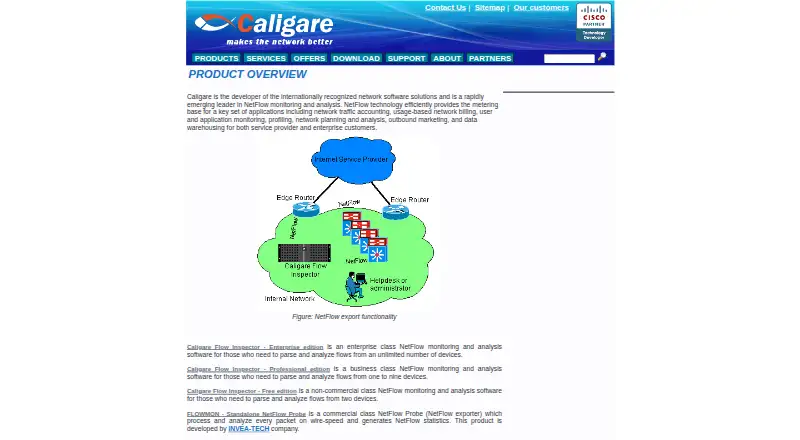
What Caligare Flow Inspector is
Caligare Flow Inspector monitors and analyzes NetFlow exports from existing routers, without requiring deployed probes. Its web-based management interface lets administrators configure collectors, network devices, application groups, and anomaly detection. The product provides real-time network analysis, user data tracking, and statistics for leading hosts, protocols, applications, and conversations. Caligare says this visibility can help reveal suspicious activity, denial-of-service attacks, worm-infected stations, bottlenecks, and routing problems. The free edition handles NetFlow versions 1, 5, 6, 7, and 9, along with low-level traffic searches, interface utilization and maps, filtering, forwarding, and local, LDAP, or external authentication. Its free license is for non-commercial use and is limited to two devices, 24-hour history, and 250 flows per second. Professional and Enterprise editions add longer historical trends, network anomaly detection, unrestricted parsing, and commercial use. A 30-day trial license can be requested by email. Linux packages are listed, and the latest version requires MySQL 5.1 or newer.
Who it suits
The editions address enterprise users monitoring unlimited devices, businesses monitoring one to nine, and non-commercial users monitoring up to two. The free edition is specifically limited to non-commercial use.
What it does well
- Analyzes exports from existing routers without probes.
- Provides real-time network analysis.
- Free edition supports five listed NetFlow versions.
- Includes LDAP and external authentication options.
- A 30-day trial license can be requested.
What to know first
- Free edition is non-commercial only.
- Free edition allows up to two devices.
- Free edition keeps 24-hour history.
- Latest version requires MySQL 5.1 or newer.
Limits
The free edition permits non-commercial use on up to two devices, keeps 24 hours of history, and processes up to 250 flows per second. Longer-term trends, network anomaly detection, unrestricted NetFlow parsing, and commercial use are additions in Professional and Enterprise editions.
Plans
| Plan | Billed and limits | Price |
|---|---|---|
| Caligare Flow Inspector Free Edition | Non-commercial use · maximum 2 devices · 24-hour history · 250 flows/sec maximum | Free |
| Caligare Flow Inspector Enterprise edition | Unlimited monitored devices · commercial use | On request |
| Caligare Flow Inspector Professional edition | 1–9 monitored devices · commercial use | On request |
As caligare.com lists them, read 30 Sept 2026. The maker's own page has the final word.
Getting started
- Visit the Caligare NetFlow website and choose an edition.
- Download the package for your Linux distribution.
- Install MySQL 5.1 or newer for the latest version.
- Configure collectors, network devices, and application groups in the web interface.
- Request a 30-day trial license key by email if you want to evaluate it.
Overview
Caligare Flow Inspector is a self-hosted network traffic analyzer for NetFlow exports from routers already in place. It suits non-commercial users monitoring a small network who want browser-based traffic visibility. Its free edition makes that possible, but the two-device, 24-hour-history and 250-flows-per-second limits rule it out for sustained or commercial monitoring.
Key features
Flow Inspector provides real-time analysis, user data tracking, and statistics for top hosts, protocols, applications and conversations. That breadth helps users trace bandwidth consumption and traffic patterns, rather than merely check whether devices are online. Caligare says it can help identify suspicious activity, denial-of-service attacks, worm-infected stations, bottlenecks and routing trouble; it is a useful investigative view, not a substitute for resolving the underlying cause.
The web interface configures collectors, network devices, application groups and anomaly detection. The free edition supports NetFlow versions 1, 5, 6, 7 and 9, as well as low-level traffic search, interface utilization and maps, filtering, and forwarding. Local, LDAP or external authentication and user and group management give small deployments options for managing access.
Professional and Enterprise add longer-term historical trends, network anomaly detection, unrestricted NetFlow parsing and commercial use. Those additions matter when a day of history is inadequate or the deployment is for business; the free edition is not a commercial-use substitute.
Pricing
Free Edition: free. It is limited to non-commercial use, two monitored devices, 24-hour history and a maximum of 250 flows per second. That is a clear fit for small personal or non-commercial monitoring, but not for growing networks or investigations requiring historical context.
Professional edition: custom pricing for commercial use on one to nine monitored devices. It is the relevant tier for a business with a bounded device count that needs the paid features.
Enterprise edition: custom pricing for commercial use with unlimited monitored devices. It suits larger deployments that need commercial rights and room to scale beyond nine devices.
A 30-day trial license key can be requested and is sent by email. Linux packages are provided for Debian, RedHat, Fedora, SuSE and other distributions; the latest version requires MySQL 5.1 or newer. One year of technical support for the free version can be purchased online.
Platforms
Flow Inspector is self-hosted software for Linux with a web-based management interface. It analyzes exports from existing routers, so its approach avoids deploying separate probes, but it does require a compatible Linux environment and the stated MySQL version.
Who it's for
The strongest fit is a non-commercial user who needs NetFlow visibility across no more than two devices and can work with one day of history. Businesses monitoring one to nine devices should consider Professional; organizations needing commercial use across more devices should look at Enterprise. Users who need longer retention, commercial use or more than 250 flows per second should not plan around the free edition.
Pros and cons
- Pro: Uses NetFlow exports from existing routers, avoiding a separate probe deployment.
- Pro: Traffic statistics cover hosts, protocols, applications and conversations, with utilization maps and filtering in the free edition.
- Pro: The free edition supports local, LDAP and external authentication plus user and group management.
- Con: The free edition is non-commercial and capped at two devices, 24 hours of history and 250 flows per second.
- Con: Longer-term trends, network anomaly detection, unrestricted parsing and commercial use require a paid edition.
- Con: Deployment requires Linux, and the latest version requires MySQL 5.1 or newer.
Alternatives
Network Traffic Analysis Software is a useful place to compare more tools in the category.
Choose ManageEngine NetFlow Analyzer if its broader platform coverage or interface-based plans better match your environment; its free edition covers two interfaces, while paid Standard starts at $172 a month for 10 interfaces.
ntopng is another freemium option, with a community edition aimed at home and network practitioners and a suggested maximum of 256 live local hosts.
Choose FlowViewer if you want free software that requires a Unix server; its listed custom support is priced on request, billed per hour with a four-hour minimum.
Nagios XI is an alternative with a free tier capped at seven nodes or 100 services, whichever comes first, and a self-supported Standard feature set.
ElastiFlow is worth considering if its Basic tier's stated allowance of up to 4,000 records per second, 25 SNMP devices, dashboards and ML detections better fits the workload.
Riverbed Aternity is another option for readers evaluating an enterprise offering.
Akvorado is a free alternative developed by Free, a French ISP.
Argus is another free alternative.
Verdict
Choose Caligare Flow Inspector if you need self-hosted NetFlow analysis for a small non-commercial network and can stay within its two-device, one-day-history and 250-flows-per-second limits. Its router-export approach and useful traffic breakdowns are the main reasons to consider it. Look elsewhere if you need commercial rights, longer historical analysis or capacity beyond those free-tier caps.
Verdict
Flow Inspector provides network visibility from NetFlow exports, with the free edition covering basic monitoring and a narrow device and history allowance. Commercial use and extended analysis features are listed for the Professional and Enterprise editions.
Questions
Is Caligare Flow Inspector free?
A free edition is listed as free. It is for non-commercial use and has limits of two devices, 24-hour history, and 250 flows per second.
Is there a free trial?
A 30-day trial license key can be requested from the download page and is sent by email.
Which NetFlow versions does the free edition support?
It lists NetFlow versions 1, 5, 6, 7, and 9.
What operating system and database does it require?
Linux packages are listed for Debian, RedHat, Fedora, SuSE, and other distributions. The latest version requires MySQL 5.1 or newer.
Which editions support commercial use?
Professional and Enterprise add commercial use. Professional is listed for one to nine monitored devices, while Enterprise is listed for unlimited monitored devices.
Where is the product based?
Caligare was founded in 2004 and is headquartered in Prague, Czech Republic.
Facts from Caligare Flow Inspector's own pages
- Analysis
- The product provides real-time network analysis, user data tracking, and statistics for top hosts, protocols, applications, and conversations. · caligare.com, 30 Sept 2026
- Audience
- Caligare describes the product editions for enterprise users with unlimited devices, businesses monitoring one to nine devices, and non-commercial users monitoring up to two devices. · caligare.com, 30 Sept 2026
- Authentication
- The free edition lists local, LDAP, or external user authentication and user and group management. · caligare.com, 30 Sept 2026
- Cisco compatibility
- Caligare says Flow Inspector met the requirements for inclusion in Cisco's Technology Developer Program and is distributed with a Cisco Compatible logo. · caligare.com, 30 Sept 2026
- Founded
- 2004 · caligare.com, 28 Sept 2026
- Free edition features
- The free edition lists NetFlow versions 1, 5, 6, 7, and 9, low-level traffic search, interface utilization, utilization maps, filtering, and forwarding. · caligare.com, 30 Sept 2026
- Headquarters
- Prague, Czech Republic · caligare.com, 28 Sept 2026
- Linux requirements
- The download page lists Debian, RedHat, Fedora, SuSE, and other Linux distribution packages, and says the latest version requires MySQL 5.1 or newer. · caligare.com, 30 Sept 2026
- Paid edition additions
- The maker says Professional and Enterprise add longer-term historical trends, network anomaly detection, unrestricted NetFlow parsing, and commercial use. · caligare.com, 30 Sept 2026
- Purpose
- Caligare Flow Inspector monitors and analyzes NetFlow exports sent by existing routers, without requiring deployed probes. · caligare.com, 30 Sept 2026
- Support
- The maker says one year of technical support for the free version can be purchased online. · caligare.com, 30 Sept 2026
- Threat visibility
- Caligare says the analyzer can help identify suspicious activity, denial-of-service attacks, worm-infected stations, bottlenecks, and routing trouble. · caligare.com, 30 Sept 2026
- Trial
- The download page says users can request a 30-day trial license key, which Caligare sends by email. · caligare.com, 30 Sept 2026
- Web interface
- Its management interface is described as 100% web-based and configures collectors, network devices, application groups, and anomaly detection. · caligare.com, 30 Sept 2026