Freedom251 › Decompiler Software
Bytecode Viewer
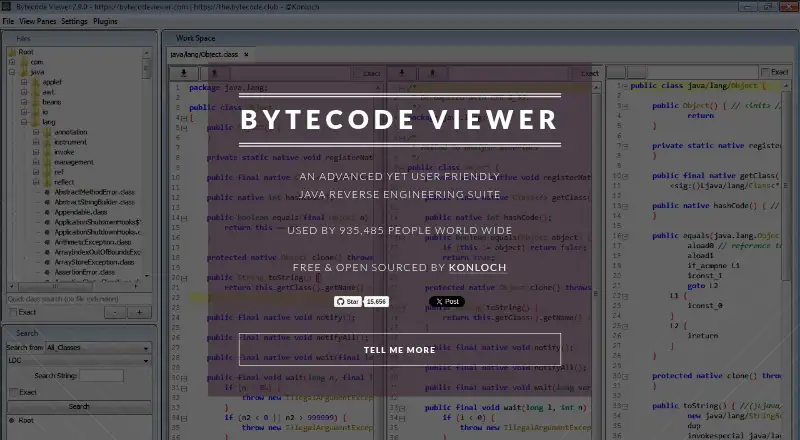
What Bytecode Viewer is
Bytecode Viewer is a free desktop application for inspecting and decompiling Java bytecode, intended for Java and Android reverse engineering. It opens Class, Jar, XAPK, APK, DEX, WAR, and JSP files, as well as image and text resources. Six Java decompilers are included: Krakatau, CFR, Procyon, FernFlower, JADX, and JD-GUI. The application also includes three bytecode disassemblers, including Krakatau and Smali/BakSmali assemblers, plus Android integrations such as Dex2Jar, Enjarify, and APKTool.jar for viewing Jar and APK resources.
Users can edit and compile Java and bytecode, run static searches, and use Java or JavaScript plugins with loaded class files. Export options include runnable Jar, Zip, APK, and decompiled files as Zip. It runs on Linux, macOS, and Windows and requires Java 8 or greater. The project lists it as free and open source under GPL v3 Copyleft. Version 2.13.2 is marked in development, and its command-line interface is not functional; v2.12 is recommended for CLI use.
Who it suits
It suits developers and reverse engineers who need to inspect Java or Android bytecode and related resources. Java 8 or greater is required.
What it does well
- Free.
- Supports Java and Android bytecode decompilation.
- Opens APK, DEX, Jar, and other listed formats.
- Includes Java and bytecode editing and compiling.
- Plugins can use Java or JavaScript scripting.
What to know first
- Requires Java 8 or greater.
- Version 2.13.2 is marked in development.
- Its command-line interface is not functional in 2.13.2.
Limits
Version 2.13.2 is marked in development and its command-line interface is not functional; the maker recommends v2.12 for CLI use. Java 8 or greater is required.
Plans
| Plan | Billed and limits | Price |
|---|---|---|
| Bytecode Viewer | 100% free · open source under GPL v3 Copyleft | Free |
As bytecodeviewer.com lists them, read 7 Oct 2026. The maker's own page has the final word.
Getting started
- Visit the Bytecode Viewer website and obtain the desktop application.
- Use a computer running Linux, macOS or Windows.
- Make sure Java 8 or greater is available.
- Open a supported file such as Class, Jar, APK or DEX.
- For command-line use, select v2.12 as recommended by the maker.
Bytecode Viewer is a free desktop workbench for examining compiled Java and Android software. It fits developers, security analysts, and reverse engineers who need several bytecode views in one place; readers working on native binaries or a dependable command-line workflow should choose another tool.
Overview
This is a Java-and-Android reverse-engineering suite rather than a single-purpose decompiler. It opens class files, archives, Android packages, DEX files, web archives, JSP files, and resource files, then combines decompilation with disassembly, editing, compiling, search, scripting, and export. That breadth is valuable when an investigation moves between code and packaged assets, although it also makes the application a poor fit for native-code work.
Java 8 or later is required. The project marks version 2.13.2 as in development and says its command-line interface is not functional, recommending v2.12 for CLI use. A changelog records a fix for the Zip Slip vulnerability CVE-2022-21675 in version 2.11.0. Bug reports go to GitHub issues, while a discussion forum and Discord provide community channels.
Key features
Several routes from bytecode to readable code
Six bundled Java decompilers—Krakatau, CFR, Procyon, FernFlower, JADX, and JD-GUI—let users compare different reconstructions when one output is incomplete or awkward. Three bytecode disassemblers, including Krakatau and Smali/BakSmali assemblers, provide a lower-level perspective. This combination suits code inspection and reverse-engineering tasks that benefit from cross-checking, but it does not extend to native-code decompilation.
Broad Java and Android file coverage
Bytecode Viewer supports Class, Jar, XAPK, APK, DEX, WAR, JSP, image-resource, and text-resource files. Dex2Jar and Enjarify are included for APK and DEX workflows, and APKTool.jar helps expose resources in Jar and APK packages. The result is a practical single workspace for applications and libraries rather than a tool limited to standalone class files.
Edit, search, script, and export
A Java compiler and Java-and-bytecode editing support allow users to modify material and compile it again. Advanced static search is useful for tracing names and patterns across loaded code. The plugin system accepts Java and JavaScript scripts that can interact with loaded class files, giving technical users room to automate inspection or add workflow-specific actions. Export includes runnable Jar files, Zip archives, APKs, and decompiled files packaged as Zip. These tools make the product more than a read-only viewer, though users wanting a polished native-binary debugger need a different category of software.
Pricing
Bytecode Viewer — $0.00 per free. The application is 100% free, open source under the GPL v3 Copyleft license, with no paid tier or trial period to weigh. That makes the full feature set accessible to individual developers, students, and teams that can work within its Java-focused scope. The free license does not turn it into a native-code suite, and the command-line caveat around version 2.13.2 still matters for automation.
Platforms
Desktop builds are available for Linux, macOS, and Windows. The maker describes the application as working with all operating systems and specifically supports Windows file associations for .class, .dex, and .apk files. Java 8 or newer is a prerequisite, so deployment also depends on having a compatible Java runtime.
Who it's for
Choose Bytecode Viewer if you reverse-engineer Java or Android software and want decompiler choice, disassembly, resource viewing, editing, scripting, and export without a purchase. It is especially suitable for developers debugging compiled code and analysts comparing output from multiple decompilers. It is less suitable for native executable analysis, or for users who require a working command-line interface in the current in-development release.
Pros and cons
- Pros: Six Java decompilers provide alternative reconstructions.
- Pros: Android bridges and resource tooling cover APK, DEX, XAPK, Jar, and related inputs.
- Pros: Editing, compiling, scripting, plugins, search, and several export formats support complete investigation workflows.
- Pros: The entire GPL v3 application is free and open source.
- Cons: There is no native-code decompilation.
- Cons: Version 2.13.2's command-line interface is nonfunctional; CLI users are directed to v2.12.
- Cons: Java 8 or newer is required, adding a runtime dependency to desktop installation.
Alternatives
For a broader commercial reverse-engineering environment with native architectures, consider Binary Ninja; its free plan is limited to five decompilation architectures and excludes API and plugin access, while Personal costs $199.00 once.
Boomerang is a free, BSD-licensed open-source decompiler for readers who want a simpler alternative.
Pick IDA Pro when x86 disassembly and cloud decompilers matter; its free tier includes x86-32/x86-64 disassembly and two cloud-based decompilers, while IDA Pro Essential costs $1099.00.
JEB suits researchers, students, hobbyists, and nonprofit reverse engineers seeking a free community edition with x86 and x86-64 decompilation.
Choose rev.ng for its Free Software decompilation pipeline and a separately commercialized interface.
CFR, Ghidra, and ILSpy are free alternatives when a focused decompiler is preferable to Bytecode Viewer's combined workspace.
See the Decompiler Software list for more options.
Verdict
Bytecode Viewer is the right recommendation for Java and Android developers or reverse engineers who want a broad, free toolkit rather than a single decompiler. Its strongest reason to choose it is the combination of six decompilers, Android resource handling, editable bytecode, scripting, and export in one application. Look elsewhere for native-code analysis or a supported command-line workflow on the in-development release.
Verdict
Bytecode Viewer brings decompilers, editing, search, and export tools together for Java and Android analysis. For command-line use, the project recommends v2.12 rather than the in-development 2.13.2 release.
Questions
How much does Bytecode Viewer cost?
The Bytecode Viewer plan is free. The project describes it as open source under GPL v3 Copyleft.
Which operating systems does it support?
It is listed for Linux, macOS and Windows. The official site also says it works with all operating systems and describes Windows file association support for .class, .dex and .apk files.
What files can it open?
Supported files include Class, Jar, XAPK, APK, DEX, WAR and JSP, along with image and text resources.
Does Bytecode Viewer support command-line use?
The maker says the command-line interface in version 2.13.2 is not functional and recommends v2.12 for CLI use.
Is Bytecode Viewer open source?
Yes. The listed plan describes it as open source under GPL v3 Copyleft.
What Java version does it require?
The maker lists Java 8 or greater as a requirement.
Facts from Bytecode Viewer's own pages
- Android integrations
- The maker lists Dex2Jar and Enjarify for APK/DEX support, and APKTool.jar for viewing Jar and APK resources. · bytecodeviewer.com, 7 Oct 2026
- Bytecode tools
- It includes three bytecode disassemblers, including the Krakatau and Smali/BakSmali assemblers. · github.com, 7 Oct 2026
- Current release limitation
- The maker marks version 2.13.2 as in development and says its command-line interface is not functional, recommending v2.12 for CLI use. · konloch.com, 7 Oct 2026
- Decompilers
- It includes six Java decompilers: Krakatau, CFR, Procyon, FernFlower, JADX, and JD-GUI. · github.com, 7 Oct 2026
- Editing and compiling
- The product includes a Java compiler and supports Java and bytecode editing and compiling. · github.com, 7 Oct 2026
- Export
- The maker lists export options including runnable Jar, Zip, APK, and decompiled files as Zip. · github.com, 7 Oct 2026
- Intended users
- The project describes itself as a Java and Android reverse engineering suite designed to aid in the reversing process. · github.com, 7 Oct 2026
- Operating systems
- The official site says it works with all operating systems and describes Windows file association support for .class, .dex, and .apk files. · bytecodeviewer.com, 7 Oct 2026
- Purpose
- Bytecode Viewer is a desktop application for analyzing and decompiling Java bytecode to help developers inspect and debug compiled code. · konloch.com, 7 Oct 2026
- Requirements
- The maker lists Java 8 or greater as a requirement. · konloch.com, 7 Oct 2026
- Search and plugins
- It provides advanced static search and a plugin system with Java and JavaScript scripting that can interact with loaded class files. · github.com, 7 Oct 2026
- Security
- The project changelog says the Zip Slip exploit CVE-2022-21675 was patched in version 2.11.0. · konloch.com, 7 Oct 2026
- Support
- The project directs users to GitHub issues for bugs and provides a discussion forum and Discord link. · github.com, 7 Oct 2026
- Supported files
- It supports Class, Jar, XAPK, APK, DEX, WAR, JSP, image resources, and text resources. · github.com, 7 Oct 2026
Where Bytecode Viewer stands on Freedom251
- Decompiler Software#6 of 24