Freedom251 › Browser Isolation Software

BrowserBox
What BrowserBox is
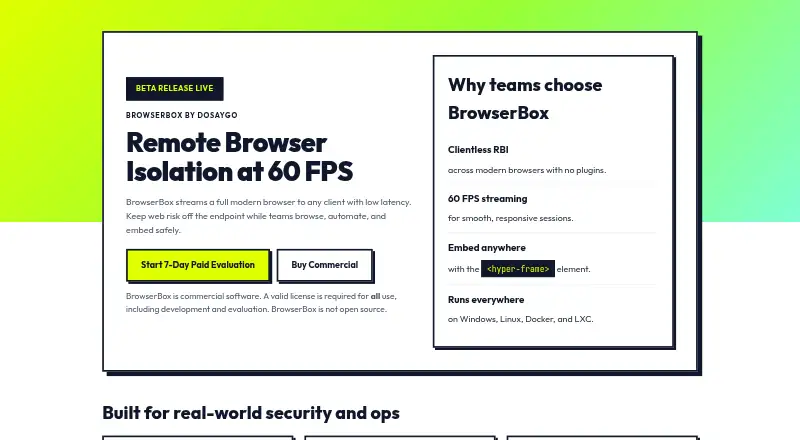
BrowserBox streams a full modern browser to clients for remote browser isolation, browsing, automation, and embedding. Access works from modern browsers without plugins, with streaming described at 60 FPS. Sessions run in controlled, disposable environments, and policies can allow or deny copying, pasting, uploads, downloads, printing, and developer tools. Secure defaults include navigation allowlisting, blocked private-network access, and browser-profile encryption at rest. Policy decisions are logged with sensitive fields redacted. The hyper-frame element embeds a live browser session, while JavaScript can drive tabs, navigation, capture, and selection. BrowserBox integrates with Puppeteer and Playwright, and its Cloud API creates ephemeral REST sessions without customer hosting. It runs headless on servers with or without a GPU and can pair with Tor, SSH tunnels, or HTTPS. On Linux, bbx fleet supports multiple isolated seats per host; elsewhere the site describes one session per machine. BrowserBox is commercial, not open source, and requires a license for development and evaluation. Commercial licensing starts at $119 a year.
Who it suits
It suits enterprises, developers, privacy-conscious users, and regulated government, healthcare, or finance organizations needing remote browser isolation. Automation, embedding, and policy controls support secure browser-based workflows.
What it does well
- Client access requires no browser plugins
- Policies control copying, uploads, and downloads
- Provides navigation allowlisting and profile encryption
- Integrates with Puppeteer and Playwright
- Cloud API creates ephemeral sessions
What to know first
- No free plan or free trial
- License required for development and evaluation
- Commercial license starts at $119 a year
- One session per machine outside Linux
Limits
Both evaluation licenses last 7 days and allow 1–10 concurrent sessions. The work-email option costs $20, paid once and requires a work email; the free-or-anonymous-email option costs $40, paid once. Both require ID verification via Stripe, are billed per seat, and have fees credited toward a full license; all sales are final.
Plans
| Plan | Billed and limits | Price |
|---|---|---|
| Commercial license | per user annually; starts at $119 · concurrent users · full access, updates, and support | $119 a year |
| Evaluation license (work email) | per seat; one-time fee · 7 days · 1–10 concurrent sessions · work email required · ID verification via Stripe · fee credited toward full license · all sales final | $20, paid once |
| Evaluation license (free or anonymous email) | per seat; one-time fee · 7 days · 1–10 concurrent sessions · ID verification via Stripe · fee credited toward full license · all sales final | $40, paid once |
| Non-commercial license | per user annually · concurrent users · for non-profits and public sector teams | $49 a year |
As browserbox.io lists them, read 30 Sept 2026. The maker's own page has the final word.
Getting started
- Choose a license: evaluation, non-commercial, or commercial.
- For an evaluation license, select the work-email or free-or-anonymous-email option; both run for 7 days.
- Use the Cloud API to create ephemeral sessions over REST without hosting them, or deploy BrowserBox on a server.
- For server deployment, choose headless operation with or without a GPU and optionally pair it with Tor, SSH tunnels, or HTTPS.
- Use the hyper-frame element to embed a live session, or integrate automation with Puppeteer or Playwright.
Verdict
BrowserBox combines streamed browser sessions with isolation policies, embedding, automation integrations, and cloud or self-hosted deployment. Its commercial licensing requirement and seat limits should be checked before adoption.
Questions
How much does BrowserBox cost?
The work-email evaluation license is $20, paid once, and the free-or-anonymous-email evaluation license is $40, paid once. The non-commercial license is $49 a year, billed per user annually; the commercial license is $119 a year, billed per user annually, and starts at $119.
Is there a free plan or free trial?
No. The two evaluation licenses are paid and last 7 days.
Which platforms does BrowserBox support?
Listed platforms are API, Linux, macOS, self-hosted, web, and Windows.
Is BrowserBox open source?
No. BrowserBox is commercial software, and a valid license is required for all use, including development and evaluation.
Who makes BrowserBox?
DOSAYGO Corporation is its owner and licensor. The company says it is incorporated in Wyoming, United States.
Can BrowserBox integrate with automation tools?
The maker says BrowserBox integrates with Puppeteer and Playwright. JavaScript can also drive tabs, navigation, capture, and selection in an embedded live session.
Facts from BrowserBox's own pages
- Audit
- Policy decisions are logged with sensitive fields redacted. · browserbox.io, 30 Sept 2026
- Automation integrations
- The maker says BrowserBox integrates with Puppeteer and Playwright for secure workflows. · dosaygo.com, 30 Sept 2026
- Client access
- The site describes clientless isolation across modern browsers with no plugins and streaming at 60 FPS. · browserbox.io, 30 Sept 2026
- Cloud API
- The Cloud API creates ephemeral sessions over REST without requiring the customer to host them. · browserbox.io, 30 Sept 2026
- Company
- The maker identifies DOSAYGO Corporation as BrowserBox's owner and licensor and says it is incorporated in Wyoming, United States. · dosaygo.com, 30 Sept 2026
- Deployment
- BrowserBox can run headless on servers with or without a GPU and can be paired with Tor, SSH tunnels, or HTTPS. · browserbox.io, 30 Sept 2026
- Embedding
- The hyper-frame element embeds a live browser session and JavaScript can drive tabs, navigation, capture, and selection. · browserbox.io, 30 Sept 2026
- Intended users
- The maker describes BrowserBox as designed for enterprises, developers, and privacy-conscious users, including regulated government, healthcare, and finance organizations. · dosaygo.com, 30 Sept 2026
- License requirement
- BrowserBox is commercial software, is not open source, and requires a valid license for all use, including development and evaluation. · browserbox.io, 30 Sept 2026
- Product
- BrowserBox streams a full modern browser to clients for remote browser isolation, browsing, automation, and embedding. · browserbox.io, 30 Sept 2026
- Seat capacity
- On Linux, bbx fleet runs multiple isolated seats on one host; elsewhere, the site says it is one session per machine. · browserbox.io, 30 Sept 2026
- Secure defaults
- The site describes a deny-by-default profile with navigation allowlisting, private network access blocked, and browser profile encryption at rest. · browserbox.io, 30 Sept 2026
- Security controls
- Sessions run in controlled, disposable environments, and policy can allow or deny copying, pasting, uploads, downloads, printing, and developer tools. · browserbox.io, 30 Sept 2026
- Support
- The commercial license page says commercial licensing includes full access, updates, and support; the homepage lists [email protected] for questions. · dosaygo.com, 30 Sept 2026
Where BrowserBox stands on Freedom251
- Browser Isolation Software#8 of 24