Freedom251 › Minecraft Character Customizers

BlockSkin Studio
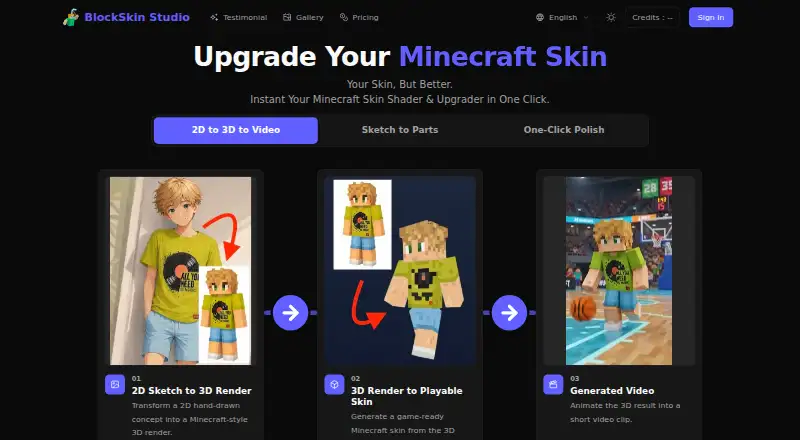
What BlockSkin Studio is
BlockSkin Studio is a web-based tool for editing Minecraft skins and creating related character images. It applies algorithmic shading and texture noise to flat images to make 3D-ready textures, and lets users upload, refine, preview, and download skins in one workflow. Users can also generate Minecraft-style character images from a reference picture, make skin drafts and character renders, and create 3D renders and wallpapers from Minecraft skins. Standard PNG exports are stated to work with both Minecraft Java and Bedrock Editions. The tool supports slim Alex and classic Steve arm models, with automatic detection or manual selection, and exports PNG files at 64×64 or 128×128 HD. Credits are used for image, video, and skin generation and purchased credits do not expire. Plans are one-time purchases starting at 1.99 USD; there is no free plan. Game-ready skin generation requires Standard or higher. The site lists support by email and through Discord.
Who it suits
It suits Minecraft players who want to create or refine skins and preview them in 3D. Users seeking game-ready skin generation need the Standard Plan or higher.
What it does well
- Works with Minecraft Java and Bedrock Editions
- Exports PNG at 64×64 and 128×128 HD
- Supports slim Alex and classic Steve models
- Purchased credits do not expire
- Includes 3D renders and wallpapers
What to know first
- No free plan
- Starter and Basic plans lack game-ready skin generation
- Available on web only
Limits
Starter and Basic plans do not include game-ready Minecraft skin generation. Starter provides 120 credits and Basic 360 credits; image generation uses 3 credits and video generation uses 85 credits.
Plans
| Plan | Billed and limits | Price |
|---|---|---|
| Advanced Plan | One-time payment · 1200 credits · 400 images · up to 14 videos · Up to 2 game-ready Minecraft skins · 3 credits/image · 85 credits/video · Private publishing | $14.99, paid once |
| Starter Plan | One-time payment · 120 credits · 40 images · up to 1 video · Game-ready skin generation requires Standard Plan · 3 credits/image · 85 credits/video · Publish anonymously | $1.99, paid once |
| Basic Plan | One-time payment · 360 credits · 120 images · up to 4 videos · Game-ready skin generation requires Standard Plan · 3 credits/image · 85 credits/video · Publish anonymously | $4.99, paid once |
| Standard Plan | One-time payment · 780 credits · 260 images · up to 9 videos · Up to 1 game-ready Minecraft skin · 3 credits/image · 85 credits/video · Private publishing | $9.99, paid once |
As blockskinstudio.com lists them, read 7 Oct 2026. The maker's own page has the final word.
Getting started
- Open https://blockskinstudio.com/
- Choose a one-time credit plan
- Upload a skin or provide a reference picture
- Select automatic or manual Alex/Steve arm modeling
- Polish and preview the skin
- Download a 64×64 or 128×128 HD PNG
Verdict
BlockSkin Studio combines skin editing, image generation, and 3D previews in a web workflow. Check the plan requirements before buying: game-ready skin generation begins with Standard.
Questions
Does BlockSkin Studio have a free plan?
No. Paid one-time plans start at 1.99 USD.
Which Minecraft editions are supported?
Generated standard PNG skins are stated to be compatible with Minecraft Java and Bedrock Editions.
What are the plan prices?
Starter costs 1.99 USD once, Basic 4.99 USD once, Standard 9.99 USD once, and Advanced 14.99 USD once.
Which plan includes game-ready skin generation?
Standard includes up to one game-ready Minecraft skin, and Advanced includes up to two. Starter and Basic require an upgrade for that function.
What formats can I export?
Exports include PNG at 64×64 and 128×128 HD.
Do purchased credits expire?
No. Purchased credits do not expire.
Facts from BlockSkin Studio's own pages
- 3D rendering
- The service offers 3D renders and wallpapers from Minecraft skins. · blockskinstudio.com, 7 Oct 2026
- Account deletion
- After ownership verification, the policy says account information and related preferences are deleted within 30 days of a deletion request; public creations are retained anonymously. · blockskinstudio.com, 7 Oct 2026
- Credits
- Credits are used for image, video, and Minecraft skin generation; purchased credits do not expire. · blockskinstudio.com, 7 Oct 2026
- Data collected
- The privacy policy lists account details, uploaded skins and usage details, device information, cookies, payment metadata, and safety and community data among information collected. · blockskinstudio.com, 7 Oct 2026
- Editing workflow
- The site says users can upload, polish, preview, and download skins in one workflow. · blockskinstudio.com, 7 Oct 2026
- Image generation
- Users can generate Minecraft-style character images from a reference picture and create skin drafts or character renders. · blockskinstudio.com, 7 Oct 2026
- Model support
- The tool supports slim Alex and classic Steve arm models, with automatic detection or user selection. · blockskinstudio.com, 7 Oct 2026
- Notable limits
- Game-ready Minecraft skin generation requires the Standard Plan on the Starter and Basic plans. · blockskinstudio.com, 7 Oct 2026
- Privacy and security
- The privacy policy says stored data is protected with controls including encryption and access restrictions, and that personal data is not sold. · blockskinstudio.com, 7 Oct 2026
- Product
- BlockSkin Studio is a web tool for upgrading Minecraft skins with algorithmic shading and texture noise, turning flat images into 3D-ready textures. · blockskinstudio.com, 7 Oct 2026
- Skin compatibility
- Generated standard PNG files are stated to be compatible with Minecraft Java and Bedrock Editions. · blockskinstudio.com, 7 Oct 2026
- Support
- The site directs users to support by email at [email protected] and mentions Discord support in its FAQ. · blockskinstudio.com, 7 Oct 2026
Where BlockSkin Studio stands on Freedom251
- Minecraft Character Customizers#22 of 24