Freedom251 › Poster Maker Software
Block Posters
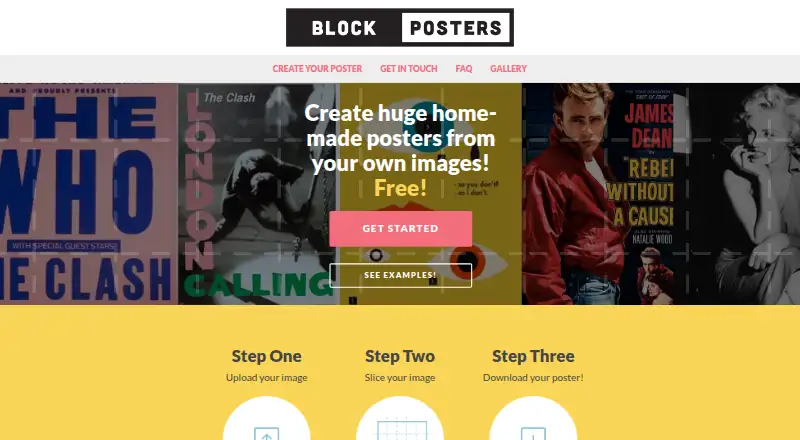
What Block Posters is
Block Posters turns a user’s image into a tiled PDF for printing as an enlarged poster at home. Upload a .jpg or .png, choose portrait or landscape, select A4 or U.S. Letter paper, and set pages to have borders or no borders. The site divides the image into sections and produces a printable PDF. Its free plan lets users create and download a poster. Premium costs $5 USD per poster, paid by PayPal or card; it removes the image watermark, accepts uploads up to 5 megabytes, and supports posters up to 10 pages wide. Each Premium PDF is a separate purchase, and its options are fixed after creation. Uploaded images are held temporarily and periodically deleted. The service says a larger source image or a smaller finished poster can help reduce pixelation. Block Posters is a web service founded in 2016 and based in Wetherby, England, United Kingdom.
Who it suits
It suits people who want to print enlarged versions of their own images at home. Users needing larger posters can consider Premium’s limit of up to 10 pages wide.
What it does well
- Free plan creates and downloads a poster
- Accepts .jpg and .png images
- Offers portrait and landscape layouts
- Premium removes the image watermark
- Images are periodically deleted automatically
What to know first
- Premium costs $5 USD per poster
- Premium options cannot be changed after PDF creation
- Each additional Premium PDF requires another purchase
- The service cannot guarantee uninterrupted or secure access
Limits
The free plan allows poster creation and download, with no further limits stated in the plan details. Premium costs $5 per poster, supports uploads up to 5 megabytes and posters up to 10 pages wide, and requires another purchase for each additional PDF.
Plans
| Plan | Billed and limits | Price |
|---|---|---|
| Free | Create and download a poster; limits not stated on the page | Free |
| Premium Block Poster | $5 USD per poster · Up to 10 pages wide · Upload images up to 5 megabytes · Remove the image watermark | $5, paid once |
As blockposters.com lists them, read 9 Oct 2026. The maker's own page has the final word.
Getting started
- Open the Block Posters website.
- Upload a .jpg or .png image.
- Choose portrait or landscape orientation and A4 or U.S. Letter paper.
- Choose bordered or borderless pages.
- Create and download the poster PDF.
- For Premium options, pay 5.00 USD by PayPal or card.
Verdict
Block Posters provides a straightforward way to turn an image into a printable, tiled PDF, with paper and orientation choices. Check the fixed PDF settings and per-poster Premium charge before creating a paid poster.
Questions
What does Block Posters do?
It slices an image into sections and creates a PDF for printing an enlarged poster at home.
Is there a free plan?
Yes. The free plan lets users create and download a poster.
How much does Premium cost?
Premium costs $5 per poster, payable by PayPal or card.
Which image formats does it accept?
The creation page accepts .jpg and .png files.
Which paper sizes and layouts can I choose?
You can choose portrait or landscape orientation, A4 or U.S. Letter paper, and bordered or borderless pages.
What happens to uploaded images?
Images are stored temporarily and deleted automatically over time.
Facts from Block Posters's own pages
- Customization
- Users can choose portrait or landscape orientation, A4 or U.S. Letter paper, and bordered or borderless pages. · blockposters.com, 9 Oct 2026
- Founded
- 2016 · blockposters.com, 28 Sept 2026
- Headquarters
- Wetherby, England, United Kingdom · blockposters.com, 28 Sept 2026
- Image formats
- The creation page accepts .jpg or .png files. · blockposters.com, 9 Oct 2026
- Image retention
- Uploaded images are stored temporarily and deleted; the FAQ says they are periodically deleted automatically. · blockposters.com, 9 Oct 2026
- Intended use
- The site describes creating large posters at home from a user's own images. · blockposters.com, 9 Oct 2026
- Limits
- The FAQ says poster pixelation can be reduced by uploading a larger image or reducing the final poster size. · blockposters.com, 9 Oct 2026
- Output and edits
- Premium produces a PDF, and the selected options cannot be changed after the PDF is created. · blockposters.com, 9 Oct 2026
- Per-poster purchase
- Each additional PDF using Premium options requires another Premium purchase. · blockposters.com, 9 Oct 2026
- Premium payment
- The Premium poster page offers payment by PayPal or card at $5 USD. · blockposters.com, 9 Oct 2026
- Privacy
- The terms say the service does not store personal information except for Premium purchases, where it is stored in accordance with PayPal. · blockposters.com, 9 Oct 2026
- Purpose
- Block Posters lets users upload an image, scale it, and produce a PDF for printing an enlarged version. · blockposters.com, 9 Oct 2026
- Security
- The terms say Block Posters cannot guarantee continuous, uninterrupted, or secure access to the service. · blockposters.com, 9 Oct 2026
- Support
- For site problems, the contact page asks users to email support with the image and settings used. · blockposters.com, 9 Oct 2026
- Workflow
- The site describes the steps as uploading an image, slicing it, and downloading the poster to print at home. · blockposters.com, 9 Oct 2026
Where Block Posters stands on Freedom251
- Poster Maker Software#10 of 41