Freedom251 › Poster Maker Software

Block Poster
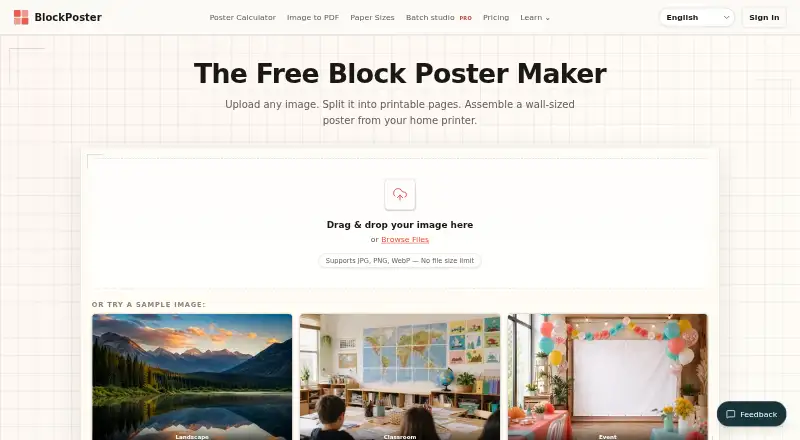
What Block Poster is
Block Poster is a web tool that divides an image into printable pages for assembling a large poster with a home printer. It accepts JPG, PNG, and WebP files and lets users set paper size, page count, orientation, margins, and overlap while viewing a live layout preview. Supported paper sizes include A4, US Letter, A3, Legal, and Tabloid. The Free plan costs nothing and provides one poster PDF, up to 300 DPI, no watermark, and no account requirement. Pro adds Batch Studio for up to 10 images, with a combined 50 MB limit, 20 megapixels per image, and 100 total print pages excluding covers. Each image becomes its own tiled PDF, and Pro users can download files separately or in one ZIP. Pro costs $4.99 a month or $39 a year. Images and project content are processed locally in the browser.
Who it suits
Block Poster suits people making classroom displays, craft patterns, event signs, photo walls, or home projects from a standard printer. The free plan fits single posters, while Pro supports batch work and saved local projects.
What it does well
- Supports JPG, PNG, and WebP
- Offers several paper sizes
- Provides real-time layout preview
- Free export has no watermark
- Processes images locally in the browser
What to know first
- Browser drafts may be lost if data is cleared
- Batch Studio limits images and print pages
- Pro is required for ZIP downloads
- Web platform only
Limits
The Free plan exports one poster PDF. Batch Studio allows up to 10 images, 50 MB combined, 20 megapixels per image, and 100 total print pages excluding covers; Pro features require a paid plan.
Plans
| Plan | Billed and limits | Price |
|---|---|---|
| Free | $0 · Single-poster PDF export · Up to 300 DPI · No watermark · No account | Free |
| BlockPoster Pro (yearly) | $39 billed yearly · Batch up to 10 posters · PDFs in one ZIP · Save local projects and print presets · Ad-free workspace · No download wait | $39 a year |
| BlockPoster Pro (monthly) | $4.99 per month · Batch up to 10 posters · PDFs in one ZIP · Save local projects and print presets · Ad-free workspace · No download wait | $4.99 a month |
As blockposter.net lists them, read 9 Oct 2026. The maker's own page has the final word.
Getting started
- Open https://blockposter.net/ in a web browser
- Upload a JPG, PNG, or WebP image
- Choose paper size, page count, orientation, margins, and overlap
- Review the real-time layout preview
- Export the multi-page PDF
- Choose a Pro plan for batch processing or ZIP downloads
Verdict
Block Poster offers straightforward tiled-poster creation with a capable free plan and local browser processing. Consider Pro if you need batch exports, ZIP downloads, or additional local project features.
Questions
Is there a free plan?
Yes. Free costs nothing and includes single-poster PDF export, up to 300 DPI, no watermark, and no account.
What do Pro plans cost?
BlockPoster Pro costs $4.99 a month or $39 a year.
Which platforms are supported?
Block Poster is available on the web.
Can it process multiple images?
Yes. Pro Batch Studio handles up to 10 images, making a separate tiled poster PDF for each.
How is poster content handled?
Images and project content are processed locally in the browser rather than uploaded to Block Poster’s account or payment servers.
Facts from Block Poster's own pages
- Batch limits
- Batch Studio allows up to 10 images, 50 MB combined, 20 megapixels per image, and 100 total print pages excluding covers. · blockposter.net, 9 Oct 2026
- Batch workflow
- Each batch image becomes its own tiled poster PDF, and Pro users can download the PDFs individually or together in a ZIP. · blockposter.net, 9 Oct 2026
- Export
- The tool creates a multi-page PDF for printing. · blockposter.net, 9 Oct 2026
- Image formats
- The poster maker supports JPG, PNG, and WebP images. · blockposter.net, 9 Oct 2026
- Intended users
- The maker describes use cases including classroom displays, craft patterns, event signs, photo walls, and home projects. · blockposter.net, 9 Oct 2026
- Layout controls
- Users can choose paper size, page count, orientation, margins, and overlap, with a real-time layout preview. · blockposter.net, 9 Oct 2026
- Local processing
- Poster images and project content are processed locally in the browser and are not uploaded to Block Poster’s account or payment servers. · blockposter.net, 9 Oct 2026
- Paper sizes
- Supported paper sizes include A4, US Letter, A3, Legal, and Tabloid. · blockposter.net, 9 Oct 2026
- Privacy controls
- Users can reject non-essential advertising and analytics scripts without losing poster-tool functionality. · blockposter.net, 9 Oct 2026
- Project storage
- Named print presets and browser drafts stay in that browser and may be lost if its data is cleared; downloaded project files can be used as backups. · blockposter.net, 9 Oct 2026
- Purpose
- Block Poster splits an image into printable pages that can be assembled into a large poster using a home printer. · blockposter.net, 9 Oct 2026
- Support
- Support, corrections, partnerships, and privacy questions can be sent by email. · blockposter.net, 9 Oct 2026
- Third-party services
- The site lists Google Analytics 4, Google AdSense, Pageview.app, Cloudflare, and Creem as third-party services involved in analytics, advertising, delivery, or billing. · blockposter.net, 9 Oct 2026
Where Block Poster stands on Freedom251
- Poster Maker Software#9 of 41