Freedom251 › Video Communications Software
BigBlueButton
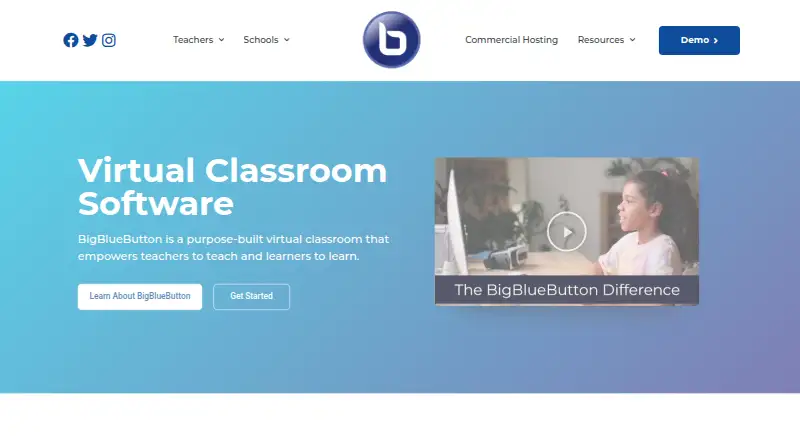
What BigBlueButton is
BigBlueButton is an open-source virtual classroom for teaching, office hours and group collaboration. Its classroom tools include document uploads, an interactive whiteboard, breakout rooms, chat, polls, shared notes, hand raising, webcam video and screen sharing. Instructors can review attendance, participation and poll responses in the Learning Analytics Dashboard, and sessions can be recorded. The platform supports up to 200 participants and lists integrations with learning systems including Moodle, Canvas, Schoology, Open edX and Sakai. Its API allows applications to create, join and end meetings, manage recordings, insert documents and perform other meeting actions. BigBlueButton is free, with web, iOS, Android, Linux and self-hosted options listed. Organizations hosting it themselves are advised to use a dedicated Ubuntu 22.04 64-bit Linux server; production recommendations include 16 GB memory and 8 CPU cores. Security measures described include HTTPS, API checksum validation, and DTLS and SRTP encryption for real-time media. BigBlueButton says it cannot eliminate all security risks, and permanent sessions that preserve slides and chat after users leave are not supported.
Who it suits
BigBlueButton is intended for K–12 schools, higher education and government, as well as online teaching, office hours and group collaboration. It suits organizations that want a virtual classroom with teaching tools and learning-platform integrations.
What it does well
- Classroom tools include polls, whiteboards and breakout rooms.
- Dashboard shows attendance, participation and poll responses.
- Supports up to 200 participants.
- Free and open source.
- API supports meeting and recording management.
What to know first
- Permanent sessions preserving slides and chat are not supported.
- Self-hosting recommendations include a dedicated Ubuntu 22.04 server.
- The company says it cannot guarantee absolute security.
Getting started
- Visit https://bigbluebutton.org/ to learn about the project.
- Choose a listed web, iOS, Android, Linux, or self-hosted option.
- For production self-hosting, prepare a dedicated Ubuntu 22.04 64-bit Linux server.
- Provide a valid SSL certificate, TCP ports 80 and 443, and UDP ports 16384–32768 for self-hosting.
- Follow the installation guide's production resource recommendations, including 16 GB memory and 8 CPU cores.
Verdict
BigBlueButton combines live classroom tools, session recording, attendance information and learning-platform integrations. It is free and open source, but self-hosting has dedicated server requirements and sessions cannot persist with slides and chat after users leave.
Questions
How much does BigBlueButton cost?
BigBlueButton is free and open source.
Which platforms does it support?
It lists web, iOS, Android, Linux, and self-hosted options.
Can a class be recorded?
Yes. Meeting recording and class recording are supported.
Which learning platforms does it integrate with?
Listed integrations include Moodle, Canvas, Schoology, Open edX, Sakai, ATutor, Chamilo, Drupal, Docebo, Nextcloud, Redmine, OpenOlat, Tiki Wiki, and LTI.
Can users leave and return to the same session with its slides and chat?
No. The server does not support permanent sessions that preserve slides and chat for returning users.
Who makes BigBlueButton?
The maker is BigBlueButton, headquartered in Ottawa, Ontario, Canada. The project launched externally in 2007.
Facts from BigBlueButton's own pages
- API
- Its API lets applications create, join and end meetings, manage recordings, insert documents and perform other meeting actions. · docs.bigbluebutton.org, 30 Sept 2026
- Breakout rooms
- Yes · bigbluebutton.org, 20 Sept 2026
- Deployment
- The maker’s installation guide supports self-hosting on a dedicated Ubuntu 22.04 64-bit Linux server and recommends production resources including 16 GB memory and 8 CPU cores. · docs.bigbluebutton.org, 30 Sept 2026
- Founded
- 2007 · bigbluebutton.org, 23 Sept 2026
- Integrations
- The product lists integrations with learning platforms including Moodle, Canvas, Schoology, Open edX and Sakai. · bigbluebutton.org, 30 Sept 2026
- Intended users
- The maker says BigBlueButton is designed for K–12 schools, higher education, and government as well as online teaching, office hours, and group collaboration. · bigbluebutton.org, 30 Sept 2026
- Learning analytics
- The Learning Analytics Dashboard helps instructors see attendance, participation and responses to polls. · bigbluebutton.org, 30 Sept 2026
- Max participants
- 200 · bigbluebutton.org, 20 Sept 2026
- Open source
- The project says BigBlueButton is completely open source and developed by an international community. · bigbluebutton.org, 30 Sept 2026
- Origin
- BigBlueButton was developed through Carleton University’s Technology Innovation Management program in Ottawa and launched externally in 2007. · bigbluebutton.org, 30 Sept 2026
- Supported platforms
- web,iOS,Android · bigbluebutton.org, 20 Sept 2026
- Privacy
- BigBlueButton Inc. says it takes reasonable administrative, technical, and physical measures to protect personal information, while acknowledging it cannot eliminate all security risks. · bigbluebutton.org, 30 Sept 2026
- Privacy limitation
- BigBlueButton says it takes reasonable measures to protect personal information but cannot guarantee absolute security. · bigbluebutton.org, 30 Sept 2026
- Purpose
- BigBlueButton is an open-source virtual classroom designed to help teachers teach and learners learn. · bigbluebutton.org, 30 Sept 2026
- Meeting recording
- Yes · bigbluebutton.org, 20 Sept 2026
- Screen sharing
- Yes · bigbluebutton.org, 20 Sept 2026
- Security
- The documentation describes HTTPS connections, checksum validation for API requests, and DTLS and SRTP encryption for real-time media. · docs.bigbluebutton.org, 30 Sept 2026
- Self-hosting
- The installation guide recommends a dedicated Ubuntu 22.04 64-bit Linux server for production installation. · docs.bigbluebutton.org, 30 Sept 2026
- Server requirements
- The production recommendations include 16 GB memory, 8 CPU cores and 500 GB of free disk space, or 50 GB when server-side session recording is disabled. · docs.bigbluebutton.org, 30 Sept 2026
- Session persistence
- The server does not support permanent sessions where users can leave and return later with slides and chat messages preserved. · docs.bigbluebutton.org, 30 Sept 2026
- Support
- The site directs users to a searchable knowledge base, community support and commercial hosting or support providers. · bigbluebutton.org, 30 Sept 2026
- Teaching tools
- Its classroom features include document uploads, whiteboards, breakout rooms, chat, polling, shared notes, screen sharing, hand raising and webcam video. · bigbluebutton.org, 30 Sept 2026
- Technical requirements
- The installation guide recommends a dedicated server, a valid SSL certificate, accessible TCP ports 80 and 443, and UDP ports 16384–32768. · docs.bigbluebutton.org, 30 Sept 2026
Where BigBlueButton stands on Freedom251
- Video Communications Software#3 of 24
- Virtual Classroom Software#5 of 30
- E-Learning Software#5 of 28
- Web and Video Conferencing - Enterprise Software#5 of 22
- Video Conferencing Software#11 of 43
- Web Conferencing Software#6 of 22
- Video conferencing apps#17 of 46
- Secure Video Conferencing Software#11 of 28