Freedom251 › Citation Generator Tools

Bibcitation
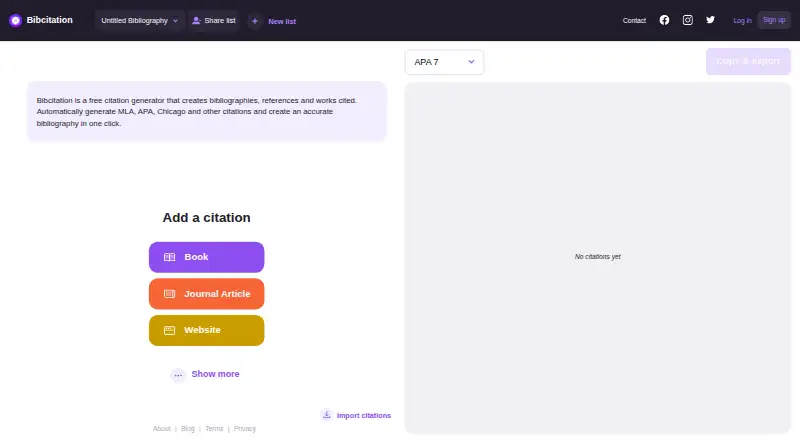
What Bibcitation is
Bibcitation is a citation generator for creating citations, bibliographies, references, and works cited. It can automatically generate citations for books, journal articles, and websites. Its listed formats include MLA, APA, Chicago, IEEE, and more than 9,000 others; Bibcitation says CSL tools handle the formatting. The service runs on the web and as an extension, with add-ons for Chrome, Google Docs, and Microsoft Word. Users can copy a bibliography or export work to Google Docs, Word, and other popular formats. The free plan is listed as free, and the homepage lists no usage limits for its free citation generator. Organizations can add a custom citation button to a webpage through a book ISBN link; this free option currently supports books only. The privacy policy says collected browser details may include browser type, language, referring site, requested pages, request time, and potentially IP addresses, with information stored and processed in the United States.
Who it suits
Bibcitation suits students, researchers, and writers who need formatted citations for books, articles, or websites. It may also suit organizations wanting a free citation button for books on a webpage.
What it does well
- Free plan listed as free
- Automatic citations for books, articles, and websites
- Supports more than 9,000 citation formats
- Exports work to Google Docs and Word
- Available on web and as an extension
What to know first
- Organization citation button supports books only
- Collected information is stored and processed in the United States
- Privacy policy was last updated September 24, 2020
Limits
The free organizational citation button currently supports books only. The privacy policy says collected information is stored and processed in the United States.
Plans
| Plan | Billed and limits | Price |
|---|---|---|
| Free | citation generation · bibliography creation · MLA, APA, Chicago and other styles | Free |
As bibcitation.com lists them, read 15 Oct 2026. The maker's own page has the final word.
Getting started
- Visit the Bibcitation website.
- Use the web service or its extension.
- Enter a URL or use identifier lookup, or create a citation for a book, journal article, or website.
- Select a supported citation format.
- Copy the bibliography or export your work to Google Docs, Word, or another popular format.
Overview
Bibcitation is a free citation and bibliography service for students and writers who want to generate references across a wide range of styles. It brings web-based citation creation together with browser and document add-ons, though its organization-specific citation button is limited to books.
Key features
Bibcitation generates citations automatically for books, journal articles, and websites. It supports MLA, APA, Chicago, IEEE, and more than 9,000 formats, using CSL tools for formatting. That breadth makes it a strong fit when an assignment or publication requires a less common style, but the number of supported formats does not by itself establish how well each source record is populated.
Identifier lookup and URL import offer ways to bring source information into a citation without entering everything manually. Users can copy a bibliography or export work to Google Docs, Word, and other popular formats. Chrome, Google Docs, and Microsoft Word add-ons extend the service beyond its website; these options are useful for readers who want citations alongside browsing or document work rather than in a separate workflow.
Organizations can place a custom citation button on a webpage through a book ISBN link. The integration is free, but supports books only, so it is not a general-purpose citation feature for sites centered on articles or other sources.
Bibcitation collects browser data such as browser type, language preference, referring site, requested pages, and request date and time, and may collect IP addresses. Collected information is stored and processed in the United States. The company says it uses generally accepted industry standards to protect personal information in transit and after receipt, while acknowledging that absolute security cannot be guaranteed. The privacy policy was last updated September 24, 2020. Users who are cautious about browser data should weigh that disclosure before adding an extension.
Pricing
Free — free. The free plan includes the citation generator, and the homepage lists no usage limits. That makes it a practical starting point for students and occasional writers who need broad style support without a subscription. No paid Bibcitation plan is part of this offer.
Platforms
Bibcitation is available on the web and as a browser extension. Add-ons are also listed for Chrome, Google Docs, and Microsoft Word, with bibliography copying and export to Docs, Word, and other popular formats. Users must be at least 13 years old, or older where their country sets a higher minimum age. Support is offered through a contact form.
Who it's for
Bibcitation suits students, researchers, and writers who need free citation generation across common and specialist styles, particularly if they work in a browser or Google Docs or Word. Its book-only organizational button may help publishers or institutions building ISBN-based citation links. It is less suited to organizations needing that button to cover journal articles and websites, or to users who would rather avoid browser-data collection.
Pros and cons
- Pro: More than 9,000 citation formats, including MLA, APA, Chicago, and IEEE, give writers options for varied style requirements.
- Pro: URL import, identifier lookup, browser and document add-ons, and export to Docs and Word support a workflow that does not rely on manual bibliography copying alone.
- Pro: The free plan lists no usage limits, removing a stated quota as a concern for regular citation work.
- Con: The custom organization button supports books only, limiting its usefulness for sites that cite articles or other source types.
- Con: Browser data may include IP addresses, and collected information is processed in the United States; privacy-conscious users may prefer not to install the extension.
Alternatives
Citation Generator Tools is a useful starting point for readers comparing citation software more broadly. Choose Cite This For Me if Android or iOS access matters; its free account is limited to Harvard, includes ads, and saves citations for seven days. CitApp may suit readers who want its free plan's weekly browser-capture and Google Docs insertion quotas alongside 150+ styles. For an installable, MIT-licensed open-source option, consider Citation.js, which is also available through an API. Citation[Z] offers a free generator, converter, and bibliography builder with five styles and bulk paste for up to five references. Choose CiteCreate for a web-only free citation generator with no sign-up required. CiteMe is another free option, with 60+ styles and stated monthly caps for reference checks, library saves, and PDF conversions. CitePlain is a free extension-and-web alternative. EasyBib may appeal to readers seeking a free citation generator with a trial of its paid grammar suggestions.
Verdict
Bibcitation is a sensible choice for students and writers who want a free, broadly styled citation generator that can move work into Docs or Word. Its strongest case is the combination of a large format range, import options, and no listed free-plan usage limit. Look elsewhere if an organization needs citation buttons beyond books or if browser-data handling is a deal-breaker.
Verdict
Bibcitation brings citation generation, bibliography formatting, and export options together in a free web and extension service. Its book-only organizational button and disclosed browser data handling are worth considering before use.
Questions
Is Bibcitation free?
Yes. The Free plan costs nothing, and the homepage lists no usage limits for its citation generator.
Which citation styles does it support?
Bibcitation lists MLA, APA, Chicago, IEEE, and more than 9,000 other formats.
Can I export citations to a document?
Yes. You can copy a bibliography or export work to Google Docs, Word, and other popular formats.
Which platforms and add-ons are available?
Bibcitation is available on the web and as an extension. Add-ons are listed for Chrome, Google Docs, and Microsoft Word.
Can an organization add Bibcitation to its webpage?
Yes. Organizations can add a custom citation button through a book ISBN link. The integration is free and currently supports books only.
Where does Bibcitation store collected information?
Its privacy policy says collected information is stored and processed in the United States.
Facts from Bibcitation's own pages
- Account age rule
- The terms require users to be at least 13 years old. · bibcitation.com, 15 Oct 2026
- Account options
- The same guide says accounts are optional, while signing in enables saved progress, cross-device access and collaboration. · guies.bibliotecnica.upc.edu, 15 Oct 2026
- Add-ons
- The about page lists add-ons for Chrome, Google Docs, and Microsoft Word. · bibcitation.com, 3 Oct 2026
- Age requirement
- The terms require users to be at least 13 years old, or older if their country’s minimum age is higher. · bibcitation.com, 3 Oct 2026
- Automatic citations
- The about page lists automatic citations for books, journal articles, and websites. · bibcitation.com, 3 Oct 2026
- Chrome adoption
- The Chrome Web Store publisher page shows about 90,000 users for the Bibcitation extension. · chromewebstore.google.com, 15 Oct 2026
- Citation formats
- The about page says Bibcitation supports MLA, APA, Chicago, IEEE, and over 9,000 formats. · bibcitation.com, 3 Oct 2026
- Citation styles
- Bibcitation supports MLA, APA, Chicago, IEEE and more than 9,000 styles. · bibcitation.com, 15 Oct 2026
- Company identifier
- The Chrome publisher page lists D-U-N-S number 203688127 for Checker Software Inc. · chromewebstore.google.com, 15 Oct 2026
- Company size
- Crunchbase lists Checker Software Inc. as a private company headquartered in Vancouver, British Columbia, with 1–10 employees. · crunchbase.com, 15 Oct 2026
- Core workflow
- The home interface lets users add or import citations and then copy or export the resulting bibliography. · bibcitation.com, 15 Oct 2026
- CSL foundation
- Bibcitation says its formatting accuracy is based on leading Citation Style Language tools. · bibcitation.com, 15 Oct 2026
- Data location
- The privacy policy states that collected information is stored and processed in the United States. · bibcitation.com, 15 Oct 2026
- Documentation status
- The official pages opened for this research provide no public API, SDK, self-hosting package or developer documentation beyond the simple website URL integration. · bibcitation.com, 15 Oct 2026
- Export
- The about page says users can copy a bibliography or export work to Google Docs, Word, and other popular formats. · bibcitation.com, 3 Oct 2026
- Formatting technology
- Bibcitation says it uses CSL tools for citation formatting. · bibcitation.com, 3 Oct 2026
- Google Docs add-on
- The Google Workspace listing describes automatic citation of books, websites and journal articles, plus manual entries for videos, images and artwork. · workspace.google.com, 15 Oct 2026
- Google Docs output
- The add-on can place in-text citations and generated bibliographies directly into Google Docs. · workspace.google.com, 15 Oct 2026
- Google Docs review count
- The Google Workspace listing displays 29 user reviews, while Google states that its ratings and reviews are not verified. · workspace.google.com, 15 Oct 2026
- Google Workspace installs
- The Google Workspace Marketplace listing displays 1M+ installs and was updated November 1, 2025. · workspace.google.com, 15 Oct 2026
- Google Workspace pricing
- Google Workspace shows pricing as not available for the add-on. · workspace.google.com, 15 Oct 2026
- Independent licence description
- AlternativeTo labels Bibcitation free to use but proprietary rather than open source. · alternativeto.net, 15 Oct 2026
- Integration limitation
- The documented website integration currently handles books only; support for web sources, journals and movies is described as planned expansion. · bibcitation.com, 15 Oct 2026
- Integration URL
- The integration uses a public URL containing a book ISBN in the query parameter. · bibcitation.com, 15 Oct 2026
Where Bibcitation stands on Freedom251
- Citation Generator Tools#2 of 29
- Citation generators#7 of 57