Freedom251 › Whiteboard Animation Software

Benime
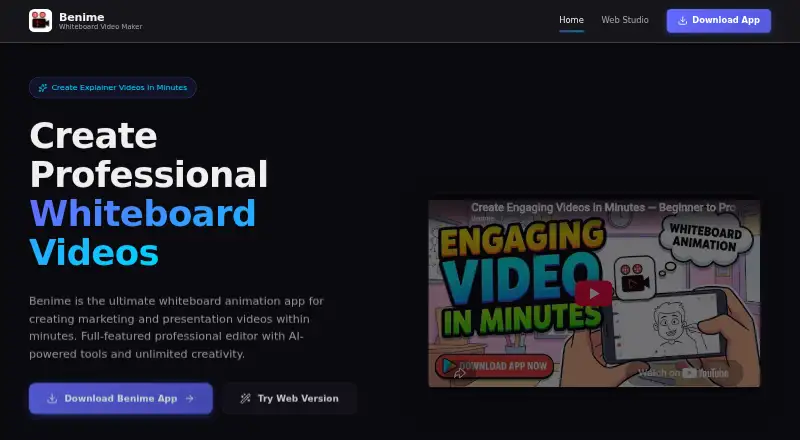
What Benime is
Benime creates whiteboard animation and doodle videos for marketing, presentations, and education. It is available on Android and the web; its browser-based studio makes puzzle-animation slideshows with background audio and exports 1080p MP4 files. The app includes an asset library, a character library, drawing animation, and customizable drawing-hand styles. Listed tools include text-to-speech voiceovers, AI image generation, and motion-slide animations. Users can add background music or record a voiceover in the app, import SVGs, GIFs, and local images, and customize text font, size, color, and alignment. Benime states that it supports offline 1080p rendering and unlimited video creation and export. Its free plan is listed as free, with no specific plan limits stated. The Google Play description names content creators, business professionals, and educators as potential users. Privacy disclosures say third-party services may collect identifying information; Google Play says the app may collect location and personal information plus three other data types, encrypts data in transit, and does not allow data deletion.
Who it suits
Benime may suit content creators, business professionals, and educators making animated videos or slideshows. It offers both an Android app and a browser-based studio.
What it does well
- Supports offline rendering at 1080p.
- Includes text-to-speech, AI image generation, and motion slides.
- Imports SVGs, GIFs, and local images.
- The free plan lists unlimited video creation and export.
What to know first
- Google Play says data deletion is not available.
- Google Play says the app may collect location and personal information.
- Third-party services may collect identifying information.
Plans
| Plan | Billed and limits | Price |
|---|---|---|
| Freemium | The policy describes the app as freemium and provided at no cost; no specific plan limits are stated. | Free |
As benime.app lists them, read 7 Oct 2026. The maker's own page has the final word.
Getting started
- Visit https://benime.app/ for the browser-based studio.
- Use the Android app or web version.
- Use the free plan to get started.
- Import SVGs, GIFs, or local images, or use the included drawing assets.
- Add background music or record a voiceover, then export the video.
Benime is a whiteboard-animation and doodle-video creator for Android and the web. It is best suited to content creators, business professionals, and educators who need illustrated explainers with narration or music. The free offering is unusually open on export and video count, while its privacy terms deserve careful consideration.
Overview
Benime combines drawing animation, doodle assets, imported media, audio, and presentation-focused editing for marketing, teaching, and business communication. Its listed AI functions include text-to-speech, image generation, and motion-slide animation. The Android app appears to be the broader whiteboard tool; the browser studio is described as a puzzle-animation slideshow workspace with background audio and MP4 output.
Key features
Drawing and scene building
An asset and character library, plus customizable drawing-hand styles, help users assemble illustrated scenes without drawing every component themselves. Drawing animation is central to the format, making Benime a practical fit for explainers and lessons that benefit from a hand-drawn look.
Imports and typography
SVG, GIF, and local-image imports let creators bring existing artwork into a project. Text controls cover font, size, color, and alignment, giving presentations and branded videos more control than a fixed template would.
Voice, music, and AI
Creators can add background music, record narration in the app, or use text-to-speech voiceovers. AI image generation and motion-slide animations broaden the production options, although the published feature set does not define generation quotas or output differences between tools.
Rendering and web studio
Benime states that videos can be rendered offline at 1080p, with unlimited video creation and export. That combination is valuable for frequent publishing and for work where an internet connection is unreliable. The browser version supports puzzle-animation slideshows, background audio, and 1080p MP4 export, but its narrower description makes Android the safer choice for general-purpose whiteboard projects.
Pricing
Benime uses a freemium model. The Free plan costs nothing and is described as providing the app at no cost. The published plan information does not state seat limits, renewal terms, trial duration, or feature caps; it does state unlimited video creation and export and 1080p rendering. This makes the free tier a sensible starting point for individual creators, teachers, and small teams evaluating the workflow. Organizations needing defined service terms or administrative controls should seek clarification before standardizing on it.
Platforms
Benime is available on Android and through a web studio. Android is the more clearly documented environment for drawing, imports, voice recording, and offline rendering. The web option is useful when a browser workflow suits you, particularly for puzzle-animation slideshows and 1080p MP4 delivery.
Who it's for
Content creators can use the asset library, AI tools, narration, and high-resolution export for social or promotional videos. Business professionals get editable typography, imported brand artwork, and presentation-oriented animation. Educators can combine hand-drawn scenes, recorded explanations, and background audio for lessons. Benime is less compelling for buyers who require published quotas, deletion controls, or detailed team-account terms before adoption.
Pros and cons
Pros
- 1080p offline rendering: Projects can be rendered without relying on a continuous connection.
- Unlimited creation and export: The stated allowance suits regular publishing rather than occasional trials.
- Flexible media input: SVG, GIF, and local-image imports accommodate existing creative assets.
- Several narration paths: Text-to-speech, in-app recording, and background music cover different production needs.
- Android and web access: Users can choose a mobile app or browser studio.
Cons
- Privacy trade-offs: Google Play says the app may collect location, personal information, and three other data types, encrypts data in transit, and does not allow data deletion.
- Third-party data collection: The privacy policy names Google Play Services, AdMob, Google Analytics for Firebase, and Firebase Crashlytics; it also says the maker cannot guarantee absolute security.
- Unclear plan boundaries: No published quotas, seat terms, or renewal conditions explain what the freemium offer may restrict.
- Uneven web scope: The browser studio is specifically framed around puzzle-animation slideshows rather than the full Android feature description.
Alternatives
For a broader shortlist, see Whiteboard Animation Software. Choose Animaker instead if you need Android, iOS, web, or API access and accept watermarked exports and limited premium assets on its free plan. Wink AI Whiteboard Video Generator is a better fit for users prioritizing AI generations across desktop and mobile, although its free tier uses credits and adds a watermark. Pick Explideo when browser exports, a five-minute video limit, and stated storage allowances matter more than mobile access. Renderforest Whiteboard Animation suits users wanting iOS alongside Android and web, with free exports carrying a watermark. AutoScribble is aimed at tightly metered production, offering welcome credits and short-video limits. Golpo AI is the alternative for credit-based AI video plans on the web or through an API. Mango Animate Whiteboard Animation Maker is Windows-only but specifies a free 576P tier and project asset limits. mySimpleshow is worth considering for browser or API workflows with monthly rendering limits and education-oriented plans.
Verdict
Choose Benime if you want a free Android or browser-based whiteboard creator with drawing assets, multiple voice options, imported media, and stated unlimited 1080p export. Look elsewhere if your decision depends on clear usage quotas, formal team terms, or the ability to delete collected data; Benime’s privacy disclosures and unspecified plan boundaries make those requirements harder to verify.
Verdict
Benime combines whiteboard animation tools with audio, imports, and 1080p export on Android and web. Review its privacy disclosures, including the stated data collection and lack of deletion, before use.
Questions
How much does Benime cost?
Benime has a free plan at no cost.
Which platforms support Benime?
Benime is available on Android and web.
Can Benime export 1080p video?
Benime states that it supports offline 1080p rendering. Its browser studio exports 1080p MP4 files.
What can I import into Benime?
The app supports importing SVGs, GIFs, and local images.
What privacy details does Benime disclose?
Its policy says requested personal information is retained on the device, while third-party services may collect identifying information. Google Play says the app may collect location and personal information plus three other data types, encrypts data in transit, and does not allow data deletion.
Facts from Benime's own pages
- AI tools
- The app lists text-to-speech voiceovers, AI image generation, and motion-slide animations. · play.google.com, 7 Oct 2026
- Audio
- Users can add background music or record a voiceover in the app. · play.google.com, 7 Oct 2026
- Drawing assets
- The app includes an asset library and customizable drawing-hand styles. · play.google.com, 7 Oct 2026
- Export
- The app states that it supports offline 1080p video rendering and unlimited video creation and export. · play.google.com, 7 Oct 2026
- Imports and editing
- The app supports importing SVGs, GIFs, and local images, and customizing text font, size, color, and alignment. · play.google.com, 7 Oct 2026
- Integrations and third parties
- The privacy policy names Google Play Services, AdMob, Google Analytics for Firebase, and Firebase Crashlytics as third-party services used by the app. · benzveen.gitlab.io, 7 Oct 2026
- Intended users
- The Google Play description names content creators, business professionals, and educators as potential users. · play.google.com, 7 Oct 2026
- Privacy and security
- The policy says requested personal information is retained on the device, while third-party services may collect identifying information; it says the maker cannot guarantee absolute security. · benzveen.gitlab.io, 7 Oct 2026
- Store data-safety disclosure
- Google Play says the app may collect location and personal information plus three other data types, encrypts data in transit, and does not allow data deletion. · play.google.com, 7 Oct 2026
- Support
- The Google Play listing gives [email protected] as the support email. · play.google.com, 7 Oct 2026
- Web version
- The maker’s site offers a browser-based studio for puzzle-animation slideshows with background audio and 1080p MP4 export. · benime.app, 7 Oct 2026
- What it does
- Benime creates whiteboard animation and doodle videos for marketing, presentations, and education. · play.google.com, 7 Oct 2026
Where Benime stands on Freedom251
- Whiteboard Animation Software#4 of 26