Freedom251 › AI Video Background Removers

Beeble Background Remover
What Beeble Background Remover is
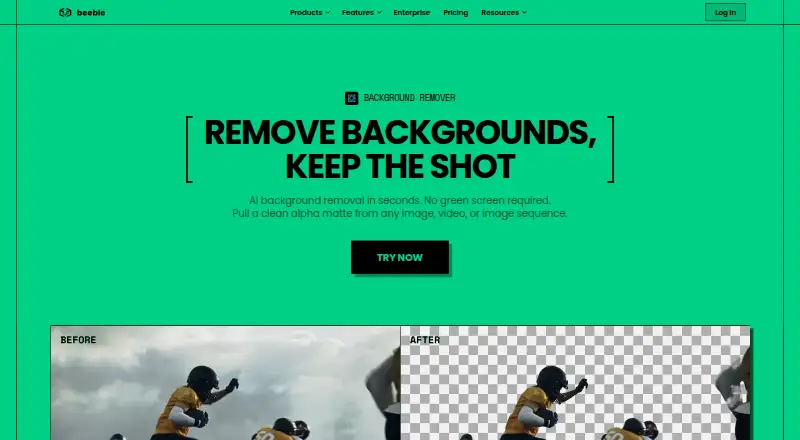
Beeble Background Remover creates an alpha matte from images, videos, and image sequences without requiring a green screen. Its MatAnyone model handles ordinary footage, while CorridorKey is designed for green-screen footage and includes spill removal. Full extraction runs on cloud GPUs that track the subject across frames. Users can preview a keyframe and refine the matte with Edit Alpha, or skip review and process automatically.
Inputs include MP4 H.264, MOV ProRes 422/4444 or H.265, PNG, and JPG. Videos can be up to 2GB, 2K resolution, and 60fps; image sequences can contain up to 2,000 frames, and images can be up to 100MB. Exports include grayscale alpha as MOV, PNG sequence, or PNG, and RGBA as 10-bit alpha-embedded MOV or transparent PNGs. ZIP downloads are available. The product says its outputs are ready for Nuke, After Effects, DaVinci Resolve, and Premiere Pro; it also names Final Cut Pro for alpha and RGBA outputs.
Beeble positions the tool for film and television VFX, online video production, advertising, commercial work, motion design, and compositing. Background Remover is included in Creator and Professional plans. Creator is listed at $16 per month billed annually, with the page also showing $19; Professional is $60 per month billed annually, with the page also showing $75. A Free plan is available, though one-time credits cannot be used on it.
Who it suits
It is for film and television VFX, online video production, advertising and commercial work, and motion design and compositing. These uses can involve subject isolation from footage or still images, including green-screen material.
What it does well
- Creates mattes without requiring a green screen.
- Offers separate models for ordinary and green-screen footage.
- Allows keyframe review and matte refinement or automatic processing.
- Accepts video, image, and image-sequence inputs.
- Exports alpha and RGBA outputs in several formats.
- Creator and Professional plans include Background Remover.
What to know first
- Creator allows videos up to 30 seconds.
- The Free plan cannot use one-time credits.
- Free-user interactions and content may be used for model training.
Limits
The Free plan cannot use one-time credits. Creator allows up to 30 seconds per video; Professional allows up to one minute per video and includes image-sequence uploads. Plan allowances are 540 credits per month for Creator and 2,400 per month for Professional.
Plans
| Plan | Billed and limits | Price |
|---|---|---|
| Free | 90 credits/month · VFX Pass Generator videos up to 5 seconds and 3D Relight only · non-commercial · Background Remover unavailable | Free |
| Creator | annually (listed regular price $19/month) · 540 credits/month · Background Remover · 1,800-frame videos · 4K max resolution · full commercial license | $16 a month |
| Professional | annually (listed regular price $75/month) · 2,400 credits/month · Background Remover · 3,600-frame videos · image sequences · 4K max resolution · full commercial license | $60 a month |
As beeble.ai lists them, read 21 Oct 2026. The maker's own page has the final word.
Getting started
- Visit the Beeble Background Remover website.
- Choose the Free plan, Creator, or Professional; Background Remover is included with Creator and Professional.
- Upload supported video, image, or image-sequence files within the stated limits.
- Preview a keyframe and refine the matte with Edit Alpha, or process automatically.
- Download the matte in an available export format.
Verdict
Choose Beeble Background Remover if you need alpha mattes for images, footage, or sequences and want options for ordinary or green-screen material. Creator includes the tool with a 30-second video limit; Professional allows up to one minute and supports image-sequence uploads. Buyers using the Free plan should consider that its interactions and content may be used for AI training.
Questions
How much does Beeble Background Remover cost?
Creator is $16 per month billed annually; the page also shows $19. Professional is $60 per month billed annually; the page also shows $75. A Free plan is also available.
Is Background Remover included in the Free plan?
The pricing page refers to a Free plan, but explicitly lists Background Remover with Creator and Professional. One-time credits cannot be used on the Free plan.
Which input formats does it accept?
Video formats include MP4 H.264 and MOV ProRes 422/4444 or H.265. It also accepts PNG and JPG images.
Which editing tools are named for its exports?
The product says its exports are ready for Nuke, After Effects, DaVinci Resolve, and Premiere Pro. It also names Final Cut Pro for alpha and RGBA outputs.
Does Beeble use customer content to train its AI models?
Beeble says paid users’ uploaded and created content remains private and user-owned, and paid customer content is not used for training. Its privacy policy says free-user interactions and content may be used for training.
What are the video input limits?
Videos are limited to 2GB, up to 2K resolution and 60fps. Creator allows up to 30 seconds per video, while Professional allows up to one minute.
Facts from Beeble Background Remover's own pages
- API availability
- Beeble offers a public-beta REST API for SwitchX with upload, generation and job-status endpoints. · developer.beeble.ai, 21 Oct 2026
- API billing
- The API uses prepaid USD credits, supports auto-recharge, has no subscription, and advertises usage starting at $0.10 per generation. · developer.beeble.ai, 21 Oct 2026
- API documentation depth
- Developer documentation provides Python requests examples, endpoint paths, parameters, polling workflow, error-code and rate-limit guidance. · developer.beeble.ai, 21 Oct 2026
- API plan separation
- API access is separate from individual cloud subscriptions. · beeble.ai, 21 Oct 2026
- Cloud scope
- Background Remover is included in paid Creator and Professional cloud plans, while Beeble Studio desktop licensing is separate. · beeble.ai, 21 Oct 2026
- Company LinkedIn facts
- LinkedIn lists Beeble as a 2–10-person software company headquartered in Seoul and founded in 2022. · linkedin.com, 21 Oct 2026
- Compliance
- Beeble states that SOC 2 Type II certification is in progress and expected in 2026. · beeble.ai, 5 Oct 2026
- Content training policy
- Beeble states that it does not train its own models on paid customers' content, while free-user content may be used to improve services. · beeble.ai, 21 Oct 2026
- CorridorKey model
- CorridorKey is designed for green-screen footage and includes spill removal for chroma-key work. · beeble.ai, 21 Oct 2026
- Credit pricing
- MatAnyone costs 1 credit per image or video second, while CorridorKey costs 2 credits per image or video second. · beeble.ai, 21 Oct 2026
- Data protection
- The DPA covers GDPR, UK GDPR-related law, Swiss FADP and CCPA obligations and defines Beeble as a processor for customer data. · beeble.ai, 21 Oct 2026
- Desktop product
- Beeble Studio is described as a local desktop application with unlimited local processing, offline VFX Pass Generator and 4K support. · docs.beeble.ai, 21 Oct 2026
- Export options
- Outputs include grayscale alpha as MOV, MP4, PNG or PNG sequence, plus 10-bit RGBA MOV and transparent PNGs, with ZIP bulk download. · beeble.ai, 21 Oct 2026
- Exports
- Exports include grayscale alpha as MOV, PNG sequence or PNG, and RGBA as 10-bit alpha-embedded MOV or transparent PNGs, with ZIP downloads available. · beeble.ai, 5 Oct 2026
- Founding team
- TechCrunch said Beeble AI was founded in 2022 by five former Krafton AI research and machine-learning team members. · techcrunch.com, 21 Oct 2026
- Free access
- The pricing page refers to a Free plan and states that one-time credits cannot be used on it; Background Remover is explicitly listed with Creator and Professional plans. · beeble.ai, 5 Oct 2026
- Funding
- TechCrunch reported a $4.75 million seed round led by Basis Set Ventures with Fika Ventures at a $25 million valuation in July 2024. · techcrunch.com, 21 Oct 2026
- Independent feature summary
- AllBestApps describes Beeble Studio as generating PBR, depth and alpha passes for Blender, Unreal and Nuke, with local sequences up to 4K and one hour. · allbestapps.net, 21 Oct 2026
- Input formats
- The remover accepts MP4 H.264, MOV ProRes 422/4444 or H.265, PNG/JPG images, and image sequences. · beeble.ai, 21 Oct 2026
- Input formats and limits
- The page lists MP4 H.264, MOV ProRes 422/4444 or H.265, PNG and JPG; videos are limited to 2GB, up to 2K and 60fps, sequences to 2,000 frames, and images to 100MB. · beeble.ai, 5 Oct 2026
- Integrations
- Official documentation lists Nuke, Blender and Unreal Engine plugins, plus the Beeble Camera iPhone app. · docs.beeble.ai, 21 Oct 2026
- Intended users
- Beeble describes the tool for film and television VFX, online video production, advertising and commercial work, and motion design and compositing. · beeble.ai, 5 Oct 2026
- Interactive refinement
- Users can preview a keyframe and paint an Edit Alpha keep-mask before processing the full clip, or skip review for automatic processing. · beeble.ai, 21 Oct 2026
- Licence
- The EULA grants a limited, non-exclusive, non-transferable license for personal or internal business use and prohibits copying, reverse engineering, redistribution and competing products. · beeble.ai, 21 Oct 2026
Where Beeble Background Remover stands on Freedom251
- AI Video Background Removers#7 of 29