Freedom251 › Restaurant Payment Processing Software
Bbot
What Bbot is
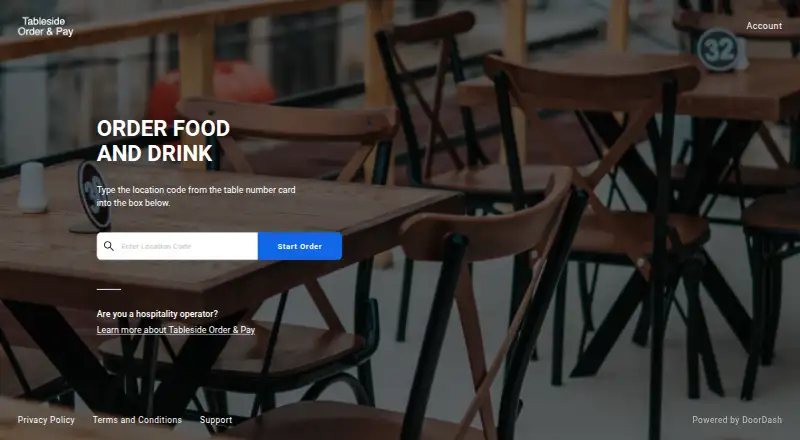
Bbot Tableside Order & Pay is a web and API platform for bars, restaurants, and hotels. Guests browse menus, place orders, pay, and tip from mobile devices without downloading an app or creating an account. QR codes can open an ordering site or menus tied to tables, rooms, pickup, delivery, or catering locations. Tabs combine multiple orders into one cumulative charge, and shared links or QR codes let groups join an order. The platform supports order-ahead takeout and delivery through a venue’s drivers or a driver-network partner such as DoorDash Drive. Listed integrations include Toast, Aloha, Square, Revel, Deliverect, Upserve, and Micros. Omnivore can sync menu availability and prices when compatible or configured. Bbot supports online, tableside, and mobile payments plus reconciliation tools. Pricing is available on request. A Square limitation means tax-inclusive pricing is unsupported for sent orders, which may cause checkout errors. Setup can take up to four weeks after checklist submission and initial invoice payment.
Who it suits
Bbot suits hospitality venues wanting browser-based ordering, tableside payments, delivery, takeout, and POS connections. It also fits group orders and venues that do not want guests to install an app.
What it does well
- Guests need no app download or sign-up
- QR codes support multiple ordering locations
- Tabs combine multiple orders into one charge
- Supports delivery and order-ahead takeout
- Integrates with several listed POS systems
What to know first
- Pricing is available only on request
- Square does not support tax-inclusive pricing here
- Setup can take up to four weeks
- API documentation lists no client libraries
Limits
Bbot has no free plan. Pricing is provided on request, and venue setup is expected to take up to four weeks after checklist submission and initial invoice payment. For Square, tax-inclusive pricing is not supported and affected checkouts may error.
Getting started
- Open the Bbot website
- Contact Bbot for pricing and onboarding
- Submit the required checklist items
- Pay the initial invoice
- Configure ordering locations, menus, and QR codes
- Connect a supported POS or delivery arrangement
Verdict
Bbot gives hospitality businesses browser-based ordering, payments, tabs, group orders, and POS integrations. Venues should account for the Square tax-inclusive limitation, setup period, and custom pricing.
Questions
Does Bbot require a guest app?
No. Guests can browse, order, pay, and tip in a web browser without downloading an app or signing up.
What does Bbot cost?
Bbot is paid, with pricing available on request.
Which POS systems are listed as integrations?
The listed integrations are Toast, Aloha, Square, Revel, Deliverect, Upserve, and Micros.
Can Bbot support delivery and takeout?
Yes. It supports order-ahead takeout and delivery through a venue’s own drivers or a driver-network partner such as DoorDash Drive.
Does Bbot provide an API?
Yes. The REST-style API uses form-encoded requests, JSON responses, standard HTTP codes, and API-key authentication for live or test mode. The documentation says client libraries are not available.
Facts from Bbot's own pages
- API
- The Bbot API uses REST-style resource URLs, form-encoded requests, JSON responses, standard HTTP codes, and API-key authentication for live or test mode. · bbot.readme.io, 8 Oct 2026
- API limitation
- Bbot’s API documentation says there are no client libraries available at this time. · bbot.readme.io, 8 Oct 2026
- Customer information
- Guests can order, pay, and tip without providing personal information; guests who sign up for tabs or electronic receipts provide information for the venue’s marketing use. · dd1psupport.zendesk.com, 8 Oct 2026
- Delivery and pickup
- The FAQ says the platform supports delivery with a merchant's own drivers or a driver-network partner such as DoorDash Drive, as well as order-ahead takeout. · dd1psupport.zendesk.com, 8 Oct 2026
- Delivery and takeout
- The platform supports delivery using a venue’s own drivers or a driver network partner such as DoorDash Drive, and supports takeout order-ahead. · dd1psupport.zendesk.com, 8 Oct 2026
- Founded
- 2017 · bbot.menu, 28 Sept 2026
- Group ordering
- Guests can share a group order link or QR code so others can join the order. · dd1psupport.zendesk.com, 8 Oct 2026
- Integration requirements
- The Omnivore setup guide specifies a back-of-house POS server running Windows 7 or higher with 700 MB free memory and a 1.8 GHz dual-core processor. · dd1psupport.zendesk.com, 8 Oct 2026
- Integrations
- The FAQ lists integrations with Toast, Aloha, Square, Revel, Deliverect, Upserve, and Micros. · dd1psupport.zendesk.com, 8 Oct 2026
- Intended customers
- Bbot describes its smart ordering technology as serving bars, restaurants, and hotels. · static.bbot.menu, 8 Oct 2026
- Messaging
- The FAQ says Tableside Order & Pay does not send unsolicited messages to guests. · dd1psupport.zendesk.com, 8 Oct 2026
- No app required
- Guests can order, pay, and tip in a web browser without downloading an app or signing up. · dd1psupport.zendesk.com, 8 Oct 2026
- No guest app required
- Guests can order, pay, and tip through the web platform without downloading an app or signing up. · dd1psupport.zendesk.com, 8 Oct 2026
- Onboarding
- The FAQ says venues should expect setup to take up to four weeks after submitting checklist items and the initial invoice payment. · dd1psupport.zendesk.com, 8 Oct 2026
- Ordering access
- QR codes can direct guests to an ordering site or a specific location code for a table, room, pickup, delivery, or catering menu. · dd1psupport.zendesk.com, 8 Oct 2026
- Payments
- A Bbot press release describes the product as offering fast and secure payments. · static.bbot.menu, 8 Oct 2026
- POS data sync
- The Omnivore integration can sync item availability and current menu prices from the POS when compatible or configured. · dd1psupport.zendesk.com, 8 Oct 2026
- POS integrations
- The support FAQ lists Toast, Aloha, Square, Revel, Deliverect, Upserve, and Micros as supported integrations. · dd1psupport.zendesk.com, 8 Oct 2026
- POS order handling
- Omnivore settings allow orders to be injected into the POS and can be configured to accept checkout through Tableside Order & Pay or abort checkout and refund guests if injection fails. · dd1psupport.zendesk.com, 8 Oct 2026
- Product
- Tableside Order & Pay is a mobile ordering platform for hospitality businesses where guests can browse menus, place orders, and pay on their phones. · dd1psupport.zendesk.com, 8 Oct 2026
- Setup time
- The FAQ says to expect setup within four weeks after the checklist items and initial invoice payment are received. · dd1psupport.zendesk.com, 8 Oct 2026
- Square integration limit
- Tax-inclusive pricing is not supported when sending Tableside Order & Pay orders to Square, and guests may see a checkout error for affected items or menus. · dd1psupport.zendesk.com, 8 Oct 2026
- Support
- The support team can be contacted at [email protected]. · dd1psupport.zendesk.com, 8 Oct 2026
- Tabs
- When enabled for a location, tabs let guests place multiple orders that appear as one cumulative charge. · dd1psupport.zendesk.com, 8 Oct 2026