Freedom251 › FTP and SFTP clients
BackendsideFTP
What BackendsideFTP is
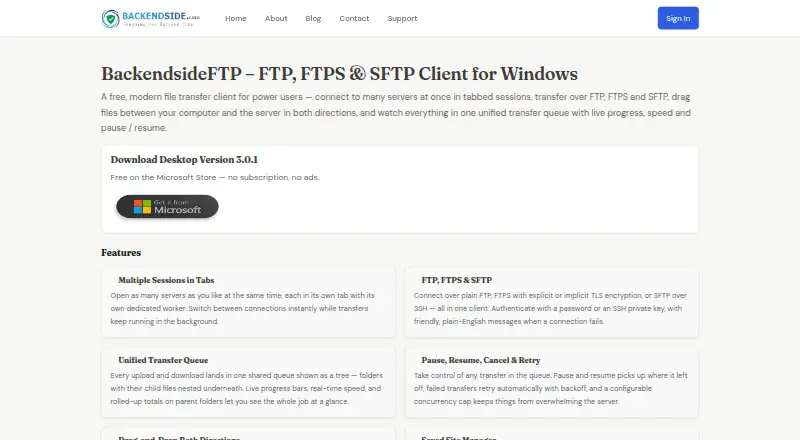
BackendsideFTP is a file transfer client for Windows that connects to servers and moves files between them and a computer. It supports FTP, FTPS with explicit or implicit TLS, and SFTP over SSH. Users can open multiple server connections in tabs and authenticate with a password or SSH private key. A shared transfer queue displays progress and speed, with controls to pause, resume, or cancel transfers; it can also retry automatically and enforce a configurable concurrency cap.
The client can browse remote directories and transfer files or folders in either direction. Users can create folders, rename items, and delete files or folders. Site Manager stores connection details for one-click reconnection, while Quick Connect allows a connection without saving a profile. Saved passwords are protected using Windows encryption tied to the user's account. SFTP host keys and FTPS certificates are verified, with options to trust once, trust always, or reject; a changed fingerprint prompts a warning. Additional tools include a visual CHMOD editor, transfer history, app-wide speed limiting, auto-reconnect, keep-alive, and an activity log with verbosity controls. BackendsideFTP is free, with no subscription or ads, and requires 64-bit Windows 10 or 11.
Who it suits
BackendsideFTP suits Windows users who need to transfer files across FTP, FTPS, or SFTP connections. It may also suit users managing several server sessions who want saved connection profiles, transfer controls, and remote file operations in one client.
What it does well
- Supports FTP, FTPS, and SFTP over SSH.
- Keeps multiple server connections open in tabs.
- Transfer queue supports pause, resume, cancellation, and automatic retries.
- Site Manager saves connection details for one-click reconnection.
- Saved passwords use Windows encryption tied to the user account.
What to know first
- Requires 64-bit Windows 10 or 11.
- Available only for Windows.
Plans
| Plan | Billed and limits | Price |
|---|---|---|
| Free | No subscription · No ads | Free |
| BackendsideFTP | Free on the Microsoft Store — no subscription, no ads. · Windows 10 / 11 (64-bit) | Free |
As backendside.com lists them, read 20 Sept 2026. The maker's own page has the final word.
Getting started
- Visit https://www.backendside.com/backendsideftp.php.
- Use a Windows 10 or 11 device with a 64-bit system.
- Get BackendsideFTP free through the Microsoft Store.
- Connect with Quick Connect or save connection details in Site Manager.
- Choose a password or SSH private key for authentication.
Verdict
Choose BackendsideFTP if you need a free Windows client for FTP, FTPS, or SFTP transfers, with queue controls and saved connections. Look elsewhere if you need a client for a platform other than Windows.
Questions
How much does BackendsideFTP cost?
The Free plan costs nothing. It has no subscription and no ads.
Which protocols does it support?
It supports FTP, FTPS with explicit or implicit TLS, and SFTP over SSH.
Which platforms can run BackendsideFTP?
It requires Windows 10 or 11, 64-bit.
Can I use it without saving a connection profile?
Yes. Quick Connect allows connecting without saving a profile; Site Manager saves connection details for later reconnection.
Who makes BackendsideFTP?
BackendSide describes itself as a small, independent software company building utility software, server-side applications, and database tools.
Facts from BackendsideFTP's own pages
- Authentication
- Connections can use a password or an SSH private key. · backendside.com, 11 Oct 2026
- Connection trust
- SFTP host keys and FTPS certificates are verified, with options to trust once, trust always, or reject, and a warning if a fingerprint changes. · backendside.com, 11 Oct 2026
- Credential storage
- Saved site passwords are protected with Windows encryption tied to the user's account and are not written to disk in plain text. · backendside.com, 11 Oct 2026
- Extra tools
- The client includes a visual CHMOD editor, transfer history, an app-wide speed limit, auto-reconnect, keep-alive, and an activity log with verbosity controls. · backendside.com, 11 Oct 2026
- File operations
- Users can drag files and folders in either direction, browse remote directories, create folders, rename files, and delete files or folders. · backendside.com, 11 Oct 2026
- Free plan
- Yes · backendside.com, 20 Sept 2026
- Latest release
- The page lists version 3.0.1, released in June 2026. · backendside.com, 11 Oct 2026
- Maker
- BackendSide describes itself as a small, independent software company building utility software, server-side applications, and database tools. · backendside.com, 11 Oct 2026
- Platform requirement
- The stated system requirement is Windows 10 or 11, 64-bit. · backendside.com, 11 Oct 2026
- Supported platforms
- windows · backendside.com, 20 Sept 2026
- Protocol coverage
- ftp-ftps-sftp · backendside.com, 20 Sept 2026
- Protocols
- It supports FTP, FTPS with explicit or implicit TLS, and SFTP over SSH. · backendside.com, 11 Oct 2026
- Purpose
- BackendsideFTP is a file transfer client for connecting to multiple servers in tabbed sessions and transferring files between a computer and servers. · backendside.com, 11 Oct 2026
- Saved connections
- The Site Manager saves connection details and supports one-click reconnection, while Quick Connect allows connecting without saving a profile. · backendside.com, 11 Oct 2026
- Transfer controls
- Its unified transfer queue provides live progress and speed, pause and resume, cancellation, automatic retries, and a configurable concurrency cap. · backendside.com, 11 Oct 2026
Where BackendsideFTP stands on Freedom251
- FTP and SFTP clients#15 of 36