Freedom251 › Game Audio Editors

AudioMass
by AudioMass
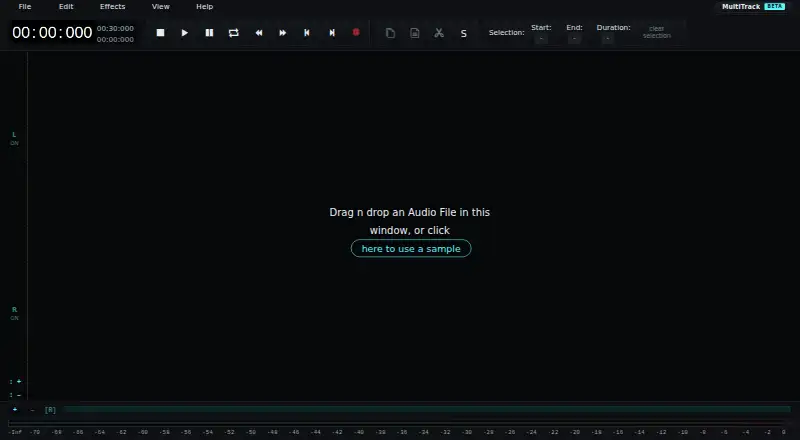
What AudioMass is
AudioMass is a free, open-source audio and waveform editor that runs in a web browser for recording and editing audio. Users can work on selected waveform regions with cut, copy, paste, trim, silence, reverse, inversion, and processing tools. Effects include gain, fades, compression, normalization, reverb, delay, distortion, pitch shifting, pitch and speed profiles, and repair tools. Its loop features include crossfade preview, silence trimming, zero-crossing adjustment, repetition, and opening a loop in a new editor tab. Multitrack mode arranges clips across tracks, offers track controls and recording, and supports mixdown; overlapping clips can receive automatic crossfades. Sessions can be saved and reopened as .amss files, with final mixes exported as WAV or MP3. The editor runs locally in the browser without a backend and can continue offline once loaded. It is MIT licensed, while bundled libraries have their own licenses, including an LGPL license for the MP3 encoder. AudioMass was started in 2018. The maker says mobile use is not particularly well optimized, and very large files can consume resources while decoding.
Who it suits
AudioMass suits people looking for browser-based audio editing, including multitrack arrangement, effects, and WAV or MP3 export. Its offline operation after loading may suit users who want to keep working without a connection.
What it does well
- Free and open-source under the MIT license.
- Runs locally and can work offline after loading.
- Multitrack mode supports recording and mixdown.
- Projects can be saved as .amss files.
- Final mixes export as WAV or MP3.
What to know first
- Mobile use is not particularly well optimized.
- Very large files can consume resources during decoding.
- No progress callback or cancellation is available for decoding.
Plans
| Plan | Billed and limits | Price |
|---|---|---|
| AudioMass | Free, open-source web audio editor | Free |
As audiomass.co lists them, read 9 Oct 2026. The maker's own page has the final word.
Getting started
- Open the AudioMass website in a browser
- Load the editor, which can then continue working offline
- Record audio or select waveform regions to edit
- Use the loop tool or multitrack mode as needed
- Save multitrack sessions as .amss files or export a mix as WAV or MP3
AudioMass is a free, open-source audio editor that runs in a web browser, combining waveform work with recording, looping, and multitrack mixing. It fits creators who want substantial editing without installing desktop software, particularly when offline work and reusable project files matter. The trade-off is a browser workflow that is less comfortable on phones and can struggle while decoding very large audio files.
Overview
AudioMass covers everyday waveform work—cutting, copying, pasting, trimming, silencing, reversing, inverting, and processing selected regions—then extends into recording and multitrack arrangement. Its effects include gain, fades, compression, normalization, reverb, delay, distortion, pitch shifting, pitch and speed profiles, and repair tools. That breadth suits editing, cleanup, sound design, and preparation of spoken or musical material without a subscription.
The editor runs locally in the browser without a backend and can keep working offline after it has loaded. Multitrack sessions save as .amss files and finished mixes export as WAV or MP3, so a project can be reopened and a mix delivered in familiar formats. AudioMass began in 2018 and is MIT licensed; bundled libraries carry their own licenses, including LGPL licensing for the MP3 encoder.
Key features
Waveform editing and effects
Region-based operations handle precise rearrangement and silence cleanup. Compression and normalization address dynamics and level consistency, while reverb, delay, distortion, and pitch controls cover creative treatment. Repair tools add a practical option for restoration work, although the browser context is less suited to users who need a specialist desktop production environment.
Looping
The seamless-loop tool previews crossfades, trims silence, adjusts zero crossings, repeats sections, and opens the loop in a new editor tab. Those controls are useful for building repeatable beds, samples, and game or ambient assets without manually hunting for clicks at loop boundaries.
Multitrack and project handling
Multitrack mode arranges clips across tracks, automatically crossfades overlapping clips, provides track controls, supports recording, and mixes down the result. Saving sessions as .amss files is valuable for work that needs later revision rather than one-off exports.
Pricing
| Plan | Price | What it means |
|---|---|---|
| AudioMass | free | Free, open-source web audio editor |
There is no paid tier, subscription, trial period, seat allowance, or usage quota to weigh against the free plan. The zero-cost model is a strong fit for independent creators, students, and teams comfortable with a browser editor; organizations wanting paid support or centrally managed collaboration should look elsewhere. AudioMass does not provide cloud collaboration.
Platforms
AudioMass is offered as a web application and can be self-hosted. It runs in a browser and supports offline work once loaded, but the maker does not name specific browsers or devices. Mobile optimization is still limited, so phone and tablet users should not make it their default editing workspace. Very large files can consume browser resources during decoding; there is no progress callback or cancellation during that process.
Who it's for
Choose AudioMass for browser-based editing, recording, looping, and modest multitrack production when avoiding installation and recurring fees matters. It is especially sensible for users who need offline continuity and saveable sessions. It is a weaker choice for mobile-first workflows, very large recordings, or collaboration that depends on shared cloud projects.
Pros and cons
- Pro: Broad waveform, effects, looping, and multitrack tools are included at no cost.
- Pro: Local browser execution enables offline work after loading and avoids a required backend.
- Pro: .amss sessions can be reopened, while WAV and MP3 exports cover common delivery needs.
- Con: Mobile optimization is limited, making touch-first editing less suitable.
- Con: Very large files may tie up browser resources during decoding with no progress or cancellation control.
- Con: No cloud collaboration is provided, so shared project workflows need another tool.
Alternatives
Audacity is the stronger alternative when you want a free, open-source desktop editor across Android, iOS, Linux, macOS, and Windows. Ocenaudio suits users seeking a free downloadable desktop editor for Linux, macOS, or Windows.
WavePad is worth choosing when you need a freemium editor across desktop and mobile, with paid annual editions adding capabilities such as full VST support. Pro Tools fits casual creators who prefer a free-forever introductory tier with stated track limits and a broader paid ecosystem.
Qtractor is a Linux-only, GPL-licensed alternative. WaveLab is for users who want a paid macOS or Windows product with a free trial and a free LE copy option. SADiE provides free Windows editions, including a license-free version intended for new computers. PhotoDirector is primarily a macOS and Windows photo application rather than a direct audio replacement.
For broader directories, see Audio Editing Software and Game Audio Editors.
Verdict
AudioMass is a strong pick for cost-conscious creators who want capable waveform, effects, looping, and multitrack tools in a browser with offline operation and reusable sessions. Its main reasons to look elsewhere are limited mobile ergonomics, resource-heavy decoding of very large files, and the absence of cloud collaboration.
Verdict
AudioMass provides a broad set of editing, effects, looping, and multitrack tools in a browser-based editor. Mobile optimization and decoding of very large files are the stated limitations.
Questions
How much does AudioMass cost?
AudioMass is free. Its listed plan costs nothing.
Does AudioMass have a free plan or trial?
It has a free plan and no free trial.
Which platforms does it support?
AudioMass supports the web and self-hosting. The maker does not name specific supported browsers or devices.
Can I use AudioMass offline?
Yes. It runs locally in the browser and can continue working offline after it has loaded.
Is AudioMass open source?
Yes. AudioMass is MIT licensed; bundled libraries have their own licenses, including an LGPL license for the MP3 encoder.
Who makes AudioMass?
The maker is listed as AudioMass. The project started in 2018.
Facts from AudioMass's own pages
- Browser support
- The maker describes AudioMass as having browser and device support but does not list specific supported browsers or devices on the page. · audiomass.co, 9 Oct 2026
- Cloud collaboration
- No · audiomass.co, 21 Sept 2026
- Editing
- Users can cut, copy, paste, trim, silence, reverse, invert, or process selected waveform regions. · audiomass.co, 9 Oct 2026
- Effects
- Effects include gain, fades, compression, normalization, reverb, delay, distortion, pitch shifting, pitch and speed profiles, and repair tools. · audiomass.co, 9 Oct 2026
- Founded
- 2018 · audiomass.co, 28 Sept 2026
- Free plan
- Yes · audiomass.co, 21 Sept 2026
- Integrations
- The maker's About page describes importing audio files by drag and drop and exporting audio, but lists no third-party integrations. · audiomass.co, 9 Oct 2026
- Large file limitation
- The maker says loading a very large audio file can consume resources until decoding finishes, and the browser API provides no progress callback or cancellation. · audiomass.co, 9 Oct 2026
- License
- AudioMass is MIT licensed; bundled libraries have their own licenses, including an LGPL license for the MP3 encoder. · audiomass.co, 9 Oct 2026
- Looping
- The seamless loop tool supports crossfade preview, silence trimming, zero-crossing adjustment, repetition, and opening the loop in a new editor tab. · audiomass.co, 9 Oct 2026
- Maker and history
- The About page says AudioMass was started in 2018; it does not state a maker name, headquarters, or company founding date. · audiomass.co, 9 Oct 2026
- Mobile limitation
- The maker says AudioMass is not particularly well optimized for mobile yet. · audiomass.co, 9 Oct 2026
- Multitrack
- Multitrack mode supports arranging clips across tracks, automatic crossfades between overlapping clips, track controls, recording, and mixdown. · audiomass.co, 9 Oct 2026
- Multitrack editing
- Yes · audiomass.co, 21 Sept 2026
- Offline use
- The editor runs locally in the browser without a backend and can continue working offline after it has loaded. · audiomass.co, 9 Oct 2026
- Product
- AudioMass is an open-source web-based audio and waveform editing tool for recording and editing audio. · audiomass.co, 9 Oct 2026
- Project files
- Multitrack sessions can be saved and reopened as .amss files, and final mixes can be exported as WAV or MP3. · audiomass.co, 9 Oct 2026
- Supported platforms
- web · audiomass.co, 21 Sept 2026
Where AudioMass stands on Freedom251
- Game Audio Editors#4 of 31
- Audio editors#12 of 31
- Audio Editing Software#55 of 131