Freedom251 › Game Map Generators

Atlas Studio
What Atlas Studio is
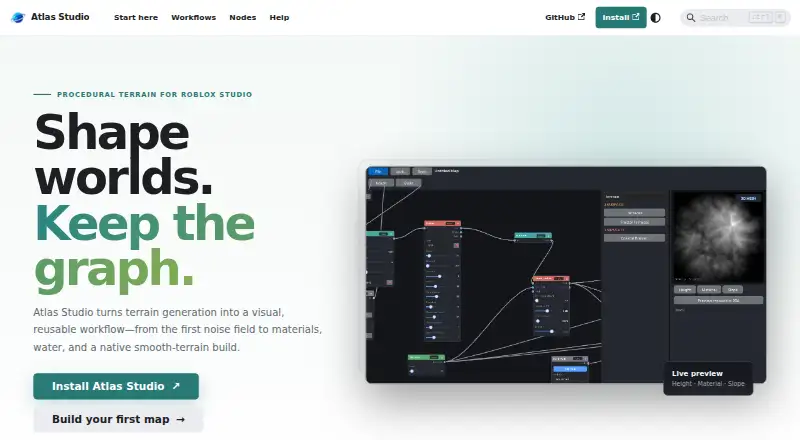
Atlas Studio is a free, open-source plugin for Roblox Studio that creates procedural terrain through a visual node graph. Its workflow covers terrain generation, shaping and weathering, material assignment, and building native smooth terrain. The node reference documents 56 nodes across generators, shaping, erosion, materials, and output; entries can be filtered by name, port type, or palette availability. The workspace previews height, material, and slope, with an optional 3D mesh preview. Paint Mask nodes open a dockable canvas for painting local changes onto those terrain views. Built-in recipes include Temperate Forest, Rolling Grassland, Rocky Highlands, and Island / Coast.
Projects save the graph, map bounds, seed, preview resolution, paint masks, environment settings, and build history inside the current Roblox place, allowing projects to be reused. Builds are written in chunks on Roblox’s 4-stud terrain voxel grid, and empty voxels below the water plane are filled with water. Preview resolution affects interactive previews, not final build resolution. Building clears all of Workspace.Terrain before generating the active map. Atlas installs from the Roblox Creator Store and opens inside Roblox Studio in an editable place. Roads, structures, landmarks, model placement, and vegetation placement are outside its current scope.
Who it suits
Atlas Studio suits Roblox Studio users who want to generate and art-direct procedural terrain with reusable node graphs, recipes, and painted masks. It is aimed at terrain work rather than placing roads, structures, landmarks, models, or vegetation.
What it does well
- Free and open source.
- Documents 56 nodes across terrain workflow categories.
- Previews height, material, and slope, with optional 3D mesh.
- Paint masks support local terrain changes.
- Projects save with the Roblox place for reuse.
What to know first
- Building clears all of Workspace.Terrain.
- Final terrain uses Roblox’s 4-stud voxel grid.
- Roads, structures, landmarks, models, and vegetation are outside scope.
- Large build regions take longer and require more memory.
Limits
Final builds use Roblox’s 4-stud terrain voxel grid, while preview resolution only changes interactive previews. Building clears all of Workspace.Terrain; roads, structures, landmarks, model placement, and vegetation placement are outside the plugin’s scope.
Getting started
- Install Atlas Studio from the Roblox Creator Store.
- Open an editable place in Roblox Studio.
- Use Plugins → Atlas → Atlas Studio to open the plugin.
- Start with a built-in recipe or create a node graph.
- Save the project with the current Roblox place for reuse.
Verdict
Choose Atlas Studio if you work in Roblox Studio and want a reusable node-based workflow for procedural terrain, with preview and local mask editing. Look elsewhere if your terrain workflow also needs road, structure, landmark, model, or vegetation placement.
Questions
Is Atlas Studio free?
Yes. It is free and open source.
Which platform does it run on?
Atlas Studio is a plugin used inside Roblox Studio on Windows.
How do I install it?
Install it from the Roblox Creator Store, then open it in Roblox Studio through Plugins → Atlas → Atlas Studio.
Can I save and reuse terrain projects?
Projects are stored with the current Roblox place and can be reused. They include the graph, map bounds, seed, preview resolution, masks, environment settings, and build history.
What does the build create?
It writes Roblox terrain in chunks and fills empty voxels below the water plane with water. It does not place parts, models, roads, or vegetation.
Can it create custom terrain textures?
No. Its materials select Roblox terrain materials rather than creating custom textures.
Facts from Atlas Studio's own pages
- Build behavior
- A terrain build clears Workspace.Terrain and replaces the entire Terrain container, including terrain outside the configured bounds. · shmeatley.github.io, 9 Oct 2026
- Build output
- Atlas writes terrain in chunks and fills empty voxels below the water plane with water; parts, models, roads, and vegetation are outside the build output. · shmeatley.github.io, 9 Oct 2026
- Build resolution
- Final terrain builds use Roblox's 4-stud terrain voxel grid; preview resolution affects interactive previews only. · shmeatley.github.io, 9 Oct 2026
- Help
- The site provides installation guidance, a node reference, and troubleshooting and FAQ pages. · shmeatley.github.io, 9 Oct 2026
- Installation
- Atlas installs from the Roblox Creator Store and opens inside Roblox Studio in an editable place. · shmeatley.github.io, 9 Oct 2026
- Integration
- Atlas Studio installs from the Roblox Creator Store and opens inside Roblox Studio from Plugins → Atlas → Atlas Studio. · shmeatley.github.io, 9 Oct 2026
- Limits
- Large width-by-depth build regions take longer and require more memory. · shmeatley.github.io, 9 Oct 2026
- Mask editing
- Paint Mask nodes open a dockable canvas for painting local changes onto the height, material, or slope view. · shmeatley.github.io, 9 Oct 2026
- Masks
- Painted masks support art-directed local changes to terrain. · shmeatley.github.io, 9 Oct 2026
- Material limit
- Materials select Roblox terrain materials and do not create custom textures. · shmeatley.github.io, 9 Oct 2026
- Node library
- The node reference documents 56 nodes for generators, terrain shaping, erosion, materials, and output. · shmeatley.github.io, 9 Oct 2026
- Nodes
- The node reference documents 56 nodes and supports filtering by name, port type, or palette availability. · shmeatley.github.io, 9 Oct 2026
- Platform
- Atlas is installed and used as a plugin inside Roblox Studio. · shmeatley.github.io, 9 Oct 2026
- Previews
- Atlas previews height, materials, and slope before writing terrain. · shmeatley.github.io, 9 Oct 2026
- Product
- Atlas Studio is an open-source Roblox Studio plugin for creating procedural terrain through a visual, reusable workflow. · shmeatley.github.io, 9 Oct 2026
- Projects
- Projects store the node graph, map bounds, seed, preview resolution, paint masks, environment settings, and build history inside the current place. · shmeatley.github.io, 9 Oct 2026
- Project storage
- Procedural projects are saved with the Roblox place, and projects can be reused. · shmeatley.github.io, 9 Oct 2026
- Purpose
- Atlas Studio is a Roblox Studio plugin for procedural terrain generation using a visual node graph. · shmeatley.github.io, 9 Oct 2026
- Recipes
- Built-in terrain recipes include Temperate Forest, Rolling Grassland, Rocky Highlands, and Island / Coast. · shmeatley.github.io, 9 Oct 2026
- Scope limit
- Roads, structures, landmarks, model placement, and vegetation placement are outside the plugin's current scope. · shmeatley.github.io, 9 Oct 2026
- Support
- The maker site links to installation guidance, node documentation, and troubleshooting help. · shmeatley.github.io, 9 Oct 2026
- Workflow
- The workflow covers terrain generation, shaping and weathering, material assignment, and building native smooth terrain. · shmeatley.github.io, 9 Oct 2026
Where Atlas Studio stands on Freedom251
- Game Map Generators#25 of 27