Freedom251 › Asset Tracking Software

Asset Giant
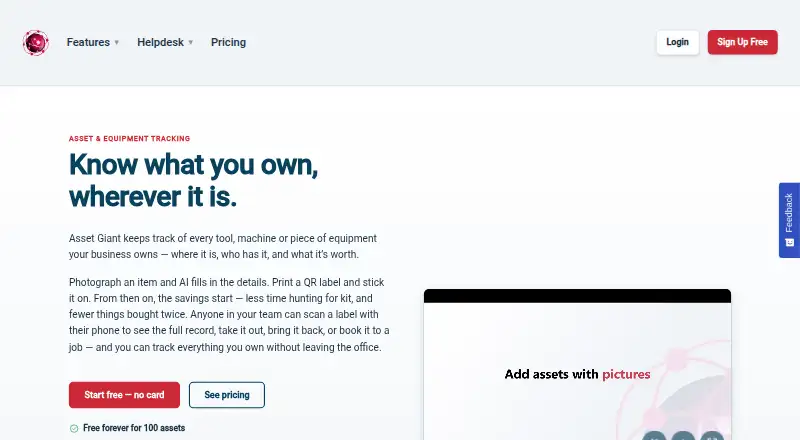
What Asset Giant is
Asset Giant helps teams keep records of physical assets, including business tools and equipment, where they are, who holds them and their value. Users can photograph an item and review AI-suggested details such as make, model and category. Teams can print QR labels on standard printers and scan them with a phone to open an asset record or check an item in or out. A booking calendar and alerts cover due backs, warranties, tests, inspections and low stock. Asset Giant also supports quotes, invoices and hire rates; card payments through Stripe are available on paid plans. It works in a browser on phones, tablets and computers, with iPhone Safari, Android Chrome and Samsung Internet specified. Free Forever includes 100 assets for one user, but excludes alerts. Paid plans start at £19/mo, and annual billing is also available. The product is made by Blueworkz Ltd, based in Pitstone, Buckinghamshire, United Kingdom.
Who it suits
It suits construction and trades, media and events, hire businesses, schools, sports clubs and community organisations that need to track shared equipment or other physical assets. The free tier may suit a single user managing a small inventory.
What it does well
- AI suggests item details from photographs.
- QR labels support record access and check-in/check-out.
- Booking calendar and several types of alerts are included.
- Inventory can be exported.
- Browser access works across phones, tablets and computers.
What to know first
- Free Forever is limited to 100 assets and one user.
- Alerts are not included on the free plan.
- Card payments through Stripe require a paid plan.
- No mobile apps are listed.
Limits
Free Forever is limited to 100 assets, one user, 50 MB storage, 25 AI lookups per month, one custom field, and one month of activity history. Alerts are not included. Crew, the least expensive listed paid plan, costs £19/mo and allows 500 assets and three users.
Plans
| Plan | Billed and limits | Price |
|---|---|---|
| Free Forever | Free; no card or time limit · 100 assets · 1 user · 50 MB storage · 25 AI lookups/month · 1 custom field · 1 month activity history | Free |
| Growth | £149/mo; yearly billing also available · 20,000 assets · 25 users · 25 GB storage · 7,500 AI lookups/month · 100 custom fields · 36 months activity history | £149 a month |
| Crew | £19/mo; yearly billing also available · 500 assets · 3 users · 500 MB storage · 500 AI lookups/month · 10 custom fields · 12 months activity history | £19 a month |
| Business | £79/mo; yearly billing also available · 5,000 assets · 10 users · 5 GB storage · 5,000 AI lookups/month · 50 custom fields · 36 months activity history | £79 a month |
| Enterprise | Contact Sales · Unlimited assets · unlimited users · unlimited storage · unlimited AI lookups/month · 200 custom fields · unlimited activity history | On request |
As asset-giant.com lists them, read 4 Oct 2026. The maker's own page has the final word.
Getting started
- Visit the Asset Giant website.
- Open it in a supported browser on a phone, tablet, or computer.
- Choose Free Forever or a paid plan.
- Add asset records, optionally using photographs for AI-suggested details.
- Print QR labels and scan them with a phone to access records or check items in and out.
Asset Giant is a browser-based asset register for tools, equipment and other physical items, with location, custody and value records. It suits teams sharing stock through bookings, hire or check-outs, especially construction, events, schools and clubs. The main choice is whether its QR-led workflows and billing justify moving beyond the tightly capped free tier.
Overview
Asset Giant combines inventory records with operational workflows. Staff can print QR labels on an ordinary printer, scan an item with a phone, open its record and check it in or out. Barcode scanning is supported too. A booking calendar coordinates use of equipment, while records retain where an item is, who has it and what it is worth.
The service runs in a browser on phones, tablets and computers, including iPhone Safari, Android Chrome and Samsung Internet. There is no installed mobile app, so organisations wanting a native app should look elsewhere. Company data is described as isolated and private, protected by logins and user roles and not sold. Inventory can be exported, and exceeding a plan limit or cancelling does not delete data, although some older items may be paused.
Key features
Cataloguing and identification
Photographing an item prompts AI suggestions for its make, model and category. That can accelerate initial data entry, but staff must review the suggestions before relying on them. Custom fields expand from one on Free Forever to 200 on Enterprise, giving larger operations room for department-specific information. Monthly AI lookup quotas range from 25 on the free plan to 7,500 on Growth, with unlimited lookups on Enterprise.
QR, bookings and alerts
QR scans open records and support check-in/check-out, making custody changes practical for shared tools and hire stock. The calendar handles bookings, and alerts can cover due backs, warranties, tests, inspections and low stock. Alerts are excluded from Free Forever, a significant omission for teams that need reminders rather than a passive register.
Quotes, invoices and integrations
Quotes, invoices and hire rates support organisations that charge for equipment. Paid plans add card payments through Stripe and iCal calendar feeds. Custom API and data integrations are reserved for Enterprise, so businesses needing deeper system connections should budget for a sales-led plan.
Pricing
Free Forever — free (billed Free) has no card requirement or time limit. It allows 100 assets, one user, 50 MB storage, 25 AI lookups per month, one custom field and one month of activity history. It is suitable for a solo trial or a small, stable inventory, but no alerts and one-user access limit collaboration.
Crew — £19 a month (yearly billing is also available) raises capacity to 500 assets and three users, with 500 MB storage, 500 AI lookups monthly, 10 custom fields and 12 months of history. It is the sensible entry point for a small working team, though the 500-asset ceiling is material.
Business — £79 a month (yearly billing also available) supports 5,000 assets, 10 users, 5 GB storage, 5,000 AI lookups, 50 custom fields and 36 months of history. It fits growing operations that need longer records and broader access.
Growth — £149 a month (yearly billing also available) expands to 20,000 assets, 25 users, 25 GB storage, 7,500 AI lookups, 100 custom fields and 36 months of history. It targets sizeable inventories without requiring Enterprise.
Enterprise — custom pricing provides unlimited assets, users, storage, AI lookups and activity history, plus 200 custom fields. It is the appropriate tier for very large estates or organisations requiring custom API and data integrations. Automated chatbot help is on every plan; Crew and Business add standard email support, while Enterprise adds phone support.
Platforms
Asset Giant works through a web browser on Android and iOS devices as well as desktop computers. It specifies iPhone Safari, Android Chrome and Samsung Internet, with nothing to install. Mobile apps are not provided.
Who it's for
The maker positions Asset Giant for construction and trades, media and events, hire businesses, schools, sports clubs and community organisations. It is strongest where equipment moves between people or bookings need tracking. A simple, single-user register may not need its paid workflow features, while larger teams should compare user, asset and alert limits carefully.
Pros and cons
- Pros: QR labels work with ordinary printers, reducing labelling overhead.
- Pros: Booking, check-in/check-out and due-back alerts connect inventory with daily operations.
- Pros: Quotes, invoices, hire rates and Stripe payments support chargeable equipment.
- Pros: Browser access covers phones, tablets and computers without installation.
- Cons: Free Forever permits only one user and 100 assets, and omits alerts.
- Cons: There is no native mobile app.
- Cons: API and data integrations require Enterprise, whose price is custom.
Alternatives
Prey is a better fit when device coverage across Android, iOS, Windows, macOS and Linux matters, with a $2.99-per-month Starter plan for five device slots.
Snipe-IT suits organisations wanting open-source, self-hosted asset management with unlimited users and assets on its self-hosted plan.
Lansweeper is worth choosing for a 14-day full trial that continues free up to 100 assets and includes unlimited user seats.
Shelf is an alternative with a free personal workspace and broader platform coverage, including native mobile and desktop options.
AssetTiger is another freemium asset-tracking option with Android, iOS, web and API support.
Reftab is preferable if a free plan with up to 50 assets, unlimited inventory and software tracking, mobile apps and barcode/QR support is enough.
AssetCenter offers a free tier for 25 available or deployed assets and a paid Starter plan for 250 assets.
MapYourTag is suited to very small teams needing a free 10-asset plan with two users and email alerts.
See the broader Asset Tracking Software selection for more options.
Verdict
Choose Asset Giant when shared equipment needs QR-based custody, bookings, reminders and hire billing in one browser service. Crew is the practical starting point for a small team, while Business and Growth add meaningful room for larger inventories. Look elsewhere if you require a native mobile app, open self-hosting or integrations without an Enterprise sales conversation.
Verdict
Asset Giant combines asset records, QR workflows, booking and billing tools. The free plan is limited, while paid plans add capacity and alerts.
Questions
Does Asset Giant have a free plan?
Yes. Free Forever costs nothing, has no card or time limit, and allows 100 assets for one user.
How much do paid plans cost?
Crew costs £19/mo, Business £79/mo, and Growth £149/mo. Enterprise is listed as Contact Sales, with no price shown.
Which devices and platforms can I use?
Asset Giant runs in a web browser on phones, tablets, and computers. The maker specifies iPhone Safari, Android Chrome, and Samsung Internet; Android, iOS, and web are listed platforms.
Can teams scan asset labels and check items out?
Yes. Teams can print QR labels on ordinary printers and scan them with a phone to view records or check items in and out.
Does it connect to calendars or other systems?
Paid plans include iCal calendar feeds. Custom API and data integrations are listed as an Enterprise feature.
Who makes Asset Giant?
Asset Giant is made by Blueworkz Ltd, based in Pitstone, Buckinghamshire, United Kingdom. The company was founded by Dan Huke.
Facts from Asset Giant's own pages
- AI cataloguing
- Users can photograph an item and have AI suggest details such as its make, model and category for review. · asset-giant.com, 4 Oct 2026
- Billing tools
- Asset Giant supports quotes, invoices and hire rates, with card payments through Stripe on paid plans. · asset-giant.com, 4 Oct 2026
- Company
- Asset Giant is made by Blueworkz Ltd, based in Pitstone, Buckinghamshire, United Kingdom, and founded by Dan Huke. · asset-giant.com, 4 Oct 2026
- Data export
- Users can export inventory, and the maker says exceeding a plan limit or cancelling does not delete data; some older items may be paused. · asset-giant.com, 4 Oct 2026
- Free tier limits
- Free Forever includes 100 assets for one user, and alerts are not included on that plan. · asset-giant.com, 4 Oct 2026
- Headquarters
- Pitstone, Leighton Buzzard, Buckinghamshire, United Kingdom · asset-giant.com, 28 Sept 2026
- Integrations
- Paid plans include iCal calendar feeds, while custom API and data integrations are listed as an Enterprise feature. · asset-giant.com, 4 Oct 2026
- Intended users
- The maker describes use by construction and trades, media and events, hire businesses, schools, sports clubs and community organisations. · asset-giant.com, 4 Oct 2026
- Platform
- Asset Giant runs in a web browser on phones, tablets and computers; the maker specifies iPhone Safari, Android Chrome and Samsung Internet, with nothing to install. · asset-giant.com, 4 Oct 2026
- Purpose
- Asset Giant tracks business tools, equipment and other physical assets, including their location, custody and value. · asset-giant.com, 4 Oct 2026
- QR workflows
- Teams can print QR labels on ordinary printers and scan items with a phone to view records or check items in and out. · asset-giant.com, 4 Oct 2026
- Scheduling
- The product includes an asset booking calendar and alerts for due backs, warranties, tests, inspections and low stock. · asset-giant.com, 4 Oct 2026
- Security and privacy
- The maker says company data is isolated and private, protected by login and user roles, and not sold. · asset-giant.com, 4 Oct 2026
- Support
- The pricing page lists an automated helpdesk chatbot on all plans, standard email support on Crew and Business, and phone support on Enterprise. · asset-giant.com, 4 Oct 2026
Where Asset Giant stands on Freedom251
- Asset Tracking Software#5 of 52