Freedom251 › Worship Planning Software

AssemblyFlow
What AssemblyFlow is
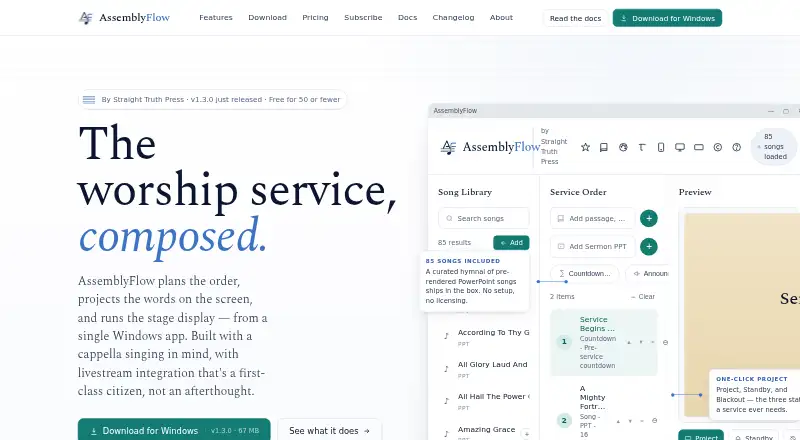
AssemblyFlow plans worship services, projects words onto screens, and runs stage display from a Windows app. Built with a cappella singing in mind, it provides drag-and-drop service orders, autosaving, templates, undo, and seven service item types. The app includes 85 shape-note hymns and supports custom lyrics and bulk imports from ChordPro, OnSong, and plain text. Projection supports multiple monitors and themed backgrounds; stage display shows current and upcoming slides, timers, and private notes. BSV, KJV, and ASV scriptures are bundled for offline use, while ESV and api.bible translations require external API keys and are cached locally. Livestream options include OBS Browser Source, OBS WebSocket controls, NDI output, and a virtual webcam for Zoom and Teams. A web remote works on church Wi-Fi and can be installed as a PWA on iOS and Android. The maker says service data stays on the church computer, with offline use after activation and no cloud sync or telemetry. The free plan serves congregations of 50 or fewer members; paid plans start at $20 a month.
Who it suits
AssemblyFlow suits local congregations planning worship services, especially those focused on a cappella singing. It is relevant to teams that need projection, stage display, or livestream tools alongside service planning.
What it does well
- Includes 85 shape-note hymns and bulk song imports.
- Stage display includes timers and private notes.
- Offers OBS, NDI, and virtual webcam options.
- Web remote works on church Wi-Fi.
- Service data is stored on the church computer.
What to know first
- Free plan is for congregations of 50 or fewer members.
- ESV and api.bible translations require external API keys.
- Offline use requires activation first.
Limits
The free plan covers congregations of 50 or fewer members and the main worship assembly with one operator. Standard, starting at $20 per month, also permits one operator at a time; multiple simultaneous operators are included in Church, listed at $40 per month.
Plans
| Plan | Billed and limits | Price |
|---|---|---|
| Free | 50 or fewer members · full app · main worship assembly | Free |
| Free (50 or fewer members) | Full app · main worship assembly · one operator · free for congregations of 50 or fewer members | Free |
| Standard | $20 / month · main worship assembly · sanctuary plus livestream · OBS / YouTube / Zoom · unlimited songs and services · one operator | $20 a month |
| Standard (annual) | $200/yr — save $40 vs. monthly · Main worship assembly · sanctuary and livestream · OBS / YouTube / Zoom integration · unlimited songs and services · one operator at a time | $200 a year |
| Standard annual | $200/yr — save $40 vs. monthly · main worship assembly · sanctuary plus livestream · OBS / YouTube / Zoom · unlimited songs and services · one operator | $200 a year |
| Church | $40 / month · Bible classes · youth meetings · weddings · funerals · special events · multiple simultaneous operators · web-remote role permissions | $40 a month |
| Church (annual) | $400/yr — save $80 vs. monthly · Everything in Standard · any room, class, or activity · multiple simultaneous operators · web remote with role permissions | $400 a year |
| Church annual | $400/yr — save $80 vs. monthly · Bible classes · youth meetings · weddings · funerals · special events · multiple simultaneous operators · web-remote role permissions | $400 a year |
The first 8 of 11 plans, as assemblyflow.net lists them, read 15 Oct 2026. The maker's own page has the final word. Every plan
Getting started
- Visit the AssemblyFlow website.
- Choose the free plan if your congregation has 50 or fewer members, or select a paid plan.
- Use the Windows app to plan services and configure projection or stage display.
- Connect through the built-in web remote on church Wi-Fi, or install it as a PWA on iOS or Android.
AssemblyFlow is worship-service planning and presentation software for congregations, especially those with a cappella singing and a Windows-based projection setup. It brings planning, display, and livestream connections together, with a local-first approach that favors churches wanting control of their service data over cloud collaboration.
Overview
The app links service orders to projected content, stage display, and livestream output, so congregations can coordinate several parts of a worship service in one workflow. Its a cappella focus is reflected in a library of 85 shape-note hymns, while custom lyrics and bulk imports let churches add material in ChordPro, OnSong, or plain text. Service data stays on the church computer, and the app works offline after activation; that suits churches with a dedicated local setup, but not teams seeking cloud sync.
The maker says licenses validate offline and projection will not be blocked mid-service if billing fails or a subscription lapses. That safeguard matters for software used during a live service. AssemblyFlow is maintained by Straight Truth Press, which describes itself as a one-person ministry; paid plans include email support within 24 hours.
Key features
Planning and music
Drag-and-drop service orders, templates, autosaving, undo, and seven service item types cover the practical work of arranging a service while leaving room for different service formats. The bundled hymn collection is a useful starting point for shape-note congregations, and bulk import reduces the burden of bringing an existing song library into the app.
Projection and stage display
Projection supports multiple monitors, themed backgrounds, and standby, blackout, and logo screens. Stage display can show current and upcoming slides, timers, and private notes, giving operators and people on stage different views of the service. This is a coherent package for churches running projection locally; it is less compelling for organizations that need a cloud-based presentation workflow.
Scripture and livestream
BSV, KJV, and ASV are bundled for offline use. ESV and api.bible translations require external API keys, though retrieved content is cached locally. That distinction makes the bundled translations straightforward to use offline, while churches relying on other translations must handle the external-key setup.
OBS Browser Source, OBS WebSocket controls, NDI output, and a virtual webcam for apps such as Zoom and Teams give congregations several ways to connect the presentation workflow to livestream tools. A built-in web remote works over church Wi-Fi and can be installed as a PWA on iOS and Android. CCLI usage logs record projected songs and export date-range CSV reports, with the maker saying the usage data remains local.
Pricing
The free plan costs nothing for congregations of 50 or fewer members. It includes the full app for the main worship assembly and one operator. That is a meaningful way for a small congregation to use the core product, but the member cap and single-operator limit rule it out for larger churches or teams that need concurrent control.
Standard costs $20 a month or $200 a year, billed $200/yr — save $40 vs. monthly. It covers the main worship assembly, sanctuary and livestream, OBS, YouTube, and Zoom integration, unlimited songs and services, and one operator at a time. It suits a single-operator setup that has outgrown the free plan, but does not extend use to other rooms or simultaneous operators.
Church costs $40 a month or $400 a year, billed $400/yr — save $80 vs. monthly. It adds use in any room, class, or activity, multiple simultaneous operators, and web remote role permissions to Standard. This is the more suitable tier for a congregation coordinating services across rooms or assigning control to several people.
Multi-campus costs $80 a month or $800 a year, billed $800/yr — save $160 vs. monthly. It adds unlimited physical campuses, NDI broadcast across LAN, hardware switcher integration, and priority email support to Church. Those additions target organizations with multi-campus production needs; a single-room congregation is unlikely to need this tier’s expanded scope.
Platforms
AssemblyFlow supports Android, iOS, web, and Windows. The purpose centers on a Windows app for running stage display, while the web remote and its installable PWA extend control to phones and tablets on church Wi-Fi.
Who it's for
AssemblyFlow is a strong fit for congregations that want service planning, projection, stage display, and livestream connections tied to a church-computer setup, particularly a cappella groups that can use the included shape-note hymns. Small congregations can start with the capped free plan; larger or multi-room teams should weigh Standard, Church, or Multi-campus according to their operator, room, and campus needs. Churches that require cloud sync or do not want to manage external API keys for certain scripture translations should look elsewhere.
Pros and cons
- Pros: Service planning, projection, stage display, and livestream connections fit into one workflow, reducing the need to coordinate separate tools for those jobs.
- Pros: Local storage and offline operation after activation suit churches that want service data kept on their own computer.
- Pros: The free plan includes the full app for a main worship assembly, making it usable without a paid subscription for congregations of 50 or fewer members.
- Cons: The free plan is limited to one operator and one main assembly, so it does not serve larger congregations or multi-room teams.
- Cons: ESV and api.bible scripture options require external API keys, unlike the bundled offline translations.
- Cons: Local storage and no cloud sync are a drawback for teams that need shared access beyond the church computer.
Alternatives
Worship Planning Software is the broader category to browse if AssemblyFlow’s local-first, presentation-oriented approach is not the right fit.
c-SPOT is worth considering if free and open-source software matters most; it has no hosted plan or usage limits stated and supports a broad range of desktop, mobile, web, and self-hosted platforms.
OnStage may suit smaller teams wanting a free starter tier with up to five members, 200MB storage, five events per month, and tools including reminders, chat, annotations, and PDF song import.
WorshipTools Presenter is an alternative for teams preferring cloud storage and a user allowance: its free plan provides 500 MB, 10 users, 15 items per service, and unlimited services and songs.
Planning Center may be preferable when a church wants a broader set of planning tools, with free Calendar, People, and Services plans subject to their respective limits.
Assemblea is another web-based option; its free plan includes up to 50 members and two users alongside finances and giving, inventory, meetings and voting, and 100 MB storage.
Ministry Planner may fit churches looking for separate free tools, including scheduling for one team and up to 1,000 volunteers or event planning for one active event and up to 1,000 people.
ServeFlow: Worship Planner is a free alternative for users on iPhone or iPad who want an iOS and macOS option.
WorshipMetrics offers a free plan with unlimited users, practical limits on cloud storage and clips, one signage screen, and streaming; consider it if those terms better fit your needs.
Verdict
Choose AssemblyFlow if your congregation wants planning, projection, stage display, and livestream tools in a locally stored workflow, particularly for a cappella worship. Its strongest reason to choose it is the breadth of its integrated presentation and connectivity features, backed by offline operation. Look elsewhere if cloud sync is essential, or if your team needs multi-operator control without moving beyond the free plan.
Verdict
AssemblyFlow combines service planning, projection, stage display, and livestream connections for congregations. Its free plan is limited by congregation size, and some scripture translations depend on external API keys.
Questions
Is AssemblyFlow free?
Yes. The Free plan costs nothing and is for congregations of 50 or fewer members.
How much do paid plans cost?
Standard is $20 a month, Church is $40 a month, and Multi-campus is $80 a month. Annual plans are listed at $200 a year, $400 a year, and $800 a year, respectively.
Which platforms does AssemblyFlow support?
The listed platforms are Android, iOS, web, and Windows. The stage-display app runs from Windows, and the web remote can be installed as a PWA on iOS and Android.
Can it work offline?
Yes. The maker says the app works offline after activation and stores service data on the church computer.
Which scripture translations are included?
BSV, KJV, and ASV are bundled for offline use. ESV and api.bible translations require external API keys and are cached locally.
Who makes AssemblyFlow?
It is built and maintained by Straight Truth Press, which describes itself as a one-person ministry.
Facts from AssemblyFlow's own pages
- API caching
- Bible API responses are cached locally so previously fetched verses work offline. · assemblyflow.net, 15 Oct 2026
- Audience
- The maker says AssemblyFlow was built with a cappella singing in mind and describes tools for local congregations. · assemblyflow.net, 4 Oct 2026
- Bible API limits
- The documented ESV key allows 5,000 verses per day and api.bible Starter allows 5,000 calls per month for non-commercial use. · assemblyflow.net, 15 Oct 2026
- Bible translations
- BSV, KJV, and ASV are bundled offline; ESV and api.bible translations require external API keys. · assemblyflow.net, 15 Oct 2026
- Broadcast outputs
- The feature list names NDI output for vMix and Wirecast plus a virtual webcam for Zoom and Teams. · assemblyflow.net, 15 Oct 2026
- CCLI reporting
- Song projections are logged with CCLI metadata and can be exported as a CSV for reporting periods. · assemblyflow.net, 15 Oct 2026
- Company
- AssemblyFlow is built and maintained by Straight Truth Press, which describes itself as a one-person ministry. · assemblyflow.net, 4 Oct 2026
- Company funding
- The maker states that the project has no venture funding and is funded through subscriptions for larger churches. · assemblyflow.net, 15 Oct 2026
- Company size
- Straight Truth Press says AssemblyFlow is maintained by a one-person ministry. · assemblyflow.net, 15 Oct 2026
- Custom song imports
- Users can create songs or bulk-import TXT, ChordPro, OnSong, Markdown, and related text formats. · assemblyflow.net, 15 Oct 2026
- Data storage
- Services, songs, backgrounds, caches, settings, and CCLI logs are stored under the user's Documents/AssemblyFlow folder. · assemblyflow.net, 15 Oct 2026
- Hymns and songs
- The app includes 85 shape-note hymns and supports custom lyrics plus bulk import of ChordPro, OnSong, and plain text files. · assemblyflow.net, 4 Oct 2026
- Independent catalog availability
- AppAgg records the Windows application as free to obtain. · appagg.com, 15 Oct 2026
- Independent catalog company location
- AppAgg describes Straight Truth Press LLC as a Texas-based ministry publisher. · appagg.com, 15 Oct 2026
- Independent catalog description
- AppAgg describes AssemblyFlow as worship-presentation software aimed at Churches of Christ and small-to-mid Protestant congregations. · appagg.com, 15 Oct 2026
- Independent catalog language
- AppAgg lists English as the supported language. · appagg.com, 15 Oct 2026
- Independent catalog platform
- AppAgg lists AssemblyFlow as a Windows productivity application published by Straight Truth Press LLC. · appagg.com, 15 Oct 2026
- Independent catalog release date
- AppAgg records the first release as June 10, 2026. · appagg.com, 15 Oct 2026
- Independent catalog size
- AppAgg lists the Windows package size as 100 MB. · appagg.com, 15 Oct 2026
- Independent catalog update date
- AppAgg records the latest update as August 25, 2026. · appagg.com, 15 Oct 2026
- Independent review availability
- AppAgg shows zero user comments and says its users have not rated AssemblyFlow. · appagg.com, 15 Oct 2026
- License validation
- Subscription licenses are cryptographically signed and validated offline without contacting a license server. · assemblyflow.net, 15 Oct 2026
- Limit: click tracks
- Click-track support is not included in version 1.x and has no promised delivery date. · assemblyflow.net, 15 Oct 2026
- Limit: desktop operating systems
- The maker says Mac and Linux desktop versions are not available in the 1.x line; only the browser remote works there. · assemblyflow.net, 15 Oct 2026
Where AssemblyFlow stands on Freedom251
- Worship Planning Software#2 of 24