Freedom251 › Cover Letter Software
ApplyKit
What ApplyKit is
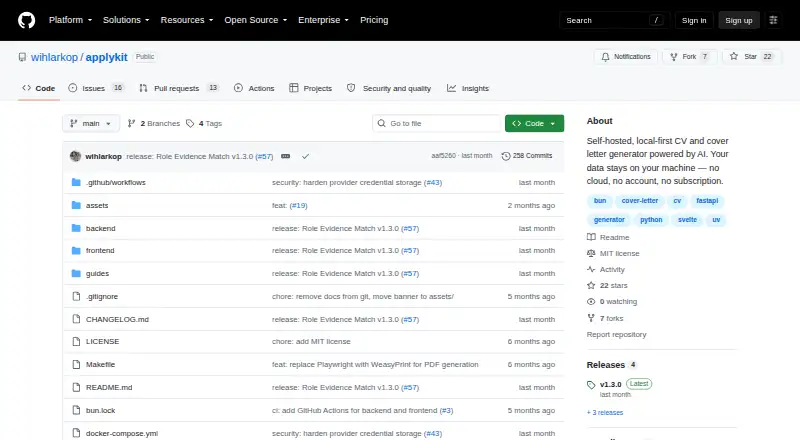
ApplyKit is a free, open-source, self-hosted tool for preparing tailored resumes, cover letters, and job applications with AI. Profiles, generated documents, application history, and provider credentials stay on infrastructure the user controls. Resume input can come from PDF, DOCX, or pasted text; features include ATS-focused CV enhancement, live preview, and PDF export. Application tools include tailored cover letters, Smart Apply workflows, an application tracker, and AI usage reporting. Role Evidence Match separates evidence match, confidence, and eligibility, and flags analysis for review when evidence is insufficient or inconsistent. AI can be supplied by hosted providers or local Ollama models, which do not require an API key. Provider credentials can be managed with manual, failover, or round-robin routing; automatic options require at least two enabled credentials. Docker installation is documented for Windows, macOS, and Linux, among other environments, and opens a browser interface at localhost:3000. SQLite is the default database. Remote deployments require password authentication, HTTPS, secure cookies, and an external encryption key. Authentication protects one installation with one owner password, not multiple user accounts.
Who it suits
ApplyKit suits job seekers who want to create and track tailored application materials while keeping their data on infrastructure they control. It can use hosted AI or local Ollama models.
What it does well
- Imports PDF, DOCX, or pasted resumes
- Exports resumes as PDF
- Supports local Ollama without an API key
- Includes application tracking and AI usage reporting
- Open source under the MIT license
What to know first
- Not a multi-user account system
- Automatic credential routing needs two enabled credentials
- No encryption-key rotation or rotation UI
- Role matching is not hiring probability
Limits
The free self-hosted plan requires your own hosted AI provider or local Ollama. Automatic failover and round-robin routing require at least two enabled credentials; password authentication is limited to one owner password.
Plans
| Plan | Billed and limits | Price |
|---|---|---|
| Free, self-hosted | No ApplyKit subscription required · uses your own hosted AI provider or local Ollama | Free |
As github.com lists them, read 4 Oct 2026. The maker's own page has the final word.
Getting started
- Open the ApplyKit GitHub repository.
- Follow the documented Docker installation route for your operating system or environment.
- Start ApplyKit and open its browser interface at localhost:3000.
- Choose a hosted AI provider or configure local Ollama.
- Import a resume or paste its text, then prepare and track applications.
Overview
ApplyKit is a self-hosted tool for preparing job applications with AI, including tailored resumes and cover letters. It best suits job seekers who want to keep application records and provider credentials on infrastructure they control. Its breadth is useful, but the single-owner password model and lack of encryption-key rotation make it a poor fit for shared or security-sensitive deployments that require those controls.
Key features
Resume imports from PDF, DOCX, or pasted text feed ATS-focused CV enhancement, a live preview, and PDF export. ApplyKit also brings tailored cover letters, Smart Apply workflows, an application tracker, application history, and AI usage reporting into the same tool. That combination can reduce the need to split preparation and tracking across separate apps.
Role Evidence Match distinguishes evidence match, confidence, and eligibility, and flags cases where evidence is insufficient or inconsistent with “Analysis needs review.” That caution is more useful than treating a match as a definitive answer: the tool explicitly does not estimate hiring or ATS pass probability and does not make hiring decisions.
Users can connect hosted AI providers or local Ollama models; Ollama does not require an API key. Multiple provider credentials can be routed manually, through automatic failover, or round-robin. The automatic strategies require at least two enabled credentials, so they do not provide failover with a single configured account.
Pricing
Free, self-hosted: free. There is no ApplyKit subscription; users supply their own hosted AI provider or use local Ollama. The free plan includes AI drafting and job tailoring, with no free trial. This suits people comfortable managing their own deployment and AI setup; it gives up the convenience of a subscription that bundles provider usage.
ApplyKit is open source under the MIT license. Its self-hosted model avoids an ApplyKit subscription, but users remain responsible for the infrastructure and AI provider they choose.
Platforms
ApplyKit supports Linux, macOS, and Windows, and is self-hosted with a web interface. The maker documents Docker installation for Windows, macOS, Linux, Git Bash, and WSL, with the browser UI at localhost:3000. SQLite is the default database; Docker stores application data and the credential encryption key in separate persistent volumes.
Who it's for
ApplyKit is a strong fit for an individual job seeker who wants resume tailoring, cover letters, application tracking, and AI provider choices in a locally controlled workflow. It is less suitable for teams: optional password authentication protects one installation with one owner password, not multiple user accounts. Remote deployments also require password authentication, HTTPS, secure cookies, and an external encryption key, while the security guide says key rotation and a rotation UI are not currently provided.
Pros and cons
- Pro: Resume preparation, letters, tracking, and usage reporting share one workflow, which can keep a job search organized.
- Pro: Local Ollama support and user-controlled storage give people alternatives to hosted AI and externally managed application records.
- Pro: Role matching separates confidence and eligibility and signals when its evidence needs review, rather than presenting the result as a hiring prediction.
- Con: Authentication is limited to one owner password, so it does not suit shared accounts or multi-user access.
- Con: There is no encryption-key rotation UI, an important limitation for operators who need to rotate credentials routinely.
- Con: Automatic credential routing needs at least two enabled credentials, and hosted AI requires the user to bring a provider.
Alternatives
For a broader comparison of letter-writing tools, browse Cover Letter Software.
- Kickresume is a web, Android, and iOS option with a free plan that includes four basic resume templates, four matching cover letter templates, and one basic website template; choose it if ready-made templates matter more than self-hosting.
- MyPerfectResume offers web and mobile access, a free plan with unlimited TXT downloads, and a 14-day Premium Access plan; consider it for a hosted resume builder and trial access.
- Resume Genius has web and mobile access and free resume downloads in TXT, with cover letters downloadable in PDF, Word, or TXT; its free job board is US-only. Choose it if those download formats or the US job board fit your needs.
- Huntr offers a free plan that tracks up to 100 jobs and includes two job-tailored resumes and two application packets; it is a fit if those capped job-search tools are enough.
- MyPerfectCoverLetter has a free option to create a cover letter and download it as plain text; consider it for a focused letter-writing tool.
- Rezi offers a free plan with one resume, one AI interview, and three PDF downloads; its Pro plan is $29 a month. Choose it if a dedicated resume tool and a stated paid tier suit you better.
- Careerflow is a web and extension option whose free Basic plan includes a limited job tracker, autofill, and resume builder; consider it for those browser-based job-search tools.
- Cover Letter Copilot offers one unblurred cover letter per day on its free tier; choose it if that daily allowance meets your letter-writing needs.
Verdict
Choose ApplyKit if you want a self-hosted job-search workspace that combines tailored documents, application tracking, and flexible AI providers without an ApplyKit subscription. Look elsewhere if you need multiple user accounts, key rotation, or a service that supplies the AI rather than relying on your provider or local model.
Verdict
ApplyKit brings resume preparation, application tracking, and AI provider management into a self-hosted workflow. Users should note its single-owner authentication and the absence of encryption-key rotation.
Questions
What does ApplyKit cost?
The Free, self-hosted plan costs nothing. No ApplyKit subscription is required.
Does it include AI?
ApplyKit supports hosted AI providers and local Ollama models. The plan uses your own hosted provider or local Ollama, and Ollama does not require an API key.
Which platforms does it support?
The listed platforms are Linux, macOS, self-hosted, web, and Windows. Docker installation is documented for Windows, macOS, Linux, Git Bash, and WSL.
Is ApplyKit open source?
Yes. The repository lists the MIT license.
Can multiple people use one installation?
ApplyKit is not a multi-user account system. Optional password authentication protects one installation with one owner password.
Facts from ApplyKit's own pages
- AI integrations
- ApplyKit supports hosted AI providers and local Ollama models; Ollama does not require an API key. · github.com, 4 Oct 2026
- Application tools
- It includes tailored cover letters, Smart Apply workflows, an application tracker, application history, and AI usage reporting. · github.com, 4 Oct 2026
- Authentication limit
- Optional password authentication protects one installation with one owner password; ApplyKit is not a multi-user account system. · github.com, 4 Oct 2026
- Credential routing
- Multiple provider credentials can be managed with manual, automatic failover, or round-robin routing; automatic strategies require at least two enabled credentials. · github.com, 4 Oct 2026
- Data control
- Profiles, generated documents, application history, and provider credentials stay on infrastructure the user controls. · github.com, 4 Oct 2026
- Deployment
- The maker documents Docker installation for Windows, macOS, Linux, Git Bash, and WSL, with a browser UI at localhost:3000. · github.com, 4 Oct 2026
- License
- The repository lists ApplyKit under the MIT license. · github.com, 4 Oct 2026
- Purpose
- ApplyKit is a self-hosted, local-first tool for creating tailored resumes, cover letters, and job applications with AI. · github.com, 4 Oct 2026
- Resume tools
- It imports resumes from PDF, DOCX, or pasted text and supports ATS-focused CV enhancement, live preview, and PDF export. · github.com, 4 Oct 2026
- Role matching
- Role Evidence Match separates evidence match, confidence, and eligibility, and shows “Analysis needs review” when evidence is insufficient or inconsistent. · github.com, 4 Oct 2026
- Role matching limitation
- Role Evidence Match is application guidance and is not a hiring probability, ATS pass probability, or automated hiring decision. · github.com, 4 Oct 2026
- Security
- Provider secrets are encrypted with Fernet before database storage, and remote deployments require password authentication, HTTPS, secure cookies, and an external encryption key. · github.com, 4 Oct 2026
- Security limitation
- The security guide says ApplyKit does not currently provide encryption-key rotation or a rotation UI. · github.com, 4 Oct 2026
- Storage
- SQLite is the default database, and Docker keeps application data and the credential encryption key in separate persistent volumes. · github.com, 4 Oct 2026
Where ApplyKit stands on Freedom251
- Cover Letter Software#1 of 62