Freedom251 › Text-to-Speech Software
AnySpeak.ai
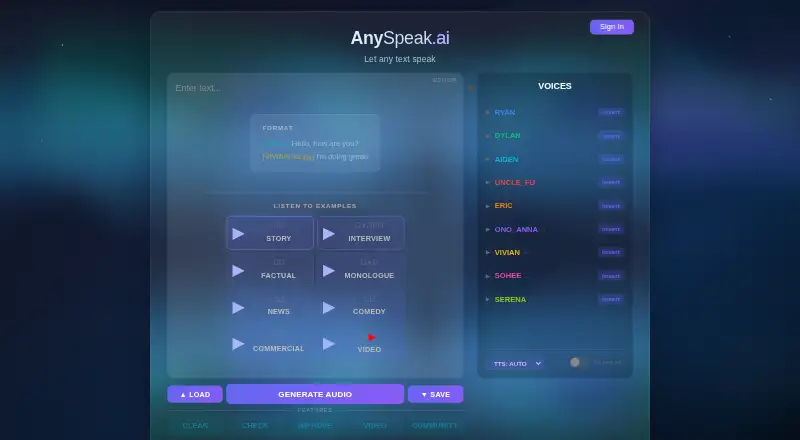
What AnySpeak.ai is
AnySpeak.ai is an open-source text-to-speech tool powered by Qwen3-TTS, with a web interface and optional local CLI. It lists Chinese, English, French, German, Italian, Japanese, Korean, Portuguese, Russian, and Spanish. Available model types include CustomVoice, VoiceDesign, and Base, and voice design can be shaped by language, age, pace, pitch, volume, and tone. Text tags choose speakers and moods, while timing controls adjust pauses and pacing. CLEAN handles text analysis and cleanup, CHECK compares synthesized speech with the source using Whisper, and IMPROVE allows selected audio segments to be edited or regenerated. The app can create video from audio and images with optional subtitles, import text from a URL or file, and load or save MP3 files with tagged source text in metadata. Local CLI generation works offline, and the web UI can run locally in server mode. Local use requires Python 3.10 or later, an AVX-capable x86_64 CPU, and at least 8 GB free RAM. The Local plan is free; Demo is free with a 50-character limit.
Who it suits
It suits people who want text-to-speech with voice and timing controls, or developers who want an offline local CLI. Local use requires the listed Python version, CPU support, RAM, and disk space.
What it does well
- Lists ten supported languages.
- Offers speaker, mood, and timing controls.
- Local CLI supports offline generation.
- Exports MP3 and WAV.
- Commercial use is listed as supported.
What to know first
- Voice cloning is not supported.
- Demo limits input to 50 characters.
- Local use requires at least 8 GB free RAM.
- First CLI run downloads about 5 GB.
Limits
The free Demo plan has a 50-character limit. Local use requires Python 3.10 or later, an AVX-capable x86_64 CPU, at least 8 GB of free RAM, and about 7 GB of disk space for CLI mode or 17 GB for server mode. The first CLI run downloads about 5 GB and takes roughly 10–20 minutes; server mode downloads additional models for about 15 GB total.
Plans
| Plan | Billed and limits | Price |
|---|---|---|
| Local | No character limit · runs on your computer | Free |
| Demo | 50 character limit · runs on AnySpeak server | Free |
| Cloud | Join waitlist · Higher limits and faster · cloud TTS in the works | On request |
As anyspeak.ai lists them, read 12 Oct 2026. The maker's own page has the final word.
Getting started
- Open the AnySpeak.ai website or use the local CLI or local server mode.
- For local use, prepare Python 3.10 or later, an AVX-capable x86_64 CPU, and at least 8 GB of free RAM.
- Allow about 7 GB of disk space for CLI mode or about 17 GB for server mode.
- Run the CLI for its first time and allow about 5 GB of downloads; server mode downloads additional models.
- Choose the free Local plan for computer-based use or the free Demo plan for server use.
- Select a listed model and configure voice attributes, speaker or mood tags, and timing controls.
Verdict
AnySpeak.ai offers a broad set of speech controls and local generation, with separate Local and Demo options. Check its local hardware and download requirements, and note that the Demo has a 50-character limit.
Questions
Is AnySpeak.ai free?
The Local and Demo plans are each free. Local has no character limit, while Demo has a 50-character limit.
Which platforms does it support?
The listed platforms are API, Linux, macOS, web, and Windows.
Can it run offline?
The local CLI supports offline generation. The web interface can also run locally in server mode.
Is AnySpeak.ai open source?
It is offered under the AGPL-3 license. The README says modified software or software offered as a service requires source availability, and lists [email protected] as the commercial license contact.
Can it clone voices?
No. Voice cloning is listed as unavailable.
What export formats does it support?
It supports MP3 and WAV exports. It can also load and save MP3 files with tagged source text in metadata.
Facts from AnySpeak.ai's own pages
- API access
- Yes · anyspeak.ai, 20 Sept 2026
- Commercial use
- Yes · anyspeak.ai, 20 Sept 2026
- Contact
- The site lists [email protected] as its contact email. · anyspeak.ai, 12 Oct 2026
- Export formats
- MP3,WAV · anyspeak.ai, 20 Sept 2026
- File provenance
- Generated files receive an inaudible watermark and metadata, and files can optionally be signed with Ed25519 to prove origin. · github.com, 12 Oct 2026
- First-run download
- The README says the first CLI run downloads about 5 GB and takes roughly 10–20 minutes, while server mode downloads additional models for about 15 GB total. · github.com, 12 Oct 2026
- Free plan
- Yes · anyspeak.ai, 20 Sept 2026
- Integrations and roadmap
- The README says community members can contribute plugins or integrations, and lists an MCP universal API, batch processing, and a sound-effect library as roadmap items. · github.com, 12 Oct 2026
- Languages
- The README lists Chinese, English, French, German, Italian, Japanese, Korean, Portuguese, Russian, and Spanish as supported languages. · github.com, 12 Oct 2026
- License
- AnySpeak is offered under AGPL-3, which the README says requires source availability when modified or offered as a service; it lists a commercial license contact at [email protected]. · github.com, 12 Oct 2026
- Local requirements
- The README specifies Python 3.10 or later, x86_64 CPU with AVX support, and at least 8 GB free RAM; the local instructions list about 7 GB disk for CLI mode and about 17 GB for server mode. · github.com, 12 Oct 2026
- Offline use
- The local CLI supports offline generation, and the web UI can run locally in server mode. · github.com, 12 Oct 2026
- Platforms
- web,windows,macos,linux,api,self_hosted · anyspeak.ai, 20 Sept 2026
- Purpose
- AnySpeak is an open-source text-to-speech tool powered by Qwen3-TTS, with a web UI and optional local CLI. · github.com, 12 Oct 2026
- Speaker and mood tags
- Text tags can select speakers and moods for multi-speaker and emotionally expressive output. · github.com, 12 Oct 2026
- Text and audio editing
- CLEAN analyzes and cleans text, CHECK compares synthesized speech with the original using Whisper, and IMPROVE lets users regenerate or edit selected audio segments. · github.com, 12 Oct 2026
- Timing control
- Timing tags and a timing control let users adjust pauses and pacing between speech segments. · github.com, 12 Oct 2026
- Video and file handling
- The app can create video from audio and images with optional subtitles, import text from a URL or file, and load or save MP3 files with tagged source text in metadata. · github.com, 12 Oct 2026
- Voice cloning
- No · anyspeak.ai, 20 Sept 2026
- Voices
- It lists Qwen3-TTS 1.7B CustomVoice, VoiceDesign, and Base models, plus voice design by selecting attributes such as language, age, pace, pitch, volume, and tone. · github.com, 12 Oct 2026
Where AnySpeak.ai stands on Freedom251
- Text-to-Speech Software#11 of 223
- Text-to-speech tools#53 of 232