Freedom251 › Game Voice Changers
AI Voice Changer
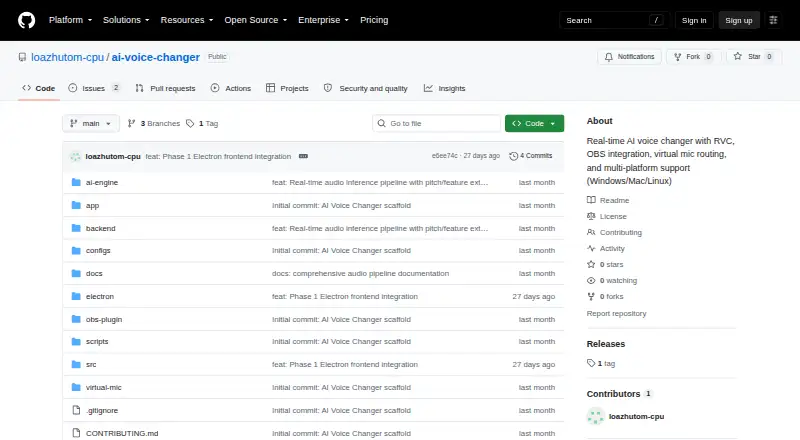
What AI Voice Changer is
AI Voice Changer is an open-source application for converting voice in real time for streaming, gaming, content creation, and online communication. It runs on Windows, macOS, and Linux, with API, web, and self-hosted options listed. Its conversion pipeline uses SoftVC, ContentVec, or HuBERT feature extraction with retrieval-based RVC models and pitch-guided conversion. Audio processing includes noise filtering, voice activity detection, pitch correction, formant shifting, equalization, compression, and reverb. Virtual audio routing can send its output to OBS Studio, Discord, Zoom, Twitch, and other streaming or calling platforms. Routing options include VB-Audio Cable on Windows, BlackHole on macOS, and PipeWire or PulseAudio on Linux. The FastAPI backend provides REST controls and real-time streaming over WebSockets. A dashboard at localhost:8000 supports model switching, audio adjustments, gain monitoring, and preset management. Custom voice training covers dataset preparation, pitch extraction, model training, and feature indexing. The project recommends a compatible NVIDIA GPU. Its stated end-to-end delay target is 35–48 ms on specified hardware; CPU fallback is supported and can have about 200 ms latency. The project uses imperceptible acoustic watermarks and calls for consent and disclosure when cloning or synthesizing voices.
Who it suits
AI Voice Changer suits streamers, gamers, creators, and people who want real-time voice conversion for online communication. It also fits users comfortable with desktop setup or self-hosting who want custom voice training and virtual audio routing.
What it does well
- Runs on Windows, macOS, and Linux.
- Supports several feature extraction and RVC model options.
- Includes voice training tools for custom models.
- Routes audio to OBS Studio, Discord, Zoom, and Twitch.
- Provides REST controls and real-time WebSocket streaming.
- Released under the MIT License.
What to know first
- A compatible NVIDIA GPU is recommended.
- CPU fallback can have about 200 ms latency.
- Voice training requires at least 10 minutes of clean speech.
- Setup uses platform-specific virtual audio routing.
Limits
The 35–48 ms end-to-end delay is a target tied to specified hardware. CPU fallback is supported but can have about 200 ms latency. Voice training requires at least 10 minutes of clean continuous speech; datasets longer than two hours without quality control increase training time without significant fidelity gains.
Getting started
- Open the project's GitHub repository.
- Follow the installation guidance for Windows, macOS, or Linux.
- Set up the matching virtual audio route: VB-Audio Cable, BlackHole, or PipeWire or PulseAudio.
- Launch the local dashboard at localhost:8000 to switch models and adjust audio settings.
- For GPU-accelerated container deployment, use Docker and NVIDIA Container Toolkit.
- For custom voice training, prepare at least 10 minutes of clean continuous speech.
Verdict
Choose AI Voice Changer if you want an open-source voice conversion project with custom training, audio processing, and routing to streaming or calling apps. The stated delay target depends on specified hardware, and CPU fallback can be substantially slower; voice cloning also requires documented consent and disclosure.
Questions
Is AI Voice Changer free and open source?
Yes. The project is free and released under the MIT License.
Which systems does it support?
Installation guidance is provided for Windows, macOS, and Linux. API, web, and self-hosted options are also listed.
Can it route audio to streaming or calling software?
Yes. The project describes virtual audio routing for OBS Studio, Discord, Zoom, Twitch, and other platforms.
Does it support custom voice training?
Yes. Its tools cover dataset preprocessing, pitch extraction, model training, and feature index creation. The guide specifies at least 10 minutes of clean continuous speech.
What latency does the project target?
The stated end-to-end target is 35–48 ms on specified hardware. CPU fallback is supported and can have about 200 ms latency.
What does the project require for voice cloning?
It instructs users to obtain documented consent before cloning a voice and to disclose AI voice synthesis. Generated audio streams carry imperceptible acoustic watermarks.
Facts from AI Voice Changer's own pages
- API
- The README lists a FastAPI backend with REST control and real-time streaming over WebSockets. · github.com, 5 Oct 2026
- Audio effects
- Listed audio processing includes RNNoise or WebRTC VAD noise filtering, pitch correction, formant shifting, equalization, compression, and reverb. · github.com, 4 Oct 2026
- Audio processing
- Its listed audio tools include noise suppression, voice activity detection, pitch correction, formant shifting, equalization, compression, and reverb. · github.com, 5 Oct 2026
- Audio routing
- It lists VB-Audio Cable for Windows, BlackHole for macOS, and PipeWire or PulseAudio for Linux virtual audio routing. · github.com, 5 Oct 2026
- Conversion models
- It says it uses SoftVC, ContentVec, or HuBERT feature extraction with retrieval-based RVC models and pitch-guided conversion. · github.com, 4 Oct 2026
- Deployment
- The README describes a web dashboard at localhost and lists Docker and NVIDIA Container Toolkit for GPU-accelerated container deployment. · github.com, 5 Oct 2026
- Ethical use
- The README instructs users to disclose AI voice synthesis and prohibits deceptive impersonation, fraud, and harassment. · github.com, 4 Oct 2026
- Hardware requirements
- The listed minimum GPU options are an NVIDIA GTX 1060 with 6 GB or Apple M1, with 4 GB VRAM listed as the minimum VRAM. · github.com, 5 Oct 2026
- Integrations
- The project describes routing converted audio to OBS Studio, Discord, Zoom, Twitch, and other streaming or calling platforms. · github.com, 5 Oct 2026
- Latency target
- The README gives an end-to-end real-time delay target of 35–48 ms and notes that the figures are targets tied to specified hardware. · github.com, 4 Oct 2026
- License
- The project says it is released under the MIT License. · github.com, 5 Oct 2026
- Local dashboard
- The README says a web dashboard at localhost:8000 supports model switching, audio parameter adjustments, gain monitoring, and preset management. · github.com, 4 Oct 2026
- OBS setup
- The OBS integration guide explains routing the app’s output through a virtual audio device for streaming or recording. · github.com, 5 Oct 2026
- Performance limit
- The README gives a 35–48 ms end-to-end latency target and says CPU fallback can have about 200 ms latency. · github.com, 5 Oct 2026
- Purpose
- The project describes itself as a low-latency, real-time AI voice conversion application for streaming, gaming, content creation, and online communications. · github.com, 5 Oct 2026
- Safety
- The README calls for explicit documented authorization before voice cloning and says generated audio streams embed imperceptible acoustic watermarks. · github.com, 5 Oct 2026
- Supported systems
- The README provides installation guidance for Windows, macOS, and Linux, with platform-specific virtual audio routing options. · github.com, 4 Oct 2026
- Training data limit
- The voice training guide specifies at least 10 minutes of clean continuous speech and says datasets longer than two hours without quality control increase training time without significant fidelity gains. · github.com, 4 Oct 2026
- Voice conversion
- It uses SoftVC, ContentVec, or HuBERT feature extraction with retrieval-based RVC models and pitch-guided conversion. · github.com, 5 Oct 2026
- Voice training
- The project includes tooling to preprocess datasets, extract pitch features, train voice models, and create index files, and says training can use 10–30 minutes of clean speech. · github.com, 5 Oct 2026
Where AI Voice Changer stands on Freedom251
- Game Voice Changers#25 of 29