AI Grader Pro
What AI Grader Pro is
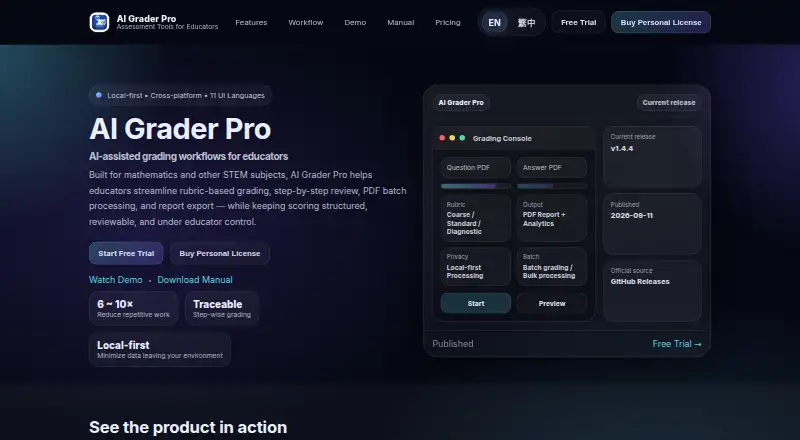
AI Grader Pro is desktop software for educators who grade mathematics and other STEM work with AI assistance. It lets educators build, adjust, and apply rubrics for structured scoring, including partial credit and review of a student’s solution steps. Question sheets and student answers can be processed in batches, after which educators can inspect rubric-supported scores and export reports, summaries, and class-level outputs. The product presents a local-first approach intended to minimize data leaving the user’s environment. Educators may instead configure selected third-party AI services, with those providers’ terms and privacy policies governing their processing. AI-generated grading, feedback, and analytics can contain errors, so users remain responsible for checking results and grading decisions. AI Grader Pro runs on macOS and Windows. Recommended requirements are macOS 13 or later, Windows 10/11 x64, at least 8 GB of RAM, and 1 GB of disk space. Full LaTeX output requires a LaTeX distribution. The Personal annual plan is $120 a year with email support. A Team annual plan is $299 a year, offers multi-user deployment and priority support, and is available in Q3 2026.
Who it suits
AI Grader Pro suits individual educators and STEM teaching teams that need rubric-based, step-wise scoring with partial credit. Departments and institutions can use the Team plan’s multi-user deployment and priority support.
What it does well
- Rubrics support structured and consistent scoring
- Partial credit and solution-step review
- Batch processing for question sheets and answers
- Exports reports, summaries, and class-level outputs
- Local-first approach minimizes data leaving the environment
- Runs on macOS and Windows
What to know first
- No free plan
- Paid annual plans start at $120 a year
- AI outputs may contain errors and require review
- Full LaTeX output needs a LaTeX distribution
Limits
There is no free plan. The Personal plan is for individual educators, while the Team plan adds multi-user deployment and is marked available in Q3 2026.
Plans
| Plan | Billed and limits | Price |
|---|---|---|
| Personal (Annual) | $120 / year · For individual educators · mathematics and other STEM subjects · macOS / Windows · email support | $120 a year |
| Team (Annual) | $299 / year · For departments, teaching teams, and institutional use · multi-user deployment · priority support · Available in Q3 2026 | $299 a year |
As aigraderpro.com lists them, read 7 Oct 2026. The maker's own page has the final word.
Getting started
- Open the AI Grader Pro website
- Choose the Personal or Team annual plan
- Start the free trial
- Install the macOS or Windows application
- Configure any third-party AI service you choose
- Prepare a LaTeX distribution if full LaTeX output is required
Verdict
Choose AI Grader Pro if you grade mathematics or other STEM responses and want rubric-driven, step-wise workflows with batch processing. Look elsewhere if you need a free plan or do not want responsibility for checking AI-generated grading and feedback.
Questions
Does AI Grader Pro have a free plan?
No. It offers a free trial, but the listed plans are paid.
How much does the Personal plan cost?
Personal (Annual) costs $120 a year and includes email support.
Which platforms does it support?
AI Grader Pro runs on macOS and Windows. Recommended systems are macOS 13 or later or Windows 10/11 x64.
Can it use external AI services?
Yes. Educators can configure selected third-party AI services, whose own terms and privacy policies govern processing.
What support comes with Team?
The Team annual plan lists priority support and multi-user deployment.
Facts from AI Grader Pro's own pages
- AI output responsibility
- The terms say AI-generated grading, feedback, and analytics may contain errors and users are responsible for reviewing outputs and grading decisions. · aigraderpro.com, 7 Oct 2026
- AI provider setup
- The software can be configured to send data to third-party AI services selected by the user, whose own terms and privacy policies govern processing. · aigraderpro.com, 7 Oct 2026
- Integrations
- The privacy policy identifies user-configured third-party AI services (BYOK) and says selected providers process data under their own policies. · aigraderpro.com, 7 Oct 2026
- Maker
- The privacy policy names HSIEH CHUNG-TSUN as the provider/developer. · aigraderpro.com, 7 Oct 2026
- PDF workflow
- It processes question sheets and student answers in batches and can export reports and summaries. · aigraderpro.com, 7 Oct 2026
- Platforms
- The latest public release is offered for macOS on Apple Silicon and Windows x64. · aigraderpro.com, 7 Oct 2026
- Privacy
- The product describes itself as local-first and says this minimizes data leaving the user's environment. · aigraderpro.com, 7 Oct 2026
- Purpose
- AI Grader Pro provides AI-assisted grading workflows for educators, with a focus on mathematics and other STEM subjects. · aigraderpro.com, 7 Oct 2026
- Requirements
- Recommended requirements include macOS 13 or later or Windows 10/11 x64, at least 8 GB RAM, and 1 GB disk space; full LaTeX output requires a LaTeX distribution. · aigraderpro.com, 7 Oct 2026
- Review and outputs
- Educators can review rubric-supported, step-wise scores and export reports, summaries, and class-level outputs. · aigraderpro.com, 7 Oct 2026
- Rubrics
- Educators can create, refine, and apply grading rubrics for structured and consistent scoring. · aigraderpro.com, 7 Oct 2026
- Step-wise grading
- The software supports partial credit and solution review for mathematics and other STEM responses. · aigraderpro.com, 7 Oct 2026
- Support
- The Personal plan includes email support, while the Team plan lists priority support. · aigraderpro.com, 7 Oct 2026
Where AI Grader Pro stands on Freedom251
- Rubric Software#13 of 22