Freedom251 › Text Summarization Software

Aginsi
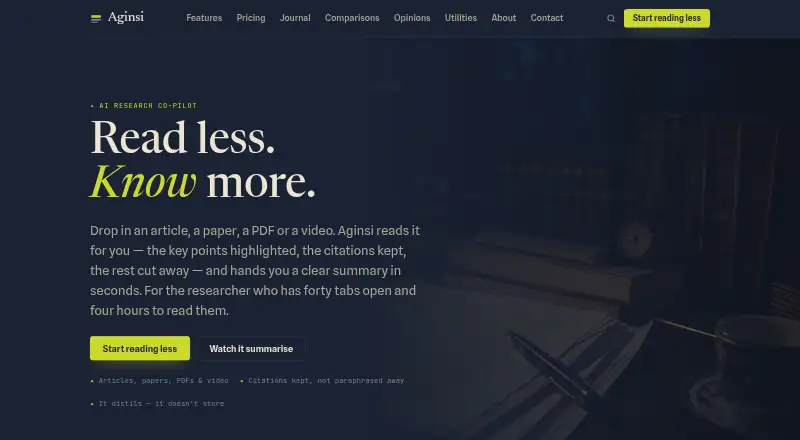
What Aginsi is
Aginsi is an AI research co-pilot that turns reading material into summaries with key points highlighted. It accepts articles, academic papers, PDFs, long threads, reports, and video transcripts. Summaries retain source references and show how much the original was shortened and the reading time saved. Aginsi says submitted source documents are discarded, keeping only summaries users choose to save; source text is processed temporarily and not used to train models. Users may request access to, correction of, export of, or deletion of account data and saved summaries by contacting [email protected]. Available through the web, an extension, and an API, Aginsi has a free Margin plan with 10 monthly summaries for articles and PDFs. Scholar costs $9 a month and adds unlimited summaries, a library, tags, search, Markdown and PDF exports, and a browser companion. Faculty costs $29 a month and adds team seats, shared shelves, batch and API access, and priority support. The company describes itself as a small studio in Helsinki. Its terms caution that generated summaries may omit nuance or contain errors, so they are not a substitute for the source when accuracy matters.
Who it suits
Aginsi suits people with substantial reading, including students and researchers using Scholar, and teams or departments considering Faculty. Readers who need accuracy should consult the original source rather than rely on a generated summary alone.
What it does well
- Accepts articles, papers, PDFs, reports, and transcripts.
- Summaries retain citations and show reading time saved.
- Source text is not used to train models.
- Free plan includes 10 monthly summaries.
- Faculty includes team seats and API access.
What to know first
- Free plan is limited to 10 summaries monthly.
- Generated summaries may omit nuance or contain errors.
- Faculty costs $29 a month.
Limits
Margin provides 10 summaries per month and supports articles and PDFs. Papers, video transcripts, unlimited summaries, library tools, and exports are included with Scholar; Faculty adds team and batch features.
Plans
| Plan | Billed and limits | Price |
|---|---|---|
| Margin | 10 summaries / month · Articles & PDFs · Key-point highlights · Citations kept | Free |
| Faculty | $29/mo · Everything in Scholar · Team seats & shared shelves · Batch & API access · Priority support | $29 a month |
| Scholar | $9/mo · Unlimited summaries · Papers & video transcripts · Library, tags & search · Export to Markdown & PDF · Browser companion | $9 a month |
As aginsi.com lists them, read 4 Oct 2026. The maker's own page has the final word.
Getting started
- Open the Aginsi website or use its extension.
- Choose the free Margin plan, Scholar at $9/mo, or Faculty at $29/mo.
- Use supported source material such as an article, PDF, paper, report, long thread, or video transcript.
- Review the summary's highlights, citations, compression, and reading-time estimate.
- Save summaries you want to retain.
Aginsi is a research summarizer for people who need to work through more reading than time allows, from individual students to research teams. Its citations and support for varied source formats make it useful for triage, but the free plan is limited and summaries should not replace originals when precision matters.
Overview
Aginsi accepts articles, academic papers, PDFs, long threads, reports and video transcripts. It keeps highlighted passages and references with each summary, then shows the degree of compression and estimated reading time saved. That combination helps readers scan and trace material, although it cannot ensure that every qualification survives the summary. Aginsi warns that generated summaries may contain errors or lose nuance; readers should consult the source for accuracy-sensitive work.
Aginsi says it discards submitted documents and retains only summaries users choose to save. Its privacy policy says source text is processed transiently and is not used to train models. The company describes industry-standard safeguards, essential cookies and privacy-respecting analytics without third-party advertising trackers. Users may request access, correction, export or deletion of account data and saved summaries by contacting [email protected].
Key features
- Highlights and citations: Key passages and references stay attached to summaries, making it easier to check a point against its source. This is valuable for research triage, but the warning about errors and lost nuance still applies.
- Visible compression: Each summary indicates how much the source was shortened and the reading time saved. These signals help prioritize what to read in full rather than treating a digest as a replacement.
- Saved library: Scholar adds a library with tags and search, plus Markdown and PDF export. Those tools suit readers building a reusable collection; Margin does not include them.
- Browser companion and API: Scholar includes a browser companion, while Faculty adds batch and API access. Aginsi does not name third-party integrations, so teams needing a particular connected service should confirm it meets their workflow.
Pricing
Aginsi is freemium, with three monthly tiers. The free plan is a sensible way to try its basic summaries, but ten per month is a tight allowance for regular reading.
- Margin — free: Ten summaries per month, articles and PDFs, key-point highlights and citations. It suits occasional readers; the monthly cap and narrower source coverage make it a poor fit for sustained research or transcript-heavy work.
- Scholar — $9 a month: Unlimited summaries, papers and video transcripts, library, tags and search, Markdown and PDF export, and a browser companion. This is the strongest fit for an individual student or researcher with ongoing reading. It does not include team seats, shared shelves or batch and API access.
- Faculty — $29 a month: Everything in Scholar, plus team seats, shared shelves, batch and API access, and priority support. It fits teams and departments that need shared research workflows; the price is monthly, and no seat count is given.
Aginsi lists support at [email protected]. Faculty includes priority support; the other tiers do not include that stated benefit.
Platforms
Aginsi is available on the web and as an extension, and it offers API access. File uploads, webpage summarization and transcript summarization are supported; summaries are output as bullets. The platform mix covers browser-based individual use and programmatic access, but no native mobile or desktop app is identified.
Who it's for
Aginsi suits people who regularly need to triage long reading while keeping a path back to source material. Margin can serve occasional article and PDF summaries; Scholar is the practical choice for individual students and researchers handling papers or transcripts. Faculty is aimed at teams and departments that need shared shelves or batch and API workflows. It is not a substitute for close reading where exact wording, context or nuance is critical.
Pros and cons
Pros
- References remain attached: Highlights and citations give readers a route back to the material behind a summary.
- Broad source coverage: Articles, papers, PDFs, threads, reports and video transcripts cover more than document-only workflows.
- Clear privacy controls: Aginsi says source documents are discarded, source text is not used to train models, and users can request account-data access, export or deletion.
Cons
- Free usage is capped: Ten summaries a month may be exhausted quickly by regular readers.
- Accuracy needs oversight: Summaries can contain errors or omit nuance, limiting their use when fidelity matters.
- Team details are limited: Faculty includes team seats, but no seat count is given, making the fit harder to assess before purchase.
Alternatives
For a wider comparison, browse Text Summarization Software.
- ChatPDF is worth considering if a two-documents-per-day free allowance or its broad Android, iOS, Linux, macOS and Windows platform coverage matters more than Aginsi's source range.
- AskYourPDF is an alternative for readers who want a yearly Premium plan at $11.99 a year, with a free plan and trial.
- OpenBrief suits readers who prefer a free desktop app built in the open, with source code linked on GitHub.
- Summify may fit readers who want analysis with Learn cards and quizzes, with iOS and web access.
- genei is an option for readers seeking a Chrome extension for one-click webpage summaries, with a free Extension plan and a trial.
- Humata is another freemium option for web and API use, with a free tier capped at 60 pages monthly for one user.
- Kenkyu.ai is a web-based alternative with free AI chats and file uploads, oriented around searching papers.
- NoteVox is a web alternative with a free tier and a Pro plan that includes larger files and saved history.
Verdict
Choose Aginsi if you are a student, researcher or team that needs summaries across varied source types and values citations, highlights and visible compression. Scholar is the clearest fit for regular individual use; Faculty makes sense when shared shelves or API access matter. Look elsewhere if you need a generous free allowance or must rely on summaries without checking originals.
Verdict
Aginsi combines highlighted summaries with citations and controls for saved data. Its plans range from a limited free option to paid plans for individual research and team use; summaries may contain errors or lose nuance.
Questions
Is Aginsi free?
Yes. Margin is free and includes 10 summaries per month for articles and PDFs.
How much do the paid plans cost?
Scholar is $9/mo. Faculty is $29/mo.
Which platforms does Aginsi support?
Aginsi is available on the web, as an extension, and through an API.
What does Scholar include?
Scholar includes unlimited summaries, papers and video transcripts, a library with tags and search, Markdown and PDF exports, and a browser companion.
What does Faculty add?
Faculty includes everything in Scholar, plus team seats, shared shelves, batch and API access, and priority support.
Does Aginsi use submitted text to train models?
Aginsi says source text is processed temporarily to generate summaries and is not used to train models.
Facts from Aginsi's own pages
- AI training
- The privacy policy says source text is processed transiently to generate summaries and is not used to train models. · aginsi.com, 4 Oct 2026
- Company location
- Aginsi describes itself as a small studio in Helsinki. · aginsi.com, 4 Oct 2026
- Data controls
- Users may access, correct, export, or delete account data and saved summaries by contacting [email protected]. · aginsi.com, 4 Oct 2026
- Headquarters
- Helsinki, Finland · aginsi.com, 28 Sept 2026
- Highlights and citations
- Aginsi highlights key passages and keeps sources and references attached to summaries. · aginsi.com, 4 Oct 2026
- Integrations and API
- The pricing page lists batch and API access in Faculty and a browser companion in Scholar; it does not name third-party integrations. · aginsi.com, 4 Oct 2026
- Intended users
- Aginsi presents itself for people with more to read than time, and describes Scholar for students and researchers and Faculty for teams and departments. · aginsi.com, 4 Oct 2026
- Notable limitation
- The terms caution that machine-generated summaries may omit nuance or contain errors and are not a substitute for the source where accuracy matters. · aginsi.com, 4 Oct 2026
- Product
- Aginsi describes itself as an AI research co-pilot that reads sources and produces summaries with highlighted key points. · aginsi.com, 4 Oct 2026
- Saved content
- Aginsi says it discards submitted source documents and retains only summaries users choose to save. · aginsi.com, 4 Oct 2026
- Security
- The privacy policy says Aginsi applies industry-standard safeguards and uses essential cookies and privacy-respecting analytics without third-party advertising trackers. · aginsi.com, 4 Oct 2026
- Support
- Aginsi lists [email protected] for support and says Faculty includes priority support. · aginsi.com, 4 Oct 2026
- Supported sources
- It accepts articles, academic papers, PDFs, long threads, reports, and video transcripts. · aginsi.com, 4 Oct 2026
- Visible compression
- Each summary shows how much the source was shortened and the reading time saved. · aginsi.com, 4 Oct 2026
Where Aginsi stands on Freedom251
- Text Summarization Software#2 of 24