Freedom251 › Action Item Tracking Software

AfterTheCall
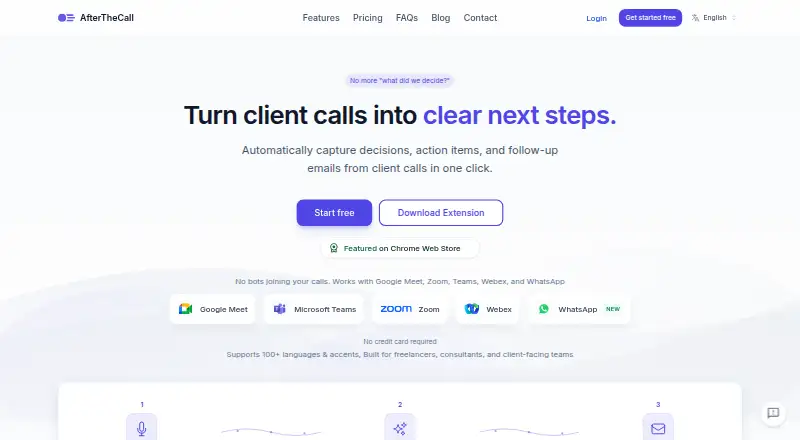
What AfterTheCall is
AfterTheCall records client meetings through a browser extension and creates summaries, assigned action items, searchable transcripts, and follow-up email drafts. The emails can recap decisions, next steps, owners, and deadlines. Meetings are captured without adding a bot or participant to the call. Supported platforms include Google Meet, Zoom, Microsoft Teams, Webex, and WhatsApp; the extension requires Chrome or another Chromium-based browser. Integrations include HubSpot, Notion, Jira, Confluence, and Google Docs. The service supports more than 100 languages and regional variants, including code-switching. Meeting audio is encrypted in transit and at rest, stored with access controls, and can be deleted on demand. Private meeting content is not used to train public models, and users can share selected audio, summaries, action items, notes, or transcripts through links. The Free plan includes three client calls, one follow-up email per call, and manual recording. Pro costs $9 a month, billed monthly, and includes unlimited calls, summaries, and follow-ups, full call history, all integrations, priority processing, and email support.
Who it suits
It is built for freelancers, consultants, agencies, and other client-facing teams. It may suit people who want meeting notes and follow-ups without adding a call bot.
What it does well
- Captures calls without a bot or participant
- Creates summaries, action items, and transcripts
- Supports more than 100 languages and variants
- Offers integrations with five named services
- Free plan includes three client calls
What to know first
- Extension requires Chrome or a Chromium-based browser
- Free plan uses manual recording
- Free plan limits users to three calls
Limits
The Free plan includes three client calls, one follow-up email per call, and manual recording. It includes Notion and Google Docs integration; unlimited calls, full call history, all integrations, priority processing, and email support are listed with Pro.
Plans
| Plan | Billed and limits | Price |
|---|---|---|
| Free | No credit card required · 3 client calls · one follow-up email per call · Notion & Google Docs integration · manual recording | Free |
| Pro | Billed monthly; cancel anytime · Unlimited client calls · unlimited summaries and follow-ups · full call history · all integrations · priority processing · email support | $9 a month |
As afterthecall.io lists them, read 15 Oct 2026. The maker's own page has the final word.
Getting started
- Open afterthecall.io.
- Use a Chrome or Chromium-based browser for the extension.
- Choose the Free plan, which requires no credit card, or Pro at $9 a month, billed monthly.
- Connect a supported meeting platform such as Google Meet, Zoom, Microsoft Teams, Webex, or WhatsApp.
- Record a client call and review its summary, action items, transcript, or follow-up email.
AfterTheCall is an AI meeting recorder for freelancers, consultants, agencies, and other client-facing teams. It suits people who need conversations turned into accountable next steps and client-ready follow-ups, not merely archived audio. Its strongest case is a bot-free workflow that connects summaries, owners, deadlines, and email drafts, provided you can work in a Chromium browser.
Overview
AfterTheCall records client meetings through a browser extension, then produces an AI summary, searchable transcript, and extracted action items. Tasks can carry an owner, due date, and reminder, giving teams a clearer handoff from discussion to delivery. Follow-up drafts combine the recap, decisions, next steps, owners, and deadlines in one email, reducing routine client communication while leaving the final review and send to you.
Capture does not add a bot or extra participant to the call. Google Meet, Zoom, Microsoft Teams, Webex, and WhatsApp are supported. The trade-off is practical: the extension requires Chrome or another Chromium-based browser, so it is a poor fit for teams whose calling workflow cannot use that environment.
Key features
- Searchable meeting records: AI summaries and transcripts let users locate decisions without replaying a full call. Support for more than 100 languages and regional variants, including Spanish-English code-switching, broadens its usefulness for international client work.
- Action-item tracking: Extraction, assignment, due dates, and reminders make commitments visible after the meeting. This is more operationally useful than transcription alone when several people share responsibility.
- Follow-up emails: Drafts assemble recaps and commitments into a ready-to-send format, saving rewriting time. They remain drafts, so users should check accuracy and tone before sending.
- Integrations and sharing: HubSpot, Notion, Jira, Confluence, and Google Docs integrations connect meeting output to existing workflows. Selective links can share audio, summaries, action items, notes, or transcripts rather than exposing every record.
- Privacy controls: Audio is encrypted in transit and at rest, protected by access controls, and deletable on demand. Private meeting content is not used to train public models.
Pricing
| Plan | Price | Includes |
|---|---|---|
| Free | free | Three client calls, one follow-up email per call, Notion and Google Docs integration, and manual recording; no credit card required. |
| Pro | $9 a month, billed monthly | Unlimited client calls, unlimited summaries and follow-ups, full call history, all integrations, priority processing, and email support; cancel anytime. |
The Free plan is a useful three-call trial for occasional users who can accept manual recording and limited follow-up output. It is not a durable plan for regular client work: call volume, emails, integrations, and history are constrained. Pro is the sensible upgrade for consultants and teams running recurring meetings, because unlimited calls and follow-ups remove the main usage ceiling at a predictable monthly price. The free trial requires no card, while Pro renews monthly until canceled.
Platforms
AfterTheCall is delivered through an extension and web app. The extension works in Chrome or another Chromium-based browser and supports Google Meet, Zoom, Microsoft Teams, Webex, and WhatsApp. Browser dependence is the key platform limitation.
Who it's for
Freelancers, consultants, agencies, and client-facing teams are the natural audience: they can turn calls into assigned work and polished recaps without placing a recording bot in the meeting. It is less suitable for users who need a non-Chromium capture method or who only want occasional transcription beyond the three free calls.
Pros and cons
Pros
- Botless extension capture avoids adding a participant to client calls.
- Owners, due dates, and reminders connect notes to follow-through.
- More than 100 languages and code-switching support serve multilingual meetings.
- Pro combines unlimited usage with all listed integrations for $9 a month.
- Encryption, access controls, deletion on demand, and a no-public-model-training policy address important meeting privacy concerns.
Cons
- Recording depends on Chrome or another Chromium-based browser.
- The Free plan allows only three client calls and one follow-up email per call.
- Follow-up messages are drafts, so client communication still needs human review.
Alternatives
Choose HyNote instead if you need Android, iOS, macOS, or broader platform coverage, with a free plan allowing up to 120 minutes per session plus audio recording, transcription, and templates.
Route5 AI is the better choice when commitment enforcement is the priority, though its free tier is view-only with a maximum of three commitments.
Pick Knowtworthy for quick, account-free meetings with real-time sharing, editing, and PDF download.
4Minitz suits organizations wanting free, open-source, self-hosted meeting software.
ActFlux is an alternative web option with five free meetings per month.
Beagle is a paid web service built around credits and broad integrations.
imeetly fits users who prefer a free five-meeting monthly allowance and AI memory searches.
Insolla Meeting Notes Analyzer is another web-based option for structured, row-based processing.
Verdict
AfterTheCall is a strong recommendation for client-facing professionals who want one workflow from meeting capture to assigned work and follow-up email. Pro’s unlimited calls, integrations, and $9.00 USD monthly price make it the practical plan for frequent users. Look elsewhere if Chromium-based recording is unacceptable, or if you need a broader native-device strategy than its extension and web setup provide.
Verdict
AfterTheCall combines meeting capture with summaries, assigned actions, transcripts, and follow-up drafts. Pro costs $9 a month, billed monthly; the Free plan has three calls.
Questions
Is AfterTheCall free?
Yes. Its Free plan costs nothing and requires no credit card. It includes three client calls and one follow-up email per call.
How much does Pro cost?
Pro costs $9 a month, billed monthly. The plan can be canceled anytime.
Which platforms and meetings does it support?
AfterTheCall is available on the web and as an extension. It supports Google Meet, Zoom, Microsoft Teams, Webex, and WhatsApp; the extension requires Chrome or another Chromium-based browser.
What integrations are available?
Integrations include HubSpot, Notion, Jira, Confluence, and Google Docs. The Free plan lists Notion and Google Docs integration; Pro includes all integrations.
Who makes AfterTheCall?
The listed website is afterthecall.io. No maker name is provided.
Facts from AfterTheCall's own pages
- Action items
- Action items are extracted with owners and deadlines. · afterthecall.io, 15 Oct 2026
- AI accuracy limit
- The terms warn that AI-generated summaries, notes and action items may contain inaccuracies and must be reviewed. · afterthecall.io, 15 Oct 2026
- AI outputs
- Each meeting gets an AI-generated summary, actionable items with ownership, and a searchable transcript. · afterthecall.io, 1 Oct 2026
- AI training policy
- Private meeting content is not used to train public models. · afterthecall.io, 1 Oct 2026
- Availability limit
- The terms provide no guarantee of uninterrupted availability, error-free operation or specific AI results. · afterthecall.io, 15 Oct 2026
- Botless capture
- AfterTheCall captures meetings through a browser extension without adding a bot or participant to the call. · afterthecall.io, 1 Oct 2026
- Browser requirement
- Chrome or another Chromium-based browser is required to run the extension. · afterthecall.io, 1 Oct 2026
- Chrome listing size
- The extension listing reports a 156 KiB package, version 1.5.0, updated July 31, 2026. · chromewebstore.google.com, 15 Oct 2026
- Client summaries
- The product extracts discussion outcomes, decisions, goals and next steps into client-ready summaries. · afterthecall.io, 15 Oct 2026
- Company founders
- A LinkedIn announcement says Muhammad Abdul Rehman and Muhammad Abu Sufyan built AfterTheCall. · linkedin.com, 15 Oct 2026
- Company positioning
- The founders describe the product as focused on turning client calls into clear, ready-to-send follow-ups and as more affordable than most competing tools. · linkedin.com, 15 Oct 2026
- Consent responsibility
- The terms place responsibility on users to inform participants and obtain legally required recording consent. · afterthecall.io, 15 Oct 2026
- Data retention limit
- The terms reserve the right to delete inactive or unused data and enforce reasonable storage limits. · afterthecall.io, 15 Oct 2026
- Developer documentation
- The public site exposes integration guides and FAQs but no public API or SDK documentation was listed on the pages reviewed. · afterthecall.io, 15 Oct 2026
- Follow-up emails
- The product drafts recap emails containing decisions, action items and next steps for review before sending. · afterthecall.io, 15 Oct 2026
- Free access
- New users get three free calls to try the AI summaries before upgrading. · afterthecall.io, 1 Oct 2026
- Integration mapping
- Meeting summaries can map to CRM activities, Notion pages or Google Docs; action items can become Jira issues or task-list entries. · afterthecall.io, 15 Oct 2026
- Integrations
- Listed integrations are HubSpot, Notion, Jira, Confluence and Google Docs. · afterthecall.io, 15 Oct 2026
- Language support
- AfterTheCall states that it supports more than 100 languages, regional variants and mixed-language conversations. · afterthecall.io, 15 Oct 2026
- Licence
- The terms grant AfterTheCall a limited license to process and store user content for service delivery and prohibit reverse engineering; no open-source licence is published. · afterthecall.io, 15 Oct 2026
- Limit: browser dependence
- The Chrome listing provides the product as a browser extension, and the official platform page requires a Chromium browser. · chromewebstore.google.com, 15 Oct 2026
- Meeting capture
- Recording is started manually from a browser extension and does not add a bot participant to the call. · afterthecall.io, 15 Oct 2026
- Mobile limitation
- The FAQ says mobile recordings are not supported yet. · afterthecall.io, 15 Oct 2026
- Notable news
- The homepage lists WhatsApp AI meeting notes and WhatsApp call support announcements dated July 30, 2026. · afterthecall.io, 15 Oct 2026
Where AfterTheCall stands on Freedom251
- Action Item Tracking Software#3 of 26