Admiral
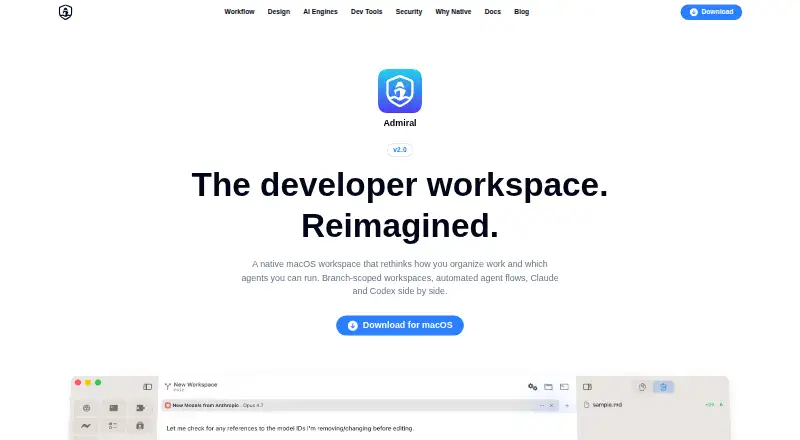
What Admiral is
Admiral is a free developer workspace for macOS that combines AI coding assistants, development tools, and project planning. Workspaces collect chats, terminals, and pull requests around a task, and can be tied to a branch and Git worktree. Chats can use Claude Code or the Codex CLI, with an agent and model selected for each chat. Automation flows can run Coordinator, Implementer, and Reviewer agents, with scripted shell checks between phases. Built-in tools include Git staging, commits and pushes, side-by-side diffs, a terminal, and project file browsing. The local planner sorts issues into Backlog, Planned, In Progress, and Done, with checklists and task context that can be added to chats. Pull request features work with GitHub only; reviews, inline comments, file diffs, and CI status remain on GitHub.com. Project files, conversations, and session history stay on the Mac. AI conversations go directly to the selected provider. Admiral 2.0.0 requires macOS 15.0 or later and supports Apple Silicon and Intel Macs.
Who it suits
Admiral is for developers who want to organize coding tasks, run AI agents, and manage Git-based work on a Mac. It suits people who use GitHub and are comfortable with a local planner that does not sync to external tools.
What it does well
- Supports Claude Code and the Codex CLI
- Includes terminal, Git tools, diffs, and file browsing
- Planner organizes issues into four workflow stages
- AI-requested edits and commands require approval
What to know first
- Requires macOS 15.0 or later
- Pull request features support GitHub only
- Planner does not sync with external tools
- No extensions support
Verdict
Admiral brings task planning, AI chats, terminal work, and Git tools into one macOS workspace. Its local storage and approval controls are notable, but GitHub review details remain on GitHub.com.
Facts from Admiral's own pages
- AI agents
- The app supports Claude Code and the Codex CLI, with an agent and model selectable for each chat. · admiralai.dev, 8 Oct 2026
- AI data path
- When AI features are used, conversations go directly from the device to the selected AI provider; Admiral says it does not proxy or access their content. · admiralai.dev, 8 Oct 2026
- Analytics
- The documentation says Admiral uses TelemetryDeck for anonymous, aggregated usage analytics and excludes personally identifiable information, file paths, source code, and message content. · admiralai.dev, 8 Oct 2026
- Approvals
- Users can review and approve or deny AI-requested file edits and terminal commands through permission panels. · admiralai.dev, 8 Oct 2026
- Audience
- The product is presented as a developer workspace for organizing coding tasks, running AI agents, and managing Git-based work. · admiralai.dev, 8 Oct 2026
- Automation
- Automation flows can run Coordinator, Implementer, and Reviewer agents, with scripted shell checks between flow phases. · admiralai.dev, 8 Oct 2026
- Credentials
- The product says API keys and credentials are stored using macOS security mechanisms, including Keychain, and are not sent to Admiral’s servers. · admiralai.dev, 8 Oct 2026
- Developer tools
- Built-in tools include Git staging, commits and pushes, side-by-side diffs, a terminal, and project file browsing. · admiralai.dev, 8 Oct 2026
- GitHub integration
- Pull request features support GitHub only and use system Git credentials for authentication. · admiralai.dev, 8 Oct 2026
- GitHub support
- Pull request features support GitHub only and use the system Git credential helper for authentication. · admiralai.dev, 8 Oct 2026
- Local data
- Project files, source code, conversations, and session history are stored locally on the Mac and are not transmitted to Admiral’s servers. · admiralai.dev, 8 Oct 2026
- Local storage
- Project files, conversations, and session history are stored locally, and the privacy policy says Admiral does not transmit them to its servers. · admiralai.dev, 8 Oct 2026
- Permissions
- AI file edits, terminal commands, and other actions are presented for approval, with per-action or per-session permission options. · admiralai.dev, 8 Oct 2026
- Planning
- Its local planner organizes issues into Backlog, Planned, In Progress, and Done, with checklists and issue context that can be inserted into chat using @task. · admiralai.dev, 8 Oct 2026
- Planning limit
- Issues and plans in the built-in planner are stored locally and do not sync to GitHub Issues or another external tool. · admiralai.dev, 8 Oct 2026
- PR limitation
- Admiral provides PR linking and creation, while reviews, inline comments, file diffs, and CI status remain on GitHub.com. · admiralai.dev, 8 Oct 2026
- Product
- Admiral is a native macOS developer workspace that combines AI coding assistants, developer tools, and project management. · admiralai.dev, 8 Oct 2026
- Support
- The site provides contact and support links in its company navigation. · admiralai.dev, 8 Oct 2026
- System requirement
- Admiral 2.0.0 requires macOS 15.0 or later and supports Apple Silicon or Intel Macs. · admiralai.dev, 8 Oct 2026
- System requirements
- Admiral 2.0.0 requires macOS 15.0 or later; the documentation lists Apple Silicon or Intel Macs as supported. · admiralai.dev, 8 Oct 2026
- Workspaces
- Workspaces group chats, terminals, files, and pull request details around a branch, with optional Git worktree isolation. · admiralai.dev, 8 Oct 2026
Where Admiral stands on Freedom251
- AI Code Editors#16 of 26