Freedom251 › Disposable Email Services

10 Minute Temp Email
What 10 Minute Temp Email is
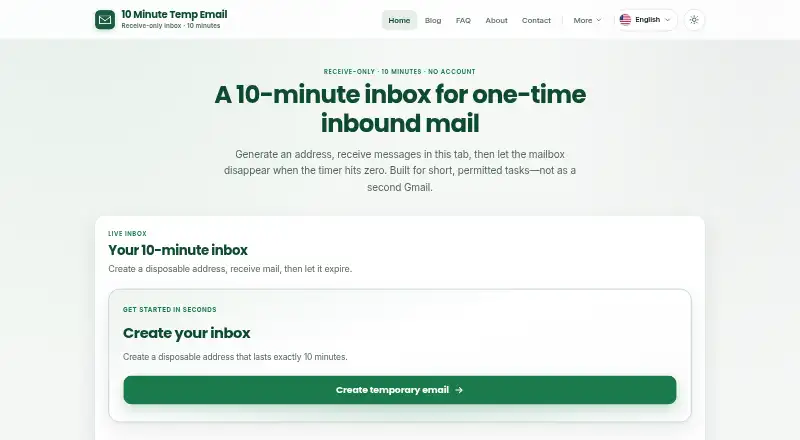
10 Minute Temp Email provides a browser inbox for receiving messages at an address that lasts 10 minutes. It is intended for low-stakes forms that accept disposable addresses and for testing systems you own or are authorized to test. No account or payment is needed, and the free plan costs nothing. The inbox cannot send, reply to, or forward messages. When the 10-minute period ends, access stops and the mailbox cannot be recovered; data is scheduled for deletion after expiry or manual deletion. Listed safe attachment types include images, PDF, text/CSV, and ZIP, while unsupported or oversized files are blocked and HTML email is sanitized. Access uses an HttpOnly session cookie, and the raw session token is not stored in the database. The maker says the service may show Google AdSense ads and uses Google Analytics; in the EEA, UK, and Switzerland, advertising and analytics storage defaults to denied until consent. It should not be used for banking, healthcare, government, employment, password recovery, or bypassing another site's disposable-address restrictions.
Who it suits
It suits people using low-stakes forms that allow disposable addresses, or testing systems they own or are authorized to test. It is not intended for sensitive accounts or bypassing site restrictions.
What it does well
- No account or payment is required.
- Free plan costs nothing.
- Supports listed safe attachment types.
- API access is listed.
What to know first
- Mailboxes expire after exactly 10 minutes.
- Messages cannot be sent, answered, or forwarded.
- Expired mailboxes cannot be recovered.
- Custom addresses and domains are unavailable.
Limits
The free plan provides a receive-only mailbox for 10 minutes, with no recovery after expiry. Custom addresses and custom domains are unavailable.
Plans
| Plan | Billed and limits | Price |
|---|---|---|
| Free | Receive-only · 10-minute mailbox · no recovery | Free |
As 10mintempemail.com lists them, read 7 Oct 2026. The maker's own page has the final word.
Getting started
- Open https://10mintempemail.com/.
- Create an inbox without an account or payment.
- Use the inbox to receive messages during its 10-minute lifetime.
10 Minute Temp Email is a free browser inbox for receiving short-lived email. It is best for permitted low-stakes signups and authorized tests where a disposable address is acceptable. Its narrow purpose is also its main constraint: mail disappears quickly, and the inbox cannot send.
Overview
You can create an inbox without an account or payment, but access lasts exactly 10 minutes (600 seconds) from creation. After that, the mailbox cannot be recovered, and its data is scheduled for deletion after expiry or manual deletion. That makes it useful for a confirmation you can handle promptly, not for keeping a receipt or retrieving a message later.
The service is intended for low-stakes forms that permit disposable addresses and for testing systems you own or are authorized to test. The maker advises against using it for banking, healthcare, government, employment, password recovery, or to get around another site's disposable-address restrictions. Those limits rule it out for sensitive records and accounts where reliable future access matters.
Key features
Receive-only mail
The inbox receives messages but cannot send, reply, or forward. That is sufficient for one-time confirmations and controlled signup-flow checks; it is not an option for correspondence or any process that expects a reply.
Attachments and message handling
Supported safe attachment types include images, PDF, text or CSV, and ZIP. Unsupported or oversized files are blocked, and HTML email is sanitized. These safeguards allow some useful inbound content while limiting what the inbox will accept and how formatted messages are handled.
Session and infrastructure
Mailbox access uses an HttpOnly session cookie, and the raw session token is not stored in the database. The maker says the public site and mail pipeline run on Cloudflare Workers, with mailbox metadata in D1 and message bodies in a private R2 bucket. This describes the service's session and storage setup, but the short mailbox lifetime remains a poor match for mail that needs ongoing access.
The free service may show Google AdSense ads and uses Google Analytics. For visitors in the EEA, UK, and Switzerland, analytics and advertising storage default to denied until consent. General support, privacy questions, and partnership or advertising inquiries can be sent to [email protected]. The service is maintained by software engineer Dinitha Ransidu, with no larger team or office address identified on its about page.
Pricing
The Free plan costs nothing and includes receive-only access, a 10-minute mailbox, and no recovery. There is no account or payment requirement to create an inbox. It includes API access, but custom addresses and custom domains are not offered. That package fits occasional inbound checks; the short expiry and inability to recover a mailbox are the tradeoffs, especially for anyone who may need to revisit a message.
Platforms
10 Minute Temp Email is available on the web. It also supports API access, which may suit authorized testing workflows, though the mailbox remains receive-only and expires after 10 minutes.
Who it's for
Choose it when a permitted low-stakes form needs a temporary address or when you are testing a system you own or are authorized to test. Look elsewhere for sensitive or important accounts, password recovery, longer retention, custom addresses, or any use that requires sending or replying.
Pros and cons
Pros
- Free inbox creation without an account or payment keeps a short-lived check simple.
- Ten-minute expiry and scheduled deletion suit situations where a temporary inbox is preferable to retaining messages.
- Safe attachment support, HTML sanitization, and an HttpOnly session cookie provide defined handling for incoming content and mailbox access.
- API access gives authorized testers another way to incorporate the service into a workflow.
Cons
- At 10 minutes, the mailbox can expire before a delayed confirmation arrives or before you can return to it.
- Expired mailboxes cannot be recovered, so the service is unsuitable when a message must remain accessible.
- Receive-only use excludes replies, forwarding, and ongoing email exchanges.
- No custom address or domain limits its fit for users who need more control over the address they use.
- Ads and analytics may be present, although storage for them defaults to denied in the EEA, UK, and Switzerland until consent.
Alternatives
Disposable Email Services is a directory-wide starting point if you want to compare disposable inbox options rather than choose this specific 10-minute model.
Pick EmailOnDeck if you want a service with Android, iOS, extension, and API availability alongside web access; its free plan is ad-supported, allows one email at a time, and securely wipes logs.
SecureTempMail is the alternative to consider if up to 30-day retention, premium private domains, attachment downloads, inbox history, and search are more important than a strictly short-lived inbox; its Premium plan is $39 a year.
Choose Temp-Mail.org if you want messages stored for up to 1–2 hours on its free plan rather than 10 minutes. Its free tier is receive-only, and it also offers a Premium monthly plan for $10 a month.
TempMailPortal is another free option, with web and Android inbox access and messages expiring within up to 24 hours.
1secemail is a free web-based temporary email alternative with no subscription needed.
Consider Emailnator if you need up to 100 addresses at once and public inboxes with messages deleted after 24 hours; its free tier requires no signup.
Maildrop is a free API and web alternative with a 10-message maximum and a 500k message-size limit.
MailDrop is another API and web option; its free plan includes 300 requests per day and one mailbox per 24 hours, while the Starter plan costs $5 a month.
Verdict
Choose 10 Minute Temp Email for a permitted, low-stakes form or an authorized test when a free, no-account inbox for immediate incoming mail is all you need. The decisive reason to choose it is that narrow, uncomplicated use; the decisive reason to look elsewhere is that access ends after 10 minutes with no recovery, and the inbox cannot send.
Verdict
This is a narrowly scoped option for short-lived, receive-only mail on permitted low-stakes forms and authorized testing. Its brief mailbox lifetime and lack of recovery make it unsuitable for accounts or messages that need ongoing access.
Questions
How much does it cost?
The Free plan costs nothing, and an account or payment is not required to create an inbox.
How long does an inbox last?
Each mailbox lasts exactly 10 minutes (600 seconds) from creation. Expired mailboxes cannot be recovered.
Can I send or forward email?
No. The inbox is receive-only and cannot send, reply to, or forward messages.
Which platforms does it support?
The listed platform is web.
Who maintains the service?
Software engineer Dinitha Ransidu created and maintains it.
Can I use it for sensitive accounts?
The service is intended for low-stakes forms that accept disposable addresses and authorized testing. Its stated restrictions exclude banking, healthcare, government, employment, password recovery, and bypassing disposable-address restrictions.
Facts from 10 Minute Temp Email's own pages
- Advertising and analytics
- The free service may show Google AdSense ads and uses Google Analytics; analytics and advertising storage default to denied for visitors in the EEA, UK, and Switzerland until consent. · 10mintempemail.com, 7 Oct 2026
- Attachments and HTML
- The service supports listed safe attachment types including images, PDF, text/CSV, and ZIP, while unsupported or oversized files are blocked and HTML email is sanitized. · 10mintempemail.com, 7 Oct 2026
- Deletion
- Mailbox data is scheduled for deletion after expiry or manual deletion, and expired mailboxes cannot be recovered. · 10mintempemail.com, 7 Oct 2026
- Infrastructure
- The maker says the public site and mail pipeline use Cloudflare Workers, with mailbox metadata in D1 and message bodies in a private R2 bucket. · 10mintempemail.com, 7 Oct 2026
- Intended users
- The service is intended for low-stakes forms that permit disposable addresses and for testing systems users own or are authorized to test. · 10mintempemail.com, 7 Oct 2026
- Mailbox lifetime
- Each mailbox lasts exactly 10 minutes (600 seconds) from creation, after which access ends. · 10mintempemail.com, 7 Oct 2026
- No account
- Users can create and use an inbox without an account or payment. · 10mintempemail.com, 7 Oct 2026
- Operator
- The service was created and is maintained by software engineer Dinitha Ransidu, and the about page says there is no larger team or office address to list. · 10mintempemail.com, 7 Oct 2026
- Purpose
- The service provides a browser inbox for short-lived inbound mail, including one-time confirmations and authorized signup-flow testing. · 10mintempemail.com, 7 Oct 2026
- Receive-only
- Users cannot send, reply to, or forward email from the inbox. · 10mintempemail.com, 7 Oct 2026
- Session security
- Mailbox access uses an HttpOnly session cookie, and the raw session token is not stored in the database. · 10mintempemail.com, 7 Oct 2026
- Support
- General support, privacy questions, and partnership or advertising inquiries can be sent to [email protected]. · 10mintempemail.com, 7 Oct 2026
- Use restrictions
- The maker says not to use the service for banking, healthcare, government, employment, password recovery, or bypassing another site's disposable-address restrictions. · 10mintempemail.com, 7 Oct 2026
Where 10 Minute Temp Email stands on Freedom251
- Disposable Email Services#9 of 25
- Temporary email services#16 of 44