Freedom251 › Temporary email services

MailDrop
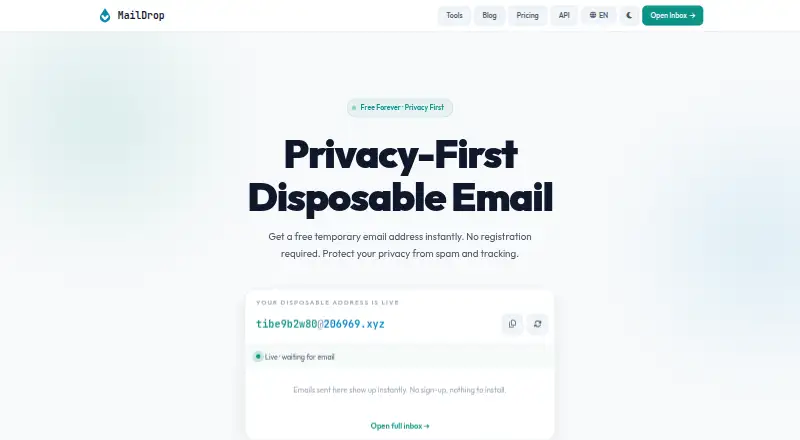
What MailDrop is
MailDrop provides temporary disposable email inboxes for sign-ups, verification messages, downloads, trials and forms. Opening an inbox does not require an account, phone number or personal information. Users can set a custom prefix and choose from several domains; inboxes refresh every 30 seconds and can receive HTML email, verification codes and attachments for browser preview or download. Messages are kept temporarily and then deleted automatically, so MailDrop advises against using temporary inboxes for long-term accounts such as banking. A REST API can create temporary mailboxes and read incoming email. API keys authenticate requests, and claimed mailboxes can be read only by the key that created them. When a quota runs out, the API returns HTTP 429 and includes quota state in response headers. The free API plan is described as a permanent trial with no credit card required. MailDrop lists web and API access and says the service is available in seven languages. Paid API plans start at $5 a month.
Who it suits
MailDrop suits people who need temporary inboxes for short-lived sign-ups or verification, as well as developers who need an API for temporary mailboxes. It is not suited to keeping long-term account messages.
What it does well
- Inbox access requires no account or personal information.
- Custom prefixes and several domains are available.
- Inbox refreshes every 30 seconds.
- Attachments can be previewed or downloaded in a browser.
What to know first
- Messages are deleted automatically after a temporary period.
- Custom domains are not available.
- The free plan allows 300 requests per day and one mailbox per 24 hours.
Limits
The Free plan costs nothing and allows 300 requests per day and one mailbox per 24 hours. Starter costs $5 a month and allows 30,000 requests per month and 10 mailboxes per 24 hours. Messages are temporary and automatically deleted.
Plans
| Plan | Billed and limits | Price |
|---|---|---|
| Free | 300 requests / day · 1 mailbox per 24h · all public domains · community support | Free |
| Pay as you go | $1 / 1,000 requests; top up from $5 · No subscription · balance never expires · monthly spending cap | $1, paid once |
| Pro | $15/month · 200,000 requests / month · 50 mailboxes per 24h · webhook notifications · priority support | $15 a month |
| Business | $49/month · 1,000,000 requests / month · 200 mailboxes per 24h · webhook notifications · priority support & SLA | $49 a month |
| Starter | $5/month · 30,000 requests / month · 10 mailboxes per 24h · all public domains · email support | $5 a month |
As maildrop.cx lists them, read 14 Oct 2026. The maker's own page has the final word.
Getting started
- Open the MailDrop website.
- Set a custom email prefix and choose one of the available domains.
- Use the inbox in your browser; it refreshes every 30 seconds.
- For API access, create requests with an API key in the Authorization or X-API-Key header.
- Choose an API plan based on request and mailbox quotas.
Verdict
MailDrop covers temporary inbox use in a browser and through a REST API, with a free API tier and paid quotas. Its automatic message deletion makes it a poor fit for long-term records.
Questions
Is MailDrop free?
Yes. Its Free plan costs nothing and includes 300 requests per day and one mailbox per 24 hours.
Does MailDrop require registration?
No account, phone number, or personal information is required to open an inbox. The free API plan also requires no credit card.
How much do the paid plans cost?
Starter is $5 a month, Pro is $15 a month, and Business is $49 a month. Pay as you go is listed at $11,000, paid once, with no subscription and top-ups from $5.
Can I use a custom email address or domain?
You can set a custom email prefix and choose from several domains. Custom domains are not available.
Does MailDrop support attachments?
Yes. In a browser, you can preview or download attachments received in messages.
What platforms does MailDrop support?
MailDrop lists web and API access.
Facts from MailDrop's own pages
- Account requirements
- The website says no account, phone number, or personal information is required to open an inbox. · maildrop.cx, 3 Oct 2026
- Address options
- Users can set a custom email prefix and choose from several domains. · maildrop.cx, 3 Oct 2026
- API
- The REST API can create temporary mailboxes and read incoming email. · maildrop.cx, 3 Oct 2026
- API access
- API keys are sent as Bearer tokens in the Authorization header or in the X-API-Key header. · maildrop.cx, 3 Oct 2026
- API authentication
- API keys are accepted as Bearer tokens or through the X-API-Key header. · maildrop.cx, 14 Oct 2026
- API endpoints
- Documentation covers mailbox creation, message listing, individual-message retrieval, and account-usage inspection. · maildrop.cx, 14 Oct 2026
- API errors
- The API documents JSON error codes for authentication, quota, mailbox, subscription, and spending-cap failures. · maildrop.cx, 14 Oct 2026
- API mailbox controls
- API mailbox creation accepts optional prefix and public-domain suffix values, and claimed mailboxes are readable only by the creating key. · maildrop.cx, 14 Oct 2026
- API mailbox privacy
- The API documentation says claimed mailboxes are readable only by the key that created them. · maildrop.cx, 3 Oct 2026
- API quota behavior
- When a quota is exhausted, the API responds with HTTP 429 and exposes quota state in response headers. · maildrop.cx, 3 Oct 2026
- App data disclosure
- Google Play says the listed app may share location and personal data, collects personal information, encrypts data in transit, and does not allow data deletion. · play.google.com, 14 Oct 2026
- Attachment handling
- Received attachments can be previewed or downloaded in the browser. · maildrop.cx, 14 Oct 2026
- Automatic deletion
- Messages are retained temporarily and then deleted automatically. · maildrop.cx, 14 Oct 2026
- Automatic refresh
- The browser inbox refreshes itself every 30 seconds. · maildrop.cx, 14 Oct 2026
- Custom prefixes
- Users can choose a custom email prefix and select from several public domains. · maildrop.cx, 14 Oct 2026
- Developer tools
- The site lists free utilities including password, UUID, URL, WHOIS, header, identity, diff, breach-check, encoding, JSON, hash, timestamp, and QR tools. · maildrop.cx, 14 Oct 2026
- External classification
- UserCheck identifies maildrop.cx as a disposable or temporary email domain and recommends blocking such domains for signup-quality control. · usercheck.com, 14 Oct 2026
- External domain fact
- UserCheck lists CentralNic Ltd as the registrar for maildrop.cx and records a March 28, 2026 flag date. · usercheck.com, 14 Oct 2026
- GitHub popularity
- That archived repository shows 724 stars and 73 forks. · github.com, 14 Oct 2026
- GitHub project status
- A GitHub repository named m242/maildrop describes an open-source Mailinator alternative but has been archived since April 27, 2019. · github.com, 14 Oct 2026
- GitLab project date
- The linked GitLab project states that it was created on April 18, 2019. · gitlab.com, 14 Oct 2026
- Google Play app identity
- The Google Play listing attributes that MailDrop app to developer Amit Das/JewelCad Designs, with 10K+ downloads and ads. · play.google.com, 14 Oct 2026
- Inbox refresh
- The inbox auto-refreshes every 30 seconds. · maildrop.cx, 3 Oct 2026
- Instant access
- A temporary address becomes available immediately and can receive mail without installing software. · maildrop.cx, 14 Oct 2026
Where MailDrop stands on Freedom251
- Temporary email services#11 of 44
- Disposable Email Services#12 of 25