Free tools Windows power users keep installed
One-click scans. No signup required.
AOC’s AGON Pro AG276FK is a specialist esports monitor announced in November 2024. It combines a 27-inch 1920×1080 Fast IPS panel with a 520 Hz maximum refresh rate, but that headline mode requires DisplayPort 1.4 with DSC; HDMI 2.0 is limited to 240 Hz. The design favors competitive-PC motion clarity over high pixel density, cinematic HDR, or all-purpose image quality.
AOC AGON Pro AG276FK: quick facts
- Launch: announced in November 2024, not a new 2026 launch.
- Panel: 27-inch (68.5–68.6 cm) Fast IPS.
- Native resolution: 1920×1080 (Full HD), 16:9.
- Maximum refresh rate: 520 Hz through DisplayPort 1.4 with DSC.
- Response claims: 0.5 ms GtG and 0.3 ms MPRT in AOC’s detailed specifications; some launch copy rounds the response figure to 1 ms.
- Launch price: £499.99 UK MSRP, with availability reported from November 2024 (PC Guide).
- Current status: AOC’s regional product pages remain the appropriate source for local stock, warranty and pricing. A Singapore listing showed S$799 (reduced from S$1,069) but was marked sold out when crawled; that is not a US price or availability guarantee (AOC Singapore store).
AOC positions the AG276FK in its performance-focused AGON Pro range and targets competitive first-person shooters rather than general home-office use (AOC product page).
As an Amazon Associate I earn from qualifying purchases.
What 520 Hz changes in practice
At 520 Hz, the panel can begin a new refresh about every 1.92 milliseconds. A 240 Hz monitor refreshes every 4.17 ms, so the theoretical interval difference is about 2.25 ms per refresh. That is an increase in motion updates, not a guarantee of lower total system latency or better aim.
What’s actually slowing this PC down?
Pick the symptom - the matching free tool is one click away.
The benefit appears only when the game, CPU and GPU deliver frames fast enough. At 180 or 220 frames per second, the monitor cannot show 520 unique frames each second. High-refresh operation is most meaningful in well-optimized esports titles running above 240 fps, with sensible frame pacing and low game, driver and display latency. Overdrive tuning and backlight behavior also affect visible trailing; refresh-rate marketing alone is not an independent motion test.
#1 Best Overall

- UNBEATABLE SPEED: Up to 280Hz refresh rate, 0.03ms GTG response time, and G-Sync unleash unprecedented fluidity to help you dominate the playing field and speed into victory
- STATE-OF-THE-ART OLED PANEL: The self-luminous OLED panel makes everything you love on screen come alive with genuine blacks, extreme color accuracy, and over 1.07 billion colors
- ULTRA-HIGH CLARITY: 26.5-inch AGON PRO tournament gaming monitor with 2K Quad HD 2560x1440 resolution OLED panel for excellent visuals and superb colors
- OUTSTANDING VISUALS: HDR10 produces rich details, diverse contrast, and wide color gamut (101 percent DCI-P3, 136.7 percent sRGB) for full immersion. It also further synchronizes your GPU or console with your monitor, resulting in unparalleled smoothness of action
- BETTER CONSOLE GAMING: AGON by AOC gaming monitors are designed to maximize the performance of your consoles by unleashing up to 120Hz frame rate (exact performance depends on consoles) and ultra low latency, giving you an edge over your opponents
Full specifications
| Specification | AG276FK detail |
|---|---|
| Screen and density | 27 inches; approximately 81.6 pixels per inch |
| Resolution / aspect | 1920×1080, 16:9 |
| Panel | Fast IPS |
| Refresh range | DisplayPort 48–520 Hz; HDMI 48–240 Hz |
| Response claims | 0.5 ms GtG; 0.3 ms MPRT (manufacturer specifications) |
| Brightness / contrast | 400 cd/m²; 1000:1 static contrast |
| Color | 8-bit, 16.7 million colors; gamut percentages vary by AOC document and measurement standard |
| Viewing angle | 178° horizontal / 178° vertical |
| Variable refresh | Adaptive-Sync; NVIDIA G-SYNC Compatible listed by AOC |
| HDR | VESA DisplayHDR 400 |
| Inputs and I/O | Two HDMI 2.0, two DisplayPort 1.4, USB downstream ports, USB upstream, headphone output |
| Audio | Two built-in 5 W speakers |
| Stand and mounting | 130 mm height adjustment, tilt, swivel, pivot; 100×100 mm VESA |
| Warranty | Three years on one current regional AOC page; terms vary by country |
| EAN | 4038986182003 |
See AOC’s English specification sheet and product leaflet for the documented connection limits and physical specifications.
How to read the response-time numbers
GtG and MPRT are different measurement methods. AOC’s 0.5 ms GtG is a manufacturer claim whose result depends on overdrive and test conditions; 0.3 ms MPRT generally refers to a motion-blur-reduction mode and can involve brightness or flicker trade-offs. Neither number means every transition completes in that time at every refresh rate. Independent reviews from TechRadar and PC Gamer provide useful context, but quoted IPS and OLED response figures should not be compared as if they used identical tests.
Rank #2

- Witness virtual worlds come to life on a stunning VA panel equipped with state-of-the-art Mini-LED backlight technology and 336 individual dimming zones that produce true blacks and brighter whites
- With Panel resolution 2560x1440, this monitor boasts a pixel density that delivers brilliantly sharp images with the finest details
- Lightning-fast 180Hz (overclocked, via DP1.4) refresh rate and rapid 1ms GtG response time lets you target moving opponents with precision, putting you ahead of the game. Fast-moving action and dramatic transitions will be rendered smoothly without the effects of ghosting
- Adaptive-Sync ensures ultra-smooth, tear-free team fights for flawless skill shots and stutter-free loading times
- The 3-sided frameless display with calibrated color gamut provides true-to-life images. Impressive 134% sRGB color gamut and VESA DisplayHDR 1000 brings characters to life and creates stunning imagery with rich details and diverse contrast
Color-gamut figures need a source label
AOC documents report different gamut values, including approximately 119.8% sRGB, 94.4% DCI-P3 and 94.3% Adobe RGB by CIE 1976 volume in one leaflet, while another regional page lists different percentages. Treat these as document-specific specifications rather than a single universal measurement (AOC regional leaflet).
How to actually enable 520 Hz
The required path is DisplayPort, not HDMI. AOC’s reference material specifies DisplayPort 1.4 plus DSC for 1920×1080 at 520 Hz, while HDMI 2.0 tops out at 240 Hz at the native resolution (AOC leaflet; AOC manual/specification sheet).
Rank #3

- THE FIRST OFFICIAL LEAGUE OF LEGENDS GAMING MONITOR: 27" class AGON PRO 5 series tournament-grade gaming monitor with a stunning 2560x1440 Quad HD 2K resolution IPS panel, specifically crafted for the MOBA gaming experience
- HEXTECH DESIGN captures the magic of League of Legends in every detail with its unique, embellished monitor design, MOBA style boot up screen, and on-screen display
- LIGHT UP THE BATTLEFIELD with ultra-vivid AOC LightFX that responds to in-game events for maximum immersion and can be customized and synchronized with other AGON gaming peripherals via the AOC G-Menu software for the ultimate gaming setup
- LAND THE FIRST STRIKE ON THE ENEMY’S NEXUS with a lightning-fast 170Hz refresh rate and get ahead of the competition and climb the ELO ranks with a rapid 1ms MPRT response time
- ADAPTIVE-SYNC technology and NVIDIA G-Sync compatibility ensures ultra-smooth, tear-free team fights for flawless skill shots and stutter-free loading times from the bridges of Howling Abyss to the jungles of Summoner’s Rift
- Connect a suitable DisplayPort cable directly to the discrete graphics card, not the motherboard video output.
- Select DisplayPort as the monitor input in the on-screen display.
- In Windows advanced display settings (or the GPU control panel), choose 1920×1080 at 520 Hz.
- Confirm the same refresh rate in the game’s video settings and enable Adaptive-Sync if you want variable refresh.
- If 520 Hz is missing, update GPU drivers, check the monitor’s DisplayPort/high-refresh options, try another certified DisplayPort cable, and verify that the GPU exposes the required DisplayPort mode and DSC.
These checks are practical troubleshooting guidance. HDMI will remain limited to 240 Hz on this model.
Esports-focused features
- Adaptive-Sync and G-SYNC compatibility: variable refresh can match panel updates to delivered frames, including when a game runs below 520 fps.
- Low Input Lag, Dark Boost, Dial Point and Sniper Scope: OSD tools intended to improve responsiveness or visibility, not replace game skill.
- Gamer presets: FPS, RTS, racing and custom modes.
- Control pad: the included gamepad-style controller gives quicker OSD access.
- Connectivity: USB hub, headphone output, speakers and RGB Light FX rear lighting, with AOC G-Menu software support.
- Ergonomics: height, tilt, swivel and pivot adjustment make the 27-inch panel easier to position for close competitive play.
The unavoidable compromises
27-inch Full HD is a performance trade-off
At approximately 81.6 PPI, 1920×1080 is visibly less sharp for text, desktop work and detailed games than 2560×1440 at the same size. The payoff is lower GPU load, making very high frame rates easier to reach. It suits players who sit close, reduce settings deliberately and value a larger image than a conventional 24-inch tournament monitor.
Rank #4
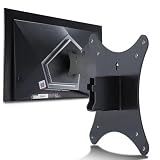
- Compatible with Agon 24"Monitor models : AG246FK , AG246FK6
- Compatible with Agon 25" Monitor models : AG256FS
- Compatible with Agon 27" Monitor models : AG276FK , AG276QKD2 , AG276QSG2 , AG276QZD , AG276UZD
- Universal VESA Support : Compatible with LG Monitor VESA Mount Adapter is the ideal accessory for users. It solves the mounting problem of monitors without VESA holes and is fully compatible with 75x75mm or 100x100mm VESA Various robotic arms Say goodbye to limited mounting options!
- Save Space : It helps free up space on your desk, improving your overall workspace. This adapter is ideal for those who want to increase productivity and create a more organized and comfortable work environment.
HDR is secondary
DisplayHDR 400 and 400 cd/m² are legitimate entry-level HDR specifications, but the 1000:1 IPS contrast ratio cannot produce OLED-like blacks or strong local contrast. Buy this monitor for SDR esports speed, not for cinematic HDR.
Do these 3 things before closing this tab:
1Scan for outdated or missing drivers - takes under a minute2Repair Windows errors before they cause bigger problems3Fix the driver behind crashes, sound loss and screen glitchesHardware must sustain the refresh rate
A powerful CPU and GPU, optimized games and stable frame pacing are prerequisites for exploiting 520 Hz. If your games normally stay below 240 fps, the headline mode offers little practical value.
Best Value

- 27” FULL HD IPS DISPLAY: Experience crisp 1920x1080 resolution and vibrant colors on a 27-inch widescreen IPS panel with wide 178° viewing angles and a 16:9 aspect ratio.
- 240Hz Native / 260Hz Overclocked Refresh Rate & 0.5ms MPRT Response Time: Dominate fast-paced games with ultra-smooth motion and razor-sharp visuals, thanks to a 240Hz native refresh rate with up to 260Hz overclocking over both HDMI and DisplayPort, plus an ultra-fast 0.5ms (MPRT) response time.
- ADAPTIVE-SYNC TECHNOLOGY: Enjoy tear-free, stutter-free gameplay with Adaptive-Sync support that keeps visuals fluid and synchronized with your GPU.
- ILT-ADJUSTABLE & VESA COMPATIBLE: Customize your setup with tilt functionality (-3° ~ 21°) and 100x100mm VESA mount support for ergonomic flexibility.
- FLICKER-FREE + LOW POWER USAGE: Flicker-Free technology helps reduce eye strain during long sessions, and Eco Mode keeps power usage efficient (22W typical).
Console compatibility
AOC’s regional specifications list PlayStation 5 and Xbox operation at 1920×1080 and 120 Hz, not 520 Hz (AOC regional leaflet). The AG276FK’s extreme refresh rate is therefore a PC esports feature.
Who should buy the AG276FK?
It makes sense when
- You play competitive FPS titles seriously and can sustain roughly 360–500-plus fps in the games that matter.
- You prioritize motion clarity and refresh rate over resolution, HDR and deep blacks.
- You specifically want a 27-inch screen and have a DisplayPort-equipped GPU.
- You accept premium pricing for a specialist feature set.
Choose another monitor when
- You want crisp 1440p desktop and gaming imagery or do substantial text-heavy work.
- You play visually demanding RPGs, strategy games or cinematic titles more often than esports shooters.
- You want OLED contrast, stronger HDR or a broader all-purpose image-quality upgrade.
- Your system rarely exceeds 240 fps, you need HDMI 2.1 for a console/4K setup, or value matters more than the maximum refresh number.
Alternatives to consider
| Alternative category | Why it may fit better | What you give up |
|---|---|---|
| 24-inch 1080p 360–500 Hz esports display | Conventional tournament size, lower pixel workload and often a more focused competitive setup | Smaller image and potentially less desk immersion |
| 27-inch 1440p 240 Hz OLED | Sharper image, deep blacks, stronger HDR and very fast pixel transitions | Lower maximum refresh rate and OLED-specific burn-in/warranty considerations |
| 27-inch 1440p 240–360 Hz Fast IPS | Better balance between competitive speed, desktop sharpness and everyday gaming | Does not reach 520 Hz and typically needs more GPU performance |
| 27-inch 1080p 240 Hz | Lower-cost way to get high-refresh competitive gaming | Less headroom for extremely high frame rates |
Compare any specific model on native resolution, required connection, independently measured motion and input lag, VRR behavior, HDR/contrast, warranty, stand and price in your country. The categories above are decision paths, not claims about a particular current model.
Verdict
The AGON Pro AG276FK is a speed-first specialist. Its 520 Hz Fast IPS panel can deliver more frequent motion updates for elite PC shooters, provided the system produces the frames and the monitor is connected over DisplayPort 1.4 with DSC. The same design leaves you with 1080p sharpness at 27 inches, entry-level HDR and ordinary IPS contrast. For serious high-FPS esports, it is a credible purpose-built option; for mixed gaming, productivity or image quality, a 1440p 240 Hz OLED or balanced 1440p Fast IPS display is usually the more sensible direction.
Quick Recap
Product prices and availability are accurate as of the date/time indicated and are subject to change. Any price and availability information displayed on Amazon at the time of purchase will apply.

