What’s actually slowing this PC down?
Pick the symptom - the matching free tool is one click away.
Yes—many American cell phones work in Europe, but not every U.S. phone will work on every European network. Confirm your exact model and regional variant, supported network bands, SIM-lock status, and the service option you plan to use. You can either keep your U.S. carrier with an international roaming plan or use a local physical SIM or eSIM if the phone is unlocked and compatible.
What determines whether a U.S. phone works in Europe?
“American cell phone” is not a technical specification. A phone sold under the same marketing name can have different radio hardware, firmware, or carrier restrictions depending on its model number and sales region. The practical question is whether your exact device can connect to the technologies and frequency bands used by the network in the country you are visiting.
As an Amazon Associate I earn from qualifying purchases.
Three separate checks control the result:
- Radio compatibility: the phone must support the destination carrier’s 4G LTE and, where relevant, 5G bands and network technology.
- Unlock status: the phone must accept another provider’s SIM or eSIM if you want local service. An unlocked phone is not automatically compatible with every foreign network.
- Service choice: you must arrange either international roaming through your U.S. carrier or a local/travel SIM or eSIM.
The Federal Communications Commission’s older overseas-travel guidance explains the basic relationship between supported technologies, bands, and an unlocked SIM slot, but that document dates from approximately 2004. Use current device and carrier checks rather than assuming its historical GSM-only framing still describes today’s networks. FCC overseas mobile-phone guidance
Check compatibility before you leave
1. Identify the exact model and variant
Open the phone’s Settings app and record the complete model number, not just a name such as “Phone Pro” or “Galaxy.” On many phones it appears under Settings > About phone or Settings > General > About. The manufacturer’s specifications page should list the model’s LTE and 5G bands and whether it has a physical SIM tray, eSIM support, or both.
#1 Best Overall

- Preloaded Orange Sim now with 100GB of 5G Data to use in Europe. Tethering & use in hotspots is allowed
- Unlimited Calls & SMS in Europe + 120 minutes & 1000 texts from Europe to the Rest of the World
- Valid for 31 days from 1st use (First call, first text, first data connection). Easy to Top-up online at topup.orange.com with international credit cards
- Triple sized SIM card (Standard/Micro/Nano). No activation, easy to use. Will work with any unlocked device
- Free to Roam Countries: Andorra, Azores, Aland islands, Austria, Balearic Islands, Belgium, Canary islands, Corfu, Crete, Croatia, the Cyclades, Cyprus, Czech Republic, Denmark, Estonia, Faeroe Islands, Finland, France (mainland), Germany, Gibraltar, Greece, Guernsey, Hungary, Ireland, Iceland, Isle of Man, Italy, Jersey, Latvia, Liechtenstein, Lithuania, Luxembourg, Madeira, Malta, Netherlands, Norway, Poland, Portugal, Rhodes, Romania, San Marino, Sardinia, Sicily, Slovakia, Slovenia, Spain, Sweden, Switzerland, UK, Vatican
Keep the model number with your travel documents. A carrier or local provider can use it to check eligibility more accurately than a retail name. If you bought the device second-hand, verify the exact regional variant and that it has not been blacklisted.
2. Check whether the phone is carrier-locked
In the phone’s cellular settings, look for a status such as Carrier lock: No SIM restrictions or an equivalent unlocked message. You can also ask your U.S. carrier to confirm the status and its unlocking requirements. T-Mobile’s BYOD guide states that a bring-your-own device must be unlocked and frequency-compatible, and warns that performance or feature compatibility for non-carrier devices cannot be guaranteed.
Unlocking changes which provider’s SIM the phone can use; it does not add missing radio bands, guarantee 5G, or ensure that calling, messaging, voicemail, or emergency services work on a particular European network.
Rank #2
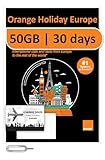
- 50GB Data in Europe - Data tethering and hotspot supported.
- 🔥 UNLIMITED CALLS & TEXTS within Europe — Plus, 2 Hours International Calls and 1000 Texts from Europe to WORLDWIDE!
- 📢 Credit valid 30 days after 1st use ( first call, first text, first internet connection).
- Plug & Go: No Activation or registration is needed, simply insert the SIM into your unlocked device upon your arrival of the supported country and it will be ready to use!
- Triple sim card sizes: Standard/ Micro/ Nano, fits in any cell phone devices physically.
3. Check the destination network, not just the country
“Europe” has no single mobile network. Check the carrier you intend to use in each country and compare its published LTE and 5G bands with your phone’s specifications. If you are buying a travel eSIM, use the eSIM seller’s coverage and network-partner list for every country on your route.
Do not treat labels such as “5G,” “world phone,” or “unlocked” as proof of compatibility. A phone may connect to 4G but lack a destination carrier’s 5G bands, or support data while lacking a required voice feature. T-Mobile specifically advises checking frequency compatibility and says it cannot promise every feature for a non-carrier device. T-Mobile BYOD compatibility guidance
4. Confirm SIM and eSIM support
For a physical local SIM, confirm that the phone accepts the size supplied by the provider (usually nano-SIM) and that the tray is not restricted to a carrier-specific card. For an eSIM, confirm that the phone has an eSIM menu and that the device is unlocked. T-Mobile’s international eSIM guide notes that adding a second local eSIM requires an unlocked phone. T-Mobile eSIM travel guide
Rank #3

- 20GB Data in Europe - Data tethering and hotspot supported. Free Upgrade - -Activate your SIM on or after October 9, 2025, and enjoy a free data upgrade to a total of 20GB!
- 🔥 UNLIMITED CALLS & TEXTS within Europe — Plus, 30 Mins International Calls and 200 Texts from Europe to WORLDWIDE!
- 📢 Credit valid 30 days after 1st use ( first call, first text, first internet connection).
- Plug & Go: No Activation or registration is needed, simply insert the SIM into your unlocked device upon your arrival of the supported country and it will be ready to use!
- Triple sim card sizes: Standard/ Micro/ Nano, fits in any cell phone devices physically.
Some phones support multiple lines but allow only one line to use cellular data at a time. Read the dual-SIM instructions before travel so you know how to keep your U.S. line available for texts while routing data through the travel line.
Choose how you will connect
| Option | Best fit | Verify before departure | Main trade-off |
|---|---|---|---|
| U.S. carrier international roaming or travel pass | Short trips, convenience, and keeping your U.S. number active | Included countries, eligibility, daily or per-use billing, data allowance, speed limits, voice/text terms, and whether data roaming must be enabled | Can cost more than local service, especially on a long trip or with heavy data use |
| Local physical SIM | Unlocked compatible phones and travelers who want a local number or local prepaid plan | SIM size, activation rules, identity requirements, coverage, data amount, validity, and how to keep the U.S. line available | Requires removing or managing the U.S. SIM and may change your reachable number |
| Travel or local eSIM | Unlocked eSIM phones and travelers who want to avoid swapping a card | Country coverage, validity period, data amount, tethering, voice/text availability, installation timing, and dual-SIM settings | Data-only plans may not provide a local phone number; an incompatible or locked phone cannot use it |
| Wi-Fi for selected tasks | Travelers who can rely on hotel, home, or venue Wi-Fi | Whether essential apps work offline and how calls or messages behave away from Wi-Fi | It does not provide mobile connectivity while you are out of Wi-Fi range |
Compare the total cost for your itinerary, expected data use, need to receive calls and verification texts on the U.S. number, trip length, speed restrictions, and setup effort. The cheapest option depends on those variables; there is no universal winner.
Using your U.S. carrier while traveling
Roaming is the simplest route because you keep your existing number and do not have to activate another line. Before departure, open your carrier account and confirm that the specific European countries are covered by your plan or pass. Check whether the plan includes data, calls, and texts, how much high-speed data is provided, what happens after the allowance, and what event starts a daily charge.
Rank #4

- 20GB of 5G | 4G LTE high speed internet Europe SIM valid for 30 days.
- Easy to use: Plug in and use, no need for activation. Tethering capable.
- Plan refillable, sim card rechargeable!
- Your device must be unlocked
- Tri-cut SIM will fit every model of cellphone. All SIM size available, including standard/micro/nano SIM
AT&T’s current International Day Pass page is one carrier-specific example, not a market-wide price: it lists $12 per day for one AT&T line on land or air, $6 per additional line on the same account using the service, and $20 per line per day at sea. AT&T says land/air charges are limited to no more than 10 daily fees per line in a billing period and that the service covers more than 210 destinations. Confirm the included-country list and eligibility because these terms can change. The page was checked in 2026. AT&T International Day Pass terms
AT&T also says data roaming must be turned on for International Day Pass data, texts, and calls to work. Its international-use guidance warns that charges depend on location and plan and that international data may be slower. AT&T ways to manage international usage
The Tool Desk
Outbyte PC Repair FREERepair Windows errors before they cause bigger problemsFix Now →Outbyte Driver Updater FREEScan for outdated or missing drivers - takes under a minuteDriver Scan →- Check your account for an international feature or pass and confirm every destination country.
- Read the billing trigger: some plans charge when the phone uses cellular data, sends a text, answers a call, or places a call.
- Turn on data roaming only when your plan requires it and you understand the charge rules.
- Disable automatic app updates, cloud backups, and video autoplay on cellular data to avoid using your allowance unexpectedly.
- Monitor usage in the carrier app and keep Wi-Fi enabled when practical.
For carrier-specific unlocking requirements, see AT&T’s current instructions at AT&T device-unlock guidance. Do not assume that meeting an unlock requirement also proves European network compatibility.
Best Value

- 20GB High Speed Data in Europe on 4G/5G networks - Data tethering and use in hotspots allowed. See description for list of countries it can be used in. PACKAGE UPGRADED TO 20GB DESPITE ANYTHING MENTIONED ON PACKAGING.
- Unlimited Local Calling in Europe using provided French number. 30 minutes of calling and 200 texts from Europe to USA / any other country.
- No registration required. Validity 30Days from 1st use. Plug & play. Refillable for additional charge at the Operator's (Orange France) website.
- Triple cut SIM Card (standard/micro/nano) fits all phones. Must use in an unlocked phone. Also works in tablets, mifi and any device with a SIM tray.
- 24 Hour helpdesk provided by seller by phone, email & instachat
Using a local SIM or travel eSIM
A local SIM or eSIM can be useful for a longer stay, frequent data use, or a plan that costs less than daily roaming. It also lets you choose a network serving the places you will visit. AT&T identifies local SIMs as an option in its Europe and Italy travel guidance. AT&T Europe phone tips AT&T guide to using a U.S. phone in Italy
Physical SIM procedure
- Before leaving, verify that the phone is unlocked and supports the destination provider’s bands.
- Back up contacts and note your U.S. voicemail and account-recovery methods.
- Buy the SIM from a legitimate carrier shop, airport kiosk, or established retailer. Confirm the data amount, expiration date, top-up method, and identity requirements.
- Insert the card after landing, restart the phone, and follow the provider’s activation instructions.
- In cellular settings, select the local line for mobile data. Keep the U.S. line off or limited to Wi-Fi if you want to avoid roaming charges.
- Test a web page, messaging app, and—if included—a voice call before leaving the shop.
eSIM procedure
- Confirm the phone is unlocked and eSIM-compatible; do this before purchasing a plan.
- Check that the plan covers every country and has the validity period and data amount you need.
- Install the eSIM using the provider’s QR code or app while you have reliable internet. Some plans start their validity when installed, while others start on first network connection; read the plan’s rule.
- Label the lines clearly, such as “U.S.” and “Europe data.” Set the travel eSIM as the mobile-data line and disable data switching if the phone could otherwise fall back to the U.S. line.
- Keep the U.S. line enabled only if you need its calls or texts, and verify your carrier’s roaming terms for that configuration.
- Test data and, if offered, voice or SMS before relying on the eSIM for navigation or account verification.
Many travel eSIMs are data-only. Messaging apps can still work, but a data-only eSIM may not give you a European telephone number for ordinary calls, SMS short codes, or services that require local-number verification.
What to do for a trip to Paris, Italy, or several countries
The same checklist applies whether you are visiting Paris, Italy, or crossing several borders. List every country and, if possible, the towns or islands where you will spend time. A plan that works in one country may have different partner networks, speed policies, or fair-use limits in another. Confirm that the provider’s coverage map includes rural areas, rail routes, and islands on your itinerary.
Recommended Free Tools
If you cross borders frequently, a regional travel eSIM or a roaming plan with all countries included can avoid repeated activation. If you stay in one country for weeks, compare a local prepaid plan with the total number of roaming days you would pay for. Keep the U.S. number available for bank alerts only when you understand whether receiving a text or call triggers a charge.
Troubleshooting when the phone does not connect
- “SIM not supported” or unlock prompt: the phone is probably carrier-locked. Contact the U.S. carrier; inserting another SIM cannot bypass the lock.
- No service after inserting a local SIM: restart the phone, confirm the SIM is active, check that the correct line is selected for data, and verify the destination carrier’s bands against the model variant.
- Calls fail but data works: the plan may be data-only, or the phone may lack the carrier’s required voice-over-LTE support. Ask the provider about voice compatibility.
- Data works only on Wi-Fi: enable the intended line’s cellular data and, for a roaming plan that requires it, data roaming. Check that the account has international service enabled.
- Very slow data: the plan may impose a high-speed allowance or the partner network may be congested. Check the plan’s fair-use terms and manually select another permitted network if the provider allows it.
- Unexpected U.S. charges: review which line is set for data, turn off automatic data switching, and disable roaming on the U.S. line unless your plan requires it.
- Cannot receive verification texts: keep the U.S. line enabled with cellular data disabled, use Wi-Fi calling if your carrier and phone support it, or arrange alternate account-recovery methods before departure.
A practical decision rule
Choose U.S. roaming when preserving your number and minimizing setup matter more than the lowest possible price, especially for a short trip. Choose a local SIM or eSIM when your phone is unlocked and compatible, you expect substantial data use, or you will stay long enough for a local plan’s validity and price to make sense. Use Wi-Fi as a supplement, not as a substitute for mobile service when you need navigation, transport apps, or emergency communication away from lodging.
Whichever route you select, save offline maps, carrier support numbers, boarding passes, and booking details before leaving. Carry a charging cable and power bank if you expect heavy navigation or hotspot use; AT&T notes that frequent travel use can drain a phone battery. Connectivity planning is successful only when the exact phone, destination network, SIM status, plan terms, and settings all agree.
Quick Recap
Product prices and availability are accurate as of the date/time indicated and are subject to change. Any price and availability information displayed on Amazon at the time of purchase will apply.
Quick wins for a faster PC:
Clear out junk files and repair common Windows errorsFree Scan →Fix the driver behind crashes, sound loss and screen glitchesFind Drivers →
