Recommended Free Tools
For a gaming mouse that works comfortably in either hand, start by checking the controls—not just the shell. The Logitech G PRO 2 LIGHTSPEED is explicitly described as ambidextrous and has interchangeable side buttons; the Razer Viper V3 Pro has a symmetrical body but is specified as right-handed. The available evidence supports these two candidates, not a fair ranking of five current models.
What “ambidextrous” means for a gaming mouse
A symmetrical shell can look usable from either side without making the mouse fully ambidextrous. Side buttons may be placed or shaped for right-hand use, or may not be accessible to the opposite hand. Check the exact button arrangement and whether buttons can be moved or swapped before buying, especially if you are left-handed.
As an Amazon Associate I earn from qualifying purchases.
Shape and grip also affect fit. A mouse that suits a claw or fingertip grip may feel less natural in a palm grip, and there is no universally best shape established by the available comparisons.
The Tool Desk
Outbyte PC Repair FREEClear out junk files and repair common Windows errorsFree Scan →Outbyte Driver Updater FREEScan for outdated or missing drivers - takes under a minuteDriver Scan →Two candidates supported by current product information
| Model | Shape and grip information | Controls and handedness | Connection and availability |
|---|---|---|---|
| Logitech G PRO 2 LIGHTSPEED | Logitech presents the PRO range as offering choices in shape, playstyle, and functionality; the cited announcement does not specify a grip style for this model. | Logitech’s 2024 PRO Series announcement describes it as ambidextrous with magnetic interchangeable side buttons. Confirm which buttons are included with the exact regional listing. | LIGHTSPEED wireless model. Check current regional availability and price. |
| Razer Viper V3 Pro | Razer specifies a right-handed symmetrical shape and says it is best suited to claw or fingertip grip styles. | A symmetrical body does not establish left-hand side-button usability. Confirm the button placement for your preferred hand. | Wireless gaming mouse. Check current regional availability and price. |
Logitech G PRO 2 LIGHTSPEED
Its interchangeable side buttons make it the clearest starting point here for a buyer who wants controls configurable for either hand. Verify the current product listing for the included buttons and regional availability rather than assuming every package is identical. Logitech G’s 2024 PRO Series announcement describes the model and its interchangeable controls.
#1 Best Overall

- Designed With Pros, Engineered to Win: Enhanced with heightened speed and precision, the PRO 2 LIGHTSPEED wireless gaming mouse helps you hone the competitive edge for a step closer to victory
- Champion-Level Precision: The most advanced sensor in gaming, the HERO 2 delivers pro-precision at up to 44K DPI with tracking up to 88 g-force of acceleration at over 888+ IPS (1)
- Undisturbed Gaming, Wherever You Play: Our LIGHTSPEED wireless is tested to deliver a responsive and reliable tournament-grade experience (1)
- Pro in Every Click, Mastery in Every Move: LIGHTFORCE switches combine the speed and reliability of optical switches with the satisfying click of mechanical switches
- Next-Level Ready: This championship-winning gaming mouse offers up to 95-hour battery life, USB-C charging, and 8 kHz polling rate with PRO LIGHTSPEED RECEIVER, sold separately (2)
Razer Viper V3 Pro
This is a plausible fit for right-handed players who use a claw or fingertip grip and want a symmetrical shell. Left-handed buyers should treat “symmetrical” as a shape description, not a guarantee of mirrored controls. Razer also lists a Viper V3 Pro SE, but the cited material does not establish its detailed differences; verify the exact model before comparing or purchasing. See Razer’s Viper range and the Viper V3 Pro product page.
How to choose for your hand and grip
- Decide which hand will use the mouse. Look for controls that are usable from that side, not merely a centered or symmetrical body.
- Match the shape to your grip. If you use a claw or fingertip grip, the Viper V3 Pro is specifically identified by Razer as suited to those styles. The cited Logitech announcement does not specify a grip style for the PRO 2 LIGHTSPEED, so assess its shape in person if possible.
- Check side-button access. If you rely on thumb buttons, confirm their placement and whether the model supports interchangeable buttons. For the PRO 2 LIGHTSPEED, check the exact package contents.
- Confirm the exact version and listing. Product variants, regional availability, and prices can change. Compare the precise model name and current regional listing before ordering.
- Choose connection type based on your needs. Both candidates discussed here are wireless; the cited sources do not establish a wired counterpart as a better fit.
Why this is a shortlist, not a ranked top five
The available sources do not provide comparable evidence for five distinct current ambidextrous gaming mice, so a five-place ranking would imply a level of comparison that is not established. Other guides offer useful context rather than filling that gap: RTINGS’ comparison of the Logitech G PRO X SUPERLIGHT 2 and Razer Viper V3 Pro, updated May 21, 2026, discusses lightweight wireless mice and performance trade-offs, while PC Gamer’s 2026 gaming mouse guide names the Logitech G Pro Wireless as its ambidextrous pick. Those recommendations do not establish a like-for-like five-model shortlist here. RTINGS notes that its recommendations change as products and availability change in its gaming mouse guide, updated July 30, 2026.
Quick Recap
Rank #4

- The next-generation optical HERO sensor delivers incredible performance and up to 10x the power efficiency over previous generations, with 400 IPS precision and up to 12,000 DPI sensitivity
- Ultra-fast LIGHTSPEED wireless technology gives you a lag-free gaming experience, delivering incredible responsiveness and reliability with 1 ms report rate for competition-level performance
- G305 wireless mouse boasts an incredible 250 hours of continuous gameplay on just 1 AA battery; switch to Endurance mode via Logitech G HUB software and extend battery life up to 9 months
- Wireless does not have to mean heavy, G305 lightweight mouse provides high maneuverability coming in at only 3.4 oz thanks to efficient lightweight mechanical design and ultra-efficient battery usage
- The durable, compact design with built-in nano receiver storage makes G305 not just a great portable desktop mouse, but also a great laptop travel companion, use with a gaming laptop and play anywhere
Rank #3

- HERO Gaming Sensor: Next generation HERO mouse sensor delivers precision tracking up to 25600 DPI with zero smoothing, filtering or acceleration
- 11 programmable buttons and dual mode hyper-fast scroll wheel: The Logitech wired gaming mouse gives you fully customizable control over your gameplay
- Adjustable weights: Match your playing style. Arrange up to five 3.6 g weights for a personalized weight and balance configuration
- LIGHTSYNC technology: Logitech G LIGHTSYNC technology provides fully customizable RGB lighting that can also synchronize with your gaming (requires Logitech Gaming Software)
- Mechanical Switch Button Tensioning: A metal spring tensioning system and metal pivot hinges are built into left and right computer gaming mouse buttons for a crisp, clean click feel with rapid click feedback
Rank #2
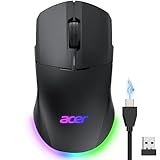
- 【24K High-Precision Gaming Sensor】Equipped with a high-performance optical sensor with 24,000 DPI, 1000Hz polling rate, and 35G acceleration, this wireless gaming mouse delivers fast, consistent tracking for accurate aim and smooth control. Switch between 6 DPI levels for quick flicks, micro-adjustments, and precise targeting in FPS or everyday tasks. 📌Note: Default DPI and each level’s value can be customized in the driver (max 24000, min 1200, default 2400).
- 【Advanced Programmable Buttons】Take control with 8 programmable buttons and full macro editing via the driver. Remap commands, assign complex macros, and fine-tune DPI settings on this computer gaming mouse. Dedicated Forward and Back side buttons help execute faster in-game actions in FPS battles, MOBA team fights, or everyday navigation. 📌Note: Click “Apply” to save changes. For driver download and installation, refer to the Installation Manual (PDF).
- 【Pro-Grade Player-Ready Mouse】Comfort Switch between high-speed USB-A wired mode and stable 2.4GHz wireless for flexible gameplay. The symmetrical ergonomic shape supports both left- and right-handed users, making it a great left handed gaming mouse option while maintaining a natural, comfortable grip for extended gaming or work sessions. 📌Note: USB-A receiver is stored under the back cover. This mouse supports 2.4GHz wireless + wired connection and does not support Bluetooth.
- 【Dynamic RGB Lighting】Enhance your setup with 9 dynamic RGB lighting modes and 16.8M color effects on this RGB wireless mouse. Adjust brightness, speed, and lighting styles in the driver to match your gaming atmosphere, desk setup, or personal style. 📌 Note: RGB auto-off can be toggled in the driver. Lighting modes can also be switched by holding the front side button while scrolling.
- 【Built for All-Day Gaming】The 650mAh rechargeable battery delivers up to 40 hours of playtime. You can also play it continuously as a wired gaming mouse while charging, so gameplay never stops. Smart power management automatically enters sleep to help extend battery life. 📌 Note: Light sleep wakes on movement; deep sleep on click. Sleep mode cannot be disabled. Idle timer adjustable (1–9 min) in driver.
Product prices and availability are accurate as of the date/time indicated and are subject to change. Any price and availability information displayed on Amazon at the time of purchase will apply.
Quick wins for a faster PC:
Clear out junk files and repair common Windows errorsFree Scan →Scan for outdated or missing drivers - takes under a minuteDriver Scan →Repair Windows errors before they cause bigger problemsFix Now →
