What’s actually slowing this PC down?
Pick the symptom - the matching free tool is one click away.
Short answer: neither service is a permanent winner. Amazon Luna is most convenient when you already have an eligible Amazon Prime membership and like its rotating included selection, with Luna Premium available for a larger library. Xbox Cloud Gaming is better suited to people whose preferred games are in an eligible Game Pass catalog, selected free-to-play titles, or the smaller set of owned games that Xbox allows to stream. Your decision should start with the exact games you want, then check the plan, region, device, controller, and cloud-play allowance required for each one.
The comparison below reflects official US-facing information available on October 13, 2026. Catalogs, plan entitlements, device support and regional availability can change, so verify the live listing immediately before subscribing.
As an Amazon Associate I earn from qualifying purchases.
What each service actually gives you
Amazon Luna and Xbox Cloud Gaming both run games on remote servers and send the video to your screen, but they organize access differently. Luna separates access into Luna Standard and Luna Premium. Luna Standard is described in Amazon’s Terms of Use as a benefit for eligible Prime members, while Amazon’s gaming portal describes the included selection as rotating. Luna Premium is a paid subscription with an expanded library. Amazon chooses the Standard titles; having Prime does not mean every Luna game is permanently included.
The Tool Desk
Outbyte PC Repair FREEClear out junk files and repair common Windows errorsFree Scan →Outbyte Driver Updater FREEFix the driver behind crashes, sound loss and screen glitchesFind Drivers →Xbox Cloud Gaming is primarily an entitlement inside eligible Game Pass plans. Xbox says most titles in the Game Pass library are playable from the cloud, but the cloud catalog is not a timeless copy of every Game Pass catalog on every device. Xbox also offers selected free-to-play games to people with a free Microsoft account in supported regions and allows streaming of selected games a user owns or buys. That last category is selective: purchasing a game does not automatically make every purchase cloud-streamable.
#1 Best Overall

- BUILT FOR AMAZON LUNA – Designed for the best experience on Luna, Amazon's cloud gaming service.
- WORKS ACROSS YOUR DEVICES – Windows, Mac, Fire TV, Fire tablet, iPhone, iPad, Chromebook, and Android devices.
- SEAMLESS SCREEN SWITCHING – When playing on Luna, pause your game on one screen then pick up right where you left off on another.
- CONNECT VIA WIFI – Connects directly to Amazon’s custom game servers using Cloud Direct technology for low-latency gameplay.
- CONNECT VIA BLUETOOTH – Use Luna Controller as game controller on any Bluetooth-compatible device.
Both companies warn that titles and availability vary by time, region, plan and platform. A catalog count, an old article or a console-library list cannot answer whether your game is playable today. Use the live Luna browsing experience and the official Xbox catalog, then open the individual game entry to confirm cloud eligibility.
| Comparison point | Amazon Luna | Xbox Cloud Gaming |
|---|---|---|
| Primary access route | Luna Standard is an eligible Prime benefit; Luna Premium is a paid plan with an expanded library. | Eligible Game Pass plans provide cloud access; selected free-to-play games work with a free Microsoft account in supported regions. |
| How the library changes | Amazon manages the Standard selection and describes it as rotating. Premium has a larger subscription library. | Cloud-playable titles, plan catalogs and owned-game eligibility can change by time, region, plan and platform. |
| Owned games | Check the current Luna listing; Prime or Premium inclusion is title-specific. | Only selected owned or purchased games are streamable, even when the title is in your account. |
| Controller expectation | The Luna Controller is an option; other controller support depends on the device and current compatibility requirements. | A compatible controller connected by Bluetooth or USB is generally required; selected games offer touch controls. |
| Published connection guidance | Amazon says quality and latency depend on device, location, network, bandwidth and subscription, and does not guarantee a particular resolution or quality. | Xbox publishes a 10 Mbps minimum download speed, says some devices may need 20 Mbps for best quality, and recommends 5 GHz Wi-Fi. |
Which service has the better game library?
Luna’s rotating Prime selection
Luna Standard can be attractive if Prime is already part of your household budget. You do not buy a second game-streaming subscription for the eligible rotating selection, but you must accept Amazon’s curation. A title can enter or leave the Standard lineup, and the selection can differ by region. Treat Prime as a changing bundle rather than ownership of a fixed Luna catalog.
Luna Premium is the paid route when the Standard lineup does not contain enough of what you want. Amazon describes it as an expanded library, but its Terms of Use do not establish a permanent title list or a universal price. Plan prices and billing terms are supplied on Amazon’s detail and help pages and can change. Check the current Premium page for your country before relying on a particular game being included.
Xbox’s Game Pass, free-to-play and owned-game routes
Xbox Cloud Gaming covers most games in eligible Game Pass catalogs, subject to the plan you choose and the title’s cloud status. Xbox identifies Essential, Premium and Ultimate tiers, each with different catalog benefits and monthly cloud-playtime allowances. The page’s quantities and limits are current details, not lifetime guarantees; Xbox explicitly says titles, numbers, features and availability vary.
Free-to-play access is a separate route. In supported regions, selected free-to-play games can be streamed with a free Microsoft account, so a paid Game Pass plan is not automatically required for those titles. Xbox also lists selected games that users own or buy as streamable. Check the game’s cloud badge or listing rather than assuming that a digital purchase, a disc license or every game in your console library qualifies.
Rank #2

- ☁️【𝐂𝐨𝐦𝐩𝐚𝐭𝐢𝐛𝐥𝐞 𝐰𝐢𝐭𝐡 𝐋𝐮𝐧𝐚】🎮 Want to play amazon luna with a cost-effective Luna Controller? Ymir wireless controller pc offers a high-performance, budget-friendly way to enjoy Luna gaming experience and other cloud services. No extra drivers or apps needed! Enjoy instant, stable Bluetooth 5.0 connection for seamless gameplay
- 🔗【𝐌𝐮𝐥𝐭𝐢𝐩𝐥𝐞 𝐂𝐨𝐦𝐩𝐚𝐭𝐢𝐛𝐢𝐥𝐢𝐭𝐲】🔄 Works seamlessly with: Fire TV Stick, Apple TV, Samsung TV, PS4, PC (Windows & Mac), tablets (iPad & Android), laptops, Chromebook, smartphones (iPhone & Android), Tesla, and Steam Deck. This Ymir game controller for PC lets you play anywhere, on almost any screen
- ⚙️【𝐀𝐝𝐯𝐚𝐧𝐜𝐞𝐝 𝐌𝐚𝐩𝐩𝐢𝐧𝐠 & 𝐑𝐚𝐩𝐢𝐝-𝐅𝐢𝐫𝐞 𝐓𝐮𝐫𝐛𝐨】✨ Ymir PC controller features 2 programmable back paddles, elevating your game with 13 customizable buttons. Remap complex inputs for faster reactions. It turns semi-auto actions into continuous output. Offers more programmable buttons than the Amazon Luna controller
- 🔋【𝐋𝐚𝐫𝐠𝐞 𝐂𝐚𝐩𝐚𝐜𝐢𝐭𝐲 𝐁𝐚𝐭𝐭𝐞𝐫𝐲】⚡ Ymir controller for PC features a built-in 1200mAh rechargeable battery and USB-C port for convenient charging. No need to worry about game interruptions due to dead batteries. Say goodbye to buying and replacing AA batteries for good
- 🎯【𝐁𝐮𝐢𝐥𝐭 𝐟𝐨𝐫 𝐏𝐞𝐫𝐟𝐨𝐫𝐦𝐚𝐧𝐜𝐞, 𝐃𝐞𝐬𝐢𝐠𝐧𝐞𝐝 𝐟𝐨𝐫 𝐂𝐨𝐦𝐟𝐨𝐫𝐭】🧤 Ymir wireless PC controller features ALPS joysticks for eliminating drift and ensuring lasting precision and a gyroscope for intuitive motion control. The ergonomic grip ensures comfort through extended gameplay
Why a catalog-size contest misleads
The two services do not expose identical inventories, and neither inventory is fixed. A larger headline number would not tell you whether the games you care about are present, whether your plan unlocks them, or whether the title is streamable on your device. A useful comparison is a short personal list: include the games you play now, two games you may start next, and any free-to-play title you want to test. Verify every entry in the live catalog for your region.
How to check a game before paying
- Write down the exact edition and platform name. Deluxe, remastered and regional editions can have different cloud listings. Note whether you mean a console version, a PC version or a cross-platform release.
- Check Luna’s live game browser. Look for the title under the current Luna selection and read whether it is available through Standard, Premium or another entitlement. Do not treat a search result from an old article as proof of current inclusion.
- Check the Xbox cloud catalog. Open the official Xbox listing for the exact title and confirm that cloud play is shown for your region and intended device. A game can appear in a broader Game Pass catalog without being cloud playable.
- Match the entitlement to your account. For Luna, verify that your Prime membership is eligible or that Premium is active. For Xbox, identify whether the title requires Essential, Premium or Ultimate, is one of the selected free-to-play games, or is an eligible owned game.
- Check the monthly allowance and timing. Xbox plan tiers can impose different monthly cloud-playtime allowances. If you play long sessions, a lower allowance may matter more than the size of its catalog.
- Repeat the check for your travel or second-home region. Availability can change by country, even when the same account and device are used.
Supported devices and where you can play
Amazon Luna
Amazon’s Terms of Use describe compatible computers, streaming media players or smart TVs, mobile devices and other devices that meet Amazon’s current system requirements. Amazon reserves the ability to add supported devices or change requirements, and compatibility can depend on third-party software or operating systems. A device that works today should not be treated as a permanent guarantee.
Amazon identifies Fire TV among the streaming-device categories that can be used for Luna. The available evidence does not establish that every Fire TV model supports Luna, so check the current Luna compatibility list for the exact model and operating-system version before buying hardware.
Xbox Cloud Gaming
Xbox lists the following device groups, with availability varying by location and model:
- Supported Windows PCs and compatible browsers.
- Apple and Android phones and tablets.
- Xbox consoles.
- Select LG, Samsung and VIDAA smart TVs.
- Amazon Fire TV devices.
- Select Meta Quest headsets.
- Supported browsers through xbox.com.
“Supported” is not the same as “every model.” TV operating systems, browser versions, headset models and regional app availability can change. Confirm the exact device on Xbox’s current cloud-gaming page and check whether the game itself is available on that platform.
Rank #3
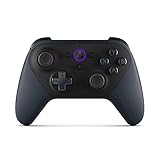
- Like-New Luna Controller is refurbished, tested, and certified to look and work like new and comes with the same limited warranty as a new device. Like-New Amazon devices may be packaged in generic Amazon-branded boxes.
- BUILT FOR AMAZON LUNA – Designed for the best experience on Luna, Amazon's cloud gaming service.
- WORKS ACROSS YOUR DEVICES – Windows, Mac, Fire TV, Fire tablet, iPhone, iPad, Chromebook, and Android devices.
- SEAMLESS SCREEN SWITCHING – When playing on Luna, pause your game on one screen then pick up right where you left off on another.
- CONNECT VIA WIFI – Connects directly to Amazon’s custom game servers using Cloud Direct technology for low-latency gameplay.
Using one screen for both services
Fire TV is a potentially convenient TV-based route because both services identify it as a supported category. The current information does not identify a single Fire TV model guaranteed to support both services simultaneously. Compare the two compatibility lists, app availability and controller pairing requirements before purchasing a device for that purpose.
Windows Errors? Fix Them Before They Spread
Repair common Windows errors and clear accumulated junk for a smoother, more stable PC - no reinstall needed.Free scan · no reinstallCrashes, No Sound, or Screen Glitches?
Random freezes, missing sound and display glitches usually trace back to one bad driver. Find and replace yours safely.Free scan · under a minuteControllers, touch input and accessories
Xbox states that cloud play generally needs a compatible controller connected by Bluetooth or USB. Selected games provide touch controls, which can make a phone or tablet usable without a gamepad, but touch support is title-specific rather than universal.
Amazon names the Luna Controller as an optional dedicated accessory. Amazon’s product-compliance documentation identifies model T28B69. It is not a prerequisite for every Luna setup: controller compatibility depends on the device, connection method and the game. A Bluetooth or USB controller already supported by your computer, TV or mobile device may be sufficient.
Before buying an accessory, check three things: whether your device accepts Bluetooth or USB input, whether the service supports that controller on that device, and whether the game has unusual input requirements. Pairing a controller with a phone does not guarantee that a smart-TV app or browser will recognize it in the same way.
Internet requirements and streaming quality
Xbox’s published baseline
Xbox publishes a minimum download speed of 10 Mbps for cloud gaming and says some devices may require 20 Mbps for best quality. It recommends 5 GHz Wi-Fi. These are guidance figures, not a promise that a connection at exactly 10 or 20 Mbps will deliver a particular resolution, frame rate or latency.
Do these 3 things before closing this tab:
1Fix the driver behind crashes, sound loss and screen glitches2Repair Windows errors before they cause bigger problems3Scan for outdated or missing drivers - takes under a minuteRank #4

- 🎮【𝐄𝐧𝐡𝐚𝐧𝐜𝐞𝐝 𝐆𝐚𝐦𝐢𝐧𝐠 𝐂𝐨𝐧𝐭𝐫𝐨𝐥𝐥𝐞𝐫 𝐟𝐨𝐫 𝐋𝐮𝐧𝐚】Ymir Upgrade for luna controller for fire tv has Patent: No.US D998,043 S. Experience superior gameplay with our firestick controller,specifically designed for Amazon's cloud gaming service.Features programmable back paddles for custom mapping and turbo function for rapid fire.Fully compatible with Luna,Fire TV,PC,GeForce NOW,Tablet,phone,android,the ultimate wireless solution for your cloud gaming needs.Dominate on PlayStation and PC
- 🎮【𝐀𝐝𝐯𝐚𝐧𝐜𝐞𝐝 𝐀𝐋𝐏𝐒 𝐉𝐨𝐲𝐬𝐭𝐢𝐜𝐤𝐬,𝐍𝐨 𝐃𝐫𝐢𝐟𝐭 𝐆𝐮𝐚𝐫𝐚𝐧𝐭𝐞𝐞】Say goodbye to joystick drift with our high-precision ALPS analog sticks.Our fire stick game controller more precise and responsive than Hall sticks,Enjoy smoother,game controller for pc more responsive control with zero dead zones, perfect for FPS games and precise movements. motion controls provide immersive feedback, while the gyro sensor enhances steering accuracy in racing games.
- 🎮【𝐏𝐫𝐨-𝐆𝐚𝐦𝐞𝐫 𝐅𝐞𝐚𝐭𝐮𝐫𝐞𝐬,𝐓𝐮𝐫𝐛𝐨 & 𝐏𝐫𝐨𝐠𝐫𝐚𝐦𝐦𝐚𝐛𝐥𝐞 𝐏𝐚𝐝𝐝𝐥𝐞𝐬】Replacement for fire tv game controller,Gain the competitive edge with 2 programmable back paddles that execute complex moves with ease. The turbo function allows rapid button presses for faster XP farming and quick combos in games like Fortnite and Call of Duty.Customize your fire tv game controller to match your playstyle and dominate the competition.
- 🎮 【𝐄𝐧𝐡𝐚𝐧𝐜𝐞𝐝 𝐆𝐚𝐦𝐢𝐧𝐠 𝐄𝐱𝐩𝐞𝐫𝐢𝐞𝐧𝐜𝐞】The mando para pc built-in speaker for clear audio,motion control for responsive gameplay,playing games like "Snowrunner" where precise control and gyro steering are crucial.game controller features a convenient TYPE-C port for charging and a built-in 1200mAh battery for long gaming sessions,controller for pc functions same as the controller.
- 🎮【𝐆𝐚𝐦𝐞 𝐔𝐧𝐭𝐢𝐥 𝐃𝐚𝐰𝐧,𝐍𝐨𝐭 𝐔𝐧𝐭𝐢𝐥 𝐃𝐢𝐬𝐜𝐨𝐦𝐟𝐨𝐫𝐭】Tired of your hands cramping or controller fatigue cutting your gaming sessions short? Our ergonomically,validated design, shaped for human hands,distributes weight evenly and fits perfectly to eliminate pressure points. Finally, play as long as you want, and remember the game,not the ache.game longer, feel better.
Bandwidth is only one part of the path between you and the server. Wi-Fi interference, congestion inside your home, distance to the service region, packet loss and other traffic can cause blur, delay or disconnections even when a speed test reports a high number.
Luna’s performance qualification
Amazon says streaming quality and latency depend on the device, location, network, bandwidth and subscription. Its Terms of Use do not guarantee a particular resolution or quality. That means a fast connection is necessary for many setups but cannot establish a guaranteed Luna experience.
A practical connection checklist
- Run a speed test on the same Wi-Fi network and in the same room where you will play.
- Prefer 5 GHz Wi-Fi when your device and router support it; wired Ethernet can reduce wireless interference on compatible TV or PC setups.
- Pause large downloads, cloud backups and 4K video streams while testing.
- Move closer to the router or use a wired connection if input feels delayed.
- Test at the time you normally play. Evening congestion can reveal problems a daytime test misses.
- If the service offers a choice of server or region, use the closest supported location, but do not bypass regional restrictions.
Subscriptions, allowances and what you are really paying for
Luna Standard and Prime
Luna Standard is described as a benefit for eligible Prime members under the applicable Prime terms. The benefit is not the same as permanent ownership: Amazon manages the rotating selection, and access depends on the Prime and Luna terms in your region. If Prime is already paid for other reasons, Standard can be a low-friction way to try cloud gaming. If you would subscribe to Prime only for one game, confirm that game’s current inclusion and the benefit’s eligibility first.
Luna Premium
Premium is a separate paid subscription with an expanded library. Amazon’s Terms of Use say that prices and billing terms are provided on its detail and help pages and may change. Because a universal current price is not established here, check the checkout page for your country, renewal terms, taxes and cancellation conditions before subscribing.
Quick wins for a faster PC:
Scan for outdated or missing drivers - takes under a minuteDriver Scan →Repair Windows errors before they cause bigger problemsFix Now →Fix the driver behind crashes, sound loss and screen glitchesFind Drivers →Xbox Game Pass tiers
Xbox’s cloud page lists Essential, Premium and Ultimate. Each tier has its own catalog benefits and monthly cloud-playtime allowance. The page does not make those allowances interchangeable: a plan with more titles can still be a poor fit if your expected playtime exceeds its limit. Review the current plan page for the allowance in your region and whether the game you want is included in that tier.
Best Value

- 🎮【Value for Money】Great replacement for the overpriced Luna Controller
- 🎮【BUILT FOR AMAZON LUNA】 – Ymir is a high-performance controller designed to provide an ideal playing experience on Luna, Amazon's new cloud gaming service.Ymir Gaming controller has Patent: No. US D998,043 S
- 🎮【Easy to Connect to FireTV】Open the bluetooth setting on Fire TV then Press Ymir's “PS“ and ”Share“ button to connect
- 🎮【Multi-Platform bluetooth controller】Ymir connects flawlessly to a PC/PS4/TV/Tesla/Fire Tablet, iPhone, iPad, Android Phones via Bluetooth. Buy one Ymir, Enjoy many platform games
- 🎮【 Best ALPS Joystick】Ymir mando built in ALPS joysticks,more precision,no drift,no deadzone
A free Microsoft account can be enough for selected free-to-play cloud titles in supported regions. This does not provide the complete Game Pass catalog. Paid access is generally required for most other cloud-playable Game Pass games, unless the title is one of the selected owned games Xbox permits you to stream.
Step-by-step setup for a first session
Setting up Luna
- Confirm that Luna is available in your country and that your intended computer, mobile device, TV or streaming player appears on Amazon’s current compatibility information.
- Sign in with the Amazon account connected to an eligible Prime membership or activate Luna Premium if the game requires it.
- Install or open the supported Luna app or browser experience for your device.
- Pair a compatible controller, or use the Luna Controller if it suits your setup. Verify that the operating system sees the controller before launching the game.
- Open the live Luna catalog, select the game and read the access label before starting.
- Play a short test session. Check input delay, image stability and audio before committing to a long campaign.
Setting up Xbox Cloud Gaming
- Confirm that your region and device are supported, then open the Xbox cloud-gaming experience through the supported app or browser.
- Sign in with the Microsoft account that holds the eligible Game Pass plan, free-to-play entitlement or qualifying game purchase.
- Connect a compatible controller by Bluetooth or USB. If the game lists touch controls, you can test those on a supported phone or tablet.
- Open the game’s cloud listing and verify the plan or ownership requirement, rather than launching from a generic library page.
- Check your network against Xbox’s 10 Mbps minimum and the 20 Mbps guidance for some devices; use 5 GHz Wi-Fi where practical.
- Start with a brief session and watch for queue messages, allowance warnings, image degradation or controller disconnects.
Common problems and fixes
The game is visible but will not launch
Recheck the entitlement first. The title may have left a rotating Luna selection, require Premium instead of Standard, or be in a Game Pass catalog without cloud support. On Xbox, confirm that the specific game is cloud playable and that your plan tier includes it. For an owned game, verify that it belongs to the selected streamable set.
The app or browser says the device is unsupported
Check the exact model, operating-system version and region. Update the app or browser, then compare the device with the current service list. Do not assume that support for one TV model, Fire TV generation or headset extends to every model in that product family.
Input feels delayed
Use 5 GHz Wi-Fi or Ethernet, move closer to the router, stop competing downloads and test at another time. Bluetooth interference can also affect controller response; try USB where the device supports it. If delay remains while local network tests look normal, distance to the cloud region or wider congestion may be the limiting factor.
Video becomes blurry or disconnects
Reduce competing traffic, improve Wi-Fi signal strength and retest. A speed test alone cannot rule out packet loss or unstable latency. Restarting the router can clear a local fault, but it will not change a service-side outage or a regional availability restriction.
The monthly Xbox allowance runs out
Review the current allowance for your plan and estimate your typical session length. If you regularly exceed it, compare another eligible tier or consider whether the game is available through a different ownership route. Do not assume that every Game Pass tier supplies unlimited cloud play.
Which service fits which player?
Choose Luna first when
- You already maintain an eligible Prime membership and are happy with a rotating selection.
- The live Luna catalog contains the particular games you want under Standard.
- You prefer a TV, computer or mobile setup that is confirmed compatible with Luna.
- You want Premium’s expanded library and its current price and terms fit your budget.
Choose Xbox Cloud Gaming first when
- Your target games are shown as cloud playable in the current Game Pass catalog.
- You want to test selected free-to-play games with a free Microsoft account.
- You use an Xbox console, supported smart TV, Fire TV, browser, phone, tablet or selected headset that Xbox lists.
- You own a game that Xbox specifically identifies as streamable and you prefer not to add another subscription.
- You can stay within the monthly cloud-playtime allowance of the plan you select.
Use both when your libraries do not overlap
The services can complement one another when different family members or game genres fall into different catalogs. In that case, compare the marginal cost: count a Prime membership only if you would otherwise cancel it, and count an Xbox plan only after checking its cloud allowance and the titles your household will actually play. Keep separate account, controller and device requirements in your setup notes so a catalog change does not surprise you.
Recommended Free Tools
A decision checklist before subscribing
- Is your exact game listed as cloud playable in your country?
- Which edition and platform version does the listing cover?
- Does the title require Luna Standard, Luna Premium, Xbox Essential, Premium, Ultimate, a free account or an eligible purchase?
- Will the game remain playable if a rotating selection changes?
- Does your intended computer, phone, tablet, console, TV, Fire TV device or headset appear on the current compatibility list?
- Do you have a supported controller, or does the game offer touch controls?
- Can your connection meet the service’s guidance during your normal play time?
- Will Xbox’s monthly cloud-playtime allowance cover your expected use?
- Are prices, taxes, renewal terms and regional restrictions clear at checkout?
Bottom line
Amazon Luna is the simpler value proposition for an eligible Prime member who likes a curated, rotating selection and wants Premium only when the larger library is worth its separate fee. Xbox Cloud Gaming offers more access routes—eligible Game Pass catalogs, selected free-to-play games and selected owned titles—but requires closer checking of plan tier, cloud eligibility and monthly playtime. Compare the games you will actually play, not a permanent catalog count, and verify device, controller, region and network requirements immediately before signing up.
Quick Recap
Product prices and availability are accurate as of the date/time indicated and are subject to change. Any price and availability information displayed on Amazon at the time of purchase will apply.

