Alienware’s 25 320Hz Gaming Monitor (AW2525HM) is a 24.5-inch Full HD esports display announced on March 4, 2025. It combines a Fast IPS panel with a 320Hz maximum refresh rate and was positioned at approximately $249.99 in the United States and Canada, with North American availability estimated for summer 2025. As of August 18, 2026, Dell still lists it in the U.S. store, although stock and sale pricing can change.
The central trade-off is simple: the AW2525HM delivers unusually high refresh at a relatively modest price, but it remains a 1920×1080 monitor. You also need DisplayPort and a gaming PC capable of very high frame rates to use its full 320Hz specification.
Alienware AW2525HM specifications
Dell’s product listing identifies the monitor as model AW2525HM. The table below separates the published specifications from assumptions about performance.
| Specification | AW2525HM |
|---|---|
| Viewable size | 24.5 inches |
| Resolution | 1920×1080 (Full HD), 16:9 |
| Panel | Fast IPS |
| Maximum refresh rate | 320Hz through DisplayPort |
| Response-time figures | 1ms GtG and 0.5ms GtG listed by Dell; manufacturer claims, not total system latency |
| Adaptive sync | AMD FreeSync Premium, NVIDIA G-SYNC Compatible and VESA AdaptiveSync |
| Video inputs | One DisplayPort 1.4; two HDMI ports |
| Input limits | DisplayPort: up to 320Hz at 1080p; HDMI: up to 255Hz at 1080p |
| USB | USB 5Gbps upstream and two USB-A downstream ports, one with charging |
| Viewing angle | 178° horizontal and vertical |
| Color | 16.7 million colors; Interstellar Indigo product finish |
| Warranty | Three-year limited hardware warranty with Advanced Exchange Service |
| Included video cables | DisplayPort 1.4 and HDMI 2.1 TMDS |
See Dell’s official AW2525HM product page for the current specification sheet and purchase status.
Quick wins for a faster PC:
Clear out junk files and repair common Windows errorsFree Scan →Scan for outdated or missing drivers - takes under a minuteDriver Scan →Repair Windows errors before they cause bigger problemsFix Now →#1 Best Overall
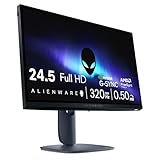
- Legendary performance: Games feel effortlessly smooth with adaptive sync technologies like NVIDIA G-SYNC Compatible, AMD FreeSync Premium and VESA AdaptiveSync.
- Minimize motion blur: 0.5ms* grey to grey response meets a 320Hz refresh rate to make high-speed objects look crisp and clear. *0.5ms (grey-to-grey min), 1ms (grey-to-grey most observed) in Extreme mode.
- Colorful clarity: See game details as intended with 99% sRGB color coverage.
- Game comfortably: ComfortView Plus hardware-based low blue light solution improves eye comfort and lessen distractions without color distortion.
- Effortless speed: See the difference in gameplay and clarity thanks to the 320 Hz refresh-rate, delivering ultra-smooth gameplay and lightning-fast reaction times.
What 320Hz changes in actual play
A higher refresh rate shortens the interval between screen updates. The theoretical interval is 16.67ms at 60Hz, 6.94ms at 144Hz, 4.17ms at 240Hz and 3.125ms at 320Hz. The jump from 60Hz to 144Hz is obvious to most players; the improvement from 240Hz to 320Hz is smaller but can make fast aiming motion look clearer and reduce the display portion of end-to-end latency.
That benefit appears only when the game is producing frames at a comparable rate. A title running at 100–180 frames per second cannot use the panel’s entire 320Hz ceiling. CPU limits, render queues, input devices, synchronization settings and network conditions also affect what you feel as latency.
Rank #2

- Alienware 27 Gaming Monitor AW2726DL, WQHD IPS Panel, 280Hz, 1ms
Who can exploit it
- Competitive Counter-Strike 2, Valorant, Overwatch 2, Rainbow Six Siege and similar players who sustain more than 240fps at 1080p.
- Players who value motion clarity and response ahead of resolution or cinematic image quality.
- Buyers building a relatively affordable esports-focused PC setup.
Ports and PC requirements
Use DisplayPort for 320Hz. Dell limits both HDMI inputs to 255Hz at 1920×1080, so an HDMI connection cannot deliver the headline refresh rate. The included DisplayPort 1.4 cable is suitable, provided it is connected directly to a compatible graphics-card output.
- Connect the monitor to the GPU with DisplayPort rather than HDMI.
- In Windows display settings, select the highest available refresh rate; confirm the same setting in NVIDIA Control Panel or AMD Software.
- Update the graphics driver if 320Hz is not offered, then try another DisplayPort output or cable.
- Check the game’s frame-rate cap and V-Sync settings when testing maximum refresh. With adaptive sync enabled, a cap slightly below the display limit can improve consistency, but the best value depends on the game and your latency preference.
A modern GPU with DisplayPort is required, and the game must render at very high frame rates. Laptops vary by model and output routing, while current consoles generally do not target 320Hz.
Rank #3

- Alienware 34 Gaming Monitor AW3426DWM, WQHD VA Panel, 240Hz, 1ms
If 320Hz does not appear
- Verify that the cable is connected to the discrete GPU, not a motherboard video output.
- Install the latest GPU driver and reboot after changing the refresh setting.
- Test another DisplayPort port or the supplied cable.
- If 320Hz flickers, try 300Hz or 240Hz; stability at lower settings can indicate a cable, port or signal-handshake problem.
Image quality and everyday compromises
Fast IPS gives the AW2525HM wider viewing angles and generally more balanced color than older TN esports panels. The 24.5-inch size is also common in competition because the entire screen stays within a player’s central field of view.
At 1920×1080 on 24.5 inches, pixel density is roughly 90 pixels per inch. That is serviceable for esports, but text and detailed single-player scenes look less sharp than on a similarly sized 1440p screen. Full HD is intentional: rendering fewer pixels makes 240–320fps easier for a mid-range gaming PC.
Rank #4

- Bring virtual worlds to life with WQHD quality: Explore your games' vast, detailed landscapes with WQHD resolution and fluid, responsive visuals in an iconically designed ultrawide gaming monitor.
- Dive into expansive details: Whether you’re exploring open worlds or completing challenges, you’ll never miss a detail thanks to WQHD resolution and a 34” ultrawide panel with a 1500R curve.
- Fluid Performance: Get in the game with a smooth 180Hz refresh rate, 1ms gray to gray response time, AMD FreeSync Premium and VESA Adaptive Sync Technology.
- Sharp visuals: Enjoy vibrant colors with DCI-P3 95% color coverage and VESA DisplayHDR 400 certification.
- Game longer: Lock in for marathon gaming sessions with a dedicated console mode and hardware-based low blue light solution that reduces eye strain while preserving color.
Dell lists HDR support in the signal specifications, but this is not an OLED or full-array-local-dimming display. Expect limited HDR impact compared with premium HDR monitors. Dell’s specification list also does not include built-in speakers, so plan on headphones or external speakers.
AW2525HM versus Alienware’s 500Hz models
The model numbers are easy to confuse. AW2525HM is the 320Hz product; the 500Hz family is older and was announced at CES 2023.
Free tools Windows power users keep installed
One-click scans. No signup required.
Best Value

- QD-OLED technology enables stunningly rich color and clarity, while QHD resolution (2560x1440) provides high level of detail.
- 360Hz refresh rate translates to superb motion clarity, empowering players to see and react to in-game situations at high speed.
- 0.03 ms gray-to-gray minimum response time** virtually eliminates blurring and ghosting and keeps latency to an absolute minimum.
- Infinite contrast ratio and VESA DisplayHDR True Black 400 make for deep blacks and stunning brights, all in the same scene.
- Excellent color performance with DCI-P3 99.3% color coverage and Delta E<2 accuracy for true-to-life visuals.
| Feature | AW2525HM | AW2524H / AW2524HF |
|---|---|---|
| Resolution | 1920×1080 | 1920×1080 |
| Refresh rate | 320Hz | 480Hz native, 500Hz overclocked |
| Panel | Fast IPS | Fast IPS |
| Sync emphasis | FreeSync Premium, G-SYNC Compatible and VESA AdaptiveSync | AW2524H: native G-SYNC; AW2524HF: AMD FreeSync Premium Pro |
| Positioning | Lower-cost high-refresh option | Esports flagship tier |
| Best suited to | Most competitive players seeking value | Specialists with exceptionally high frame rates who specifically want 500Hz |
Alienware described the AW2524H as the world’s fastest-refresh gaming monitor when it announced that model in 2023. That claim does not apply to the AW2525HM. The 500Hz models also remain 1080p, so paying for their extra ceiling makes sense mainly for players whose systems and games consistently exceed 400fps. Dell’s 2023 announcement is documented by PR Newswire.
Independent reader supportYour contribution helps us test, update, and keep practical guides available for everyone.Price, availability and buying checks
Dell’s March 2025 announcement gave an approximate U.S. and Canadian target price of $249.99 and only a “summer 2025” availability estimate; no more precise original launch day was established. Dell search results around August 2026 have shown $249.99 list pricing alongside promotional snapshots of $229.99 and $189.99. These are time-sensitive U.S. prices, not guaranteed future prices, so check the live listing before ordering.
- Confirm the model number is AW2525HM, not AW2524H or AW2524HF.
- Check that your GPU or laptop provides DisplayPort if 320Hz is important.
- Estimate real frame rates in your main games; a system that rarely exceeds 200fps will not realize the full advantage.
- Decide whether 1080p sharpness is acceptable for your desktop and non-competitive games.
- Compare the current sale price with 1440p 240Hz alternatives available in your region.
- Check regional stock, warranty terms and whether the unit is new, open-box or refurbished.
Who should buy the AW2525HM?
Buy it when
- You play competitive shooters at 240fps or higher.
- You prefer a 24.5-inch esports format and motion clarity over resolution.
- You want IPS viewing angles and broad AMD/NVIDIA sync compatibility.
- The current price is near or below the original $249.99 positioning.
Choose something else when
- Your PC cannot sustain high frame rates or you mostly play cinematic games.
- You want 1440p or 4K detail, high desktop pixel density or OLED-level contrast.
- Strong HDR performance is a priority.
- A 1440p 240Hz monitor costs about the same and better matches your mix of work and gaming.
- You are buying primarily for a console, which will not use 320Hz output.
Verdict
The Alienware AW2525HM is a sensible 2025-era esports monitor for players who can feed it very high 1080p frame rates. DisplayPort is mandatory for 320Hz, and the practical gain over a good 240Hz screen is incremental. If your priorities are competitive motion clarity and low display latency, it is a focused value option; if you want one monitor for sharp productivity, HDR or immersive single-player gaming, a 1440p 240Hz or OLED display is likely the better upgrade.
Quick Recap
Product prices and availability are accurate as of the date/time indicated and are subject to change. Any price and availability information displayed on Amazon at the time of purchase will apply.




