For better AirPods 4 sound, calls, or battery life, start by checking which model you own: noise-control settings such as Adaptive Audio and Conversation Awareness require AirPods 4 with Active Noise Cancellation (ANC). Both models support useful adjustments, including Personalized Volume and sound personalization. The best choices depend on your surroundings, call app, and listening preferences.
Check which AirPods 4 model you have
Apple sells AirPods 4 and AirPods 4 with Active Noise Cancellation. The standard model does not include ANC listening modes. Adaptive Audio, Transparency, and Conversation Awareness are available on the ANC model; Personalized Volume is available with AirPods 4. See Apple’s AirPods 4 specifications and AirPods user guide for model and software details.
As an Amazon Associate I earn from qualifying purchases.
Choose a listening mode for your surroundings
AirPods 4 with ANC: switch modes from Control Center
- Connect and wear your AirPods.
- Open Control Center on your iPhone or iPad.
- Touch and hold the volume control, then choose a Listening Mode.
Use ANC to reduce surrounding noise, or Transparency when you want to hear more of what is around you. Adaptive Audio blends noise cancellation and Transparency behavior as conditions change. In AirPods settings, choose Adaptive and adjust its slider to allow more or less ambient sound. Try the modes in your usual environments; no single setting is right for every situation.
Crashes, No Sound, or Screen Glitches?
Random freezes, missing sound and display glitches usually trace back to one bad driver. Find and replace yours safely.Free scan · under a minuteWindows Errors? Fix Them Before They Spread
Repair common Windows errors and clear accumulated junk for a smoother, more stable PC - no reinstall needed.Free scan · no reinstallAdaptive Audio and these ANC listening modes are not available on standard AirPods 4. Apple’s guide to listening modes and controls describes the options.
#1 Best Overall
![Gcioii 3 Pairs Ear Tips for AirPods 5/4 Noise Cancelling Earbuds Cover [Added Storage Pouch] Anti-Slip Accessories Compatible with AirPods 5 (2026) & AirPods 4 (2024),Translucent](https://m.media-amazon.com/images/I/31tWH+r9PkL._SL160_.jpg)
- Comfort for AirPods 5/4 – Crafted from soft, high-quality silicone, these ear tips offer a snug, comfortable fit for hours of uninterrupted listening. (NOTE: AIRPODS CAN NOT BE CHARGED WITH TIPS ON)
- Noise Isolation & Superior Sound – The soft silicone material creates a better seal, boosting your AirPods' noise-canceling capabilities for a more immersive audio experience.
- Secure Fit for Active Lifestyles – The anti-slip design texture ensures a secure, stable fit during activities like running, cycling, and intense workouts, keeping your AirPods in place.
- Packing List - Includes 3 pairs of medium-sized ear tips, a handy storage pouch, a carabiner, and a quick start guide.Simply slide on for a secure fit, and store them in the included pouch for easy, on-the-go convenience.
- Gcioii Quality Guarantee – Enjoy peace of mind with the Gcioii Guarantee – we stand behind the quality of our product.
Decide whether automatic volume features suit you
Personalized Volume
Personalized Volume can adjust media volume in response to your surroundings and learned volume preferences. It is available with AirPods 4. If you prefer to control volume yourself, turn it off in the connected AirPods settings on your iPhone or iPad; the exact menu location can vary by operating system version.
Conversation Awareness
On AirPods 4 with ANC, Conversation Awareness lowers media volume and enhances voices in front of you when you begin speaking, then restores the previous volume and listening mode after the conversation. Find the setting in connected AirPods settings—on some versions it is inside Audio & Routing—or in the Control Center volume panel.
This can be useful for brief conversations, but may disrupt spoken audio: Apple notes that podcasts and other spoken media can pause after a few seconds while a conversation continues. Press and hold the AirPods stem to end the conversation response manually. Conversation Awareness is not available on standard AirPods 4. Apple explains both features in its AirPods user guide.
Do these 3 things before closing this tab:
1Fix the driver behind crashes, sound loss and screen glitches2Clear out junk files and repair common Windows errors3Scan for outdated or missing drivers - takes under a minuteRank #2
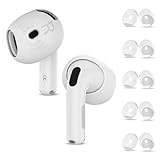
- Compatibility — This earbuds covers designed to perfectly fit AirPods 4th Generation (2024)/AirPods 5th Generation (2026 New) — Fit in the Case, the case can still closed and AirPods can still charge with these covers
- Rebuilt for Comfort — Our AirPods 4 & AirPods 5 ear tips cover made of soft flexible premium soft silicone, in-ear stability and a lasting comfort, reduce the pain of too long listening. Great for running, cycling, working out at the gym and much more
- Full Body Protection — Guard your AirPods 4 from accidental scratches and damage, and they are water-washable, durable, flexible, removable and replaceable. Simple design keeps application/removal just in seconds
- Package Included — 5 Pairs air pods 4 eartips cover (White), with a storage box, so that you can store your eartips cover after removing or replacing the eartips cover (The airpods and earpods NOT included)
- Reliable After-sales Service — You buy our airpods 4 earbuds cover, you will get reliable customer service and trusted guarantee. If you received defective products or had any problems, please feel free to contact us, we will solve your problem within 24 hours
Personalize sound without assuming one EQ fits everyone
AirPods 4 or later can use a three-band Custom EQ on iPhone, iPad, or Mac. Headphone Accommodations offers choices including Balanced Tone, Vocal Range, which boosts middle frequencies, Brightness, which boosts high frequencies, and a slider to boost softer audio. These tools can make listening more comfortable, but the result is personal—not a guaranteed sound-quality upgrade.
- Open the audio or headphone accessibility settings on your iPhone, iPad, or Mac and find Headphone Accommodations or the available EQ controls.
- Choose an accommodation or adjust one EQ band at a time.
- Compare Standard and Custom with familiar audio at a comfortable volume before keeping the change.
Menu names and locations can differ by device and software version. Apple’s Headphone Accommodations guide covers the options.
Improve AirPods call quality in noisy places
Voice Isolation is a microphone mode for supported calls on AirPods 4 with iPhone, iPad, or Mac. It reduces background noise, such as wind, so the other person can hear your voice more clearly. It is separate from ANC: it changes how your microphone handles sound during a call, not what you hear in your listening mode.
Rank #3

- PERFECT FIT FOR AIRPODS 4: Specifically engineered replacement with AirPods 4 ear tips, designed only for the 4th Generation AirPods (Not for Pro, 3rd gen, or others). Ensures optimal compatibility and performance.Y Ear Tips for AirPods 4 Earbuds 2024 NOT Fit in Charging Case
- ULTRA-THIN DESIGN (CASE NOTE): Features incredibly thin, soft silicone for maximum comfort and a deep, secure fit. Important: This ultra-thin profile means these for AirPods 4 silicone ear tips will NOT fit inside the original charging case when attached; swap back to originals for charging.
- ENHANCED COMFORT & SECURITY: Three pairs of flexible silicone ear tips for AirPods 4 provide a stable, comfortable seal that reduces slippage, perfect for daily use, commuting, or workouts. Compatible with most AirPods 4 ear hooks for extra hold.
- IMPROVED SOUND & ISOLATION: Achieve better passive noise isolation for clearer audio during music, calls, and podcasts thanks to the secure fit provided by these premium with AirPods 4 ear tips.
- VALUE-PACKED AIRPODS 4 ACCESSORIES: Get 3 pairs in one set - find your ideal size and have spares ready. An essential upgrade among AirPods 4 accessories for superior fit, comfort, and replacement needs.
- On iPhone or iPad: During a supported call, open Control Center, select the call controls or FaceTime Controls, and choose Voice Isolation.
- On Mac: Open the call’s microphone or video menu, choose Mic Mode, and select Voice Isolation.
Labels vary by app and operating system. For AirPods 4 stem controls, Apple lists one press to answer or mute/unmute and two presses to end a call. See Apple’s Voice Isolation instructions and AirPods 4 specifications.
Balance AirPods 4 battery life against listening features
Apple’s AirPods 4 ANC specifications give these listening-time estimates from its 2024 testing. They are not guarantees for everyday use.
| AirPods 4 ANC configuration | Apple’s estimate |
|---|---|
| ANC enabled, one charge | Up to 4 hours |
| ANC test configuration, with charging case | Up to 20 hours |
| ANC and Spatial Audio off, one charge | Up to 5 hours |
| ANC and Spatial Audio off, with charging case | Up to 30 hours |
Apple says its testing was conducted in July and August 2024 using pre-production AirPods 4 and iPhone 16 Pro Max units with pre-release software. Apple also says battery life depends on device settings, environment, usage, and other factors. The estimates show a trade-off under those test conditions; they do not establish how much switching off one feature will extend your own listening time.
Rank #4

- AirPods 4 Ear Covers Set:6 pairs replacement ultra-thin ear tips (black and white), only eartips, not headphones included
- Material: Made of high-quality soft silicone, flexible replaceable, durable, dustproof, sweat proof, waterproof
- Easy to use: Airpods daily accessories are perfect for running, cycling, exercising in the gym, and more
- Suitable for charging case: ultra-thin design suitable for charging case, not need to remove put in the case for charge.
- Reliable after-sales service: If you receive defective products or have any problems, please feel free to contact us and we will solve your problem within 24 hours
If ANC or Spatial Audio is not useful in a particular setting, try turning it off and compare your own battery use. Apple says five minutes in the case provides around one hour of listening. See the AirPods 4 specifications for the testing details.
Other settings to check when something feels wrong
- Microphone: If call pickup is inconsistent, check whether the microphone is set to Automatic, Always Left, or Always Right.
- Automatic Ear Detection: Review this if audio behavior when you remove an AirPod does not match your preference.
- Press-and-hold actions: Check the assigned action if holding a stem does not do what you expect.
- Pause media when falling asleep: Apple documents this option for supported products; it is a playback preference, not a promised battery improvement.
These controls and their locations depend on the connected device, product, and software version. Apple’s AirPods user guide describes the available settings.
The Tool Desk
Outbyte PC Repair FREERepair Windows errors before they cause bigger problemsFix Now →Outbyte Driver Updater FREEFix the driver behind crashes, sound loss and screen glitchesFind Drivers →Quick Recap
Product prices and availability are accurate as of the date/time indicated and are subject to change. Any price and availability information displayed on Amazon at the time of purchase will apply.

