Free tools Windows power users keep installed
One-click scans. No signup required.
Yes, AI can help with specific education tasks, but it has not been shown to improve learning automatically. A student may produce a stronger assignment with a chatbot and still learn little that they can recall or use without it. AI is more promising when it is designed for education and used with a clear teaching purpose that keeps students thinking and teachers involved.
Does AI improve learning, or just help students finish work?
The difference is between task performance—the quality or speed of work completed with AI—and learning: knowledge and skills students retain and can apply when the tool is unavailable. The OECD’s Digital Education Outlook 2026, published January 19, 2026, warns that better performance on an AI-assisted task does not by itself show that learning has taken place.
As an Amazon Associate I earn from qualifying purchases.
The OECD describes evidence that general-purpose generative AI can improve the quality of student outputs, while gains may disappear or reverse in exams when AI access is removed. That is why a polished essay, completed worksheet, or fluent explanation generated with AI is not sufficient evidence of understanding. Assessment should also reveal what a student can explain, remember, or do independently.
Recommended Free Tools
The Outlook says purpose-built educational tools used intentionally are more likely to support sustained learning than general-purpose AI used without a learning design. This is a qualified finding, not a guarantee that an education-focused label makes a tool effective. The OECD’s 2025 review of digital technologies in education likewise cautions that access to technology alone does not ensure educational gains.
#1 Best Overall

- 4 Pack for More Fun: Apply the newest flexible liquid crystal technology, brighter and clearer than most LCD writing tablet. Take pressure-sensitive technology, you can draw lines of different thicknesses through different pressure levels. Package includes 4 pack lcd writing tablet (Blue, Light blue, Green and Pink), free children's imagination and creativity.
- 8.5 Inch Colorful Lcd writing Tablet: TQU kids LCD doodle board is a creative education and learning toy, perfect support for drawing, writing, spelling, math, remark, and notes which can let your kids freely release their natural instincts. With erase button on the front and lock switch. You can draw and erase easily by pressing the button on the front of the board. The pen fits snug on top of tablet and it will not come loose.
- Easy to use and Durable: The LCD writing tablet for kids is easy to use, just use the stylus to write, draw, scribble, doodle anything you want. Press the erase button to clear the screen in one second. Or press the lock key to save the screen contents. Our magic reusable drawing tablet is built in a button battery.
- Safe & Portable Toddler Travel Toys: Great for quiet, take-along entertainment. It’s an easy way to color on the go without lugging a bunch of stuff in the car or to a restaurant or church.
- Perfect Gift Idea: The multi-functional LCD writing tablet is a great gift choice for kids. It can be an educational toy for preschoolers. A perfect parent-pick gift for 3 4 5 6 7 8 year old girls and boys on back to school, homeschool, birthday, Easter, Children's Day, Thanksgiving Day, Christmas and any occasion.
What the evidence says about teachers’ use of AI
AI is already part of many teachers’ work, though reported use varies across education systems. OECD publications reporting results from TALIS 2024 say around one in three lower secondary teachers used AI for their job in 2024 on average across participating systems; the OECD’s 2026 Outlook presents the average as 37%. These figures refer to lower secondary teachers in participating TALIS systems, not all teachers worldwide. The survey’s definition of AI is broad and includes technologies beyond generative AI and large language models.
Use differs sharply by system: the OECD’s TALIS 2024 results report use around 75% in Singapore and the United Arab Emirates, and below 20% in France and Japan. The OECD also cautions that some estimates carry a higher risk of non-response bias, so these comparisons should be read as survey findings rather than a complete census of teacher practice.
Among teachers who said they used AI, the OECD’s 2025 report on TALIS 2024 results found that 68% used it to learn about or summarize a topic and 64% to generate lesson plans, on average across participating systems. Those are self-reported uses by AI-using teachers, not evidence that students learned more as a result.
What’s actually slowing this PC down?
Pick the symptom - the matching free tool is one click away.
Rank #2

- Comprehensive Early Learning: This upgraded toddler music learning tablet includes 90+ fun modules covering animals, shapes, musical instruments, vehicles, letters, numbers, and colors. Available in English, French, Spanish, German, and Italian, it supports early language skills and builds essential preschool concepts for children ages 1-3
- 4 Playful Learning Modes: This toddler activity tablet offers Learning Mode to teach basic concepts, Quiz Mode to build problem-solving skills, Music Mode to spark creativity, and Pretend Play Mode with fun icons like a phone and camera. Supports fine motor development, memory, and communication through interactive, sensory-rich play
- Screen-Free Multilingual Learning: This no-screen toddler tablet supports English, Spanish, and French with just one press. With 39 interactive icons, it reads out words and plays sounds to boost vocabulary, pronunciation, and listening skills for toddlers ages 1-3
- Physical & Motor Skill Development: The tablet's responsive touch controls help toddlers develop fine and gross motor skills while improving hand-eye coordination. Encourages active, hands-on exploration for toddlers ages 1-3
- Durable, Portable and Safe: Crafted from non-toxic, BPA-free ABS plastic, this toddler tablet is designed to withstand bumps, drops, and everyday play. Its compact, lightweight design makes it easy to carry whether at home or on the go
Where teachers report value—and where evidence is limited
In the OECD’s 2026 summary of TALIS 2024, 57% of lower secondary teachers agreed that AI helps them write or improve lesson plans. Around 40% of teachers in the 2025 TALIS report said AI helps them support students individually. These figures capture teachers’ views; they do not measure the quality of the resulting lessons or establish a causal effect on achievement. Views about lesson-planning help vary substantially by country.
Reported use is less common for work that directly evaluates or monitors students. In the OECD’s TALIS 2024 results, 25% of teachers who use AI said they use it to review participation or performance data, and 26% to assess or grade student work. These are reported uses, not a recommendation to delegate consequential judgments to AI. Reviewing AI-generated material and making decisions about students still require professional judgment.
General-purpose AI and education-focused tools are not interchangeable
The key difference is not simply which product is newer or more capable. It is whether the tool and the activity help students practise and develop the intended knowledge or skill, and whether teachers can guide that process. The OECD, UNESCO, and U.S. Department of Education identify considerations that schools can use to assess both kinds of tool.
Rank #3
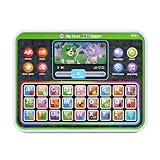
- Slide the play button to hear from Scout and Violet while watching them move
- Enjoy the bright backlit rainbow buttons and tap to practice letters, words and colors
- Venture out with Scout and Violet as they share details of trips to the farm, beach and more
- Hit all the right notes with the ABC song
- Intended for ages 12+ months; requires 3 AAA batteries; batteries included for demo purposes only; new batteries recommended for regular use
| What to assess | Questions for a general-purpose chatbot | Questions for an education-focused tool |
|---|---|---|
| Learning design | Does it encourage explanation, practice, questions, and feedback, or mainly supply finished answers? | Does its instructional design prompt students to think and practise, rather than merely complete work? |
| Evidence of learning | Is there evidence of retained or transferable learning, beyond the quality of AI-assisted output? | Does evidence measure what learners can do after using the tool, including when they no longer have access to it? |
| Teacher agency | Can teachers shape how students use it, review outputs, and keep their judgment central? | Does it support teachers’ instructional decisions rather than displace them? |
| Privacy and age suitability | What student information is collected and how is it used? Is the tool appropriate for the students’ ages and setting? | Are data practices, age suitability, and safeguards clear for the school’s context? |
| Equity and policy fit | Can students access it, and does its use fit school rules, curriculum, assessment expectations, and local law? | Can different learners use it accessibly, and is it consistent with school policy and local requirements? |
An education-focused tool may offer a more purposeful learning experience, but the label alone does not establish its effectiveness, privacy protections, or accessibility. For either type, schools need to check the actual design, evidence, and terms of use.
Crashes, No Sound, or Screen Glitches?
Random freezes, missing sound and display glitches usually trace back to one bad driver. Find and replace yours safely.Free scan · under a minutePC Slower Than It Used to Be?
A free scan shows the junk files, broken settings and background clutter dragging Windows down - then fixes them in one click.Free scan · Windows 10 & 11What are the risks of AI in education?
Academic integrity is a prominent teacher concern. In the OECD’s 2026 summary of TALIS 2024, 72% of lower secondary teachers believed AI could harm academic integrity by allowing students to pass off work as their own. This measures a perception, not the verified share of students who have done so. Schools can respond by making expectations for permitted AI assistance explicit and using assessments that give students a chance to demonstrate their own understanding.
The OECD’s 2025 TALIS report says around 40% of teachers agreed that AI may amplify bias, reinforce misconceptions, or compromise privacy and security. These are concerns reported by teachers, not measured incidence rates. They point to concrete issues to check: whether a response may mislead, whether outputs work fairly for different learners, and what happens to information students enter.
Rank #4

- FINE MOTOR TOYS: Invite little learners to practice letter formation with the Letter Tracing Sensory Pad, a tactile writing tool that builds fine motor strength and early handwriting confidence. The sensory surface turns practice into engaging play.
- EDUCATIONAL TOYS: Prefilled with thick, squishy gel that stays safely sealed inside, the pad delivers a mess free experience. Kids trace with a child friendly stylus that is securely attached, making cleanup simple for classrooms and homes.
- BIRTHDAY GIFTS FOR KIDS: Use reusable activity cards to guide uppercase and lowercase letter practice again and again. Cards store inside the pad for easy organization, supporting centers, small groups, or travel so learning can happen anywhere.
- TODDLER LEARNING TOYS: Perfect for Preschool and Kindergarten, this tool strengthens pencil grip, hand eye coordination, and prewriting skills. Pair with Montessori style lessons, literacy activities, or quiet time for independent skill building.
- KINDERGARTEN CLASSROOM MUST HAVES: Set includes 1 Letter Tracing Sensory Pad with attached stylus, 16 double sided activity cards, and a Getting Started Guide.
UNESCO’s guidance on AI in education calls for a human-centred approach that protects inclusion and equity. It also notes that technological development has outpaced policy debate and regulatory frameworks. A school should therefore treat safeguards and oversight as part of implementation, not assume that a tool is suitable simply because it is available.
Independent reader supportYour contribution helps us test, update, and keep practical guides available for everyone.How schools can use AI without outsourcing learning
A practical approach is to start with the learning goal, then decide whether AI has a role. The OECD recommends selective use that enriches learning without replacing cognitive effort or weakening teacher–student relationships. In practice, a classroom plan can follow these checks:
- Name the skill students must learn. Decide what students should be able to explain, remember, or do independently—not only what they need to submit.
- Choose a role for AI that supports that skill. Use it, if appropriate, to prompt practice, questions, feedback, or exploration rather than to do the core thinking for the learner.
- Make the rules visible. Tell students what AI assistance is allowed for the activity and what work or explanation must be their own.
- Check understanding without AI assistance. Include a way for students to show what they can do independently, so task completion is not mistaken for learning.
- Review the tool and its effects. Check privacy, age suitability, accessibility, and policy fit, and look at whether students are developing the intended skill rather than only producing better outputs.
This is consistent with UNESCO’s emphasis on human-centred, inclusive use and with the OECD’s distinction between supported task performance and learning that lasts. It also keeps teachers responsible for interpreting student work and deciding what instruction should follow.
Best Value

- Abundant Writing Tablets for Kids: you will receive 20 colorful writing boards, 4 different colors, each color has 5 pieces, including blue, red, green and pink, sufficient to meet boys and girls' needs, which solves the problem of children fighting for a writing board, available to share with their friends to have fun
- Eye Protection Lcd Screen: adopting eye protection LCD screen, no radiation and no glare, these bulk toys are helpful for your child's eyesight, while providing a more comfortable painting experience; It is made of quality plastic material, providing enough space for graffiti and easy to watch, good for children imagination and creativity
- Portable and Reliable: these kids doodle pads are about 8.5 inches long, weighing only 93 grams, lightweight and portable doodle board, convenient for kids to use and carry, available to be put into backpacks; The drawing board will keep kids occupied for hours in a car, airplane, so parent can enjoy a relieved trip
- Nice Education Gift with Endless Fun: the LCD kids writing tablet is reusable, saving the world a lot of paper and ink, kids and adults can have fun, and it can be applied as an educational toy for preschoolers; It can also be good for long drives and road trips travel toys, back to school, homeschooling, Easter, birthday, Children's Day, Thanksgiving, Christmas and other occasion gifts
- Ease of Use: this electronic writing pad is designed by pressure sensitive technology, each drawing board has a built in battery, easily creating lines; Just press the instant clear button to easily erase and start over, pick up the included pen and create anything you want, the lock switch on the back avoids your work from accidental erasure
What U.S. federal guidance says about responsible use
For U.S. schools and institutions using federal education funds, the Department of Education’s July 22, 2025 announcement describes a Dear Colleague Letter addressing responsible AI integration in the use of formula and discretionary grant funds. The announcement identifies instructional materials, high-impact tutoring, and college and career pathway exploration as areas covered, and highlights user privacy and engagement with affected stakeholders, especially parents.
The same announcement described an additional supplemental grantmaking priority as proposed and gave an August 2025 comment deadline. That announcement does not establish that the proposal became a final rule. The guidance is specific to its U.S. federal-funding context; schools elsewhere need to follow their own applicable policies and laws.
Quick Recap
Product prices and availability are accurate as of the date/time indicated and are subject to change. Any price and availability information displayed on Amazon at the time of purchase will apply.

