What’s actually slowing this PC down?
Pick the symptom - the matching free tool is one click away.
There is no universal winner. Cameras support visual observation, drones provide aerial mapping and progress views, and wearables can alert individual workers to proximity or environmental and physiological conditions. Choose according to the hazard, coverage needed, response plan, site conditions, privacy impact, and maintenance burden. These tools can complement one another; official guidance does not establish a single best system, a model-level accuracy ranking, or that AI can replace a required competent safety monitor.
What the three approaches monitor
These technologies observe different things, so comparing them as if they were interchangeable products leads to the wrong choice. A camera looks at a visual area, a drone captures an aerial view for a particular task, and a wearable can collect information close to a worker or provide an alert to that worker. The appropriate starting point is the hazard and the action needed—not the word “AI” in a product description.
As an Amazon Associate I earn from qualifying purchases.
| Approach | What it is suited to observe | Typical use described by official sources | Key limitation or consideration |
|---|---|---|---|
| Camera | A visual area from a fixed or mobile viewpoint | Visual monitoring as part of digital occupational-safety systems | The cited EU-OSHA material does not establish the accuracy, features, or site suitability of a specific AI camera. |
| Drone | An aerial view of an area or work activity during a flight | Mapping, site surveys, and work-progress monitoring; may reduce the need for workers to enter dangerous areas | Human-drone collaboration still has safety challenges, and a drone is not inherently risk-free. |
| Wearable or sensor | A particular worker, nearby equipment, or local environmental conditions | Proximity alerts, physiological monitoring such as heat-stress warnings, and measurement of hazards such as gases, temperature, humidity, and noise | Cost, maintenance, privacy, and the need to select and evaluate sensors for their intended use matter. |
EU-OSHA includes mobile monitoring cameras among digital systems developed with the aim of monitoring and enhancing occupational safety and health. NIOSH describes construction drones used for mapping, surveys, and progress monitoring, and wearables used for proximity and physiological or environmental sensing. Those descriptions establish use cases, not a head-to-head performance ranking. EU-OSHA’s digitalisation of work overview, NIOSH’s 2024 construction automation and robotics overview, and NIOSH’s 2019 construction wearables bulletin provide the relevant context.
Which approach fits the hazard?
Choose cameras for a visual-observation need
A camera is the most direct match when the task calls for observing a visual area. It may support a safety workflow that depends on seeing what is happening in that area, but a camera’s view is not the same as knowing every worker’s condition or measuring a local environmental hazard. A camera can also fail to provide useful observation when its view is obstructed or visibility is poor; NIOSH specifically identifies dust, rain, glare, and poor lighting as conditions that can degrade sensing in construction robotics.
#1 Best Overall
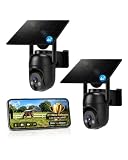
- 【4G LTE Network & No WiFi Needed】Cellular security camera include a pre-installed SIM card with 7-day unlimited trial data; auto-connects to the strongest U.S. network (Verizon/T-Mobile/AT&T). After the 7-day trial ends, subscribe to unlimited data for $19.90/month or $169.90/year via the UBox app to maintain remote access. Note: Each device requires a separate data plan subscription and cannot be shared. 100% wireless & no wifi needed—ideal for ranches, construction sites, vacation homes, or home security. (SIM card is non-replaceable)
- 【High-capacity Battery & Non-stop Solar Powered】 No wifi security camera that works without WiFi comes with a rechargeable battery and a 6W solar panel; the high-capacity battery and solar panel together provide continuous power for 365 days of uninterrupted operation, so you don't need to worry about it running out of power. Plus, with an IP65 weatherproof rating, this solar outdoor camera withstands rain, dust, heat, and cold, delivering reliable performance in harsh outdoor environments year-round. (Do not support WiFi)
- 【2K Color Night Vision & 360° Wide View】 This jobsite camera offers a 360° wide view and 4X digital zoom. You can remotely pan 355° and tilt 100° via the UBox App, which increases the flexibility of the 360 camera to get the broadest view without blind spots. By adopting color 2K HD night vision mode, the non wifi security camera could capture colorful footage up to 65ft. Even in the dark, the full-color night vision lets you always keep an eye on your assets. (Do not support auto-tracking)
- 【Smart Motion Detection & Real-Time Alerts】 Solar security cameras wireless outdoor features an advanced PIR motion sensor that detects movement and immediately sends an alarm notification to your mobile phone when humans or animals are detected. Built-in microphone and speaker let you listen and speak through the app to deter intruders. If you turn on white light alarm & siren alarm, solar camera will also emit dazzling lights and sirens, and you can customize detection zones and sensitivity to reduce unnecessary notifications.
- 【Flexible Dual Storage Options & Multi-Sharing】 Enjoy 30-day free trial cloud storage with easy playback anytime via the app— subscription is required after the 30-day trial ends. For added flexibility and data security, the 4g camera also supports local storage with a TF card up to 128GB (not included). Easily share cellular camera access with family members through the app, allowing remote property monitoring anytime, anywhere, even when abroad. (TF Card not included)
Do not assume that a camera labelled AI detects every hazard, recognizes every unsafe act, or provides a legally sufficient safety-monitoring arrangement. The cited sources do not publish a validated accuracy figure or feature list for any particular camera, and they do not establish that automated camera monitoring can take over a human monitor’s required duties.
Choose drones for aerial capture, mapping, or progress views
A drone is suited to a task that benefits from an aerial perspective: NIOSH identifies mapping, site surveys, and work-progress monitoring as construction uses. Aerial capture can reduce the need for workers to enter dangerous areas for some tasks, but that benefit does not mean every survey can be done remotely or that flight activity is safe without controls.
NIOSH notes that safety challenges in human-drone collaboration remain unexplored. Treat each flight as a site activity that needs its own planning: establish what area and task the flight covers, how people nearby will know about it, and how the work fits around other site activity. The cited material does not specify a universal flight procedure, accuracy threshold, or operating approval; those details depend on the task and applicable rules.
Choose wearables for worker-level or local sensing
Wearables are the closest fit when the needed information follows a worker or is measured near that person. NIOSH describes proximity alert systems for nearby heavy construction equipment, physiological monitoring that may warn of heat stress, and environmental sensors for hazards including gases, temperature, humidity, and noise. These are distinct jobs: a device intended to warn about approaching equipment is not automatically a heat-stress monitor or a gas detector.
For any sensor, identify the condition it is meant to detect and the next action a reading should trigger. NIOSH’s Direct Reading and Sensor Technologies Center explains that sensors can detect and monitor hazardous conditions, help assess interventions, and trigger alarms immediately. It also notes the need for guidance on choosing sensors and evaluating their performance characteristics. A sensor reading without a defined recipient and response is not, by itself, a complete safety process.
Rank #2

- NO WIFI NEEDED — WORKS ANYWHERE WITH CELL SIGNAL — Connects over LTE cellular, not your home network, so it works at a remote gate, barn, or cabin with zero WiFi setup or dropped connections.
- 360° PAN, TILT & ZOOM FROM YOUR PHONE — Remotely rotate the camera to check any angle of your property on demand, instead of installing multiple fixed cameras to cover the same ground.
- SOLAR + RECHARGEABLE BATTERY — RUNS OFF-GRID — Solar charging keeps the built-in battery topped off, so the DEFEND 360 runs continuously anywhere, with no wall outlet required.
- 4K PHOTOS, 1080P VIDEO, INSTANT MOTION ALERTS — Get real-time notifications and imagery the moment motion is detected, sent straight to your phone.
- WEATHER-RESISTANT, BUILT TO STAY OUTSIDE — Handles rain, heat, cold, and years of exposure without missing a trigger.
How to make a site-specific choice
Use the following sequence to compare options before selecting equipment or combining technologies. It is a planning framework, not a claim that one configuration has been validated for every site.
- Describe the hazard and the decision. Name the condition the system is intended to address—such as a worker nearing heavy equipment, a heat-stress concern, an environmental exposure, a need to inspect an area, or a need to observe a visual zone. Then state what decision a person should make when the information arrives.
- Define the coverage boundary. Decide whether useful information must cover a visual area, an aerial view for a particular survey or progress task, or an individual worker or local environment. Record where the system is expected to work and what it cannot see or measure.
- Specify the response path. Identify who receives an alert or observation, how it reaches them, and what safe action follows. NIOSH describes sensors that can trigger alarms, but does not prescribe a universal alert design. Assigning ownership and an actionable response is therefore a site decision, not something to assume the device handles automatically.
- Check conditions where the system will operate. Consider changing layouts and conditions such as dust, rain, glare, and poor lighting. NIOSH flags these as potential causes of sensor degradation in construction robotics. Assess the actual operating conditions rather than assuming performance in one environment will carry over to another.
- Estimate the operating burden. Include the infrastructure, upkeep, and staff attention needed to keep the system useful. NIOSH identifies cost and maintenance as adoption concerns for construction wearables; the sources do not provide a current price schedule or a comparable maintenance cost across cameras, drones, and wearables.
- Set privacy and worker-involvement rules before collection begins. Explain the purpose, what information is collected, who can access it, how long it is retained, and whether it may be disclosed later. Decide how workers who do not participate will be accommodated, especially if video is involved.
- Evaluate performance for the intended use. Establish how the site will determine whether the system detects the target condition reliably enough for its role, and what happens when it is unavailable, uncertain, or obstructed. The sources do not supply a common benchmark or product accuracy ranking, so avoid selecting on an unsupported headline percentage.
The criteria are deliberately hazard-led. NIOSH says construction conditions change quickly, while sensing can be affected by dust, rain, glare, or poor lighting. That makes the site and the specific deployment—not just a product category—part of the evaluation. NIOSH’s 2026 construction robotics safety bulletin discusses these technology-related hazards.
The Tool Desk
Outbyte PC Repair FREERepair Windows errors before they cause bigger problemsFix Now →Outbyte Driver Updater FREEFix the driver behind crashes, sound loss and screen glitchesFind Drivers →Questions to ask before buying or piloting
Ask vendors and project stakeholders to connect every claimed capability to the site’s specific use. What condition is the device intended to sense? What performance information is available for that condition and in the site’s actual operating environment? How will the system indicate that a sensor is obstructed, unavailable, or not functioning as intended? Who receives an alert, and what is that person expected to do? These questions do not imply that every vendor provides a particular feature; they help separate a defined monitoring function from a broad AI claim.
Also account for what the deployment requires beyond the device itself. NIOSH identifies cost and maintenance as adoption concerns for wearables, but does not provide a price range or comparative ownership-cost estimate. Ask what infrastructure and ongoing upkeep the proposed setup requires, and who is responsible for it. A system that cannot be maintained or whose alerts have no clear owner may not fit the site’s operating needs, regardless of its nominal capabilities.
For a general product search, “construction site security camera” is a relevant category for camera-based visual monitoring. It is not a recommendation of a tested model or proof that a listing has verified AI functions. Construction worker proximity-alert wearables and construction mapping or progress-monitoring drones are other relevant categories, but no specific model or marketplace listing has been verified here.
Rank #3

- Forever Power: Empower your viewing to go anywhere you desire. Enjoy off-the-grid freedom with the upgraded solar panel and a powerful 9,400 mAh battery.
- Seamless Connectivity with 4G and Wi-Fi: The Dual-Mode technology of eufy 4G LTE Cam S330 Ultimates security with uninterrupted access compared to traditional cellular no wifi cameras. If Wi-Fi signal is lost, the auto-switching 4G feature swaps to mobile data. Guaranteeing continuous use.
- Works with EIOTCLUB to Automatically Switch to the Strongest Network:eufy 4G LTE Cam S330 includes an EIOTCLUB SIM card, which is compatible with the three major U.S. networks: AT&T, T-Mobile, and Verizon. For consistent, reliable coverage, we recommend using the provided EIOTCLUB SIM, which supports cross-network roaming to connect to the strongest signal automatically. If you prefer using SIMs from AT&T, T-Mobile, or Verizon, please ensure they are data-only plans.
- 4K in Color, Day and Night: The color 4K camera gives you the clarity to identify a license plate 30 feet (10 meters) away. Shine a light on your surroundings with the 100-lumen spotlight to continue seeing colorful details up to 26 feet (8 meters) away, all through the night.
- 360° Viewing with AI Tracking:All-around viewing with pan and tilt. AI detects and tracks people, and vehicles, with an extensive range of motion.
When combining technologies makes sense
Because the approaches cover different things, a site may have a reason to use more than one. For instance, aerial mapping or progress capture addresses a different need from a worker-worn proximity alert; neither should be treated as a substitute for the other unless the task and hazard assessment support that conclusion. A visual camera view may help observe a designated area while an environmental sensor measures a condition that cannot be determined reliably from an image alone.
PC Slower Than It Used to Be?
A free scan shows the junk files, broken settings and background clutter dragging Windows down - then fixes them in one click.Free scan · Windows 10 & 11Outdated Drivers Are Slowing You Down
One free scan finds every outdated or missing driver and matches the right update for your exact hardware.Free scan · exact hardware matchBefore combining systems, map each one to a distinct purpose and response. If two tools generate alerts about the same condition, decide which person owns follow-up and how conflicting or repeated alerts are handled. If one tool fails, define whether work pauses, switches to another control, or continues under a separate procedure. The official sources identify uses and implementation concerns, but do not establish a standard integrated system architecture or prove that combining devices automatically improves safety.
AI monitoring does not remove human safety duties
For fall-hazard safety monitoring in the United States, OSHA’s FAQ describes a monitor who must be competent to recognize fall hazards, within visual sighting distance of the employee, close enough to communicate orally, and free from other duties that could distract from monitoring. An AI camera alone should not be represented as meeting those requirements. The applicable regulation and jurisdiction should be checked for the particular work and monitoring plan. OSHA’s safety monitoring systems FAQ addresses this specific context; it is not a universal summary of every construction-safety duty.
More broadly, automated sensing can support observation or raise a warning, but official guidance does not establish that it replaces a required competent person or other safety controls. Before relying on an alert, establish who will notice it, judge what it means, communicate with workers, and take action. A technology’s intended function and the legal responsibilities attached to a job are separate questions.
Privacy, consent, and worker trust
Monitoring can affect people even when the stated goal is safety. EU-OSHA identifies regulatory, ethical, privacy, and psychosocial concerns around digital monitoring. NIOSH’s ethical framework for wearable sensors sets out three objectives: justify the monitoring, optimize it through the least intrusive means necessary, and minimize harm. It also calls for informed consent, clear disclosure of the program’s purpose and future data disclosures, and an opportunity for nonparticipants to work outside a videotaping area.
Quick wins for a faster PC:
Repair Windows errors before they cause bigger problemsFix Now →Scan for outdated or missing drivers - takes under a minuteDriver Scan →Rank #4

- 【Built-in SIM Card & Data Service】Comes with a pre-installed & pre-activated 4G LTE SIM card with a 7-day free data trial. Multiple flexible plan options are available, including unlimited data plans with both monthly and annual billing cycles. (For US use only)
- 【Wireless Solar-Powered & 4G LTE Network】: Forget about messy wires! This wireless camera no internet needed is completely wire-free in design, no need power or wifi connection, this Cell camera is powered by solar panel and rechargeable battery, connected to internet via its own SIM card, 100% wire-free, very easy to install.
- 【PTZ & 2K HD Color Night Vision】: This non wifi camera supports 270° pan, 90° tilt and 4x digital zoom, fully cover all around, the cellular camera has 2K HD image sensor and 4pcs spotlight, which can offer stunning clear color pictures for day and night.
- 【Human Motion Detection & Phone Notification】: The 4G camera is built-in sensitive PIR sensor, that can detect moving people, vehicles and animals, once it is triggered, the no wifi security camera outdoor will push instant alerts to your mobile phone. 4G Security camera no WIFI needed, allows you to leave one eye on what you care.
- 【Remote Playback & Two-Way Audio】: Ubox camera can save events to the local micro SD card (excluded) and free cloud storage(Need to apply), allows playback on the free Ubox phone app. Built-in speaker and microphone help you to talk to visitors under the LTE security camera through your mobile phone.
Translate those principles into clear operating rules rather than relying on a general statement that monitoring is for safety. Specify what data is collected, its purpose, who can access it, what future disclosure may occur, and how long the information is kept. Make the participation process understandable before deployment, and address how a worker who does not participate can be accommodated. These steps are particularly important where video could capture people who are not the intended subject. NIOSH’s ethical framework for wearable sensors explains the principles.
The practical trade-offs matter too: NIOSH authors Scott Earnest, PhD, PE, CSP; CAPT Alan Echt, DrPH, CIH; CDR Elizabeth Garza, MPH, CPH; John Snawder, PhD, DABT; and Rick Rinehart wrote in the 2019 bulletin, “Cost, maintenance, and privacy are all issues that could affect how widely these technologies are adopted.” Those factors are not secondary procurement details; they can shape whether a system is usable and accepted on a site.
Independent reader supportYour contribution helps us test, update, and keep practical guides available for everyone.What the available evidence does—and does not—show
The cited official materials explain use cases, risks, and governance considerations, but they do not provide controlled side-by-side testing of cameras, drones, and wearables; product-specific accuracy results; or a current market inventory. They also do not identify a model-level winner or establish that a system advertised as AI will work under every site condition. A buyer should therefore ask for evidence relevant to the intended hazard and deployment conditions, rather than infer performance from a technology label.
NIOSH’s 2019 bulletin quotes CPWR 2018 figures stating that “nearly 20% of all work-related fatalities in any given year occur on construction sites” and that construction employed “about six percent of the U.S. workforce.” These are historical figures attributed to CPWR 2018 and quoted by NIOSH; they should not be treated as current estimates without checking the original CPWR publication and a current data series. Their context underscores why safety decisions matter, but they do not show that any particular monitoring technology prevents injuries or fatalities.
Do these 3 things before closing this tab:
1Fix the driver behind crashes, sound loss and screen glitches2Repair Windows errors before they cause bigger problems3Scan for outdated or missing drivers - takes under a minuteQuick decision guide
- Need an aerial survey, mapping, or progress view? Consider a drone for that task, with site-specific controls for human-drone interaction.
- Need to warn a worker about nearby heavy equipment? Consider a worker-worn proximity alert system and define the alert recipient and action.
- Need to monitor a worker’s physiological or nearby environmental condition? Consider a sensor designed for that specific measurement, and assess its performance characteristics and maintenance needs.
- Need to observe a visual area? Consider a camera, but do not assume a visual feed or AI label establishes accuracy or satisfies a human-monitor requirement.
- Need to comply with a monitoring rule? Check the governing rule and jurisdiction first; technology selection does not by itself settle compliance.
Frequently Asked Questions
Which monitoring approach is best for construction site safety?
There is no universal best option established by the cited guidance. Match the tool to the hazard and coverage needed: cameras for visual observation, drones for aerial mapping, surveys, and progress views, and wearables or sensors for worker proximity, physiological, or local environmental conditions. Then evaluate response, site conditions, maintenance, privacy, and applicable safety duties.
Best Value

- 4G LTE outdoor security camera with included SIM card, ideal for construction sites, and storage areas where Wi-Fi is not available.
- Wireless surveillance powered by a frameless solar panel and high-capacity battery, delivering up to 6 months of autonomy with no external power.
- Detects motion up to 100 ft and sends instant photo alerts or 15-second video clips on demand, giving real-time visibility of your tools, equipment, and site.
- Integrated deterrent light signals the camera’s presence and repels intruders, protecting valuable materials, trailers, and storage containers.
- Rugged antenna, IP65 weather resistance, and durable solar design ensure continuous operation in rain, snow, dust, and harsh jobsite conditions.
Can AI cameras replace a required construction safety monitor?
Do not assume that they can. OSHA’s fall-hazard safety-monitoring FAQ describes a competent human monitor who can see and communicate with the employee and is not distracted by other duties. Check the governing rule for the specific work and jurisdiction; an AI camera alone should not be represented as satisfying those requirements.
What are drones used for in construction monitoring?
NIOSH describes construction drones being used for mapping, site surveys, and work-progress monitoring. They can reduce the need for workers to enter dangerous areas for some tasks, but human-drone collaboration has safety challenges, so plan for the task and site rather than treating a drone as inherently risk-free.
What can construction wearables detect or warn about?
NIOSH describes worker-worn proximity alerts for nearby heavy equipment, physiological monitoring that may warn of heat stress, and environmental sensing for hazards such as gases, temperature, humidity, and noise. A device should be selected and evaluated for the specific condition it is intended to measure or alert about.
How much do construction monitoring cameras, drones, or wearables cost?
The cited materials do not provide current prices or a comparable cost breakdown across the three approaches. NIOSH identifies cost and maintenance as adoption concerns for wearables. When assessing a setup, account for its infrastructure and upkeep as well as the device, and ask who will maintain it and handle alerts.
What should a site check before relying on automated monitoring?
Define the hazard, coverage boundary, alert recipient, and safe response. Evaluate the system under the site’s actual conditions, including dust, rain, glare, poor lighting, and changing layouts, and establish what happens when sensing is obstructed or unavailable. Also set clear privacy and worker-involvement rules before collecting data.
The Bottom Line
Start with the hazard, not the AI label. Use cameras for visual observation, drones for aerial mapping and progress tasks, and wearables or sensors for worker-level proximity or local environmental and physiological monitoring. Define who responds to information, validate the setup under real site conditions, plan for maintenance and privacy, and do not treat automated monitoring as a replacement for a required competent human monitor.
Quick Recap
Product prices and availability are accurate as of the date/time indicated and are subject to change. Any price and availability information displayed on Amazon at the time of purchase will apply.
Recommended Free Tools

