A US iPhone can still work in Brazil, but activation is not guaranteed by the fact that it is unlocked or supports Brazilian network bands. For a successful local line, check three things: the phone’s carrier-lock status, whether the Brazilian carrier can activate eSIM on that exact device and account, and whether the device’s IMEI is accepted and free of restrictions. Newer US iPhones have no physical SIM tray, so there may be no physical-SIM fallback.
What “activation” means—and where it can fail
People use “activation” to describe several separate steps. An iPhone may complete its initial setup and connect to Wi-Fi while still having no Brazilian cellular service.
- iPhone setup: getting through the device’s initial setup, usually using Wi-Fi and an Apple Account.
- Carrier activation: adding a Brazilian line through a physical SIM or eSIM.
- Network registration: the phone connecting to a carrier such as Claro, TIM, or Vivo.
- Carrier unlocking: removing a restriction imposed by the original US carrier.
- IMEI and regulatory checks: whether the device is accepted for use or provisioning and whether it has restrictions.
These are different checks. A compatible radio does not make a carrier unlock happen, and an unlocked phone can still be rejected by a carrier’s eSIM process or IMEI system.
Why US iPhone activation is getting harder
The main change is the move to eSIM-only hardware in US-market models. Apple’s current SIM guide lists US-purchased iPhone 14, 15, 16, and 17 family models—including the 16e, 17e, and iPhone Air—as eSIM-only. The configuration varies by sales market, so do not assume that an iPhone with the same generation name has the same SIM tray everywhere. Check Apple’s [SIM and eSIM guide](https://support.apple.com/pt-br/118569) for the exact model. Many older US models, including numerous iPhone 13 and earlier variants, have a physical SIM tray, but verify the individual variant before buying.
Free tools Windows power users keep installed
One-click scans. No signup required.
#1 Best Overall

- 【Important Safety Warning】This is not a voltage converter. This adapter is only compatible with dual-voltage appliances (110V-250V). Do not use it with high-power single-voltage heating appliances such as hair dryers, hair straighteners, curling irons, or coffee makers. Please check the appliance label before use.
- 【5 in 1 European Travel Plug Adapter】- The adapters for europe provides 2 standard Amercian outlets, Max Capacity Up to 2500 Watt (max 250 Volt, 10 A); 3 USB Ports can charge up to 3.1A, allowing you charge 5 devices simultaneously, ideal for cell phone, tablet, power bank and other electrical charger etc
- 【2 x Travel Adapter USB C】- This european plug adapter added extra 2 USB C ports for your devices, the USB C port can charge up to 5V/3A. USB-A ports can charge up to 5V/2.4A Max, all USB Ports Output is 5V/3.1A, 15.5W max which is 30% faster than other travel adapter. With smart charging technology, the type c adapter can auto-detects your devices and can reach faster charging efficiency, perfectly fit for your iphone, ipad etc
- 【US to Europe Plug Adapter】- This European power adapter compatible with most European areas such as Italy, Spain, France, Austria, Belgium, Croatia, Denmark, Finland, Germany, Turkey, Iceland, Israel. More country list can be checked in description. ( NOTE: NOT WORK in UK/Ireland/Scotland)
- 【European Travel/Cruise Essentials-Lightweight & Compact】- This International plug adapter is mini size: 2.2*1.1*1.5 in, 2.4 oz, it's easy to carry and use. Indicator can let you know the power of this European travel plug adapter is on/off. No need to carry extra plug adapter and for your traveling, the travel adapter can save your suitcase space. The international travel plug adapter with NO surge protection, it's absolutely a must have Travel and Cruise Ship Must Haves
With a physical SIM, a user can often insert a local card and test service immediately, provided the phone is unlocked and the carrier accepts it. With eSIM, the carrier must also support a suitable activation route, provision the correct device identifiers, and complete any account or identity checks. Apple describes QR-code, carrier-app, carrier activation, and other eSIM methods, but availability depends on carrier and country ([Apple eSIM requirements and methods](https://support.apple.com/pt-br/118669)).
This is not a blanket ban on US iPhones in Brazil. Apple says an unlocked iPhone XS, XS Max, XR, or later can be activated with one of more than 400 eSIM-supporting carriers in 100 countries and regions; that broad statement does not guarantee that a particular Brazilian carrier, plan, store, or activation route will support a particular phone ([Apple iPhone purchase and carrier information](https://www.apple.com/shop/help/iphone)). Apple’s current documentation identifies TIM Brazil as supporting the iOS 26 Android-to-iPhone eSIM transfer feature, but that establishes support for that specific workflow—not universal eSIM activation across Brazilian carriers ([Apple’s transfer-carrier list](https://support.apple.com/pt-br/123878)).
Check these four things before buying or activating
1. Exact model and SIM configuration
On the iPhone, open Settings > General > About. Note the Model Name and Model Number. Match the exact market variant to Apple’s [SIM configuration information](https://support.apple.com/pt-br/118569) and [cellular-band specifications](https://www.apple.com/br/iphone/cellular/). A generation name alone is not enough: US and non-US versions can differ in SIM hardware and radio configuration.
Rank #2

- Adapter for Europe Plug: Europe plug adapter works in European countries such as Italy, Spain, France, Portugal, Greece, Iceland, Germany, Switzerland, Netherlands, Turkey, Poland, etc; Some countries or regions use multiple socket types (Note: Type C adapters are not supported in the UK, Ireland, Scotland)
- NOTE: This Europe adapter is a PLUG ADAPTER ONLY, NOT a VOLTAGE CONVERTER. If you want to use a hair dryers, straighteners, or curing irons, please check if they support wide voltage (110V-240V). If they support 110V only or 240V only, you cannot use this adapter.
- Power Range: This travel adapter supports voltages from 100V to 250V with a rated current of 10A. Maximum total power is 2500W at 250V local voltage and 1000W at 100V local voltage. Please check local voltage before use to avoid device malfunction.
- USB C PD 20W: TESSAN European travel plug adapter USB C is of 20W Max output, charging your phone, earphones and other devices; EU adapters for travel also has 2 USB A port to meet the charging needs of various devices
- Compact and Portable: Compact size 2.24 x 3.14 x 2.65 in and lightweight 3.48 ounces; International plug adapter fits easily into your bag; EU adapter with 4 sided design won't block when plug in large adapter; No surge protection, cruise ship essentials
2. Carrier-lock status
In Settings > General > About, find Carrier Lock. The result you want is No SIM restrictions. Check the actual phone, rather than relying only on the seller’s listing. Paying off a device does not necessarily mean the carrier has processed its unlock; ask the original US carrier to resolve any restriction. Apple says only the carrier can unlock an iPhone, not Apple itself ([Apple carrier-unlock guidance](https://support.apple.com/pt-br/109316)).
3. Brazilian carrier and account eligibility
Ask the intended carrier whether it can activate eSIM on the exact US model and its IMEI or EID, and whether your account type and activation route are eligible. “We support eSIM” may refer to some plans or workflows but not necessarily a new line, prepaid service, number transfer, foreign IMEI, or activation from outside Brazil. A carrier may require an app, QR code, in-person exchange, or identity verification. Apple’s iPhone guide also says eSIM setup requires an internet connection and carrier involvement ([Apple eSIM setup guide](https://support.apple.com/pt-br/guide/iphone/-iph3f11fba92/ios)).
4. IMEI status and Brazilian requirements
Record the IMEI and, if shown, IMEI2 and EID in Settings > General > About. Ask the carrier to check the identifiers it will use for provisioning. Separately, consult Anatel’s guidance on [checking a phone before purchase](https://www.gov.br/anatel/pt-br/assuntos/celular-legal/antes-de-comprar), [IMEI restrictions and what to do](https://www.gov.br/anatel/pt-br/assuntos/celular-legal/o-que-fazer), and [device questions](https://www.gov.br/anatel/pt-br/assuntos/celular-legal/perguntas-frequentes). Anatel also says that, as a general rule, cellular devices may be marketed or used in Brazil after the relevant product certification is published ([Anatel certification guidance](https://www.gov.br/anatel/pt-br/regulado/certificacao-de-produtos/orientacoes-para-aquisicao-de-aparelhos-celulares)).
Rank #3
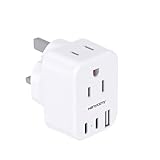
- 【Important Safety Warning】This is not a voltage converter. This adapter is only compatible with dual-voltage appliances (110V-240V). Do not use it with high-power single-voltage heating appliances such as hair dryers, hair straighteners, curling irons, or coffee makers. Please check the appliance label before use.
- 【5 in 1 UK Travel Plug Adapter】- The Type G Travel Adpater provides 2 standard Amercian outlets, Max Capacity Up to 3250 Watt (max 250 Volt, 13 A); 3 USB Ports can charge up to 3.1A, allowing you charge 5 devices simultaneously, ideal for cell phone, tablet, power bank and other electrical charger etc
- 【US to UK Plug Adapter】- This UK travel plug adapter compatible in most overseas countries such as UK, Ireland, Dubai, Scotland, Hong Kong, Bahrain, Belize, Botswana, Brunei, Cyprus, Dominica, England, Ghana, Gibraltar, Grenada, Iraq, Kenya, Macau, Malaysia, Nigeria, Nothern Oman, Qatar, Saint Vincent, Saudi Arabia, Singapore, Sri Lanka, Uganda, the UAE, Yemen and ect
- 【2 x Travel Adapter USB C】- This us to uk plug adapter added extra 2 USB C ports for your devices, the USB C port can charge up to 5V/3A. USB-A ports can charge up to 5V/2.4A Max, all USB Ports Output is 5V/3.1A, 15.5W max which is 30% faster than other travel adapter. With smart charging technology, the type g travel adapter can auto-detects your devices and can reach faster charging efficiency, perfectly fit for your iphone, ipad etc
- 【Lightweight & Compact】- This uk power adapter is mini size: 2.2*1.1*1.5 in, 2.4 oz, it's easy to carry and use. Indicator can let you know the power of this European travel plug adapter is on/off. No need to carry extra plug adapter and for your traveling, the travel adapter can save your suitcase space. The international travel plug adapter with NO surge protection, it's absolutely a must have travel essentials and cruise ship must haves
Certification of a model or product family, an IMEI blacklist, a carrier’s acceptance of a foreign device, and customs or import obligations are distinct matters. Do not treat “Anatel approval” as a synonym for unlocked, nor assume that a missing Brazilian retail label by itself proves a traveler’s personal phone cannot connect.
How to activate a Brazilian eSIM
Exact menu wording can vary by iOS release and carrier. Apple’s documented methods include carrier activation, scanning a QR code, and using a carrier app; the carrier must support the route you choose. Keep the phone on Wi-Fi or another working internet connection during setup. Apple’s [eSIM instructions](https://support.apple.com/pt-br/118669) and [iPhone cellular setup guide](https://support.apple.com/pt-br/guide/iphone/-iph3f11fba92/ios) explain the available approaches.
- Before starting, ask the carrier to confirm account eligibility and which identifier—IMEI, IMEI2, or EID—it needs. Obtain its activation instructions or QR code.
- Connect the iPhone to Wi-Fi. Open Settings > Cellular or Settings > Mobile Service, then choose Add eSIM or Set Up Cellular.
- Follow the carrier-activation prompt, scan the carrier’s QR code, or continue in its app. Complete any account and identity verification requested.
- Wait for the plan to appear in cellular settings. Choose which line to use for calls, messages, and mobile data if you have more than one.
- Test an outgoing and incoming call, SMS, and mobile data. Confirm the expected 4G or 5G connection and VoLTE availability with the carrier if those features matter to you.
Do not delete an installed eSIM just to retry activation unless the carrier confirms it can issue a replacement. A QR code may be single-use or linked to a particular device or account.
Rank #4

- 【7 in 1 EU Power Adapter】- The European travel plug adapter turns 1 European Type C outlet into 3 standard American outlets, 2 USB-A and 2 USB-C charging port, Max Capacity Up to 2500 Watt (max 250 Volt, 10 A); 4 USB Ports can charge up to 3.1A, allowing you charge 6 devices simultaneously. ideal for cell phone, tablet, power bank and other electrical chargers; No need to carry extra adapter and power strip for your traveling, a small US to Europe plug adapter can save your suitcase space
- 【US to Europe Travel Plug Adapter】- Our italy travel plug adapter compatible with most European countries such as Austria, Belgium, Croatia, Denmark, Finland, France, Germany, Spain, Turkey, Iceland, Italy, Israel. More country list can be checked in description. ( NOTE: NOT WORK in UK/Ireland/Scotland)
- 【2 USB C Fast Charge 】- The plug extender total output of 4 USB ports is 5V/3.1A. Built in smart technology, the multi plug outlet can auto-detect charged devices and deliver optimum charging speed up to 5V/2.4A (max) each port, USB-C up to 3A.( Please note The UCB-C port is not Quick Charger 3.0, doesn't support any other devices which need 9~22V charging voltage.)
- 【European Travel Essentials】- This International power adapter is mini size: 3.0*2.4*1.6in, it's easy to carry and use. Indicator can let you know the power of this European travel plug adapter is on/off
- 【Note】- NOT WORK in UK/Ireland/Scotland. Please confirm the socket type with the hotel before traveling. This is not a voltage converter; This power adapter US to Europe is only compatible for 100V to 250V wide voltage device, especially your hair dryer, straightener, electric toothbrush or razor need to support 100V to 250V dual voltage, otherwise you may need a power voltage converter. Please DO NOT forcefully plug or unplug to avoid twisting or tilting the plug
Troubleshoot by symptom
| Symptom | Likely issue | What to do |
|---|---|---|
| “No SIM restrictions” is absent, or a message says only compatible SIMs may be used | The iPhone may still be locked to a US carrier or subject to an unresolved carrier policy. | Check Settings > General > About > Carrier Lock and contact the original carrier. Apple cannot unlock it ([Apple guidance](https://support.apple.com/pt-br/109316)). |
| The eSIM plan does not appear, or the QR code fails | The code may be expired or already used, the wrong identifier may have been provisioned, or the carrier/account may not support that route. | Ask the carrier to verify the IMEI/EID and account, then reissue the eSIM if needed. Do not erase the existing plan before confirming replacement is possible. |
| “No SIM” or “No Service” after eSIM installation | The line may not be active, the carrier may have provisioned the wrong identifier, or the phone may not be registering. | Restart the phone, toggle Airplane Mode, check Settings > General > About for a carrier-settings update, and ask the carrier to confirm provisioning. |
| Carrier says the IMEI is incompatible | Foreign-device provisioning, account eligibility, an IMEI restriction, or an eSIM-only classification may be involved. | Ask support to check IMEI and IMEI2 where applicable, EID, account type, device status, and whether store or technical-support activation is required. |
| Signal appears but mobile data does not work | The plan may not include data or may not be fully provisioned; carrier settings or roaming configuration may also matter. | Confirm the plan and line selected for data with the carrier, then check carrier settings. Do not assume band compatibility alone guarantees data service. |
| A physical Brazilian SIM cannot be inserted | The US iPhone may be an eSIM-only model. | Use a carrier and plan that can activate eSIM on that exact device, or use a phone with a physical SIM tray. |
If the same Brazilian SIM or account works in another phone but not this iPhone, that narrows the problem to the iPhone’s lock status, model, IMEI acceptance, or eSIM provisioning; it does not by itself prove a network-band problem.
Independent reader supportYour contribution helps us test, update, and keep practical guides available for everyone.What radio compatibility does—and does not—tell you
Apple publishes model-specific LTE and 5G band information and says iPhone models connect to cellular networks worldwide ([Apple iPhone cellular specifications](https://www.apple.com/br/iphone/cellular/)). That is not a promise that every model supports every Brazilian carrier feature. Compatibility can also depend on VoLTE, carrier aggregation, standalone versus non-standalone 5G, carrier provisioning or firmware, and roaming arrangements. Check the exact model against Apple’s specifications and ask the carrier about the features and service it will provision.
Prepare before leaving the United States
- Verify No SIM restrictions on the phone and resolve any financing or carrier-policy issue with the original carrier.
- Record the model number, IMEI, IMEI2 if present, and EID. Keep the details somewhere available if the phone is lost or reset.
- Contact the Brazilian carrier before travel about its current eSIM procedure, eligible plan and account types, required documents, and foreign-device provisioning.
- If possible, arrange activation while you still have reliable connectivity and access to your usual email, phone number, and identity documents.
- Update and back up the phone. Install any carrier app and authentication tools you will need while connected to a trusted network.
- Keep another connectivity option, such as Wi-Fi access, a suitable travel eSIM, or a second unlocked phone. A travel eSIM can provide short-term data but does not remove a carrier lock or provide a Brazilian number unless its plan explicitly does so.
- Do not erase the only working phone or remove a working line until the replacement eSIM is confirmed and tested.
Buying a US iPhone for use in Brazil
Before paying, get the exact model number and, where possible, the device’s IMEI. Verify the SIM configuration, unlock status, and restriction status; ask the Brazilian carrier you plan to use whether it can provision that specific device and account. Get a return option if local activation fails. A seller calling the phone “international” is not a substitute for these checks.
Quick wins for a faster PC:
Fix the driver behind crashes, sound loss and screen glitchesFind Drivers →Clear out junk files and repair common Windows errorsFree Scan →Scan for outdated or missing drivers - takes under a minuteDriver Scan →Best Value
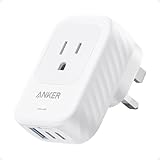
- Our chargers and accessories don't just power up your devices, they offer the tech experience you want with zero restrictions.
- Superior Safety: ActiveShield 2.0 Intelligently monitors temperature 3 million times per day and adjusts power output to safeguard your connected devices.
- Get grounded protection,short-circuit prevention and fire resistance
Also compare the total cost rather than just the US sticker price: taxes, import costs, exchange rates, and warranty or service terms may change the calculation. Do not assume a US-market model receives identical service or warranty treatment in Brazil; check Apple’s current regional terms before buying.
Choose the phone or service around the use case
| Option | Best suited to | Trade-off to consider |
|---|---|---|
| Brazilian-market iPhone | A buyer who wants a locally sold model and the least uncertainty about local carrier activation. | Compare its actual SIM configuration and total price; local sale does not eliminate the need to check plan and device details. Apple’s Brazil store is at apple.com/br/shop/buy-iphone. |
| US eSIM-only iPhone | A buyer with a confirmed compatible Brazilian eSIM route, or someone who values multiple stored eSIM profiles. | There is no physical-SIM fallback. Stored eSIM profiles do not necessarily mean two lines can be active at once; simultaneous-line support depends on model, iOS, and carrier. |
| Older or non-US physical-SIM model | Someone who values swapping a local SIM between phones or wants a physical-SIM option. | Check exact bands, lock status, condition, and model variant. A physical tray does not fix a carrier lock or IMEI restriction. |
| Brazilian carrier plan | A longer stay, local phone number, calls and SMS, or services that require a Brazilian number. | Confirm identity/account requirements, eSIM availability, and support for the exact foreign device. Carrier sites: TIM, Claro, and Vivo. |
| Travel eSIM | A short visit where data connectivity matters more than a local number or local billing. | Check Brazil coverage, network partner, data allowance, tethering, validity, refunds, and voice/SMS inclusion. Availability and terms vary; it does not resolve a carrier lock. |
For a US phone purchased directly from Apple, Apple says its iPhones are unlocked; still confirm the actual device’s status before relying on it for Brazilian service ([Apple purchase and carrier information](https://www.apple.com/shop/help/iphone)).
Quick Recap
Product prices and availability are accurate as of the date/time indicated and are subject to change. Any price and availability information displayed on Amazon at the time of purchase will apply.




