If Hindi text is blank, substituted, or incorrectly shaped in a BrowserStack screenshot, first check whether the intended font and stylesheet loaded in the capture environment, then confirm the capture waited for the text and font to appear. Also identify whether the image came from Percy’s DOM snapshot workflow or an in-session BrowserStack Automate screenshot; the two capture paths have different environments to inspect.
First identify how the screenshot was captured
Percy’s SDK workflow captures the page’s DOM and discovers its assets, then renders the screenshot on Percy infrastructure. A screenshot taken during an Automate browser session instead reflects the browser session in which it was taken. A font that works on your computer therefore does not establish that Percy’s renderer can fetch it, while an Automate screenshot should be investigated in the context of that session. See BrowserStack’s Percy SDK workflow documentation.

- For a Percy snapshot, inspect the Percy build, captured assets, and network errors.
- For an Automate screenshot, inspect the page and font requests in the configured browser session.
Check that Hindi font and CSS assets load
In the capture’s build details or network logs, look for the stylesheet that sets the Hindi font and the font-file request itself. Check whether the requests failed, were redirected, or require access unavailable to the renderer. BrowserStack’s troubleshooting guide calls out the case Other asset are not loading (font/css).
It recommends allowing failed asset hosts where appropriate and addressing the network errors shown. Follow the guidance in BrowserStack’s troubleshooting documentation.
- Find the Hindi text element and identify its stylesheet and intended font family.
- Check the request outcome for both the stylesheet and font file in the capture logs.
- If a host is blocked, allow the relevant host as appropriate and resolve the reported network error.
- Capture again and verify the intended font request succeeds before changing the font stack.
A fallback font can make Hindi appear different when the intended font did not load. Inspect the element’s computed font family in the rendered page as well as the request outcome. Replacing the CSS stack without fixing inaccessible assets may only conceal the underlying failure.
Do these 3 things before closing this tab:
1Repair Windows errors before they cause bigger problems2Fix the driver behind crashes, sound loss and screen glitches3Clear out junk files and repair common Windows errorsWait for the Hindi content and font before capture
A snapshot taken before a delayed element or font has loaded can show incomplete or differently styled text. Confirm the Hindi text element exists and is styled at capture time. If it appears later, configure a wait for a page-specific selector or an appropriate capture delay. BrowserStack includes delayed elements and capture waits among its page-load troubleshooting steps; see its common-issues guide.
- Prefer waiting for a selector that identifies the actual Hindi content when the page loads it asynchronously.
- Use a delay only when a selector-based wait is unsuitable, and make it long enough for the relevant content and font to load.
- After capture, check that the text is present and that the intended font was applied—not merely that the page shell rendered.
Compare the browser and operating-system rendering
Font availability and rendering can differ by operating system. BrowserStack notes that Linux-based Chrome, Firefox, and Edge can render text differently from Windows or macOS, and that Percy manages the operating systems used for its browser rendering. Identify the Percy browser and version, then compare with an Automate configuration using an operating system relevant to your users. BrowserStack documents this in its cross-browser visual testing guidance.
Rank #2

- 【Large Print Keyboard】- 4X larger than standard keyboard fonts, clear and easy to find, and can really help those who have trouble seeing keyboards. Perfect for elderly, the visually impaired, schools, special needs departments and libraries, etc
- 【White LED Backlight】- Bright and evenly distributed backlit keys, easy typing in lower light environment. Ideal for studio work, office. Backlit can choose to turn on/off and adjust brightness.
- 【Full Size & Ergonomics Design】- Unfold the feet at back of the keyboard to reduce hand fatigue and enjoy long hours of playing. Full QWERTY English (US) 104 key keyboard layout with numeric keypad, Large Print keys provides superior comfort without forcing you to relearn how to type.
- 【Plug and Play & Wide Compatibility】 - This USB keyboard takes away the hassle of power charging or swapping out batteries and is easy to setup. No drivers required.Compatible with Windows 2000/XP/7/8/10, Vista,Raspberry Pi 3/4, Mac OS(Note: Multimedia keys may not fully compatible with Mac, OS System).Works with your PC, laptop.
- 【Spill-proof】- This durable keyboard features a spill-resistant design. So you don't have to worry about spilling coffee and water. Enjoy Keys life of more than 5000W times.
Change one variable at a time: capture route, browser and version, operating system, viewport, locale-specific baseline, or font request outcome. If all Hindi pages fail in Percy but work locally, prioritize font and CSS reachability in Percy’s renderer. If only one browser or OS differs, focus on that environment’s font fallback. These comparisons help distinguish an asset-access issue from environment-specific rendering.
Use a Hindi-specific visual baseline
Keep the Hindi page as a Hindi locale snapshot and establish its baseline separately from the English page. Percy does not independently determine whether the first Hindi rendering is correct: a reviewer needs to inspect and approve that initial baseline. Once approved, later builds can reveal changes such as glyph substitution, fallback fonts, or layout shifts. See BrowserStack’s guide to visual testing across multiple locales.
Rank #3

- Large Print Computer Keyboard: It has large print font, Largest print on keycaps available in a full-size keyboard, these high-contrast keys can really help those who have trouble seeing keyboards. Designed for visually impaired, the elderly and Beginners to type.
- High Contrast: Large print keyboard offers increased visibility with easy to see white key caps and crisp large print black letters, Easily seen print, even in low light.
- Ergonomics Computer Keyboard: Full QWERTY English (US) 104 key keyboard layout with number pad, largest print on keycaps available in a full-size keyboard. Equipped 1.35 meters long cord, It just needs to be plugged into the computer to use, which is very convenient.
- High Quality Keyboard: It is made of ABS material, which is very wear‑resistant and durable. Large print keyboard with white keys and black letters, makes print quieter and more accurate. The durable membrane keys switch can provide 5 million keystrokes life.
- Wide Compatibility: Compatible with Windows 10 / 8 / 7 / Vista / XP / 2000 / 98 and OS X. No software installation CD is required. Suitable for notebook computers, desktop, laptop, etc.
Troubleshoot by symptom
| What you see | Likely area to check | Next action |
|---|---|---|
| Hindi text is blank or missing in Percy | Font or CSS request failed, or capture occurred before content loaded | Inspect asset and network errors, then wait for the Hindi content and font before recapturing. |
| Hindi text appears, but uses an unexpected typeface | The intended font may not have loaded, leaving a fallback active | Check the font request and computed font family; fix asset access before adjusting the CSS stack. |
| Local rendering differs from Percy | Percy’s renderer may have different asset access or an OS font stack | Identify the Percy browser/version, inspect font requests, and compare against a relevant Automate OS configuration. |
| Only one browser or OS differs | Environment-specific font fallback or rendering | Compare browser and OS while holding viewport, locale, and capture route steady. |
| The first Hindi visual comparison looks wrong | The Hindi page may lack a reviewed Hindi baseline | Set up the Hindi locale snapshot and have a reviewer verify its initial baseline. |
Or skip the browser setup
For a direct screenshot request, ScreenshotNeo accepts a URL and returns an image or PDF. Its cookie/consent-banner handling, newsletter-popup and chat-widget removal can be turned off; bot checks, blank pages, timeouts, failed loads, and cache hits are not billed. It also provides an MCP server for AI agents. The free plan includes 1,000 screenshots per month with no card, and paid plans start at $5 for 3,000. See ScreenshotNeo and the API documentation.
curl -G "https://api.screenshotneo.com/v1/shot" -d access_key=YOUR_API_KEY --data-urlencode url=https://example.com/hindi -o shot.webpSign up free for 1,000 screenshots a month, with no card required.
Quick Recap
Best Value
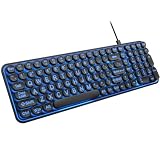
- 【Large Print Keyboard】: 4X larger than standard keyboard fonts, clear and easy to find when typing, and can help those who have trouble seeing keyboards. Perfect for seniors, the visually impaired, students, special needs departments and libraries, etc.
- 【7 Color Backlit Wired Keyboard】This lighted keyboard features 7 vibrant LED colors and 3 adjustable brightness levels, with easy-to-use backlight hotkeys. Evenly distributed lighting ensures clearly visible key displays, enabling effortless typing in dimly lit offices, at night, or in other low-light environments
- 【Retro Round Key Keyboard】Blends vintage aesthetics with modern typewriter functionality, featuring round keycaps, quiet typing keys, and a compact layout. Designed for smooth, comfortable use, this retro typewriter keyboard helps you stand out in the office. It can showcase its unique charm at home, school,studio, and office
- 【Plug and Play & Silent Click】This wired Backlit keyboard offers effortless setup with plug-and-play functionality—no drivers, power charging, or battery swaps required. Features quiet typing keys for noise-free use.
- 【12 Multimedia Hotkeys & Ergonomic Design】12 convenient multimedia hotkeys for control of music, volume, lock keyboard, email and more, greatly boosting your work and entertainment efficiency. Ergonomic key arrangement reduces wrist fatigue and discomfort during prolonged use.
Rank #4

- Arabic English Letters:This USB wired keyboard adopts advanced laser engraving technology, which will not fade when typing for a long time, allowing you to clearly see letters and symbols, bidding farewell to the trouble of character wear and tear causing unclear reading
- Waterproof and anti slip: The keyboard is waterproof, comfortable to the touch, Reduce finger pressure.with a wire length of 1.6 meters and anti slip silicone pad on the back, making the keyboard work efficiently,The space bar has a crisp sound, not silent
- Arabic QWERTY English 104 key keyboard layout with numeric keypad,Has all Arabic letters including commonly missed ones (see pics), suitable for offices and work. There are uppercase lock indicator lights and numeric lock indicator lights in the upper right corner of the keyboard
- Efficient office work: The wired keyboard has 12 multimedia shortcut key combinations for instant access to music, volume, computer, email, and more.The space bar has a normal tapping sound, not a quiet keyboard
- Plug and play: wired USB interface, no need to download programs, saving the trouble of replacing batteries or charging, suitable for Windows, Android, smart TV and Mac (Note:Mac systems may not be compatible with multimedia buttons)
Product prices and availability are accurate as of the date/time indicated and are subject to change. Any price and availability information displayed on Amazon at the time of purchase will apply.



