Do these 3 things before closing this tab:
1Scan for outdated or missing drivers - takes under a minute2Repair Windows errors before they cause bigger problems3Fix the driver behind crashes, sound loss and screen glitchesThe 2019 ASUS ROG Zephyrus S GX531GWR is a thin 15-inch gaming laptop with an Intel Core i7-9750H, NVIDIA GeForce RTX 2070 Max-Q, 144-Hz Full HD display, 24 GB of RAM and a 1 TB SSD in the documented Japanese configuration. It remains capable for 1080p gaming and everyday creative work, but its age, limited upgradeability, small battery and demanding cooling make it a buy only if the specific unit is healthy and priced well below a newer gaming laptop. There is no reliable current-market price threshold here, so judge the total cost against newer alternatives rather than its original premium price.
GX531GWR specifications at a glance
The GX531GWR is one regional configuration in ASUS’s GX531 Zephyrus S family. Specifications varied by model and market, so check the full model code and the hardware in the actual laptop rather than relying on a listing that says only “GX531” or “RTX 2070.” The table below describes the Japanese configuration reported at launch.
| Component | GX531GWR specification |
|---|---|
| Processor | Intel Core i7-9750H, 6 cores / 12 threads, 2.6 GHz base and up to 4.5 GHz |
| Graphics | NVIDIA GeForce RTX 2070 Max-Q with 8 GB of VRAM |
| Display | 15.6-inch, 1,920 × 1,080, 144 Hz, 3 ms |
| Memory | 24 GB DDR4-2666 |
| Storage | 1 TB M.2 NVMe PCIe 3.0 SSD |
| Ports | HDMI 2.0b, two USB-C ports, one USB-A 3.1 Gen 2, two USB-A 2.0, and a 3.5-mm audio jack |
| Battery estimate | Approximately 5.1 hours under Japan’s JEITA 2.0 measurement |
| Size and weight | 360 × 268 mm; 15.35–16.15 mm thick; approximately 2.1 kg |
| Operating system at launch | Windows 10 Home 64-bit |
ASUS’s Japanese launch announcement listed a planned price of ¥349,800 before tax and a June 21, 2019 release date. That is historical launch pricing, not a guide to what a used unit is worth today. Mynavi’s launch report and configuration details
Which GX531 model is this?
Do not treat the GX531 suffixes as interchangeable. The GX531GWR is the ninth-generation Core i7 and RTX 2070 Max-Q configuration covered here. The GX531GS pairs an eighth-generation Core i7-8750H with GTX 1070 Max-Q; GX531GM and GX531GV denote lower-GPU configurations; GX531GX is associated with RTX 2080 Max-Q; and GX531GW and GX531GXR refer to other configurations whose specifications can vary by region. ASUS itself cautioned that family specifications differ by model and market.
PC Slower Than It Used to Be?
A free scan shows the junk files, broken settings and background clutter dragging Windows down - then fixes them in one click.Free scan · Windows 10 & 11Outdated Drivers Are Slowing You Down
One free scan finds every outdated or missing driver and matches the right update for your exact hardware.Free scan · exact hardware match#1 Best Overall
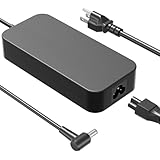
- Compatible with ROG Strix SCAR 15 17 G532 G532LWS G532LW G532LV G532L G532LWS G542LU G542LV G542LW G542LWS G732 G732LV G732LW G732LWS Strix Scar II GL704 GL704GM GL704GW GL704GV GL504 GL504GS GL504GW GL504GV Strix SCAR III G531GU G531GV ROG Strix G702VS G702VSK GL702VS GL702VSK GL731 GL731GU GL731GW GL731GV ROG Strix G GL531GU GL531GW GL531GV ROG Strix G15 G17 G512 G512LI G512LV G712 G712LU G712LV G712LW G712LWS Strix Hero II GL504GM Zephyrus GX501VI Laptop. ROG GR8 and ProArt PA90 Desktop
- Compatible with ROG Zephyrus M15 GU502 GU502LU GU502LW GU502LV GU502LWS GU502GV GU502GU GU502GW GU502DU Zephyrus S GX735 GX735GW GX735GV GX735GX GX735GXR GX735GWR GX735GVR GX531 GX531GS GX531GV GX531GW GX531GWR GX531GX GX531GXR Zephyrus M GM501GM GM501GS Zephyrus S15 GX502GW GX502GV. TUF Gaming A15 FA506IV FA506IH FA506II FA506IHR FA506NF ProArt Studiobook 17 15 H500 H700 ProArt Studiobook Pro 15 17 W500 W700 ZenBook Pro Duo UX581 UX581GV UX581LV UX581G UX581L StudioBook S W700G3P Laptops
- ADP-230GB B Specification: Input Voltage: 100-240V, 50-60Hz (Worldwide use), Output Voltage: 230W 19.5V/11.8A, (also Works for 200W 180W 150W Wattage Devices).Power Jack Connector Type:6.0mm*3.7mm Round Tip. (It is not fit for laptops devices requiring more than 230W)
- Stable Compatibility; Experience faster, more reliable charging with this Portable charger. Lightweight and compact size makes it easy to pack for business trips, vacations, or daily use at the office.Durable Construction and Made with heat-resistant materials for extended durability.The built-in chip automatically adjusts power based on your devices temperature and battery status. Less heat, safer charging, and a battery that lasts longer
- Safe & Efficient Charging: Built-in safeguards protect against overcurrent, short-circuit, and overheating, ensuring reliable power delivery every time. Designed with high temperature resistant, flame retardant and fire-resistant materials, all our products provide ultimate protection for your devices. Choosing this charger is a smart choice for the safety of yourself and your family
Listings sometimes shorten the GWR’s GPU to “RTX 2070,” which can imply performance the laptop does not deliver. Confirm the full Max-Q designation in Windows hardware information or a utility such as GPU-Z, and verify the complete model identifier in BIOS or ASUS system software. ASUS’s family pages provide further context, but the exact regional SKU remains decisive: ASUS GX531 family overview, ASUS 2019 configuration guide, and ASUS regional GX531 specifications.
Design and everyday portability
The GX531GWR’s appeal is its combination of a 15.6-inch screen and a chassis roughly 15.35–16.15 mm thick, weighing about 2.1 kg. Its metal construction and restrained, angular gaming design are more distinctive than a typical thick gaming notebook. ASUS describes the chassis as aluminum and magnesium alloy and says the family underwent military-standard durability testing; those are the manufacturer’s claims, not a guarantee that an individual second-hand laptop has escaped damage. ASUS’s design and display announcement
The opening underside
When the lid opens, ASUS’s Active Aerodynamic System (AAS) raises part of the underside to create more intake area. This unusual cooling arrangement helps make the thin body possible, but it also means surface choice matters: use a hard, flat desk and keep the underside opening clear of fabric and dust. Check that the moving section and hinges open and close evenly, without cracks, looseness or scraping. A stable stand may help keep the intake unobstructed; a solid panel positioned over the opening may do the opposite.
Desk use versus lap use
At a desk, the narrow profile is a real advantage for a gaming laptop with discrete graphics. The forward-positioned keyboard and minimal palm-rest area, however, make it less natural on a lap than a conventional notebook. A separate wrist rest or external keyboard can improve long sessions, but that reduces some of the convenience of carrying a single compact machine.
Rank #2

- [Compatibility]; This 230W charger is designed to be fully compatible with major ASUS ROG series, including Zephyrus G14/G15/M15, ROG Strix G15/G17, and high-performance SCAR or TUF Gaming models (FA506IV, FX505DV, GL504, etc.). It intelligently supports high-power devices with a 6.0*3.7mm connector. If your model requires a 19.5V/11.8A output with this specific barrel connector, this is your perfect match.
- [Portable Design]; Whether you are heading on a business trip or a family vacation, this lightweight power adapter (only 645g) is your ideal travel companion. With a wide input range of 100-240V, it works seamlessly in any country. The slim, compact profile slides easily into carry-on luggage, while the extra-long 8.2ft (2.5m) total reach—including a detachable 1m US power cord—ensures you can stay powered even when the wall outlet is far from your desk or airport seat.
- [Safety with Overheat Protection]; Safety is our priority. Unlike standard chargers, this unit features a built-in smart chip and LBS (Load Break Switch) that provides multi-layer protection against overcharging, overcurrent, and short circuits. The flame-retardant, high-temperature resistant materials prevent overheating (up to 50°C) during intense use. The intelligent heat management system automatically regulates power based on battery status, keeping your home and family secure while extending your laptop’s battery life.
- [Smart Fast Charging Efficiency]; Experience rapid power delivery that mirrors original performance. This charger can power your device from 0% to 100% in just 0.6 to 1.2 hours (based on standard high-capacity batteries). The intelligent internal chip detects your device’s temperature and battery health to optimize charging speed, ensuring less heat generation and more efficient energy transfer. It’s the smart way to keep your workflow uninterrupted at home, in the office, or during intense gaming.
- [Full Package & 12-Month Peace of Mind]; Your purchase includes 1x 230W AC Adapter and 1x Detachable Power Cable, all backed by a professional 12-month warranty and a 30-day easy return policy. We focus on providing high-quality power solutions and responsive customer support. If you have any questions about compatibility or specifications, our team is here to help, ensuring a worry-free shopping experience from day one.
Display: fast Full HD, with unit-level checks
The 15.6-inch 1080p, 144-Hz, 3-ms panel is a sensible match for the RTX 2070 Max-Q: Full HD is less demanding than higher resolutions, while 144 Hz can make motion feel smoother in games that render at high frame rates. It is especially useful for competitive titles, although the panel’s refresh rate does not mean every game will run at 144 frames per second.
ASUS described relevant GX531 display configurations as IPS-type/AHVA panels with wide viewing angles and 100% sRGB coverage, and referenced Pantone-oriented validation for some configurations. Those family claims do not establish the panel fitted to every regional GWR unit. Check the precise listing and inspect the individual screen for dead pixels, uneven brightness, backlight bleed and flicker. ASUS display information and ASUS’s 2019 guide
Gaming and creative-work performance
RTX 2070 Max-Q is not a full-power RTX 2070
The GWR’s RTX 2070 Max-Q is an 8-GB, lower-power laptop GPU. Its results depend on the laptop’s power limit, cooling condition, drivers and game; they should not be equated with a desktop RTX 2070 or every laptop GPU carrying the RTX 2070 name. Expect its strongest fit to be 1080p gaming, with settings adjusted according to the title and the condition of the machine.
- Competitive games: The 144-Hz panel can be put to good use in lighter esports games when settings and frame rates allow.
- Demanding newer games: High settings and high frame rates are not assured; lowering visual settings or using supported upscaling may be necessary.
- Ray tracing: The GPU supports it, but its age and Max-Q power envelope make heavy ray-traced workloads a poor reason to buy this laptop.
- Creator applications: CUDA, hardware video encoding and 8 GB of VRAM remain useful in compatible workflows. The older six-core CPU, Full HD screen and constrained cooling make it less attractive as a modern workstation.
The exact-model Japanese report includes benchmark testing, while published Notebookcheck measurements cited for GX531 cooling and maintenance concern the related GX531GS with GTX 1070 Max-Q, not the GWR. Do not use that GS review as a direct RTX 2070 Max-Q benchmark. Exact GWR report and Notebookcheck GX531GS review
Quick wins for a faster PC:
Clear out junk files and repair common Windows errorsFree Scan →Fix the driver behind crashes, sound loss and screen glitchesFind Drivers →Rank #3

- The AMD Ryzen AI 9 HX 370 Processor Blends Power and Performance with Ease Armed with 12 cores and 24 threads, AMD Ryzen AI 9 HX 370 Processor powers your laptop with ease. With up to 50 TOPS in AI Performance, its integrated AI Accelerators are ready to enhance your experience.
- Experience Cutting Edge Graphics With NVIDIA GeForce RTX 5080 Laptop GPU Maximize your gaming and creativity with NVIDIA GeForce RTX 5080 GPU. Game-changing features like DLSS 4 and ray racing technology bring game graphics to life by simulating sunlight and creating a realistic environment for an immersive gaming experience.
- OLED ROG Nebula Display and NVIDIA G-SYNC Uplevel your visual experience with the Zephyrus G14's OLED Display certified with the ROG Nebula Display standards. Enjoy rapid 0.2ms response times, a vivid 3K resolution, and a smooth 120Hz refresh rate. With NVIDIA G-SYNC, eliminate visual tearing, minimize stuttering, and reduce input lag.
- Windows Copilot+ AI Acceleration Meet Copilot+ in Windows – your AI-accelerated assistant for quick answers, creative inspiration, and focused tasks without breaking a sweat. Boost productivity with fast answers, image generation, and more. Elevate your Windows 11 experience and unleash creativity!
- Enjoy Seamless Multitasking With 32GB of LPDDR5X RAM Equipped with 32GB of LPDDR5X RAM running at up to 8000MHz speed, the Zephyrus G14 effortlessly handles multitasking demands whether you're gaming, creating, or simply browsing.
Thermals, fan noise and sustained load
A thin gaming laptop must move heat through a compact cooling system. ASUS’s AAS intake is part of that design, not a reason to expect silent gaming. The exact-model report evaluates cooling, noise and sustained performance, but no specific temperature or decibel figure is established here. A used unit with clogged vents, aging thermal compound or a failing fan may behave very differently from a clean review sample.
During an inspection, run a demanding game or GPU workload for 20–30 minutes on a hard surface. Listen for grinding, rattling or pulsing fans; watch for crashes, abrupt shutdowns, severe stutter or large clock drops; and note whether performance collapses after the initial warm-up. Some fan noise at high performance is normal for this class. Persistent throttling or mechanical noise is a repair and value concern, not something to dismiss as routine gaming sound.
Keyboard and touchpad
The keyboard sits unusually far forward, leaving the cooling intake behind it. The arrangement can feel more desktop-like when the laptop is on a desk, but the short or absent palm-rest area can make typing uncomfortable without wrist support. The touchpad is positioned to the right and, on supported configurations, can switch to a numeric keypad. That saves space but does not replace the tactile feel of dedicated number keys.
Per-key RGB lighting and numeric touchpad behavior should be verified on the exact unit rather than assumed from another GX531 listing. Test every key, the touchpad click and gestures, lighting zones, and any mode-switch function before buying.
Rank #4

- Note: There are many kinds of fan wiring sequence, and they are incompatible. We need to check the fan interface wiring sequence.
- Please send us the front and back of the fan and the interface wiring sequence diagram.
Battery life and charging
The approximately 5.1-hour figure published for the Japanese GWR configuration uses the JEITA 2.0 measurement method. It is a standardized estimate, not a promise of that much modern web browsing, video playback or gaming, and it says nothing about the condition of a battery in a laptop from 2019. Gaming on battery will be much more demanding than light documents; performance mode, display settings and discrete-GPU activity also affect runtime.
Ask the seller for a battery-health report or test the laptop unplugged, and check for swelling or a case that no longer sits flat. USB-C Power Delivery is documented for selected GX531 variants, but ASUS warns that smaller adapters are intended for lighter workloads; it should not be treated as a substitute for the original high-wattage adapter during gaming. Confirm USB-C charging support for the precise GWR SKU and make sure the correct main adapter is included. ASUS GX531 family port and power details
Independent reader supportYour contribution helps us test, update, and keep practical guides available for everyone.Ports, wireless, webcam and audio
The documented GWR configuration has HDMI 2.0b, two USB-C ports, one USB-A 3.1 Gen 2, two USB-A 2.0 ports and a combined 3.5-mm audio jack. ASUS says the family’s HDMI 2.0b output supports up to 4K at 60 Hz and documents DisplayPort 1.2 and Power Delivery on supported USB-C ports. These capabilities can depend on configuration, so check the exact SKU and port behavior if an external display or charging setup is important. Notebookcheck noted the absence of Thunderbolt 3 in its GX531GS review; do not assume this family offers it. ASUS port specifications and Notebookcheck GX531GS review
The Japanese configuration lists 802.11ac Wi-Fi, while wireless details can vary by regional documentation. Webcam availability also differs across listings and reviews. Confirm whether the specific laptop has a working camera, test the speakers and headset jack, and do not rely on a generic family listing for these details.
Recommended Free Tools
Best Value

- To receive the correct product, please confirm if your laptop model matches ours.
- It's best to compare the pictures to see if they are the same. If there are any differences, please send us your pictures.
- If you are purchasing a keyboard, please note that most of our products are in the (US) English version, and the shape of the "enter" key may be different from keyboards in other languages.
- If you are purchasing a screen, please confirm the resolution, frame rate, etc.
- About the other laptop parts(LCD Top Cover-A shell, LCD Front Bezel-B shell, The shell around the keyboard-C shell,Bottom Base Case Cover-D shell), many laptop parts is uploading.
Upgradeability and repair considerations
Easy upgrades are not a GX531 family strength. Notebookcheck found one accessible RAM slot and one M.2 slot in its GX531GS review and criticized the family’s limited maintenance options. That is useful family-level evidence, not definitive proof of the GWR’s internal layout. The 24-GB GWR configuration may combine soldered memory and a replaceable module, but the exact arrangement and maximum supported RAM should be confirmed for the motherboard and regional SKU before purchase. Treat the installed RAM shown by the actual machine as authoritative; listings that claim 16 GB and 24 GB may refer to different configurations or simply be wrong.
The documented GWR configuration has a 1-TB NVMe SSD, and family maintenance evidence indicates a single M.2 position. If the drive needs replacement, confirm the physical and interface compatibility before ordering; a premium PCIe 4.0 drive will not transform a PCIe 3.0 platform. Opening the thin chassis for cleaning or repair is less convenient than servicing a roomier laptop, so include maintenance condition in the purchase decision.
Battery listings associate part number C41N1828 with the GX531GWR, but a product title alone is not proof of compatibility. Match the part number, voltage, connector and dimensions to the battery in the specific laptop. GX531GWR battery parts listing
How to inspect a used GX531GWR
- Verify identity: Check the full model code in BIOS, Windows System Information or ASUS software. Confirm that the graphics processor is RTX 2070 Max-Q, not a different GX531 variant or GTX 1070 Max-Q.
- Check installed hardware: Confirm RAM and SSD capacity directly in the operating system, and compare them with the seller’s description.
- Inspect the chassis: Look for hinge damage, uneven panel gaps, a loose or damaged AAS underside section, blocked vents and signs of liquid or impact damage.
- Test under load: Run a game or GPU-heavy task for at least 20–30 minutes on a hard surface. Watch for crashes, abrupt clock drops, severe stuttering and shutdowns.
- Listen to cooling: Check that fans spin without grinding or rattling, and that airflow is not obstructed.
- Test input and display: Check the entire keyboard, RGB where fitted, touchpad and numeric mode if supported; inspect the screen for dead pixels, bleed, flicker and uneven brightness.
- Test connectivity: Try each USB port, HDMI, USB-C, audio jack, Wi-Fi and Bluetooth. Verify the camera if one is claimed or needed.
- Check power and battery: Confirm the adapter’s wattage and connector, test unplugged operation, review battery health and reject a unit with a swollen battery.
- Check software state: Verify Windows activation and make sure the laptop is not BIOS-locked or enterprise-managed. Use the support and download page for the exact model when checking firmware and drivers; do not install another GX531 variant’s BIOS casually. ASUS GX531 downloads
- Prefer a return option: A seller’s inspection or return period matters because faults may appear only after sustained heat or repeated charging.
Who should buy it—and what to compare
Consider the GX531GWR if a thin, premium-feeling 15-inch gaming laptop is the priority, the price is substantially below newer gaming options, the battery and cooling are healthy, and the machine is mainly for 1080p gaming. The original high-end specification does not make a high resale price good value by itself.
Skip it if the listing costs close to a newer RTX 4050-, 4060- or 5060-class laptop, if long unplugged use matters, or if you need easy upgrades, current wireless features, strong modern ray tracing or current frame-generation capabilities. Compare the whole purchase cost—including a missing adapter, battery replacement or repairs—with a newer, thicker RTX laptop that may offer better efficiency and warranty coverage. For portability, compare newer Zephyrus G-series machines; for cooling and upgrade access, consider roomier Lenovo Legion or ASUS TUF designs. A used full-power RTX 2070 or RTX 3060 system may suit a buyer who values gaming performance more than thinness. No current prices are assumed for these comparisons.
Final verdict
The ASUS ROG Zephyrus S GX531GWR still has a clear niche: a strikingly thin 15-inch design, 144-Hz Full HD screen and RTX 2070 Max-Q performance in a machine that can handle 1080p gaming and moderate creative work. Its age and constrained cooling, battery and servicing make condition and price more important than the original spec sheet. Buy only after confirming the exact GWR hardware and inspecting the unit; skip a listing priced like a modern gaming laptop.
Quick Recap
Product prices and availability are accurate as of the date/time indicated and are subject to change. Any price and availability information displayed on Amazon at the time of purchase will apply.




