Free tools Windows power users keep installed
One-click scans. No signup required.
F.lux did not launch in the Windows Store in 2026. The milestone was May 29, 2017, when f.lux released a Windows Store build (identified at the time as version 4.32) soon after Microsoft introduced Night light in the Windows 10 Creators Update. The Store package made installation easier, but it did not introduce a fundamentally different color-filter technology. Today, f.lux’s official site primarily directs personal Windows users to its conventional installer, while the old Store listing’s current availability is unverified.
What the 2017 Windows Store launch changed
The Windows Store release gave Windows 10 users a simpler distribution route for an established desktop application. The contemporary report described the build as a Project Centennial conversion, meaning the existing desktop program was packaged for Microsoft’s Store rather than rebuilt as a native Universal Windows app. It retained the desktop edition’s feature set, ran from the system tray, and did not support Windows phones. Softpedia’s May 2017 report identified the Store build as version 4.32.
The practical benefit was reduced installation friction and better discoverability immediately after Microsoft added Night light. It was a distribution milestone, not evidence that f.lux became a new display technology.
What f.lux actually changes
f.lux changes color temperature over the day: a cooler, daylight-like appearance during the day and a warmer appearance at night. It is not simply a brightness control. Brightness determines how much light the panel emits; color temperature changes the balance of cool and warm tones. The official FAQ explains this distinction at justgetflux.com/faq.html.
Quick wins for a faster PC:
Fix the driver behind crashes, sound loss and screen glitchesFind Drivers →Clear out junk files and repair common Windows errorsFree Scan →#1 Best Overall
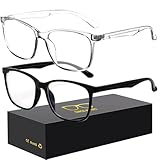
- 【Anti-Glare Blue Light Glasses】- Anti blue light glasses can effectively help you block harmful blue light from computer/phone/TV screen, filter harmful light waves and reduce glare, protect your eyes from the harmful effects of blue light.
- 【Relieve Eyestrain and Help Sleep Better】- Reduces eye strain, headache, blurred vision from prolonged exposure to blue light, allowing you to enjoy a peaceful deep sleep.
- 【Durable Glasses Lenses】- Our HD clear lenses with their superior abrasion and scratch resistance, high light transmittance, and no chromatic aberration can help you minimize chromatic aberration and restore true colors. Bring a better new visual experience.
- 【Excellent Material】- Our blue light blocking glasses are ergonomically designed. They are made of lightweight and impact-resistant PC material to reduce stress on the bridge of the nose and prevent frame breakage and skin scratching, and metal hinges ensure durability. Casual oversized frame design makes you look professional and stylish while working or playing video games.
- 【Safety Guarantee】- When you receive the blue light blocking glasses, if there are any quality problems, we promise to provide a lifetime breakage warranty for all Oilway glasses. If you have any questions, please feel free to contact us, we will solve it for you in time to ensure your satisfaction.
f.lux calculates transitions from your local time and location, then offers more detailed controls than a single on/off night filter. Its Windows controls are available from the area beside the system clock. Presets range from relatively cool settings such as Sunlight and Fluorescent to very warm choices such as Ember and Candle. A bedtime mode can make the display substantially dimmer and warmer before sleep, and documented Windows integrations can coordinate compatible Philips Hue White and Color Ambiance lights through the f.lux lighting guide.
These features are intended to make late-night screen use look less like daylight. They may improve visual comfort for some people, but f.lux should not be presented as a proven treatment for insomnia or another medical condition.
F.lux versus Windows 10 Night light
Night light already handled the basic use case in Windows 10. The launch-era implementation could schedule a warm display from sunset to sunrise using location services, or use manually chosen start and end times, and it allowed adjustment of the nighttime color temperature. Exact labels and options vary across Windows releases.
Rank #2

- [Filter Blue light Glasses] Blue light filterer with UV400 protection, help you resist harmful blu-ray, reduce discomfort from TV, phone, digital screen and reading under fluorescent lights; Reduce glare, fatigue, eye strain and dry eye, protect your vision and help sleep better
- [Lightweight Computer Glasses] Durable, flexible and super light plycarbonate Frame, suitable for long-term wearing; Stylish style, puts you in the spotlight all the time
- [Polycarbonate HD Lens] Anti reflective, non-prescription amber tint lens; High transparency, restore the true color; Besides, you can remove the lens and replace it with the prescription lens you want
- [Product Dimension] Lens Width: 52mm(2.05in), Lens Height: 42mm(1.65in), Temple Length: 140mm(5.51in), Nose Bridge: 14mm(0.55in), Frame Width: 140mm(5.51in)
- [Worry-free Service] We attach great importance to the quality of our products; Please feel free to contact us if there is any problem with the eye glasses, you have no risk to try
| Category | F.lux | Windows Night light |
|---|---|---|
| Installation | Third-party software; the historical Store route is not currently verified. The official site now provides a Windows installer. | Built into Windows; no extra download. |
| Warm-color filtering | Yes, with a broad range of presets and finer controls. | Yes, with a simpler temperature control. |
| Scheduling | Automatic time/location transitions, wake-time and bedtime-oriented options. | Sunset-to-sunrise or manual scheduling in the Windows 10 implementation described in 2017 coverage. |
| Special modes | Bedtime mode, very warm presets and temporary disable controls. | Basic night scheduling and adjustment. |
| Smart lighting | Documented Windows support for compatible Philips Hue lighting. | Not part of the cited launch-era comparison. |
| Cost | Free for personal Windows use. | Included with Windows. |
| Best fit | Users who want customization, automation or room-light integration. | Users who want the simplest possible solution. |
Neither option is universally “better.” Choose Night light when avoiding third-party software matters more than detailed control. Choose f.lux when presets, stronger transition controls, bedtime behavior or smart-light integration justify installing a background utility.
What’s actually slowing this PC down?
Pick the symptom - the matching free tool is one click away.
How to install f.lux now
For a personal Windows installation, use the current official download rather than assuming the 2017 Store listing is still active. The vendor’s download page is justgetflux.com/dlwin.html, and the main site is justgetflux.com.
- Download f.lux from the official site.
- Run the downloaded
flux-setup.exefile. - Enter your location so transitions follow local sunrise and sunset.
- Select the type of lighting normally used in the room at night.
- Allow f.lux to run in the system tray.
- After sunset, adjust the nighttime setting until the display is comfortable.
If you work nights, configure the schedule around your actual wake time rather than accepting a sunset-based routine. You can temporarily disable or quit f.lux for color-sensitive applications, films, games or display calibration.
Rank #3
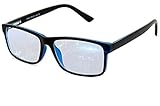
- Blue Light Glasses for Screen Protection: Staring at electronic screens can have negative health effects. While it may be hard to avoid exposure to blue light, you can protect your eyes with Blue Cut blue light blocking glasses. These glasses filter damaging blue light while offering a stylish design suitable for everyday use.
- Reduce Eye Strain and Fatigue: Screen-induced eye strain can lead to dry eyes and visual fatigue, reducing productivity. Blue Cut lenses, manufactured in an FDA-registered facility, help reduce harmful blue light and improve focus. Designed for men and women, they’re a practical and fashionable choice.
- Comfortable for All-Day Wear: Unlike bulky computer glasses, Blue Cut video game glasses are lightweight and flexible. Designed for extended wear from morning to night, they offer comfort and visual clarity whether you’re working or gaming.
- Choose Your Perfect Fit – With or Without Magnification: Whether you wear contacts, need reading help, or have perfect vision, Blue Cut has you covered. 0.00 (No Magnification): Great for screen use without vision correction. +1.00 to +1.50: Ideal for reading and close-up tasks. If you're unsure which option is right, match the power you already use in reading glasses or consult your eye care provider.
- Warranty & Packaging: Each pair of Blue Cut glasses includes a semi-soft storage case and a microfiber cleaning cloth, all packed in a stylish, gift-ready box. Backed by a two-year limited warranty for your peace of mind.
Troubleshooting common problems
No visible color change
It may not yet be past local sunset, the location may be wrong, or the night setting may be set to Daylight. Check the tray controls and location first.
Transitions happen at the wrong time
Verify the computer’s clock and time zone. The f.lux FAQ notes that an incorrect time zone can shift transitions by hours.
Windows Errors? Fix Them Before They Spread
Repair common Windows errors and clear accumulated junk for a smoother, more stable PC - no reinstall needed.Free scan · no reinstallOutdated Drivers Are Slowing You Down
One free scan finds every outdated or missing driver and matches the right update for your exact hardware.Free scan · exact hardware matchFlicker or competing color changes
Do not run Windows Night light and f.lux simultaneously while diagnosing a problem. f.lux specifically recommends disabling Night light in a Windows 10 flickering scenario. Monitor overdrive can also cause flicker; reducing or disabling it, and trying DDC/CI disabled where appropriate, may help.
Rank #4

- PROTECT YOUR EYES FROM SCREENS - Benicci blue light glasses may block up to 99% of blue light from computers, phones, and tablets to help fight eye strain, headaches, and fatigue. Stay sharp, focused, and comfortable for longer with these computer glasses.
- ULTRA-LIGHTWEIGHT & ALL-DAY COMFORT - Our blue light glasses for women and men combine premium durability with a feather-light nylon frame, giving you a barely-there feel that stands up to everyday wear in comfort and style. Benicci glasses are perfect for work, school, or relaxing at home all day.
- UNIVERSAL FIT – ONE SIZE FOR MOST - Frame Width: 5.3'' | Temple Length: 5.3'' | Lens Height: 1.54'' | Bridge: 0.67''. Blue light blocking glasses are designed to fit narrow to medium-width faces. Wear these reading glasses while you are at work or while you play your video games at home.
- UNISEX DESIGN FOR ALL AGES - Timeless and versatile, our blue light filter glasses look great on men, women, teens, and kids alike. Comes with a compact travel case for easy protection on the go. So you can work smarter and game better in comfort wherever life takes you, no matter your age or gender.
- SLEEP BETTER, NATURALLY - Benicci mens blue light glasses may minimize screen-related melatonin disruption in the evening so you can fall asleep faster and wake up feeling refreshed.
It stopped working after a Windows update
Update the graphics driver from the relevant NVIDIA, AMD or Intel support channel. DisplayLink adapters, multi-monitor arrangements and older graphics hardware can have additional color-profile limitations.
A tint remains after uninstalling
Another program may have retained the color profile. The official workaround is to reinstall f.lux, set both day and night sliders to daylight, wait for the profile to reset, and then uninstall again.
Colors look wrong in photos or games
Warm settings can make whites appear yellow, orange or red. Disable f.lux before professional photography, illustration, print work, grading or calibration. Its FAQ warns that it is not intended for advanced color-critical work.
Best Value

- Elevate your screen time comfort with these stylish women's/men's eyewear frame blue light blocking glasses, designed to reduce eye strain and protect against harmful UV rays. Stay focused and comfortable with these anti-glare computer glasses featuring a women's eyewear frame, perfect for long hours in front of digital screens .
- Enhance your visual clarity and reduce eye fatigue with these transparent blue-light glasses, featuring a chic women's eyewear frame for added style and functionality .
- Protect your eyes from blue light and glare with these women's eyewear frame bluelight blocking glasses, designed for screen protection during work or leisure activities .
- Upgrade your digital experience with these non-prescription anti-blue light glasses, featuring a sleek women's eyewear frame for a fashionable and protective solution against digital eye .
- Excellent Material - Ultra-lightweight and flexible nylon frame material for durability and comfortable long-term wearing. Casual frame design keeps you looking professional and stylish while working or playing video games .
Who should use f.lux?
- Use f.lux if you want more presets and control than Night light, automatic location-based changes, a specialized bedtime mode or documented smart-light integration.
- Use Night light if you want a no-install, built-in Windows feature with basic scheduling and temperature adjustment.
- Use neither as a medical solution if you are seeking treatment for persistent sleep problems.
- Pause either tool for color-critical work or when your monitor, GPU, driver or DisplayLink setup cannot apply profiles reliably.
Current availability and licensing
The historical Microsoft Store address is apps.microsoft.com/store/detail/9n9kdphv91jt?hl=en-us&gl=us, but its present availability has not been independently verified. The dependable current route for personal Windows use is the installer offered by f.lux’s official website.
Personal Windows use is free. Organizations needing controlled deployment, managed defaults or disabled automatic updates can review the separate f.lux Corporate Edition: the listed price is $24 for the first 10 devices and $12 for each additional device, with one year of updates; larger orders may receive quoted discounts. The corporate build disables home automation, so it is not a replacement for the personal edition’s smart-light features.
In short, the Windows Store launch mattered because it lowered installation friction in 2017. For a Windows user today, the real choice is simpler: use built-in Night light for a basic warm shift, or install current f.lux when deeper scheduling, presets and automation are worth the extra software.
Quick Recap
Product prices and availability are accurate as of the date/time indicated and are subject to change. Any price and availability information displayed on Amazon at the time of purchase will apply.




