The TP-Link Archer AX12 is a basic dual-band Wi-Fi 6 router that can suit a small home or apartment, particularly when it costs substantially less than newer alternatives. Its AX1500 label is a combined theoretical link-rate class, not a promise of 1.5 Gbps downloads, and its gigabit ports rule it out for internet plans faster than 1 Gbps. The bigger reason to be cautious in 2026 is support: TP-Link still lists firmware for some regional versions, while its end-of-life documentation appears to include the model in at least some markets or revisions. Buy only after checking the exact hardware version and local support status.
What the Archer AX12 is—and what AX1500 means
The Archer AX12 is an entry-level, dual-band Wi-Fi 6 router. TP-Link rates it AX1500 by adding the maximum theoretical link rates of its two bands: up to 1,201 Mbps on 5 GHz and 300 Mbps on 2.4 GHz. Those are physical-link-rate figures derived from Wi-Fi specifications, not a speed one device should expect to see in a download test. A client connects on one band at a time, and its actual throughput depends on its Wi-Fi hardware, channel width, distance, interference and network traffic. TP-Link’s product page and US datasheet describe its Wi-Fi 6 features and gigabit connectivity.
The router has four external antennas and supports OFDMA, MU-MIMO, beamforming and Target Wake Time. These features can improve airtime efficiency or communication with compatible clients; none guarantees a particular speed, range or number of devices. Older Wi-Fi devices can connect, but they will not gain all Wi-Fi 6 benefits.
Performance: realistic expectations, not a speed guarantee
TP-Link’s published material gives specifications, not independent throughput or room-by-room test results. There is therefore no substantiated benchmark here for close-range speed, distant-room performance, latency under load or simultaneous-client capacity. Treat advertised rates as a description of the radio link’s theoretical ceiling, not a substitute for measured results.
#1 Best Overall
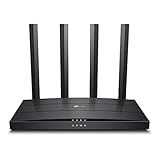
- Wi-Fi 6 Technology: Archer AX12 comes equipped with the latest wireless technology, Wi-Fi 6, for faster speeds, greater capacity and reduced network congestion
- Next-Gen 1.5 Gbps Speeds: Archer AX12 dual-band router reaches even faster speeds up to 1.5 Gbps (1201 Mbps on 5 GHz band and 300 Mbps on 2.4 GHz band)
- Connect More Devices: Wi-Fi 6 technology communicates more data to more devices using revolutionary OFDMA and MU-MIMO technology while simultaneously reducing lag
- More Reliable Coverage: Achieve the strongest, most reliable WiFi coverage with Archer AX12 as it focuses signal strength to your devices using Beamforming technology and four antennas
- Increased Battery Life: Target Wake Time technology reduces your devices' power consumption to extend their battery life
For internet service up to 1 Gbps, the AX12’s gigabit WAN and LAN connectivity can make it a plausible wired router, assuming the modem or ONT and provider settings are compatible. A wired client is the most reliable way to approach the service’s full speed. A Wi-Fi 6 client may perform well near the router, but wireless gigabit throughput is not assured. Internet plans above 1 Gbps are a poor match because the router has no multi-gigabit port.
On 2.4 GHz, a client may retain a connection farther away, generally at lower rates. The 5 GHz band is the better choice for high throughput near the router, but walls and distance can reduce performance. Antenna count and beamforming do not establish a coverage radius: building materials, nearby networks, local transmit-power limits and client antennas all matter. For a dead zone, repositioning the router or adding a compatible access point may work better than expecting one budget router to cover a large, multi-story home.
Rank #2

- DUAL-BAND WIFI 6 ROUTER: Wi-Fi 6(802.11ax) technology achieves faster speeds, greater capacity and reduced network congestion compared to the previous gen. All WiFi routers require a separate modem. Dual-Band WiFi routers do not support the 6 GHz band.
- AX1800: Enjoy smoother and more stable streaming, gaming, downloading with 1.8 Gbps total bandwidth (up to 1200 Mbps on 5 GHz and up to 574 Mbps on 2.4 GHz). Performance varies by conditions, distance to devices, and obstacles such as walls.
- CONNECT MORE DEVICES: Wi-Fi 6 technology communicates more data to more devices simultaneously using revolutionary OFDMA technology
- EXTENSIVE COVERAGE: Achieve the strong, reliable WiFi coverage with Archer AX1800 as it focuses signal strength to your devices far away using Beamforming technology, 4 high-gain antennas and an advanced front-end module (FEM) chipset
- OUR CYBERSECURITY COMMITMENT: TP-Link is a signatory of the U.S. Cybersecurity and Infrastructure Security Agency’s (CISA) Secure-by-Design pledge. This device is designed, built, and maintained, with advanced security as a core requirement.
Ports and Wi-Fi features
The US datasheet describes full-gigabit ports; check the specifications for the exact regional hardware before buying. The AX12 is not positioned as a multi-gigabit router, so it can become the bottleneck on faster-than-gigabit service. Its Wi-Fi 6 features are useful in the right conditions, but they are not a replacement for stronger hardware when many devices are busy at once.
- OFDMA: can divide airtime more efficiently among compatible clients, especially when several are communicating.
- MU-MIMO: can support concurrent communication, with benefits depending on client compatibility and traffic patterns.
- Beamforming: can focus transmission toward a client in some conditions; it is not a promise of whole-home coverage.
- Target Wake Time: is designed to help compatible devices schedule communications and conserve power.
Setup, management and firmware updates
TP-Link promotes setup through its Tether app, and the user guide documents web management through tplinkwifi.net. ISP requirements vary: some services need PPPoE credentials, VLAN settings, a particular IPv6 mode or an ISP modem/ONT in front of the router. Confirm those requirements with your provider if replacing its equipment.
Rank #3

- OneMesh Compatible Router - Form a seamless WiFi when work with TP-Link OneMesh WiFi Extenders
- Next-Gen Wi-Fi 6 Technology – The Archer AX10 leverages advanced Wi-Fi 6 features like OFDMA and 1024-QAM to deliver improved efficiency across your entire network. Perfect for high-bandwidth activities like streaming, gaming, and smart home connectivity.
- Next-gen Dual Band router - 300 Mbps on 2. 4 GHz (802. 11n) plus 1201 Mbps on 5 GHz (802. 11ax)
- Connect more devices than ever before - Wi-Fi 6 technology simultaneously communicates more data to more devices using OFDMA and MU-MIMO while reducing lag dramatically
- Powerful Dual-Core 900MHz Processor – Handles multiple data streams simultaneously for reliable performance across your devices. Ensures smooth streaming, online gaming, and video conferencing without buffering or lag.
For a manual firmware check, the guide gives this path:
- Connect to the router and sign in at
tplinkwifi.net. - Open Advanced > System > Firmware Upgrade.
- Select Check for Upgrades.
- If an update is offered, select Upgrade and allow the router to reboot without interrupting power.
Before a manual update, save a configuration backup and verify both the hardware revision and the router’s purchase region. Use the official support page for that market; do not install firmware intended for a different region or version. TP-Link’s EU/US user guide covers firmware management, while its regional support pages show why the exact version matters: Singapore, Nordic and India.
Rank #4

- Wi-Fi 6 Technology: Archer AX1450 comes equipped with the new wireless technology, Wi-Fi 6, for faster speeds, greater capacity and less network congestion.
- Next-Gen 1.45 Gbps Speeds: Archer AX1450 dual-band router reaches even faster speeds up to 1.45 Gbps (1201 Mbps on 5 GHz band and 250 Mbps on 2.4 GHz band)
- Connect More Devices: Wi-Fi 6 technology communicates more data to more devices using revolutionary OFDMA technology while simultaneously reducing lag.
- More Reliable Coverage: Achieve the strongest, most reliable WiFi coverage with Archer AX1450 as it focuses signal strength to your devices using Beamforming technology and four antennas.
- Increased Battery Life: Target Wake Time technology reduces your devices' power consumption to extend their battery life
Hardware versions, EasyMesh and support status
Check the region and hardware version before buying or updating. The AX12 name covers regional and hardware variants; support pages identify different versions and firmware branches. Features, menus, radio behavior and update schedules should not be assumed identical. Record the version printed on the router label and use the matching local support page. Imported hardware may also follow a different regulatory configuration and support policy.
Mesh capability is similarly version- and firmware-dependent. TP-Link’s UK V1 support page lists a 2026 firmware release that adds EasyMesh Ethernet Backhaul and EasyMesh in Access Point mode. That does not establish that every AX12 supports those functions. Confirm the exact unit’s firmware notes and the satellite device’s compatibility before planning a mesh setup; EasyMesh, OneMesh and Deco should not be treated as automatically interchangeable systems. The UK V1 firmware page also lists recent releases.
Best Value

- Dual band router upgrades to 1200 Mbps high speed internet (300mbps for 2.4GHz plus 900Mbps for 5GHz), reducing buffering and ideal for 4K stream
- Full Gigabit Ports - Gigabit Router with 4 Gigabit LAN ports, ideal for any internet plan and allow you to directly connect your wired devices
- Boosted Coverage - Four external antennas equipped with Beamforming technology extend and concentrate the Wi-Fi signals
- MU-MIMO technology - (5GHz band) allows high speeds for multiple devices simultaneously
- Access Point Mode - Supports AP Mode to transform your wired connection into wireless network, an ideal wireless router for home
TP-Link’s support pages show firmware activity for the AX12 in some regions during 2026. Separately, the company’s 2026 home-networking end-of-life list appears to include the model, with dates that may depend on market or version. The document’s model and regional columns do not support a blanket claim that every AX12 unit has the same end-of-support date. Check TP-Link’s current local listing for your exact version. A router can continue to work after support ends, but updates and security fixes may no longer be available.
Who should buy the Archer AX12?
- Consider it for a small apartment or modest home, ordinary browsing, streaming and video calls, and internet service at or below 1 Gbps—if the price is clearly below newer alternatives and the exact local version remains supported.
- Choose something stronger if several people routinely use demanding applications at once, or if you need dependable whole-home coverage across a large or multi-story house. A dedicated mesh system or additional access point is more suitable for broad coverage.
- Skip it for multi-gigabit broadband, Wi-Fi 6E or Wi-Fi 7, multi-gigabit Ethernet, or a purchase where a long, clearly documented support horizon is a priority.
- Check features first if you need specific VPN functions, VLANs, detailed traffic controls, parental controls or particular security settings. The available documentation does not establish the complete feature set across all current regional revisions; confirm the installed firmware’s options rather than assuming they are present.
Verdict
The Archer AX12 remains a reasonable low-cost way to get basic Wi-Fi 6 in a small home, provided its price reflects its entry-level class and you verify regional firmware support before purchase. Its gigabit ports suit service up to 1 Gbps, not faster plans, and its AX1500 rating says little about real-world coverage or throughput. If a newer AX3000-class Wi-Fi 6 router or entry-level Wi-Fi 7 model costs about the same, the newer option is usually the safer long-term choice.
Quick Recap
Product prices and availability are accurate as of the date/time indicated and are subject to change. Any price and availability information displayed on Amazon at the time of purchase will apply.




