Recommended Free Tools
Yes—but it is an accessory feature, not a hardware upgrade. Samsung says Galaxy Tab S9-series tablets running One UI 7.0 or later can use the Galaxy AI Key on compatible Book Cover Keyboards. The key is built into the optional keyboard cover, and it launches a configured AI assistant such as Bixby or Gemini; it is not a new button built into the Tab S9 itself.
What Samsung actually added
Samsung’s Japanese Galaxy Tab S10 announcement specifies One UI 7.0 or later as the requirement for Galaxy AI Key support on the Tab S9 and Tab S9 FE families (Samsung Japan). Samsung’s US support pages also list the Tab S9 series as compatible with Galaxy AI after a software update and with Book Cover Keyboards that include an AI shortcut (Galaxy AI compatibility; keyboard compatibility).
That support has two separate parts:
- Galaxy AI: software tools such as writing assistance, summarization, translation and Samsung Notes features.
- Galaxy AI Key: a physical shortcut on selected Samsung keyboard covers.
- One UI 7 support: the software compatibility that lets a supported Tab S9 recognize and use that key.
Samsung’s Tab S10 materials describe the key as launching an AI Assistant app, with Bixby and Google Gemini shown as choices (Samsung Global; Samsung US). The assistant shown on your tablet can vary by region, language, account, app version and configuration.
Which Tab S9 models are eligible?
Samsung’s support listings cover these families:
- Galaxy Tab S9
- Galaxy Tab S9+
- Galaxy Tab S9 Ultra
- Galaxy Tab S9 FE
- Galaxy Tab S9 FE+
Wi-Fi and 5G variants can receive firmware at different times. Country, carrier and model-code differences also matter, so eligibility on Samsung’s support site does not guarantee the same release date for every tablet.
PC Slower Than It Used to Be?
A free scan shows the junk files, broken settings and background clutter dragging Windows down - then fixes them in one click.Free scan · Windows 10 & 11Crashes, No Sound, or Screen Glitches?
Random freezes, missing sound and display glitches usually trace back to one bad driver. Find and replace yours safely.Free scan · under a minute#1 Best Overall

- Compatible For Samsung Galaxy Tab S6 Lite
- Greate Quality : Brand New High Quality Stylus Pen (Without Bluetooth) .Before shippment, we will check every point include :the appearance ,touch , color and function to make sure that you got a High-Quality Satisfied Product
- Take Note :It also work for Samsung Galaxy Note 20, Note 20 Ultra 5G. The Stylus Pen (Without Bluetooth) Can't use pen to control Bluetooth functions such as taking photos of mobile phone (please pay attention when purchasing)
- Hight Sensitivity:4096 levels of pressure sensitivity.Precise touch and control, support all menu functions.Perfect replacement. The Pen allows you to make quick notes, draw or edit along with all other typical touch-screen commands
- What in the Package : 1 Pen + 5 black tips,1 Tweezer
One UI 7 is the requirement—not necessarily the newest version
A Tab S9 that remains on One UI 6.x should not be treated as guaranteed to support the AI Key. Samsung’s requirement is One UI 7.0 or later. One UI 7 also brought redesigned controls and notifications, AI actions for selected text, and side-by-side summarization or translation results in supported Samsung Internet and Samsung Notes workflows (Samsung Tab S9 update record).
Samsung’s current US support information says One UI 8 is rolling out as a newer version (Samsung One UI support). In practical terms, One UI 7 introduced the relevant compatibility; a tablet already on One UI 8 or a later release should retain that foundation, subject to Samsung’s model and regional support.
Rank #2

- Compatible For Samsung Galaxy Tab S7 /S7 FE
- Greate Quality : Brand New High Quality Stylus Pen (Without Bluetooth) .Before shippment, we will check every point include :the appearance ,touch , color and function to make sure that you got a High-Quality Satisfied Product
- Take A Note :it also work for Samsung Galaxy Note 20, Note 20 Ultra 5G. The Stylus Pen (Without Bluetooth) Can't use pen to control Bluetooth functions such as taking photos of mobile phone (please pay attention when purchasing)
- Hight Sensitivity:4096 levels of pressure sensitivity.Precise touch and control, support all menu functions.Perfect replacement. The Pen allows you to make quick notes, draw or edit along with all other typical touch-screen commands
- What in the Package : 1 Pen + 5 black tips,1 Tweezer
Keyboard covers that provide the AI Key
The shortcut is available only on specific AI Key keyboard covers. Older Tab S9 keyboard covers that lack the AI Key branding should not be assumed to gain the shortcut through software.
| Tablet family | Accessory | Model | Samsung US MSRP signal | Best fit |
|---|---|---|---|---|
| Tab S9, S9 FE and listed related models | Book Cover Keyboard Slim — AI Key | EF-DX720UBEGUJ | $139.99, listed on Samsung’s March 2026 MSRP sheet | Lighter, lower-cost route to the shortcut |
| Tab S9, S9 FE and listed related models | Book Cover Keyboard — AI Key | EF-DX725UBEGUJ | $199.99, listed on Samsung’s March 2026 MSRP sheet | More conventional keyboard-cover setup |
| Tab S9+ and Tab S9 FE+ | Book Cover Keyboard Slim — AI Key | EF-DX820 | $159.99, listed on Samsung’s March 2026 MSRP sheet | Plus-size tablet owners wanting the slimmer cover |
| Tab S9+ and Tab S9 FE+ | Book Cover Keyboard — AI Key | EF-DX825 | $229.99, listed on Samsung’s March 2026 MSRP sheet | Plus-size tablet owners who type frequently |
| Tab S9 Ultra | Dedicated larger AI Key covers | Exact model not stated in the cited material | Not stated | Verify the Ultra-specific model before ordering |
Check Samsung’s product pages for the standard-size covers: EF-DX725 and EF-DX720. For the larger Plus covers, see EF-DX825. Prices are reference MSRPs from Samsung’s March 2026 sheet, not guaranteed sale prices (MSRP PDF).
Free tools Windows power users keep installed
One-click scans. No signup required.
Rank #3

- Compatible: Compatible with Samsung Galaxy Tab S8, Tab S8+, Tab S8 Ultra.
- Functionality: The Galaxy Tab S8 s pen (WithBluetooth) with 4,096 pressure levels to write ,so writing and sketching are as natural and accurate as they are on paper
- Screen operation: Hover the S Pen on the screen, making it easy to navigate and scroll without directly touching the screen. It can also be operated through Bluetooth photography, providing a more convenient way to operate.
- Package include: 1 PCS Stylus Pen (WithBluetooth) + 5 PCS Replacement Tips + 1 Tweezer
- After-sales: If there are any non-human factors quality problems, Please contact us in time, we will reply you within 24 hours, the warranty period is 180 days.
How to activate and test the shortcut
- Open Settings on the tablet.
- Tap Software update, then Download and install.
- Install the available update and restart if prompted. Check the displayed One UI version, not only the Android version.
- Attach the correctly sized AI Key keyboard cover through the tablet’s physical connector.
- Press the AI Key. The tablet should open or invoke the configured AI assistant.
- Choose or configure an available assistant if prompted, then enter a request from the keyboard.
Samsung does not publish one worldwide rollout date for every Tab S9 variant. If no update appears, use Wi-Fi, charge the tablet, check Settings → About tablet for the exact model number, and try again when Samsung releases the firmware for your country, carrier or product code. Do not flash firmware intended for another model.
What Galaxy AI features can the Tab S9 use?
Samsung documents supported Tab S9 Galaxy AI functions including writing assistance, summarization, translation, Samsung Notes assistance and actions applied to selected text. In One UI 7, Samsung renamed “Chat assist” to “Writing assist,” so older guides may use a label you no longer see (Samsung AI feature information).
Rank #4
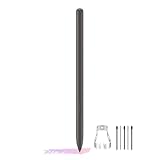
- About the product:Compatible with Samsung Galaxy Tab S10 FE+ | S10 FE | S10 FE 5G | S9 FE+ | S9 FE | S9 FE 5G all version (Tablet S10 FE/FE+, S9 FE/FE+ :Does not support connecting a stylus and does not have Air Actions)
- About Product Function: Air Command, Magnetic attraction tablet. The effect is perfect. 0.7mm Fine Tip for Precision.
- About Product Quality :Brand New High Quality Stylus Pen .Before the product is transported, we check the appearance / touch / color / function of the product one by one to ensure that you receive high-quality products.
- Packing: 1* Tab S9 FE S Pen (Gray), 5*Tips, 1*Tweezer (Show the picture).
- About after-sales :180 days of quality assurance. If there are any non-human factors quality problems, Please contact us in time, we will reply you within 24 hours.
Availability depends on the tablet model, software version, language, region and the individual feature. Some functions require a Samsung account, an internet connection or both. Samsung says basic Samsung-provided Galaxy AI features are free, while cloud services, third-party assistants and future features can have separate terms or limits.
Independent reader supportYour contribution helps us test, update, and keep practical guides available for everyone.If pressing the AI Key does nothing
- Confirm the tablet is on One UI 7.0 or later.
- Detach and firmly reattach the cover; inspect and clean the connector and pogo-pin area.
- Restart the tablet with the keyboard attached.
- Try ordinary typing. If regular keys also fail, the issue is with the connection or keyboard rather than only the shortcut.
- Update Samsung Keyboard, Bixby, Google Gemini and related system apps through Galaxy Store or Google Play where applicable.
- Check that the selected assistant is installed, signed in and available in the chosen language and region.
- Test the cover on another compatible tablet if one is available, then contact Samsung support if the problem persists.
A factory reset should be a last resort after backing up data and following Samsung support guidance.
Do these 3 things before closing this tab:
1Repair Windows errors before they cause bigger problems2Scan for outdated or missing drivers - takes under a minute3Clear out junk files and repair common Windows errorsBest Value

- PERFECTLY COMPATIBLE: For Samsung Galaxy Galaxy Tab S9 FE Stylus Pen /S9 FE Plus S Pen.( Please check whether your device model is compatible before purchasing.)
- BEST CHOICE: The best choice for Samsung Galaxy electronic pen, designed for smooth writing and drawing at home or office for daily work and study tab S9 FE Stylus Pen.
- Use: 4096 levels of pressure sensitivity, precise touch and control, supports all menu functions, perfect replacement. The pen allows you to quickly take notes, draw or edit and all other typical touchscreen commands.
- Smarter: More precise than your finger, you can edit photos, take notes, sketch, copy and paste text, and mark up screenshots. tab S9 FE Stylus Pen gives you precise control and a whole new way to express yourself.
- Easy to carry: Simply attach it to the S9 FE Stylus Pen magnetic holder on your tablet and charge it whether it's up or down.
Is buying the AI Key cover worthwhile?
It makes sense when
- You already own a Tab S9 and regularly use Samsung Notes, writing tools, Samsung Internet or an AI assistant.
- You want a first-party cover that connects directly to the tablet and adds a dedicated shortcut.
- You prefer the Slim model’s lower listed MSRP or the full keyboard’s more substantial typing setup.
Skip it when
- You rarely use AI features or already have a satisfactory Bluetooth keyboard.
- You expect a full-size laptop keyboard or trackpad experience from the Slim cover.
- You believe the purchase will add Tab S10 performance or hardware.
No keyboard purchase is required for every Galaxy AI function; the cover mainly adds the physical shortcut and a keyboard-oriented workflow. Verify the tablet size and the exact EF-DX model before ordering because standard, Plus and Ultra covers are not interchangeable.
What the update does not change
One UI 7 does not give the Tab S9 the Tab S10’s MediaTek Dimensity 9300+ processor, display, cameras, speakers, industrial design or every newer-model feature. It enables supported software and accessory compatibility on existing Tab S9 hardware. The result is an accessory upgrade—not a conversion of the Tab S9 into a Tab S10.
Quick Recap
Product prices and availability are accurate as of the date/time indicated and are subject to change. Any price and availability information displayed on Amazon at the time of purchase will apply.



